
You’ve just wrapped a massive keyword research session. You’ve got hundreds, or even thousands, of promising keywords, each with traffic potential. You’re feeling good.
But as you’re staring at your spreadsheet, reality sets in. What are you supposed to do with all these keywords?
If you’ve ever wondered what to do after keyword research, this article is for you.
I’ve been there more times than I’d like to admit in my SEO career. But the truth is: facing a large data set of keywords never really gets easier, no matter how long you’ve been doing SEO.
Because, as any digital marketer knows, this is where the real work begins.
But fear not! The process doesn’t have to be hard or require an SEO professional. (Don’t tell them I told you so.)
In this article, I’m going to show you exactly what to do after keyword research — step by step. This is the framework I use in my personal workflow, and it’s how you’re going to turn your keywords into organic traffic for your website.
Let’s get started.
In This Article
- The 2 Biggest Mistakes You're Making Right Now
- The 8-Step Blueprint for Turning Keywords Into Traffic
- Step 1: Understand the Why Behind Your Keywords (Search Intent)
- Step 2: Find Your Weak Spots
- Step 3: Cluster Your Keywords to Build Topical Authority
- Step 4: Create a Data-Driven Content Strategy
- Step 5: Write & Optimize for SEO Success
- Step 6: Add Internal Links to Your New Content
- Step 7: Promote Your Content
- Step 8: Monitor, Measure, & Improve
- Final Thoughts
- FAQs About What to Do After Keyword Research
The 2 Biggest Mistakes You’re Making Right Now
Before we get into the steps, let’s talk about the two most common errors I see entrepreneurs and DIY SEOs make. Avoiding these will save you a ton of time and wasted effort.
Mistake #1: Stopping at a Generic Keyword Difficulty Score
Most keyword tools give you a keyword difficulty (KD) score—a number from 0 to 100—that’s supposed to tell you how hard it is to rank for a keyword. The problem? That number is often a generalization based on a website’s backlink profile and domain authority. It doesn’t tell you the whole story.
Pro Tip: I’ve personally seen keywords with a high KD score that were actually easy to rank for, and vice versa. The real “low-hanging fruit” isn’t a number; it’s a tangible opportunity on the search engine results page (SERP) itself. You need to go one step deeper to find it. (And I’ll tell you how shortly.)
Mistake #2: Ignoring Search Intent
What’s the user’s purpose for typing a keyword into Google? Are they looking to buy something, learn something, or find a specific website?
If you don’t understand the “why” behind the search, your content is likely to miss the mark. A keyword is useless if you don’t understand the user’s underlying goal.
That’s why it’s critical to decipher search intent and align your content strategy with it.
The 8-Step Blueprint for Turning Keywords Into Traffic
Ready to stop making those common SEO mistakes and start building a real strategy?
Let’s get into it.
Step 1: Understand the Why Behind Your Keywords (Search Intent)
Before you write a single word, you need to understand why the user is performing a search. There are 4 main types of search intent:
- Informational: The user wants to learn something. Keywords often include words like “how to,” “what is,” or “why.” (e.g., “what to do after keyword research”)
- Navigational: The user wants to go to a specific website or page. (e.g., “LowFruits blog”)
- Commercial: The user is researching a purchase but hasn’t decided yet. Keywords include “best,” “review,” or “vs.” (e.g., “LowFruits vs. Semrush”)
- Transactional: The user is ready to buy something. Keywords often include “buy,” “price,” or “coupon.” (e.g., “buy LowFruits subscription”)
You can identify intent by simply searching for your keyword on Google and seeing what kind of content ranks. Are the results blog posts? E-commerce pages? Product reviews?
The top-ranking content is your biggest clue.
You should create content in the same format as what’s already ranking — and make it better than the competition.
Step 2: Find Your Weak Spots
This step is where you’ll find real opportunities (aka, keywords you can actually rank for). Instead of trusting a generic KD score, look for what we call “Weak Spots” on the first page of Google.
A Weak Spot is a low-domain-authority website that’s ranking in the top 10 results. These are often Q&A sites (like Quora), forums (like Reddit), or user-generated content (UGC).
Why are these so important? Because their presence is a clear signal from Google that you can outrank them with a higher-quality, more comprehensive article.
And the best part is that you don’t have to have a super high domain authority (DA) or thousands of backlinks to do it.
Unfortunately, manually analyzing the SERPs for every keyword is a pain. (I mean, really, who has the time?)
That’s why I use LowFruits.
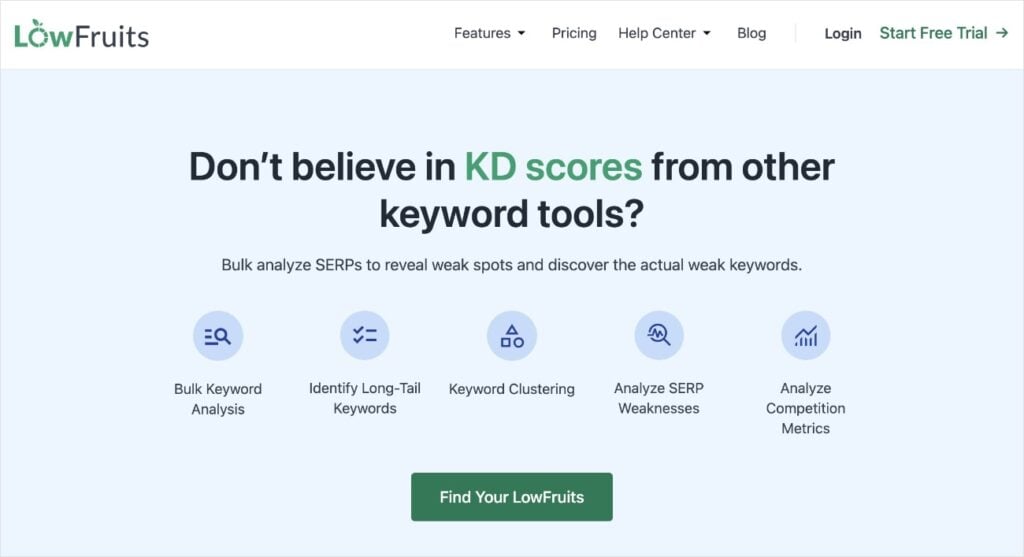
LowFruits is a keyword research and SERP analysis tool that helps you identify easy keywords in minimal time. Here’s how it works:
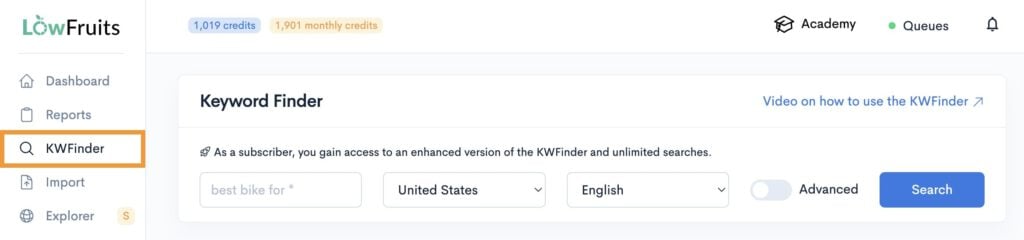
First, you perform a seed keyword search in the KWFinder.
Then, you tell it to analyze all high-intent keywords. (These are buyer-intent keywords that have high conversion potential.)
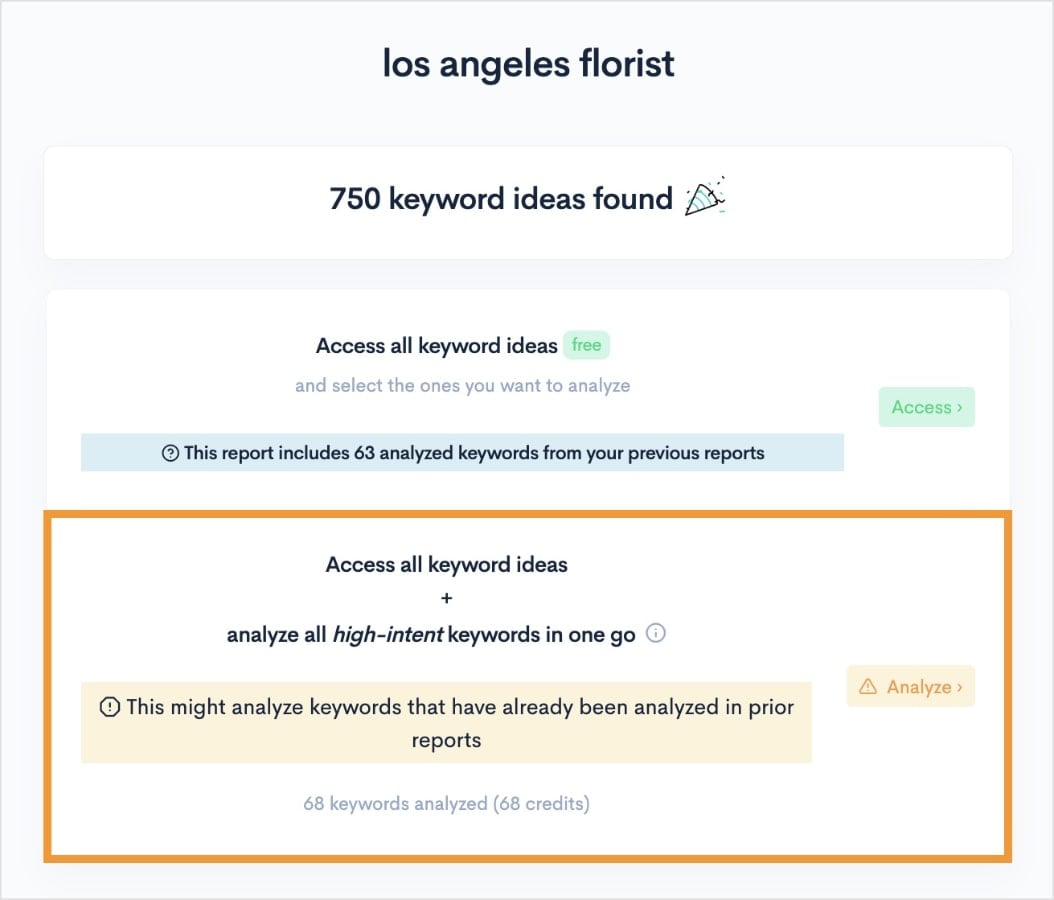
Pro Tip: If you’re low on credits (LowFruits uses a credit system to analyze keywords and extract SERP data), you can select the first option (access all keyword ideas). If you go this route, you’ll still be able to do a SERP analysis for your keywords, you’ll just need to select them manually.
From here, you’ll get a report that looks like this:
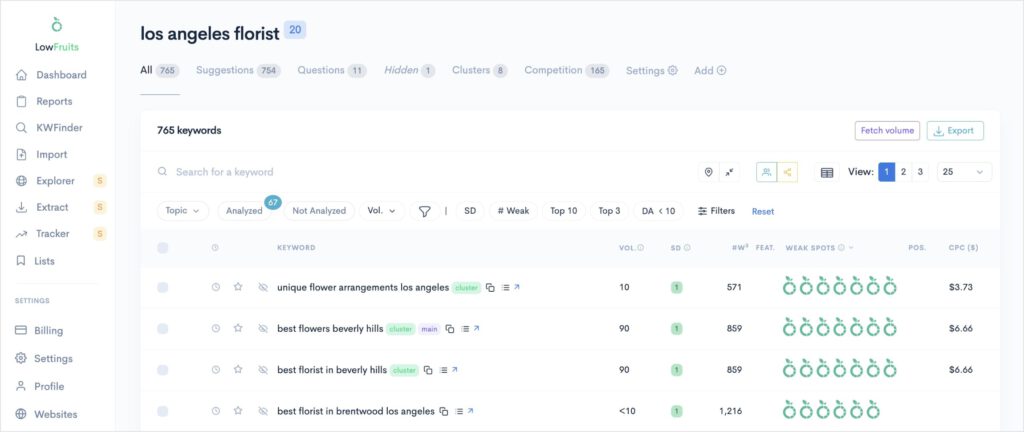
See all those green icons on the right? Those are Weak Spots.
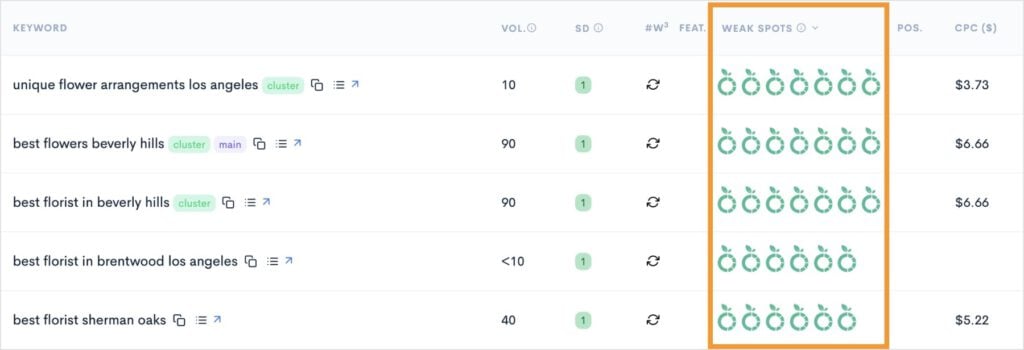
You can use this data to inform your content strategy and help you find the easiest keywords to target.
And if you really want to do SEO like a pro, combine it with the SERP Difficulty (SD) data, which represents the keyword difficulty. If you find a keyword with a low SD score (it’s on a scale from 1-3, with 1 being the easiest) and multiple Weak Spots, you’ve got yourself a keyword jackpot.
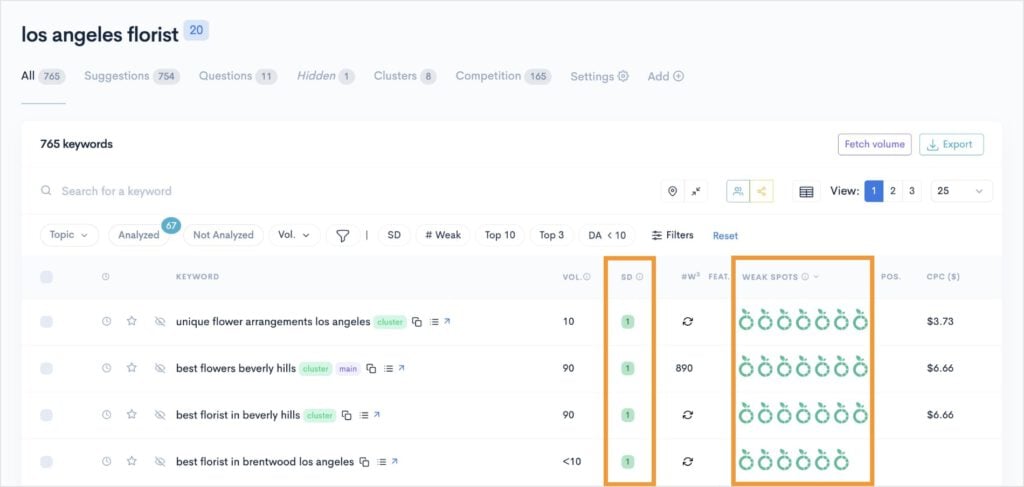
Ultimately, using the right SERP analysis tool can make all the difference for finding these weak domains. LowFruits automates this process so you can instantly see which keywords are worth targeting and easy to rank for.
Step 3: Cluster Your Keywords to Build Topical Authority
Once you’ve identified your low-competition keywords, don’t just write one article for each.
Group related keywords that share the same search intent into a single, comprehensive piece of content.
This is called keyword clustering, and it helps improve the visibility of your content.
This strategy allows you to cover a topic in its entirety, which Google and users love. It also builds your website’s topical authority, a massive Google ranking factor that proves you’re an expert on a subject.
Furthermore, targeting multiple related keywords in the same piece prevents keyword cannibalization. This phenomenon occurs when you have multiple pages competing for the same keywords, decreasing the effectiveness of your SEO efforts.
So, want to know how to do it? Building topic clusters is pretty straightforward, but if you’re doing it manually, it takes a lot of time.
Essentially, you group your keywords one by one. (And don’t forget that group keywords with shared search intent, meaning you need to check the search intent for each one, too.)
The good news is that certain SEO tools can do this process automatically for you.
My favorite keyword clustering tool is LowFruits because I literally don’t have to do anything (nope, not even 1 click) to get my clusters.
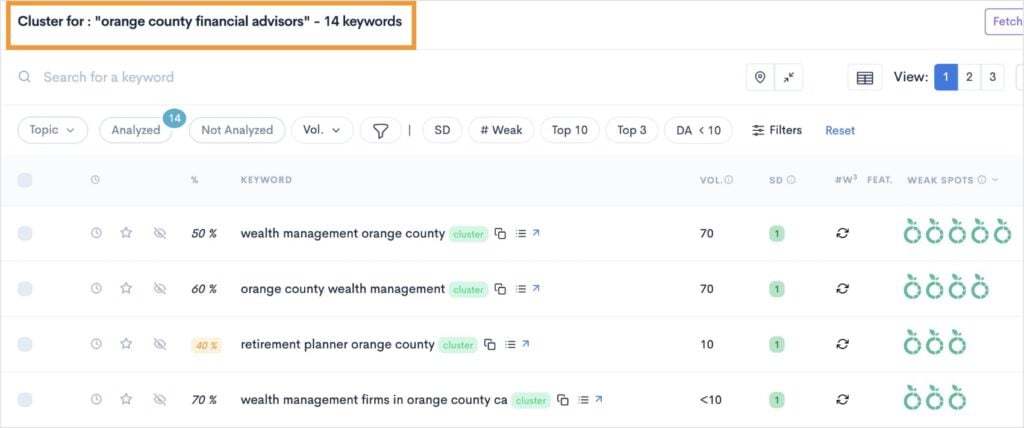
When you’re in a keyword report, just click on the Clusters tab at the top of the page. This will open a view of all the keyword clusters it created based on your initial search.
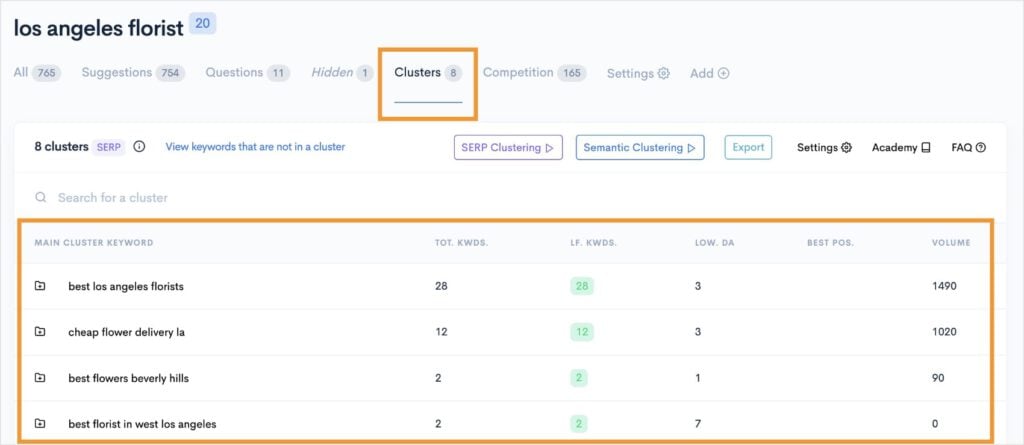
You can then open any of these clusters to see the individual keywords inside. These are the keywords you would target on the same page.
And that’s it.
You can create a complete keyword strategy for your entire website using this one tool alone. I’ve done a lot of keyword clustering in the past, and this is by far the most efficient way to do it.
P.S. Don’t forget to add internal links between related content! This will increase the discoverability of your content by users and search engines. (I’ll tell you more about this in step 6, too.)
Step 4: Create a Data-Driven Content Strategy
Now that you have your keyword clusters, it’s time to build your content strategy.
First, take your keyword clusters and organize them by theme. (Remember, LowFruits does this automatically for you, but you could also use a spreadsheet.)
This step will help you visualize your keywords and how to target them on different pages. You’re basically creating a roadmap for your content and determining which keywords go where.
Here are some tips for creating an effective content strategy:
- Prioritize Quick SEO Wins: Start with the keyword clusters that have the most Weak Spots and a high search volume. These are your best opportunities to rank quickly and start seeing traffic right away.
- Fill the Gaps: Next, focus on the clusters that build out your topical authority. Even if they have slightly less traffic, they prove to Google that you are a comprehensive resource on the subject, which will help your more competitive keywords rank in the long run.
- Create Your Content Calendar: In your spreadsheet, list out your article titles, the primary keyword for each, and a target publish date. You can also include columns for the content length, status, and any important notes.
Pro Tip: Your content strategy should be a living document. Don’t be afraid to adjust it based on new trends, search volume changes, or the performance of your existing content. Here’s a great resource on how to build a winning SEO content strategy.
Step 5: Write & Optimize for SEO Success
This is the fun part! Take your content strategy and start writing.
At this step, keep in mind everything we’ve talked about:
- Address the user’s search intent directly and comprehensively.
- Use your chosen keywords naturally throughout the article. (No keyword stuffing!)
- Structure your content with clear SEO headings (H1, H2, H3), bullet points, and short paragraphs to improve readability.
- Write with a tone that demonstrates your E-E-A-T (Experience, Expertise, Authoritativeness, and Trustworthiness).
Content optimization in SEO is the cornerstone of getting your websites to rank online. Luckily, there are tools that can help you with the process.
One of my favorite content optimization tools is SEOBoost.
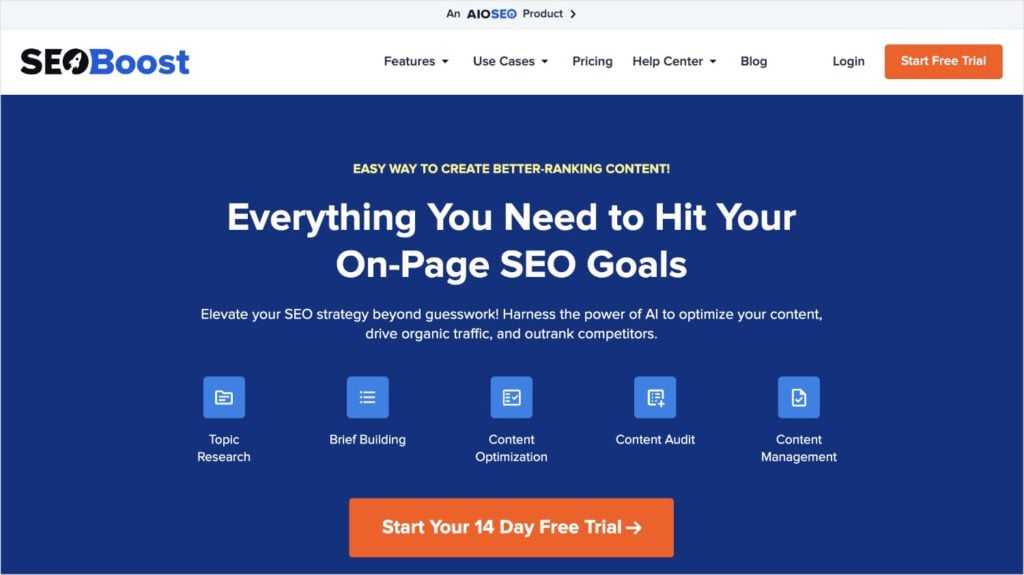
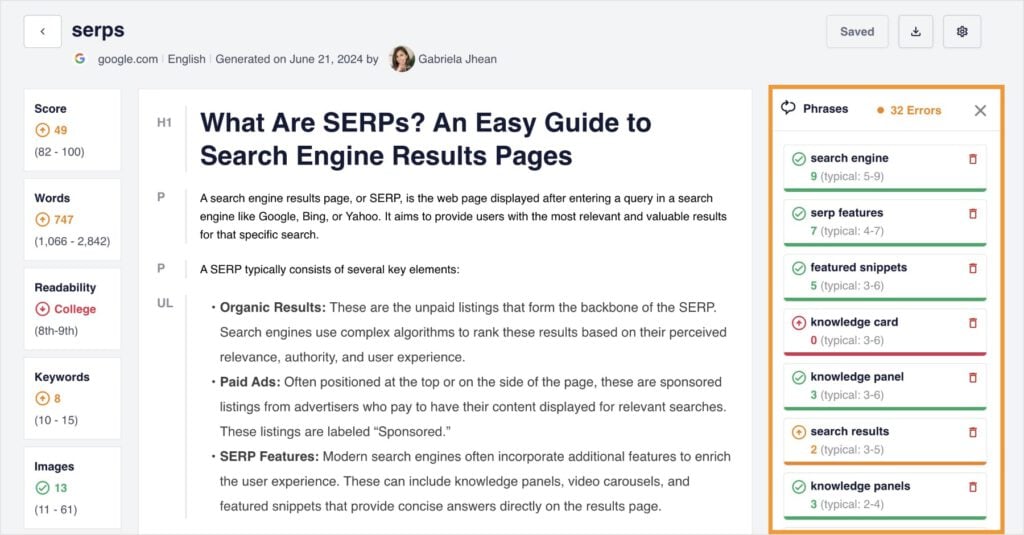
SEOBoost is a full content creation suite that helps with everything from initial topic ideation to final on-page SEO checks. For content optimization, it has a dashboard that’s similar to any other word processing software, like Google Docs, Microsoft Word, or Apple Pages.
The difference? It gives you real-time SEO feedback as you write. It also provides related keyword ideas to the right of your document. I often use these suggestions to incorporate additional keywords and boost my content’s visibility in SERPs.
I also want to mention that if you’re a WordPress user, SEOBoost integrates with the popular SEO plugin All in One SEO (AIOSEO).
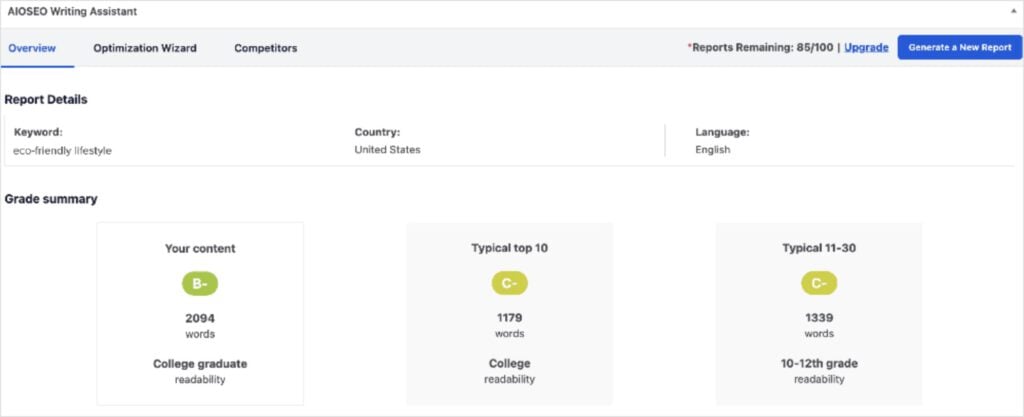
AIOSEO has an AI Writing Assistant (powered by SEOBoost) that gives you similar feedback (like on-page SEO and related keywords) directly in the WordPress editor.
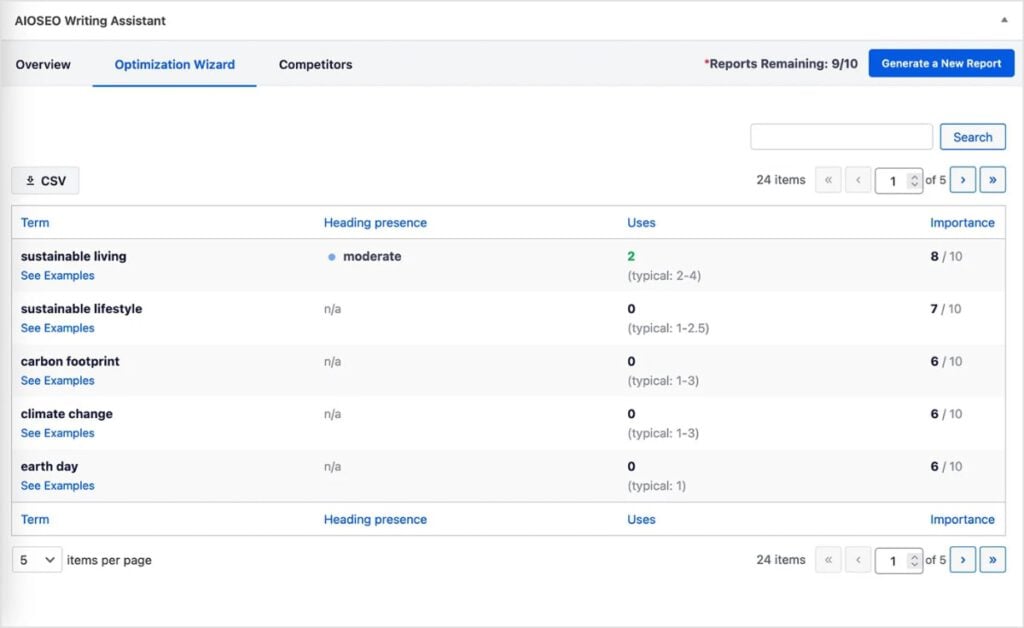
It also provides competitors insights on average word count, readability level, and an SEO grade. These insights inform your writing process, allowing you to create content that’s on par—and better—than the competition.
I’ve used both tools (together and separately) and honestly can’t imagine my content creation process without them anymore. They help me catch small SEO mistakes and make optimizing content a breeze.
Related reading:
Step 6: Add Internal Links to Your New Content
Your new piece of content shouldn’t be an island (or what we call an “orphan page” in SEO). It needs to be connected to the rest of your site through internal links.
Internal links are hyperlinks from one page on your website to another. They are crucial for two reasons:
- They help Google discover your new pages.
- They pass “link equity” from older, more authoritative pages to your new content, helping it rank faster.
Remember our topic clusters from step 3? Internal linking is a core SEO best practice of working with topic clusters.
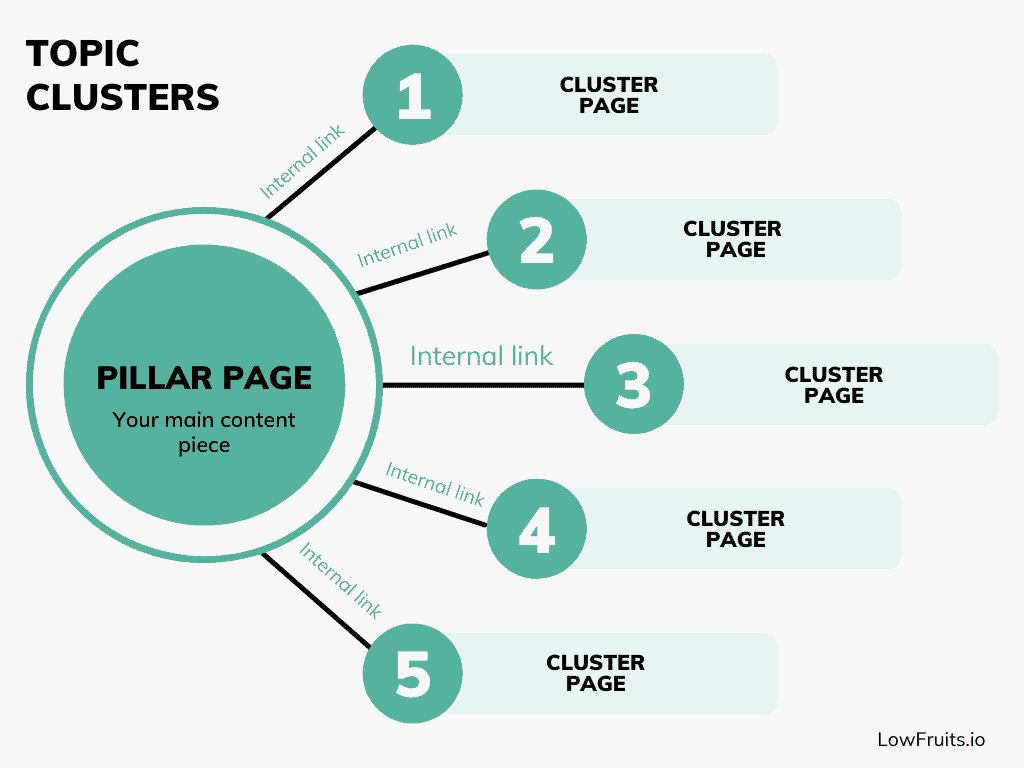
The idea is to use internal links to connect your main (pillar) page to other subtopic (cluster) pages. This creates a mutually beneficial network of interconnected content, passing link juice and building topical authority.
Pro Tip: When you publish a new article, go back to your older, relevant blog posts and add a link to the new one using descriptive anchor text (this is text you use for the hyperlink).
Step 7: Promote Your Content
The work isn’t over when you hit “publish.” If you want to maximize your traffic, you need to actively promote your new content.
Here are a few powerful promotion strategies:
- Social Media: Share your new post across all your social media channels. Don’t just post it once. Repurpose key takeaways, create a carousel with your pro tips, or turn a section into a short video.
- Email Newsletter: Share your new content with your email subscribers. This is one of the most effective ways to drive immediate traffic and get early engagement, which can signal to Google that your content is valuable.
- Forums & Communities: Share your content in relevant online communities and forums, but with a crucial caveat: Don’t spam. Find threads where your article genuinely answers a user’s question, then link to your post as a helpful resource.
- Influencer Outreach: If you mentioned any experts, tools, or other websites in your article, send them a quick email or a tag on social media to let them know. They might share it with their audience, giving you a valuable backlink and a massive traffic boost.
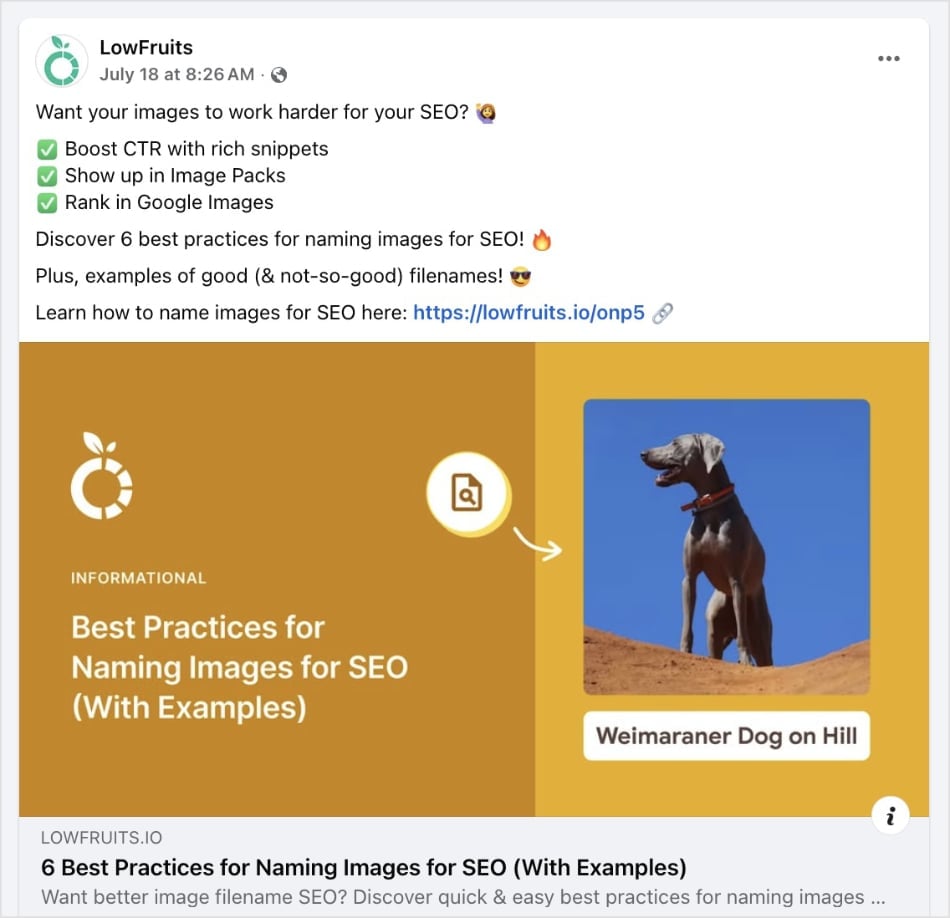
Here’s an example of how I promoted a LowFruits blog post about image SEO on Facebook:
Step 8: Monitor, Measure, & Improve
The final step is to track your content’s performance. After all, you want to know if your efforts are helping you reach your SEO goals.
Free tools can help with this process, including:
- Google Search Console (GSC): See what keywords your website is ranking for and how their positions change over time. You’ll also get keyword metrics like impressions, clicks, and click-through rate (CTR).
- Google Analytics (GA): Discover how users are getting to and interacting with your website. GA focuses on user engagement metrics and the different ways people navigate through your content.
I also want to highlight that a rank tracker tool is indispensable for monitoring SEO performance.
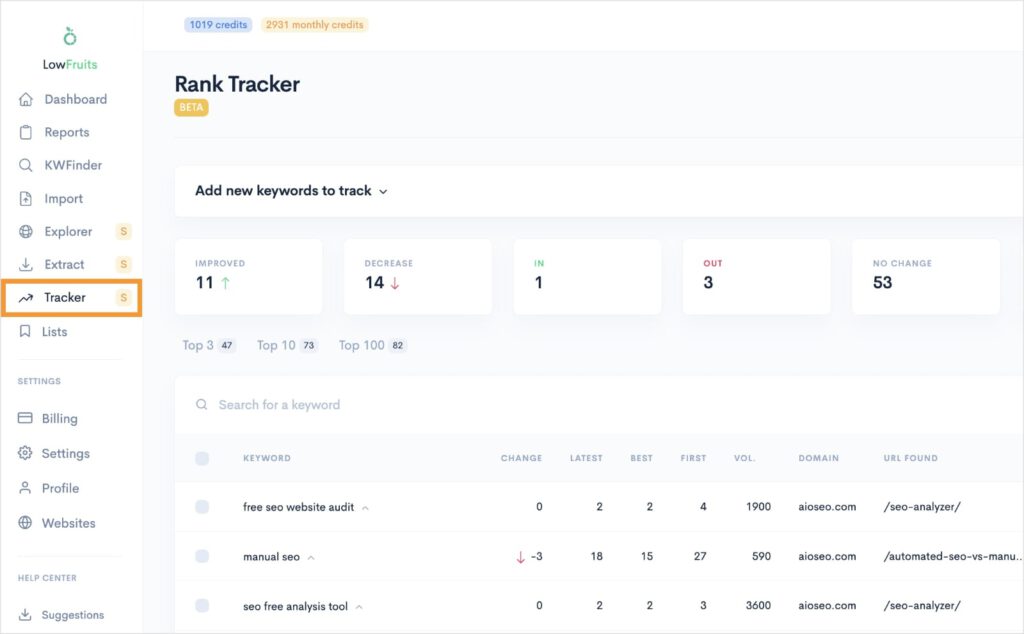
I like how LowFruits has one built into the platform. Plus, it’s super quick to set up. Just enter your most important keywords, customize the settings, and click Track.
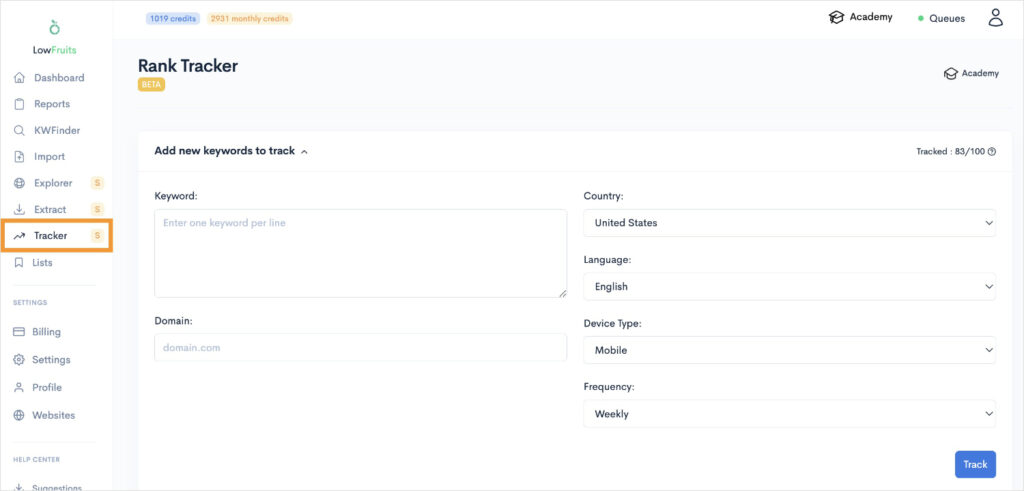
From here, Rank Tracker will automatically fetch your keyword positions directly from Google. You’ll get the data in a user-friendly dashboard like the one below.
You can also expand any of these keywords to see the keyword’s historical positions.
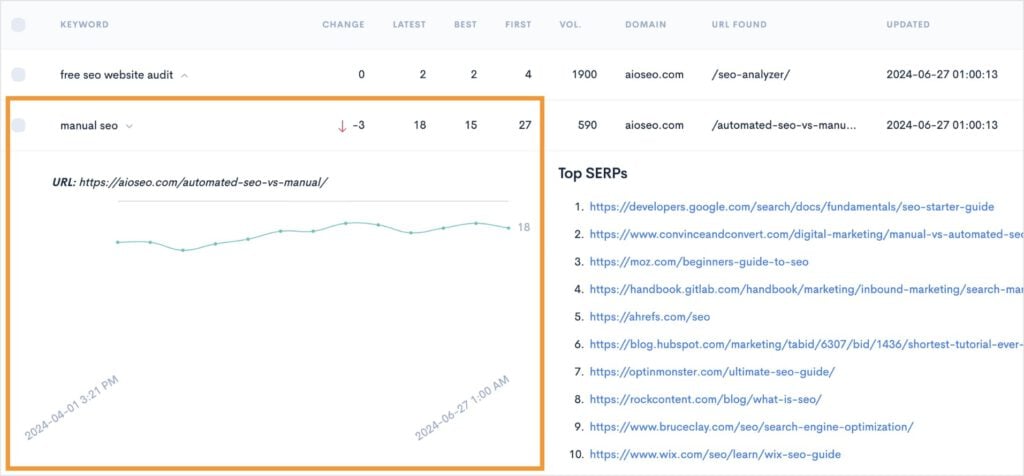
Ultimately, this tool helps you track which of your new articles are gaining traction and which ones might need a little extra love. You can use this data to find opportunities to improve on your existing content strategy.
Pro Tip: Do you notice a decline in performance? Check the SERPs to see if the search intent has changed since when you originally published.
Final Thoughts
I hope this article helped you understand what to do after keyword research.
A list of keywords is just a starting point. The real traffic and growth comes from a strategic, step-by-step process that gets your content in front of the right people.
To recap:
Start by deciphering search intent (why are users typing this keyword?). Then, evaluates the SERPs for weak competitors. From here, you’ll create a content strategy and start writing.
Once you’ve finished a piece, add internal links and promote it online.
The final step is to monitor your results and aim for continuous improvement.
LowFruits was built to take the guesswork out of many of these crucial steps. It’s the solution that turns your long list of keywords into an actionable blueprint for traffic and revenue. Plus it does all the SERP analyzin, clustering, and rank tracking for you!
Don’t let your hard work go to waste. Start turning your keywords into traffic today with LowFruits.
FAQs About What to Do After Keyword Research
What’s the first step after keyword research?
The first step after keyword research is to analyze the search intent behind your keywords. This will tell you the “why” behind each query. While doing this, you should also look for “Weak Spots” in search results. These are low-authority domains ranking in the top positions. Using these two elements will help you determine what type of content to create that has a real chance of ranking.
Do I need a separate piece of content for every keyword?
No. In fact, you shouldn’t target only 1 keyword per page. The best content targets multiple keywords to increase visibility in search results. To do this, group related keywords with shared search intent and optimize for them on the same web page. This is the core of keyword clustering and helps you build authority on a topic instead of creating dozens of thin, competing articles.
How do I know which keywords to use first?
Start with keywords that have high intent, multiple Weak Spots, and real business value. LowFruits make this decision much faster and easier by allowing you to instantly sort and find your best opportunities.
How often should I update my keyword strategy?
You should review your keyword strategy at least quarterly. You may also need to update it whenever you notice major changes in your rankings, a new competitor enters the market, or you pivot your own business goals.


