

Creating content that ranks isn’t just about writing well — it’s about having the right process, from research to publication. That’s where a smooth content creation workflow comes in.
With the right tools and steps, you can go from keyword research to a live post with less stress, better results, and faster turnarounds.
In this tutorial, we’ll walk through an actionable content workflow using LowFruits. You’ll learn how to:
- Find high-potential keywords with LowFruits.
- Organize and prioritize your content ideas.
- Outline and draft SEO-optimized content.
- Use SERP analysis insights for better targeting.
- Publish and monitor your new content.
Whether you’re a solo blogger or managing a team, this content workflow will help you create smarter, more effective content — every time.
In This Article
- What Is a Content Creation Workflow?
- Why Is a Content Workflow Important?
- Easy Content Creation Workflow in 5 Steps
- Step 1: Start Your Keyword Research With LowFruits
- Step 2: Organize Your Keywords With Topic Clusters
- Step 3: Plan & Prioritize Your Content
- Step 4: Create an Outline for Your Content
- Step 5: Write & Optimize Your Draft
- Step 6: Run Your Draft Through a Content Optimization Tool
- Step 7: Publish & Promote Your Content
- What’s Next?
- Final Thoughts
What Is a Content Creation Workflow?
A content creation workflow is the step-by-step process that takes you from a simple idea to a published, optimized piece of content. Think of it as your roadmap for turning raw concepts into articles, guides, or other resources that can actually rank and drive traffic.
In practice, a strong content workflow covers each of the following stages:
- Keyword research: Finding topics and angles worth targeting
- Content planning and outlining: Mapping out what your piece will cover
- Drafting and editing: Turning an outline into a polished draft
- SEO optimization: Ensuring your post checks the right boxes for search engines
- Publishing, promoting, and updating: Getting your work live and keeping it relevant over time
Instead of jumping straight into writing (and hoping for the best), you’re following a system proven to save time, align with business goals, and set every piece up for real-world results.
Why Is a Content Workflow Important?
Without a clear workflow, it’s easy to:
- Waste hours targeting keywords that are impossible to rank for.
- Miss important SEO steps like optimizing images or meta descriptions.
- Forget crucial parts of the process (like internal linking or content promotion).
A defined content creation workflow safeguards against these pitfalls. It helps you:
- Prioritize your highest-value topics first.
- Stay consistent (even if you’re working with a team).
- Spot and fix bottlenecks before they slow your progress.
- Develop content that’s intentionally crafted for SEO from day 1.
Easy Content Creation Workflow in 5 Steps
Follow these 5 steps to create content that resonates with your audience and ranks in search engine results pages (SERPs).
Step 1: Start Your Keyword Research With LowFruits
Every effective content creation workflow begins with keyword research.
Instead of chasing random topics or relying solely on your gut, LowFruits uses real data straight from Google to guide your SEO efforts.
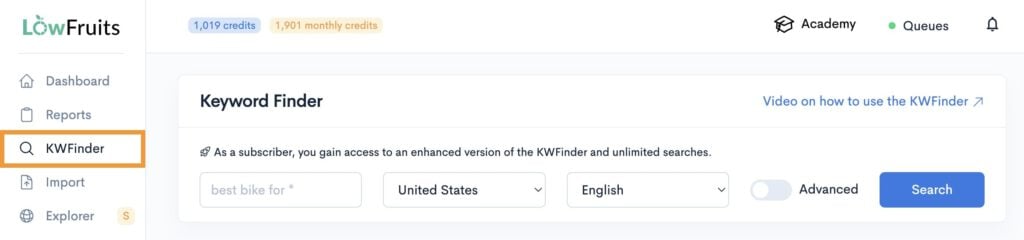
To get started, navigate to the Keyword Finder tool. Then, enter a seed keyword that fits your niche.
From here, the tool is going to ask you how you want to view your keywords.

Personally, I like selecting the second option (access all keywords + analyze high-intent keywords) because this means LowFruits will automatically perform a SERP analysis for keywords with high conversion rates (aka, buyer-intent keywords.)
However, if you’re low on credits (because each keyword analyze equals 1 credit), go ahead and select the first option. You can pick which keywords to analyze afterward in the report manually.
Once you’ve reached your keyword report, your goal is to find low-competition keywords.
These are easy keywords to rank for, even if you have a new website or small business.
So, how do we do that?
There are 2 keyword metrics we want to pay particular attention to:
- SERP Difficulty Score (SD): This is the LowFruits metric for keyword difficulty. 1 is easy, 3 is hard.
- Weak Spots: These are low-authority domains ranking in the top 10 search results.
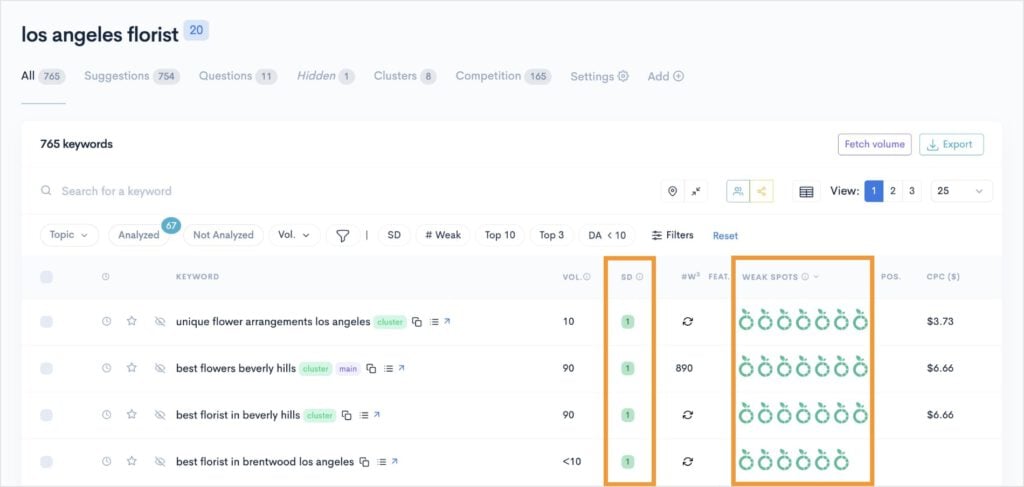
In the keyword report above, we have several keywords that have an easy difficulty (SD of 1) and multiple Weak Spots.
These are prime ranking opportunities.
Pro Tip: Sort your report by keyword search volume to prioritize which keywords to target first.
And it only took a minute or so to get them.
That’s the LowFruits advantage. Within a short session, you can quickly get easy keywords and content ideas that are actually achievable for your site.
This process helps you move into content planning with a sense of direction, knowing your topics are worthwhile and realistic.
Related reading:
Step 2: Organize Your Keywords With Topic Clusters
After you’ve gathered a list of easy-win keywords, the next smart move is organizing them into topic clusters.
Topic clusters are groups of related keywords. They help you target multiple keywords with the same search intent in a single piece of content. This helps your web page rank for more queries and increases its visibility in search results.
The other component of topic clusters is internal links. These are hyperlinks that connect various pages of your website to create a network of related content.
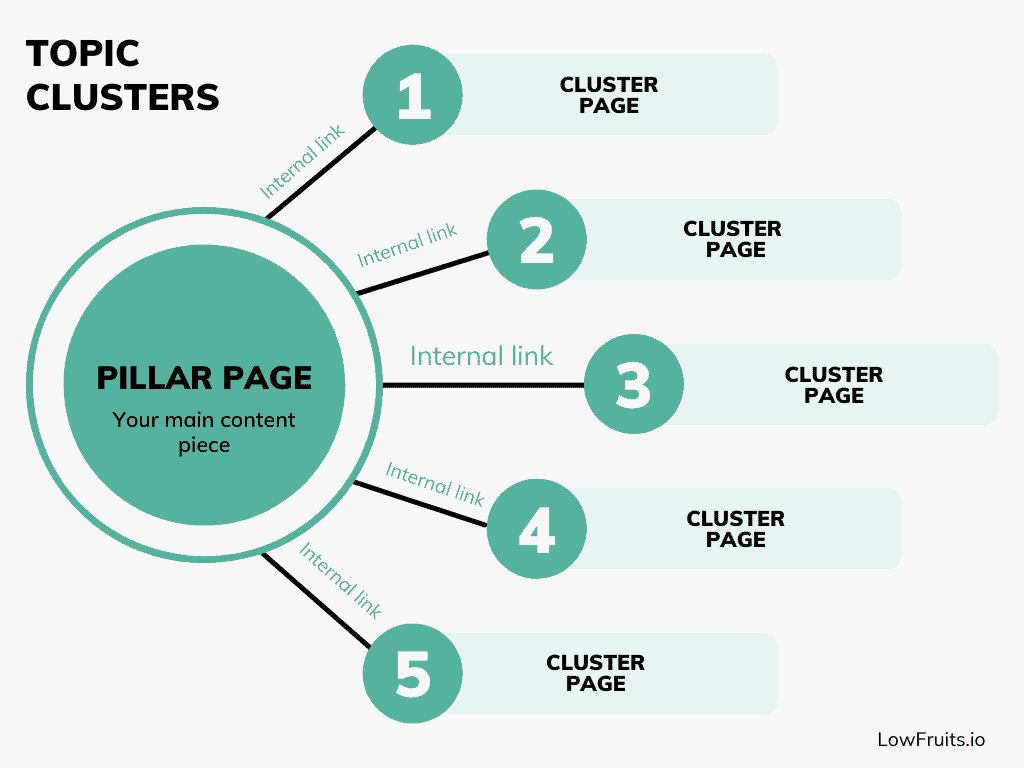
By linking across your pages, you make it easier for search engines and users to discover new content. It also helps distribute link equity (aka, SEO value) across your site.
Now, here’s where things really start to get interesting…
LowFruits creates topic clusters automatically for you.
When you’re in a keyword report, select the Clusters tab. You’ll get a new list of your main clusters related to the initial seed keyword.
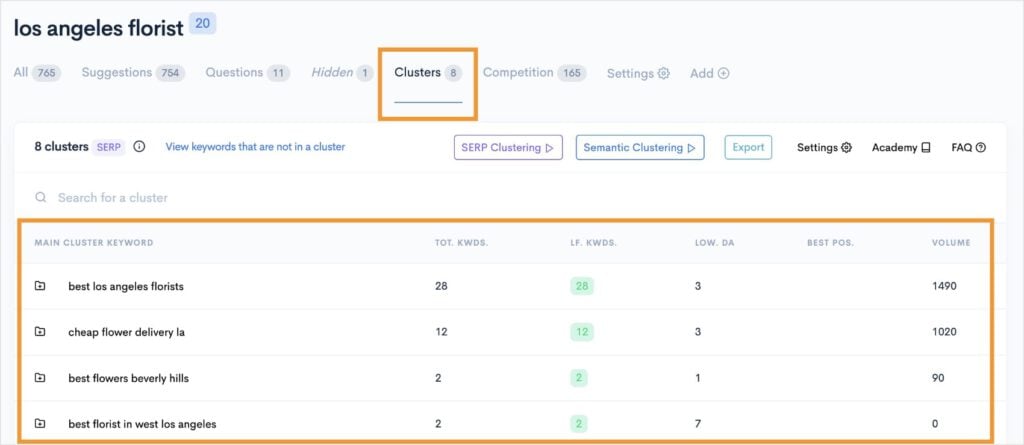
These are your content ideas. You can use each cluster to address a specific topic on your website.
You can also open any of these clusters to view the individual keywords within.
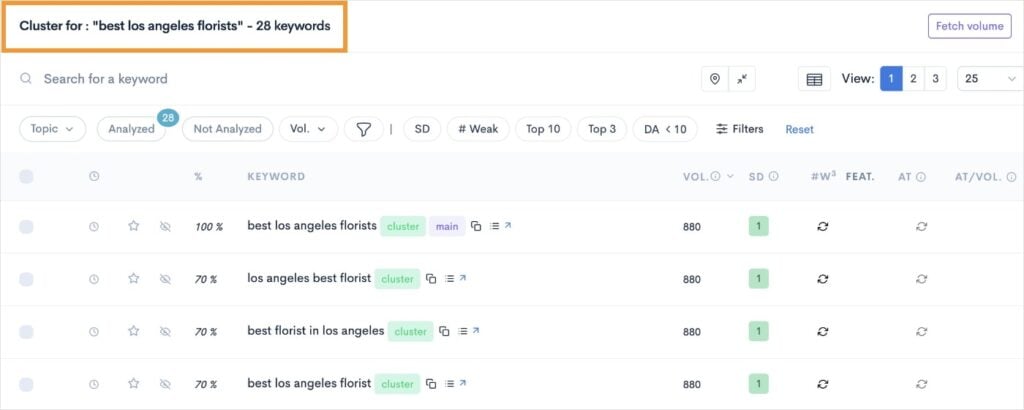
These are your keyword targets.
When writing your content, you’ll want to include these keywords as part of your on-page SEO strategy.
With LowFruits handling the heavy lifting of grouping keywords, organizing content ideas becomes straightforward.
You’ll move beyond creating one-off articles and start building a site structure that can grow with your business, establish topical authority, and make your content workflow much more efficient.
Step 3: Plan & Prioritize Your Content
With your topic clusters and keyword groups in place, it’s time to move from research to execution.
Start by deciding which clusters (or individual topics) have the most potential for your website right now. Look at factors such as search volume, keyword difficulty, and how closely each topic aligns with your SEO goals or your audience’s needs.
Map out a realistic publishing schedule based on your resources, whether it’s just you or a whole content team. You can assign clusters or topics to upcoming weeks or months, and decide who will handle the writing, editing, and publishing for each.
If certain clusters tie into seasonal trends or new product releases, prioritize those so your content is timely and relevant.
Pro Tip: Need help identifying trends? Run your primary keyword through Google Trends to see if a specific query is popular in search results right now. See a spike? Get a piece of content out quickly!
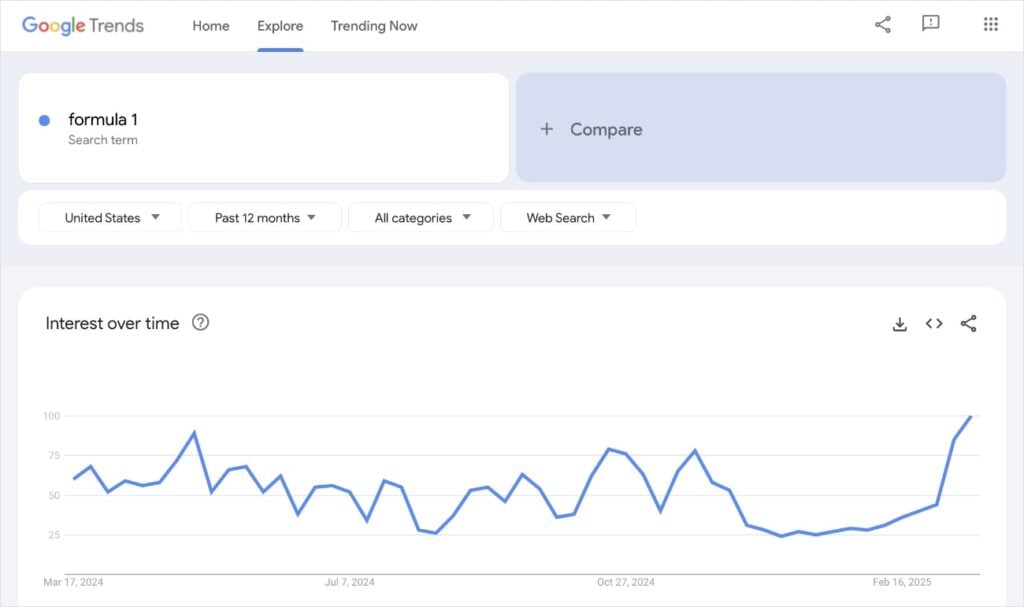
By consistently covering related topics, you’ll start building momentum and authority in your niche.
Step 4: Create an Outline for Your Content
Once you’ve chosen your topic and supporting keywords from your clusters, it’s time to build an outline.
This is where you start turning a content idea into something more tangible.
To start, I highly recommend analyzing the SERPs. By looking at the top-ranking content, you’ll get a feel for what Google (and users) want to see.
Is it an in-depth guide? What about a video? Or maybe it’s a shopping carousel.
Search results will tell you exactly the type of content you need to create.
Plus, in LowFruits, you can get this information effortlessly.
When you’re viewing a keyword report, click the View the SERP icon next to the keyword you’re interested in.

You’ll get a list of the top 10 organic results, and you can learn a lot about the type of content that ranks just by looking at the SEO title.
In the example below, we see how all the top results are listicles. This means we’d likely want to write a blog post in a similar fashion if we want to rank for this keyword.
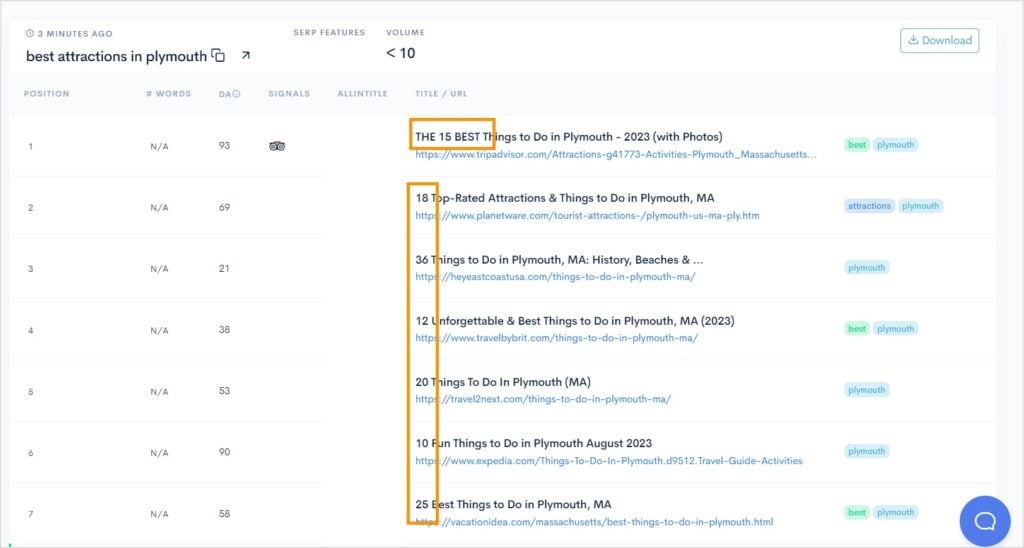
You can also click any of the URLs to view the page directly and get ideas for your content. Use these insights to organize your own outline. Here are some tips:
- Lay out your heading tags in a logical order.
- Include an FAQ section to rank in Google People Also Ask.
- Identify and include content gaps your competitors missed.
- Plan internal links for when you’re writing.
Ultimately, a well-structured outline saves time when you start writing, ensures nothing important is missed, and keeps your article focused from the very beginning.
Step 5: Write & Optimize Your Draft
With your outline as a guide, start drafting your content section by section.
Focus on providing clear information that is genuinely helpful to your audience. (You may have heard the expression, “Write for people first, search engines second.” Follow this advice!)
Naturally weave your focus keyword into the most critical areas, such as:
You should also sprinkle related keywords throughout the text. However, do NOT keyword stuff. This is when you go overboard optimizing for keywords. It creates a poor user experience and doesn’t read naturally.
Some additional elements to consider when writing, include:
- Break up content for readability (short paragraphs, bullet points, images).
- Add internal links to other relevant articles in your topic cluster.
- Include answers to common questions or People Also Ask queries where relevant.
Once you’re happy with your draft, we’re going to run it through an SEO tool in our next step.
Step 6: Run Your Draft Through a Content Optimization Tool
Now that you have your draft, it’s time to add a layer of polish that can make a real difference in rankings: content optimization.
Even the best-written content often leaves SEO opportunities on the table. This is where content optimization tools come in handy.
Why use one?
Content optimization tools analyze your text against top-ranking competitors for your target keyword. They identify keyword gaps, suggest relevant keywords to add, and ensure your article hits all the right SEO notes.
The result?
Higher chances of ranking, less risk of missing out on valuable traffic, and improved content quality overall.
My two favorite tools for this process are SEOBoost and All in One SEO. Let’s quickly look at each.
SEOBoost is a comprehensive content optimization platform that helps with every step from initial topic research to final on-page SEO edits. I use it in my daily workflow to check my drafts before uploading to my content management system (CMS).
To get started, just navigate to the Content Optimization tab and enter your primary keyword. Once the tool has analyzed the SERPs, you can enter the dashboard to work on your content.
It looks like this:
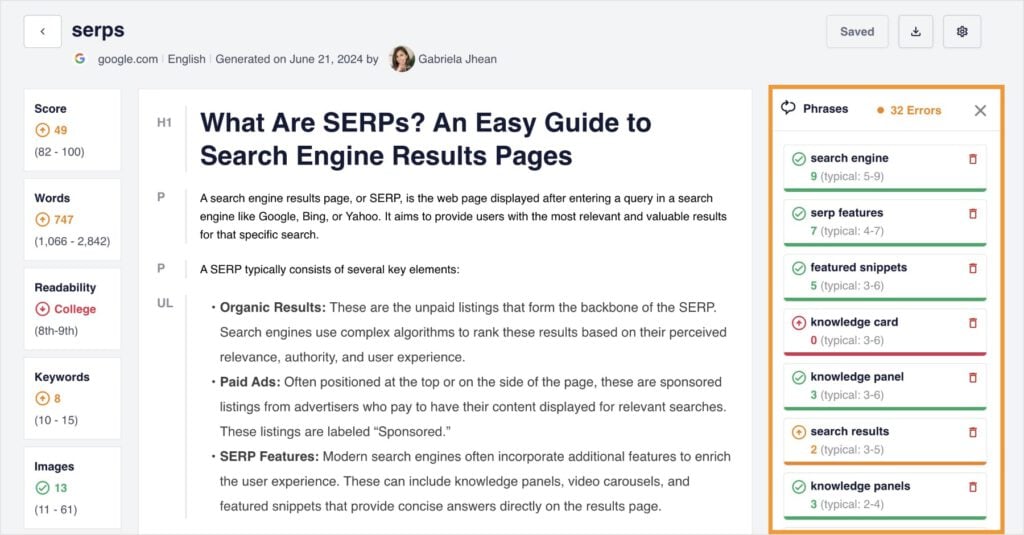
Personally, I like working in Google Docs and pasting my copy into here for final edits. However, you could type directly in here, too. It has a similar interface to all popular word processing programs.
SEOBoost provides real-time feedback on your SEO score, word count, readability, and more.
I also really like how it gives you related keyword phrases to the right of the screen. (Remember what we talked about in Step 2? Targeting multiple keywords in a single piece of content ensures higher visibility.)
Overall, it’s extremely intuitive and helps give your content the finishing touch for search engines.
SEOBoost also integrates with my next recommendation, All in One SEO (AIOSEO).
This WordPress plugin has tons of beginner-friendly and powerful SEO features, like an AI Writing Assistant and Google Search Console Integration.
It also functions as an SEO optimization plugin with its TruSEO tool. This tool checks for your primary keyword in all the most important areas of a web page. You’ll get a handy checklist that lets you know when you’ve forgotten your keyword in specific elements.

Overall, this is a huge time-saver for SEO. Plus, these details can make the difference between your content or a competitor’s ranking in position 1.
Step 7: Publish & Promote Your Content
With your content thoroughly optimized, you’re ready to move it from draft to live on your website. But don’t stop at just hitting “publish” — promotion and ongoing monitoring are crucial to squeeze maximum results from your effort.
Here are some tips for getting your content live:
- Upload your final draft to your CMS (like WordPress).
- Double-check your on-page SEO.
- Preview to catch formatting issues or broken links.
- Hit publish!
Then, promote your content to build momentum:
- Share on your main social media channels.
- Send to your email list.
- Reach out to industry forums or communities where your content can help.
- Consider repurposing into short-form videos, infographics, or guest posts.
And there you have it! This content creation workflow has taken you all the way from initial keyword research to sharing your finished piece on the internet.
Congratulations, you’re a content creator (with a plan!).
What’s Next?
Next steps are to monitor and improve. The reality is your content creation workflow doesn’t end once your post is live.
Use rank tracker tools like LowFruits to monitor your content’s performance in search results. You’ll want keep an eye on important keyword metrics, like ranking position, organic traffic, and clickthrough rate (CTR).
The LowFruits Rank Tracker makes monitoring your website’s keyword rankings easy. The dashboard is clear and comprehensive, so you can easily spot SEO wins and losses.
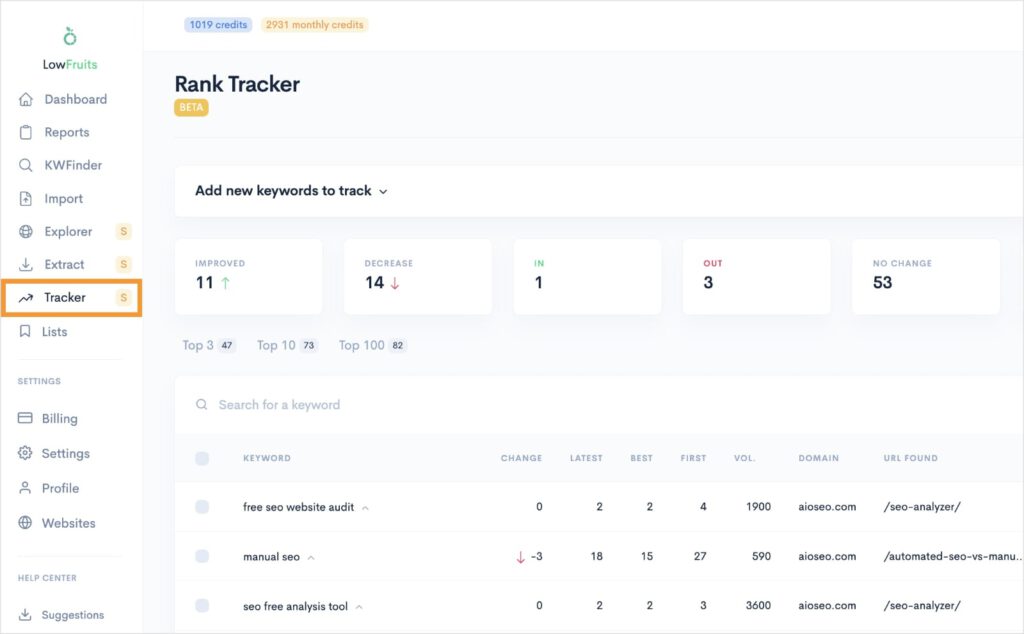
You can also expand any keyword to view its position history over time. This can help you analyze content updates or refreshes with changes in ranking.

Pro Tip: Schedule regular content audits every few months. Check if your articles are still up to date, filling the right gaps, and maintaining rankings. If a post is lagging, refresh it and promote again for an extra boost.
Final Thoughts
A smart content creation workflow isn’t just about writing a good article. With the right process and tools you turn a daunting series of tasks into a streamlined, repeatable system. Each step, from keyword research to post-publication promotion, fits together to build not only better individual articles, but a stronger, more authoritative website.
Ready to make your next post your best yet?
Start with these steps, optimize along the way, and watch your content make a real impact.


