
Internal linking might not be the most exciting part of SEO, but it’s an essential framework that holds your website together.
Think of your website as a city: internal links are the roads connecting all the important locations. Without them, visitors and search engines end up lost in dead ends.
But here’s the thing: creating an internal linking strategy doesn’t have to be complicated.
In this guide, we’ll break down exactly how to build an effective internal linking structure that both search engines and users will love.
In This Article
- What Are Internal Links? A Simple Explanation of Link Types
- Why Are Internal Links Important for SEO?
- How to Build an Internal Linking Strategy in 5 Steps
- Measuring the Success of Your Internal Linking Strategy
- Next Steps: Putting Your Strategy into Action
- FAQs About SEO Internal Linking Strategies
- Final Thoughts
What Are Internal Links? A Simple Explanation of Link Types
Internal links are hyperlinks that connect one page on your website to another page on the same website. They’re the pathways that guide both users and search engines through your content.
Here’s what an internal link looks like in your website’s code:
<a href="https://yourwebsite.com/blog-post">This is your anchor text</a>Not all internal links are created equal. Here are the main types you’ll encounter:
Navigation Links
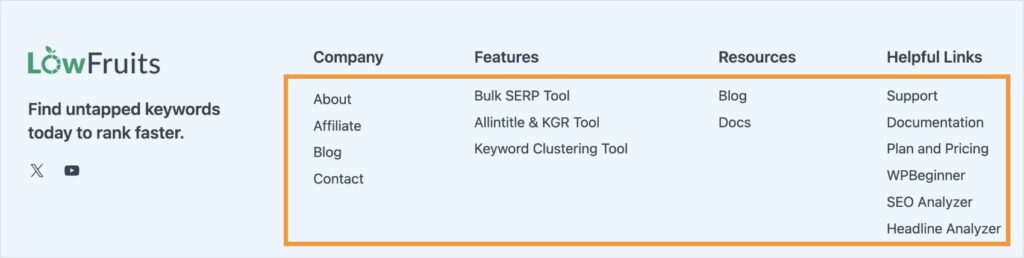
These are your menu links, header links, and footer links. While essential for user experience, they appear on every page and carry less SEO weight than our next type, contextual links.
In the screenshot of our LowFruits foooter below, all the elements in the orange box are navigation links.
Contextual Links
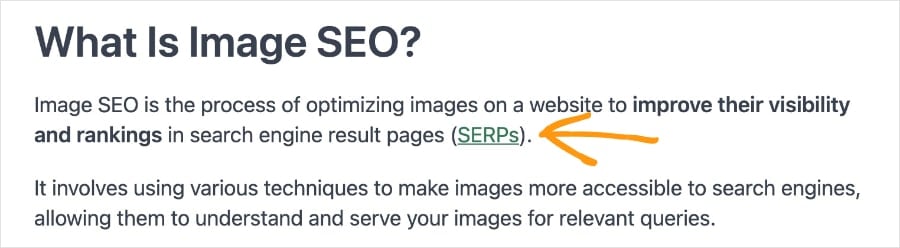
These are the gold standard of internal linking. They appear naturally within your content, connecting related topics and ideas. Search engines pay special attention to these because they provide context and show relationships between your content.
In this example, you’ll see that the hyperlink is a different color from the rest of the text. This allows users to easily identify a link.
Structural Links
Think “Related Posts” sections, sidebar links, or product recommendation boxes. These help with navigation and UX but aren’t as powerful as contextual links for SEO.
Here’s an example:
Additional resources:
Utility Links
These lead to pages like your privacy policy, terms of service, or contact page. They’re necessary but don’t significantly impact your SEO efforts.
The key to a strong internal linking strategy is understanding how to use each type effectively.
While all internal links matter, focusing your energy on creating relevant, contextual links within your content will give you the biggest SEO benefits.
Why Are Internal Links Important for SEO?
Internal links are crucial for your website’s success. Here’s what a strong internal linking strategy does for your SEO:
- Guides search engine crawlers: Think of search engine crawlers like explorers mapping your website. Without internal links, some of your best content might remain undiscovered.
- Passes authority between pages: Every page on your website has a certain amount of “authority” or ranking power. Internal links help distribute this authority throughout your site.
- Helps Google understand your content: When you link between related pages using descriptive anchor text, you’re giving Google valuable clues about what each page is about.
- Keeps visitors engaged: Good internal linking isn’t just about SEO — it’s about user experience. When readers find relevant, helpful links, they’re more likely to spend more time on your site. (And higher engagement means higher rankings.)
- Builds topical authority: By connecting related content through internal links, you show Google you have in-depth coverage of certain topics.
How to Build an Internal Linking Strategy in 5 Steps
Creating an effective internal linking strategy doesn’t have to be overwhelming. Let’s break it down into 5 easy steps:
1. Audit Your Current Internal Links
Before adding new links, you need to understand your existing link structure. Start by answering these questions:
- Which pages have the most internal links?
- Which pages have few or no internal links?
- Are your important pages easily accessible?
- Do you have any broken internal links?
Tools like Google Search Console can help you get this information quickly. Under “Links,” you’ll find a report showing your most-linked pages and how they’re connected.
Pro Tip: Use LowFruits to identify which of your under-linked pages have the best ranking potential. This helps you prioritize your linking efforts where they’ll have the most impact.
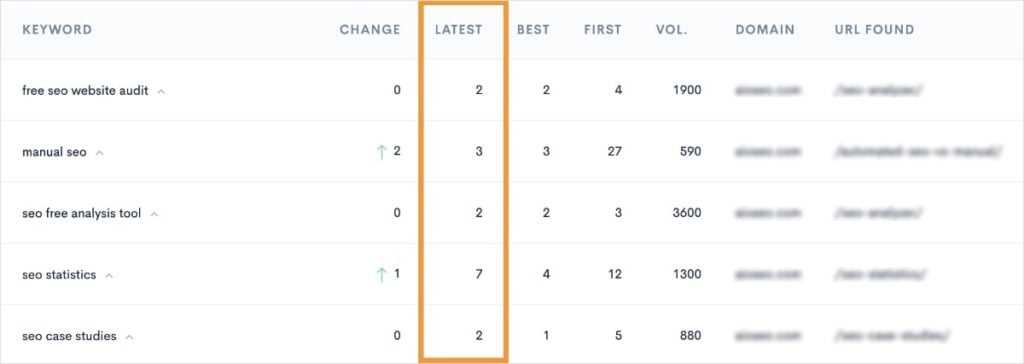
You can do this by using the Keyword Rank Tracker and checking for pages ranking in positions 11–14. (This data is in the “Latest” column.) These are prime candidates for adding internal links, as they’re already showing potential and could benefit from an authority boost.
Note: Rank Tracker requires a LowFruits subscription.
2. Create Your Content Hierarchy
Think of your content like a pyramid, but built from the ground up:
- Bottom: Your pillar content (comprehensive guides about main topics)
- Middle: Supporting subtopic pages that dive deeper into specific aspects
- Top: Detailed, specific content like case studies, examples, or specific questions
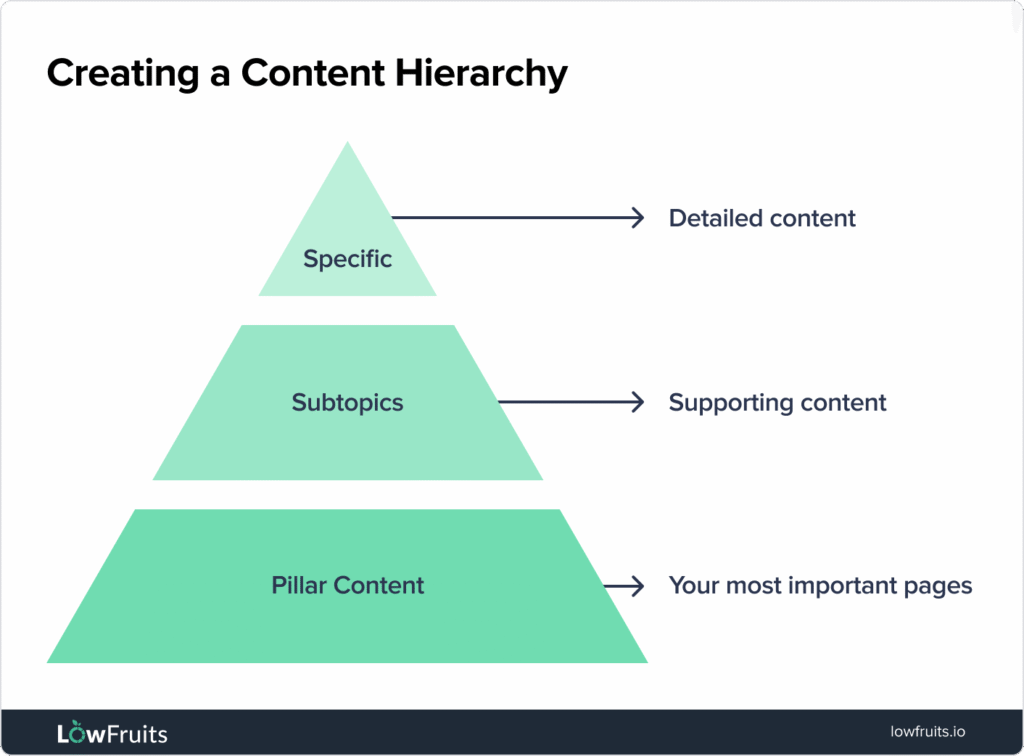
For example, if you run a coffee website:
- Bottom (Pillar): “Complete Guide to Coffee Brewing”
- Middle: “Pour Over Coffee Guide,” “French Press Tutorial”
- Top: “Best Water Temperature for Pour Over Coffee,” “Common French Press Mistakes”
Each detailed piece should link back to relevant subtopic and pillar pages, while pillar content links out to more specific information.
This structure helps you create meaningful connections between your content.
3. Follow These Internal Linking Best Practices
When adding internal links to your content, keep these guidelines in mind:
1. Use natural anchor text.
Anchor text is the clickable text of your hyperlink. While you should incorporate your focus keyword for that page, don’t force it. You also want to avoid keyword stuffing, which makes it difficult for users to read.
Finally, instead of using generic phrases like “click here” or “read more,” aim to be more descriptive so users know what to expect when clicking a link.
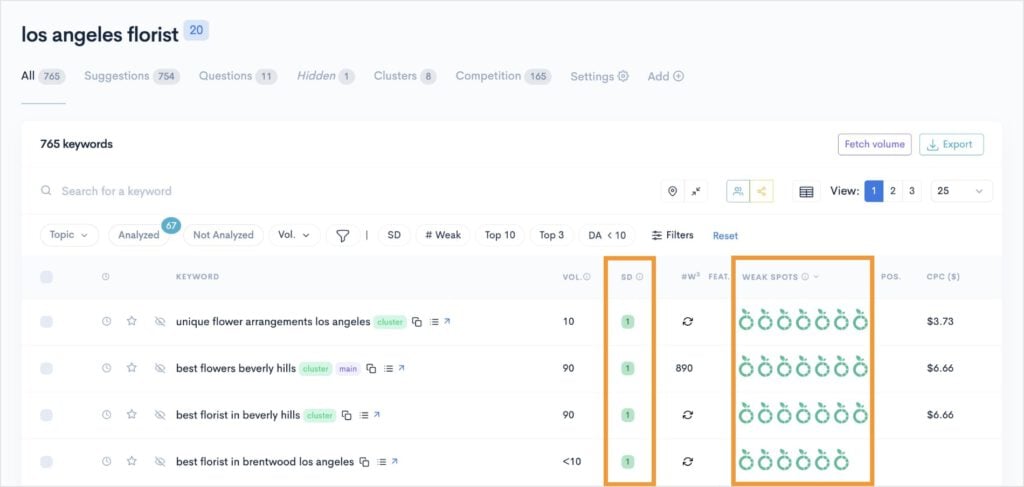
Need help finding the right keyword to target on a web page — and use for its anchor text? The LowFruits KWFinder helps you identify low-competition keywords that are easy to rank for. Just look for keywords with low SERP Difficulty Scores (keyword difficulty) and multiple Weak Spots (low-authority ranking domains). These are prime ranking opportunities.
2. Link to relevant content.
Every internal link should add value. If you’re writing about coffee brewing temperatures, linking to your coffee bean storage guide makes sense. Linking to your “about” page most likely doesn’t.
3. Keep links visible.
Place links where readers can find them naturally within your content. Buried links in footnotes or hidden in images don’t help users or search engines. This is also why hyperlinks are typically a different color. It’s easier for users to spot them when navigating a page.
4. Watch your link count.
While there’s no strict limit, keep it reasonable. A 1,000-word article probably doesn’t need 50 internal links. Focus on quality over quantity.
5. Point to important pages.
Direct link authority to pages that matter. Your lead magnets, product pages, and comprehensive guides should receive more internal links than your privacy policy.
Pro Tip: Use the LowFruits KW Clustering tool to identify topics that should be linked together. This ensures your internal linking strategy aligns with search intent and provides comprehensive topic coverage.
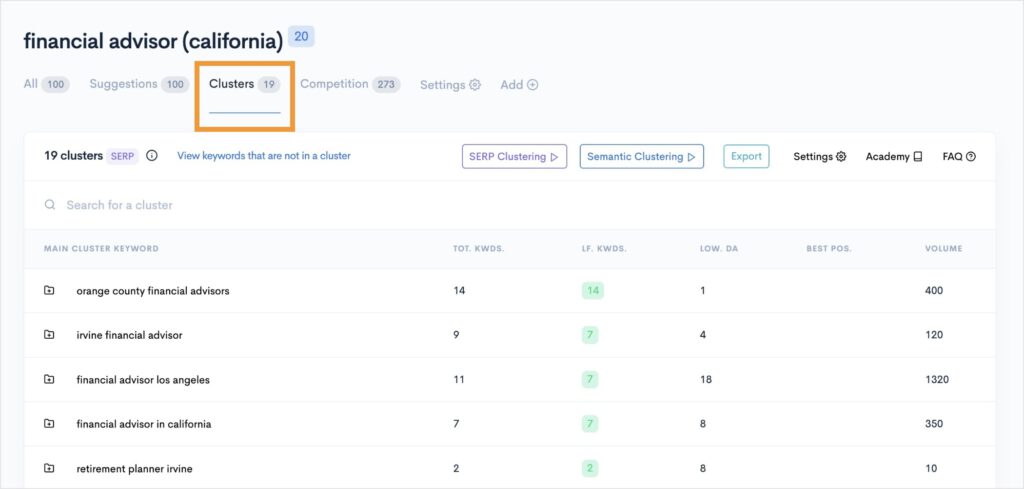
To learn more, check out this tutorial on how to use LowFruits clusters.
4. Implement Your Internal Linking Strategy
Now comes the practical part. Here’s how to put your internal linking plan into action:
- Start with high-value pages. Begin with pages that already perform well in search or drive conversions. These pages have existing authority to share.
- Look for natural opportunities. Read through your content and ask, “Would a link here help explain this concept better?” or “What related content would add value for the reader?”
- Update old content. Don’t forget about existing articles. Regular content audits help you find opportunities to add relevant internal links to newer content.
- Create strategic new content. When planning new articles, consider how they’ll fit into your linking structure. What existing content can you link to? What future content might link back?
Reminder: While reviewing your content, don’t forget to check which keywords and pages are on the cusp of page 1 using the LowFruits Keyword Rank Tracker. These “almost there” pages often benefit most from strategic internal linking.
5. Avoid These Common Internal Linking Mistakes
Even with the best intentions, it’s easy to make internal linking mistakes. Here are the big ones to watch out for:
- Using the same anchor text every time: Mix up your anchor text naturally. While your “default” setting should be the primary keyword, related keywords are another great option.
- Linking only to your homepage: Your homepage isn’t always the most relevant or helpful destination. Spread the link love to your deeper, more specific content.
- Creating dead ends: Pages that don’t link to anything else trap users (and search engines) in a corner. Every page should have at least a few relevant internal links to other content.
- Overdoing it: Yes, you can have too much of a good thing. Stuffing paragraphs with links makes content hard to read and dilutes the value of each link.
- Ignoring user experience: Don’t add links just for SEO. Each link should make sense and provide value to your readers.
Measuring the Success of Your Internal Linking Strategy
How do you know if your internal linking strategy is working? Here are the key metrics to watch:
- Average time on site: If people are following your internal links, this number should increase as they explore more content.
- Pages per session: More internal links should lead to visitors viewing more pages during each visit.
- Bounce rate: Effective internal linking typically reduces bounce rates as users find relevant content to explore.
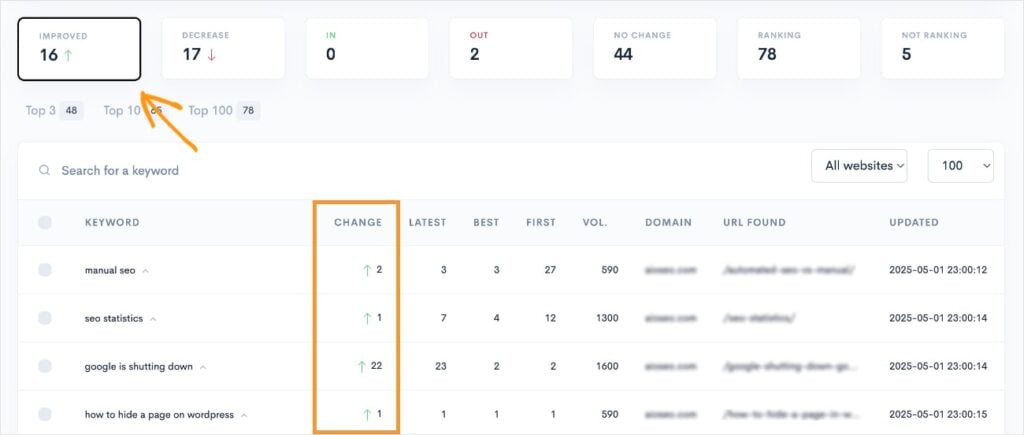
- Rankings for target pages: Monitor how pages move in search results after implementing internal links. Rank Tracker can help you spot positive changes by clicking on the “Improved” filter. Conversely, you can check the “Decrease” filter to see if you’ve lost any positions.
Next Steps: Putting Your Strategy into Action
Now that you understand internal linking, let’s turn that knowledge into action. Here’s your game plan:
- Start small. Choose 5-10 of your most important pages and analyze their current internal links. Are they getting enough attention? Do they link to relevant content?
- Look for quick SEO wins. Use LowFruits to identify pages ranking in positions 11–14. These pages often need a little boost from strategic internal linking to reach page 1.
- Create a linking schedule. Set aside time each month to review and update internal links. This could be as simple as spending an hour adding relevant links to your most recent content.
- Track your progress. Keep an eye on those key metrics we discussed. Small improvements add up over time.
Remember: The best internal linking strategy is one you’ll actually implement consistently. Don’t feel pressured to fix everything at once – steady progress beats perfection.
FAQs About SEO Internal Linking Strategies
How many internal links should a page have?
There’s no magic number, but aim for quality over quantity. The key is ensuring each link adds value for your readers and makes sense in context.
Should I use exact match anchor text for internal links?
While it’s good to use keywords in your anchor text, variation is important. Mix natural phrases with exact match keywords. For example, if you’re linking to a coffee brewing guide, alternate between anchors like “brewing methods,” “how to brew coffee,” and “coffee brewing techniques.”
Should I open internal links in new tabs?
Generally, no. Let users control their browsing experience. Save opening in new tabs (target=”_blank”) for external links that take visitors away from your site.
How often should I audit my internal links?
For most websites, a quarterly internal link audit is sufficient. However, if you publish content frequently (multiple times per week), consider monthly audits to ensure your linking structure stays healthy.
What about linking to old content?
Absolutely link to old content — as long as it’s still relevant and valuable. Just make sure to regularly update older content to keep it fresh and accurate.
Final Thoughts
Internal linking isn’t just about SEO — it’s about creating a better experience for your readers while helping search engines understand your content.
Start small, focus on quality over quantity, and remember that consistency beats perfection.
The best internal linking strategy is one that grows naturally with your site.
Keep creating valuable content, connecting related topics, and helping your audience find what they need.


