
Do you ever feel like you’re drowning in a sea of keywords after hours of research? You’ve got the data, but now you don’t know what to do with it, let alone where to start.
That’s where keyword clustering tools come to the rescue. And trust me, they’re a game-changer for your content strategy and SEO (and not to mention, your time).
After 6 years in the SEO trenches, I’ve tested dozens of keyword grouping tools, from free options to premium powerhouses. Some promised the world but delivered confusion. Others looked basic but packed a surprising punch.
In this guide, you’ll discover my favorite keyword clustering tools for turning your keyword chaos into content gold. I’ve also got some free recommendations in here, so be sure to stick around until the end.
In This Article
- What Exactly is Keyword Clustering (And Why Should You Care)?
- My Methodology: How I Picked and Evaluated These Keyword Grouping Tools
- The 5 Best Keyword Clustering Tools (Tried & Tested)
- Bonus: Free Keyword Clustering Tools
- Pro Tips to Get the Most Out of Your Keyword Clustering Tools
- FAQs: Your Questions Answered
- Final Thoughts
What Exactly is Keyword Clustering (And Why Should You Care)?
Keyword clustering is the process of grouping related keywords based on shared characteristics. Most often, they have the same or similar search intent. (These are called semantically-related keywords.)
Think of it like this: instead of treating every single keyword like a lone wolf, you’re identifying natural “packs” or families of keywords. These are terms that people search for when they’re looking for the same kind of information, even if they type slightly different phrases into Google.
Now, the big question: “Why should I care?”
If you want your content to work smarter, not harder, this is where you lean in. I’ve seen first-hand how websites struggle to rank without a clear content strategy. And guess what?
Keyword clusters are your ticket to higher rankings. They help you turn your massive keyword lists into full-blown content ecosystems. Here’s why they’re fundamental to your SEO success:
- Become a topical authority (aka Google’s best friend). When you create content that covers a cluster of related keywords, you’re signaling to search engines like Google that you’re not just dabbling – you’re an expert on that subject. This is a massive leg-up for your rankings.
- Craft content that actually tits the mark. Forget thin, one-keyword-wonder articles. Clustering helps you understand the full spectrum of what users are searching for around a topic. This means you can build comprehensive, powerhouse content that answers multiple related questions in one go. Happy users, happy Google.
- Make content planning less of a headache. Seriously, this is a big one. Clusters naturally show you what your main content pillars should be and what supporting topics (or “spokes”) you need to cover. Your editorial calendar will practically write itself.
- Dodge the dreaded keyword cannibalization. Ever had two of your own pages fighting each other for the same keyword in the search results? It’s frustrating. Clustering helps you assign distinct keyword groups to specific pages, so each piece of content has its own clear purpose and target.
- Improve your internal linking strategy. Pages within the same topic cluster are prime candidates for linking to each other. This helps spread link equity (aka, SEO juice) and guides users (and search engine crawlers) to more of your awesome content.
- Unearth hidden gem keywords. Sometimes, within a cluster, you’ll find those less obvious, long-tail keywords that your competitors might have missed. These can be quick SEO wins.
In short, keyword clustering helps you move from just targeting keywords to strategically owning topics. And that is how you win in today’s SEO landscape.
My Methodology: How I Picked and Evaluated These Keyword Grouping Tools
Transparency matters, especially when recommending tools that cost real money. I didn’t just read marketing materials or watch demo videos — I put each tool through its paces using real client projects and my own websites.
Here’s exactly how I evaluated each tool:
- Accuracy: Does the clustering actually make sense? I tested each tool with the same seed keyword lists and compared results against manual SERP analysis. Some tools group “WordPress hosting” with “WordPress themes” — technically related, but completely different search intents.
- Ease of Use: Can you get results without a PhD in data science? I timed myself from login to actionable clusters, noting where I got stuck or confused.
- Speed: Time is money. I measured how quickly each tool processed 500+ keyword lists, because waiting 30 minutes for clustering results breaks workflow momentum.
- Data Quality: Where does the clustering data come from? I prioritized tools using fresh, reliable data sources over those relying on outdated or questionable information.
- Export Capabilities: Can you actually use the results? The best clustering insights are worthless if you can’t export them in a usable format for content planning.
- Integration Options: Does the tool play nice with other SEO software? Seamless workflow integration saves hours of manual data transfer.
- Value for Money: Not just price, but ROI. A $200/month tool that saves 10 hours weekly beats a $50/month tool that requires constant manual work.
The 5 Best Keyword Clustering Tools (Tried & Tested)
Alright, time for the main event. I’ve curated the options down to my top 5. These are the best keyword clustering tools that have consistently proven their worth in my day-to-day workflow.
First up…
1. LowFruits
You might already know LowFruits for its ability to sniff out “low-hanging fruit” keywords. You know, the ones you can rank for without a Herculean effort?
But what you might not realize is how it helps you spot and group these opportunities into actionable clusters.
My Experience & Why It Made the List:
LowFruits is my go-to when I want to find untapped topic clusters with ranking potential, fast. When I’m sizing up a new niche or looking for quick wins for a client, I plug in a seed keyword into the KWFinder tool.
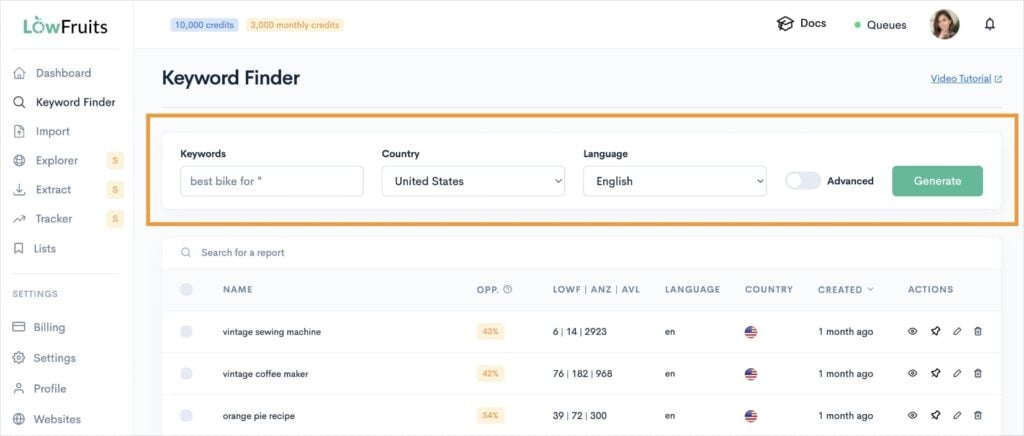
Then, I analyze the SERPs (automatically, of course) using the Extract feature.
From here, LowFruits has all the data it needs to cluster your keywords by (1) search intent or (2) semantics.
I like to cluster by the former. (LowFruits calls this SERP clustering.)
To get here, just click the Cluster tab at the top of any keyword report.
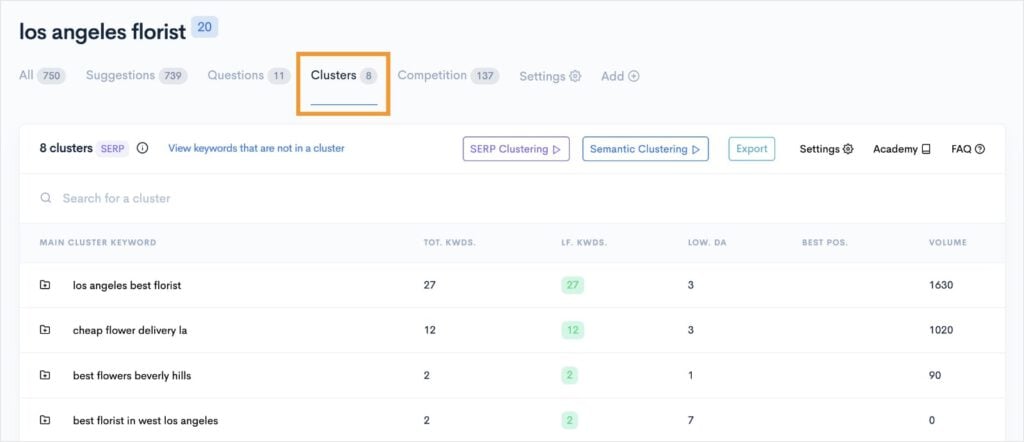
And there you have it. LowFruits identified 8 main clusters based on 1 seed keyword search.
I like how this dashboard view shows you how many “low-fruit” keywords there are in the cluster and the Domain Authority (DA) of the weakest competitor ranking in the top 10 search results. You also get the total monthly keyword search volume for the group. This allows me to prioritize which clusters to tackle first.
Naturally, you can click on any of these clusters to see the individual keywords inside, too.
Here’s an example:
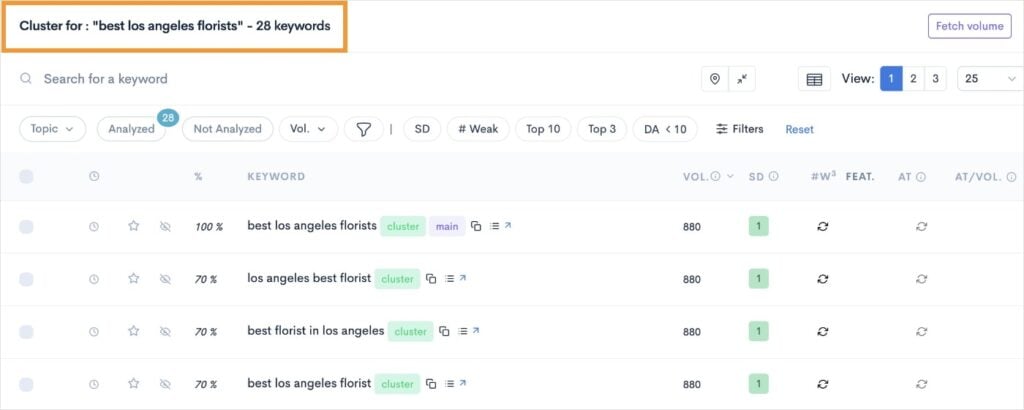
This view gives us even more data for each keyword. I recommend paying particular attention to the SERP Difficulty Score (SD) column. This metric measures keyword difficulty, with 1 being the easiest and 3 the hardest. It’s like having X-ray vision for the SERPs’ soft spots — minus any manual work.
Ultimately, it’s one of the easiest and fastest keyword clustering tools out there. I’ve been surprised with how much I find myself using the Keyword Clustering feature in LowFruits, and don’t see myself slowing down anytime soon.
LowFruits Pricing: Subscriptions start at $21/month. You can also access the bulk SERP checker using pay-as-you-go (PAYG) credits, which start at $25 for 2,000 credits.
LowFruits Pros:
- Unbeatable for finding low-competition keyword clusters.
- Saves a massive amount of time in the initial content ideation and planning phase.
- The “Weak Spots” feature is incredibly actionable for prioritizing content.
- Very intuitive and user-friendly interface – no steep learning curve here.
LowFruits Cons:
- It’s not designed to be a bulk clustering tool for, say, 10,000 keywords you already have from another source. Its strength is in discovering clusters through its unique SERP analysis.
2. Surfer

Surfer is a popular content optimization platform for on-page SEO. It has a lot of powerful features related to content creation, but we’re going to focus on its Topical Map. This tool is designed to help you plan and build out entire content hubs, ensuring you cover a topic in its entirety.
My Experience & Why It Made the List:
When I’m looking to build topical authority for a client, or for one of my own projects, leveraging clusters is key. This is where Surfer’s Topical Map feature really shines.
Instead of just optimizing a single page, the Topical Map helps you visualize and plan an entire network of content around a main “pillar” keyword.
Here’s how I use it:
- I input a broad, core topic or “pillar” keyword that I want to own (e.g., “content marketing strategies”).
- Surfer then analyzes the SERPs and identifies dozens, sometimes hundreds, of related sub-topics and supporting keywords that are semantically linked to that main topic. It essentially generates a blueprint for your entire topic cluster.
- It groups these into logical “cluster” categories, often suggesting specific article titles or focus areas for each supporting piece of content.
For example, for “content marketing strategies,” the Topical Map might generate clusters like “content marketing for small business,” “B2B content marketing,” “video content marketing,” “content distribution tactics,” and “measuring content marketing ROI.”
Each of these then becomes a potential article (a “spoke”) that links back to the main pillar page.
Overall, Surfer integrates seamlessly into any content creation workflow. It has a visual dashboard that makes analyzing data more engaging and insightful than just graphs and columns. (As a visual person, this is a huge bonus.)
Surfer Pricing: Starts at $79/month.
Surfer Pros:
- Excellent for building topically comprehensive content that satisfies user intent.
- Directly translates SERP analysis into actionable writing guidelines.
- Helps you identify and fill crucial topical gaps in both new and existing content.
Cons:
- Its primary focus isn’t on clustering a standalone, bulk list of keywords you upload (like some dedicated cluster tools). It’s more about building out the topic cluster around a primary keyword for a specific piece of content.
- The sheer amount of data can feel a bit overwhelming for absolute beginners, though they’ve done a good job with the UI.
- Can be on the pricier side if you’re not regularly creating or optimizing content.
3. Semrush

Semrush is pretty much on every “best SEO tool” list out there. But there’s a reason for it.
I’ve been using it since day 1 of my SEO journey, and I’ll stay faithful until the end. It’s just that good.
For keyword grouping, they have an intuitive Keyword Strategy Builder integrated into the platform. This is where I’ll focus my assessment.
My Experience & Why It Made the List:
When I’m tasked with developing a broad content strategy or trying to understand all the different angles of a core topic, Semrush’s tools for topic discovery and organization are unmatched. Their Keyword Strategy Builder helps me go from a few seed ideas to a full-fledged map of content clusters.
Here’s how I typically use it:
- Start by entering 1–5 seed keywords.
- Semrush then generates a list of pages and appropriate keyword targets. (It’s basically a pre-made content strategy for a specific topic.)
- I can then explore these suggested subtopics, select the most relevant ones, and add them to my content planning. This effectively builds out my keyword clusters around the main theme and gives me the page to house them on.
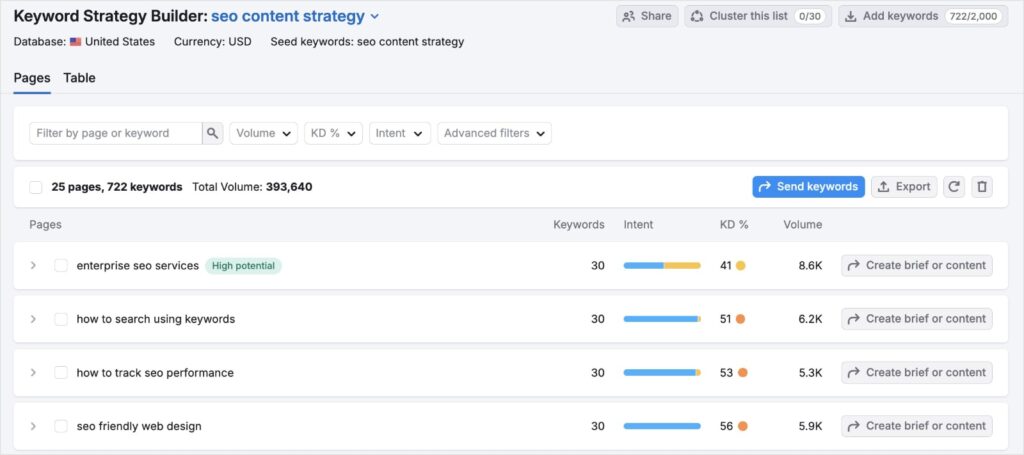
In the example, we can see how a single seed keyword generated 25 unique pages with over 700 keywords. And it took literal seconds.
There’s obviously some refinement you’ll need to do to ensure the content ideas align with your business and SEO goals. With that said, it’s a huge time-saver and gives you a jump start on content creation.
Semrush Pricing: Starts at $139.95/month.
Semrush Pros:
- Excellent for idea generation and discovering new angles within a broader topic.
- The visual interface can make topic relationships easier to understand and plan around.
- The ability to see metrics alongside topic suggestions is very helpful for prioritization.
Semrush Cons:
- Semrush is a premium, comprehensive suite, so the cost can be a barrier for those on a tight budget or only needing clustering functionality.
- The sheer number of features and data points can sometimes feel overwhelming for new users.
4. Keyword Cupid

Unlike the other SEO tools in our lineup, Keyword Cupid specializes almost exclusively in keyword clustering. It’s built around the principle of analyzing SERP overlap — that is, grouping keywords based on how many of the same URLs are ranking for them.
My Experience & Why It Made the List:
There are times when I have a massive list of keywords. We’re talking tens of thousands, especially for larger client projects or when I’ve done a huge data dump from various research tools. Trying to manually make sense of that kind of volume is a recipe for a headache. This is where Keyword Cupid has been a real lifesaver.
To get started, I upload my big, messy list of keywords directly into Keyword Cupid.
Then, I configure the settings, primarily the target country/language and the “Minimum Overlap” (how many of the top 10 URLs must be shared for keywords to be grouped). I usually start with an overlap of 2 or 3 and then adjust if needed.
Keyword Cupid then goes to work, analyzing the live SERPs for every single keyword on my list.
The output is a user-friendly organized set of clusters. Each cluster contains keywords that are genuinely related because they share common ranking URLs, indicating Google sees them as part of the same topical query.
So, in summary, if you already have a keyword list and just want to cluster them, Keyword Cupid is it. You can’t do initial keyword research in it, but it works with the data you give it.
Keyword Cupid Pricing: Start at $9.95/month.
Keyword Cupid Pros:
- Highly accurate and relevant clusters because it’s based on actual SERP data.
- Massive time-saver when dealing with large keyword datasets.
- Excellent for visualizing topical silos and planning site architecture or content hubs.
Keyword Cupid Cons:
- Being a specialist tool, it’s not as feature-rich as the big all-in-one SEO platforms.
- The pricing is typically credit-based, which means you need to estimate your usage. For very frequent, high-volume users, this could add up.
- It’s a clustering tool first and foremost; it doesn’t do the initial keyword discovery in the way LowFruits or the broader research tools do. You need to bring your own keyword list.
5. SE Ranking
SE Ranking is a comprehensive SEO platform with a suite of tools for rank tracking, site audits, competitor analysis, and more. Its Keyword Grouper tool is a dedicated feature for keyword clustering. It also comes at a budget-friendlier price point than some other tools, like Semrush.
My Experience & Why It Made the List:
I’ve always appreciated SE Ranking for offering a solid “bang for your buck.” For clients or projects where we need a versatile SEO platform that includes reliable keyword grouping without breaking the bank, SE Ranking has often been a great fit.
Their Keyword Grouper tool is quite straightforward and effective:
- You create a project or just go straight to the tool.
- You upload your list of keywords.
- You can then configure settings like the search engine, country, language, and crucially, the “Clustering accuracy” or “Grouping strength.” This determines how many of the top SERP positions (e.g., top 10, top 20) must have overlapping URLs for keywords to be grouped together. I typically start with a setting that requires 2 or 3 overlaps in the top 10.
- SE Ranking then processes your list and presents you with keyword clusters.
What I find useful is that it doesn’t just give you the clusters. It also pulls in search volume and keyword difficulty data, which helps in prioritizing which groups to focus on first.
I recently worked with a small business owner who was already using SE Ranking for rank tracking. Introducing them to the Keyword Grouper within the same platform was seamless. We took their existing list of target keywords, ran it through the grouper, and quickly identified several distinct content themes they could build out, all within an interface they were already familiar with. It helped them see how different service variations they offered actually belonged to distinct search intents.
Overall, SE Ranking aims to provide a robust set of features without the top-tier price tag of some other major platforms.
SE Ranking Pricing: Starts at $52/month.
SE Ranking Pros:
- Good balance of functionality and affordability.
- The Keyword Grouper is generally easy to use and understand.
- Having search volume and difficulty data right there with your clusters is convenient.
- It’s a reliable option if you’re already using SE Ranking for other SEO tasks, keeping your workflow consolidated.
SE Ranking Cons:
- While the clustering is good and SERP-based, it might not offer the same level of advanced visualization as other tools.
- The cost-per-query pricing system can get confusing and difficult to track.
Bonus: Free Keyword Clustering Tools
Want to dip your toes into keyword clustering without opening your wallet? No problem. Here are a couple free keyword clustering tools for learning the ropes.
KeySearch
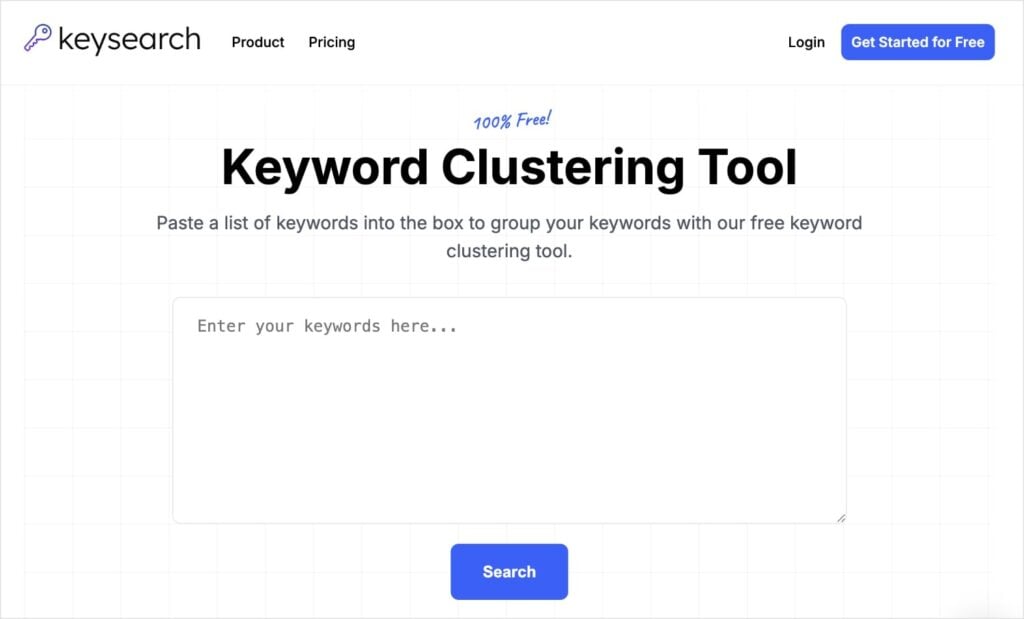
KeySearch has a free keyword cluster tool that’s super simple to use. You just paste your keyword list into the empty field box and click “Search.” I’ve done over 1,000 keywords at once, and it had no issue sorting them into the clusters.
Now, here’s the thing about KeySearch: this tool does a pretty good job of organizing your keywords into clusters, but it’s pretty basic. The overall “topic” it chooses for each cluster can be rather vague (for example, “seo in” or “how to”).
Because of this, you’ll need some extra time sorting through the clusters to make sure they really make sense. You’ll probably need to perform a bit of a SERP analysis, too, to make sure the keywords have the same search intent. I wouldn’t rely on KeySearch’s cluster results alone.
Ultimately, it’s a good option if you’re just starting out with keyword clustering. It gives you a rough idea of different topic clusters and sorts your keywords based on word matching. You’ll need to do additional research to confirm search intent, though.
Zenbrief
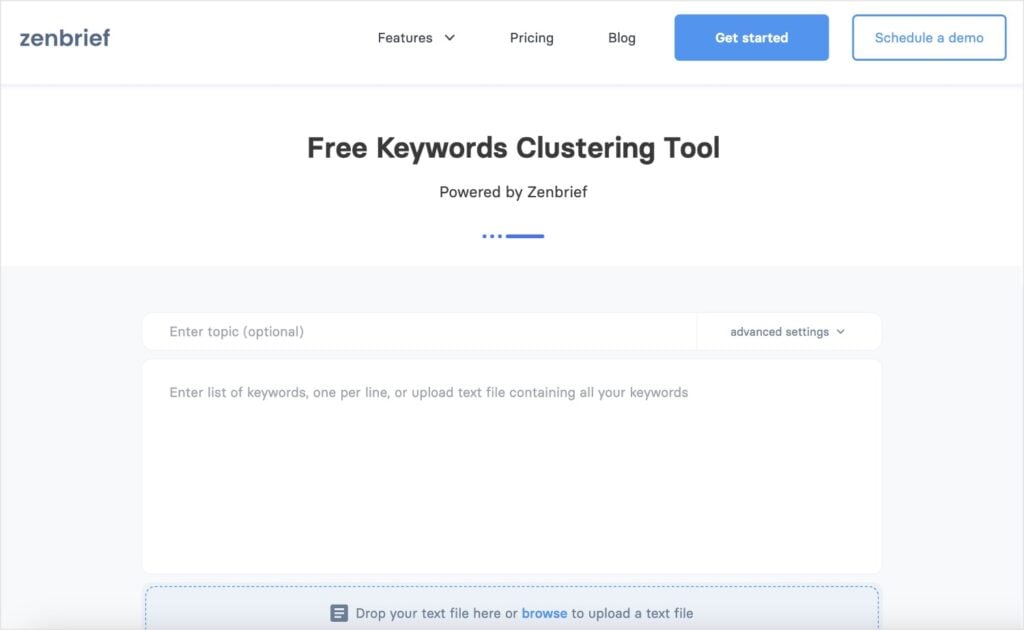
Zenbrief is another free keyword grouping tool that works similar to Keysearch. However, with Zenbrief, you have a few more import and setting options.
For example, you can upload text files or drop them directly into the web page. You can also customize the cluster minimum and maximum settings (i.e., minimum of 5 keywords per cluster and maximum of 15). This gives you a little more control over the output.
Once you’ve got the results, you can download clusters individually or all results at once.
Personally, I think Zenbrief does a slightly better job of clustering than Keysearch. The interface is also a bit more appealing, if design matters to you.
Overall, it’s another really solid option that doesn’t cost a dime. I’d highly recommend it for small business owners or DIY SEOs who don’t want to spend on keyword grouping tools just yet.
Pro Tips to Get the Most Out of Your Keyword Clustering Tools
So, you’ve chosen a tool, run your keywords, and now you have organized clusters. Nice job!
But, like all things SEO, the work doesn’t stop there.
Getting the clusters is just the first step; knowing what to do with them is where you really start to see the SEO needle move.
Here are a few tips on how to transform those clusters into tangible results:
1. Embrace the Pillar-Spoke Model for Topical Authority
This is a classic, but clustering makes it so much clearer. For each major topic cluster, identify the main, broader keyword (often higher volume). This is your pillar page target.
The other more specific, long-tail keywords within that same cluster become your spoke pages (or supporting articles/sections).
Each spoke page should dive deep into its specific sub-topic and link back to the main pillar page. The pillar page should also link out to its spokes.
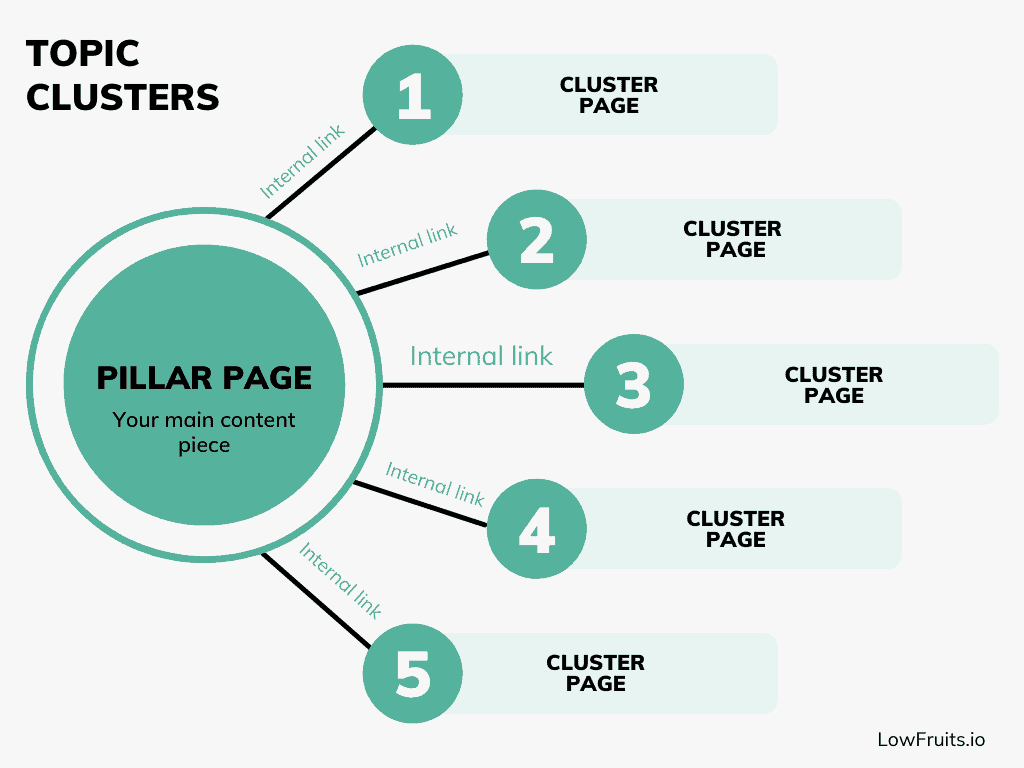
This interconnected structure tells Google you’ve covered the topic comprehensively.
It’s also the basis of any successful internal linking strategy.
2. Use Clusters for Content Gap Analysis
Once you’ve clustered your target keywords, map them against your existing content. Which clusters (or keywords within clusters) don’t have a dedicated page or section on your site?
These are your high-priority content gaps. You already know there’s search intent around them; now you just need to create the content.
To learn more, check out this article how to do a keyword gap analysis.
3. Refresh Your Existing Content With Keyword insights
Keyword clustering isn’t just for new content. Go back to your existing articles.
Is an old blog post only targeting a single keyword when it could be expanded or refocused to address an entire relevant cluster you’ve identified?
Look for opportunities to refresh, expand, or consolidate content based on your cluster analysis. You might find two older, thinner articles that could be combined into one powerhouse piece targeting a whole cluster.
This builds topical authority and prevents keyword cannibalization.
4. Let Clusters Dictate Your Internal Linking Strategy:
This one is huge and often underutilized. Your keyword clusters provide a natural, logical roadmap for your internal links.
Articles within the same topic cluster should absolutely link to each other. This helps distribute link equity effectively and guides users (and search engine crawlers) through related content on your site. This keeping them engaged longer and signals topical depth.
5. The “SERP Intent Sanity Check”
Even with the best keyword clustering tools, always do a quick manual spot-check. For any given cluster, take the top 2–3 keywords (especially the highest volume ones) and Google them in an incognito window.
Look at the top 3–5 organic results. Do these pages feel like they’re addressing the same core user need or intent? Are the types of content similar (e.g., blog posts, product pages, listicles)?
These insights can save you from blindly following a tool if there’s an anomaly or if the intent for seemingly similar keywords is actually different. Trust the data, but always verify with your own SEO brain!
FAQs: Your Questions Answered
What is the best keyword clustering tool?
The best keyword clustering tool largely depends on your specific needs, size of your projects, and your budget. For instance, LowFruits is excellent for finding and clustering low-competition keyword opportunities. This is ideal for small business owners who can’t compete with big websites. Tools like Semrush, on the other hand, offer advanced capabilities. But it comes at a high price point. You can also use free tools like Zenbrief if you’re on a really tight budget.
What are the best free keyword clustering tools?
Zenbrief and KeySearch are both good options for free keyword clustering tools. Zenbrief offers more keyword import options and cluster settings, giving it an upper-edge. You can also go the old school method and organize keywords manually using Google Sheets or Excel. This method, however, is time-consuming.
Why does keyword clustering matter for SEO?
Keyword clustering is important for SEO because it helps you build topical authority, satisfy user intent, and streamline your content strategy. All these benefits combined can lead to improved rankings, as Google sees your site as an authority in your niche.
Final Thoughts
And there you have it! A deep dive into the best keyword clustering tools and my personal picks for the job.
We’ve seen how clustering your keywords can transform a jumbled list in a strategic content roadmap. Now, it’s up to you to take the next steps!
Check out our guide on how to create topic clusters that boost your rankings. Plus, I’ll show you exactly how to automate the process using LowFruits.
And don’t forget to set up rank tracking, so you can watch the fruits of your SEO efforts flourish. (Explore my recommendations of the best rank tracker tools.)
Happy clustering!


