
With over 7 million blog posts published daily, the competition for visibility has never been more intense.
The good news is that topic clusters can help you rise above the digital noise and build a content strategy that ranks. And they’re not just about pleasing search engine algorithms.
Topic clusters provide real value to your readers while establishing your site as an authority in your niche.
In this guide, we’ll explore how topic clusters can transform your content strategy for better user experience (UX) and SEO. I’ll also reveal how you can automate the entire clustering process with LowFruits.
In This Article
Understanding SEO Topic Clusters
So, what exactly are topic clusters, and why should you care?
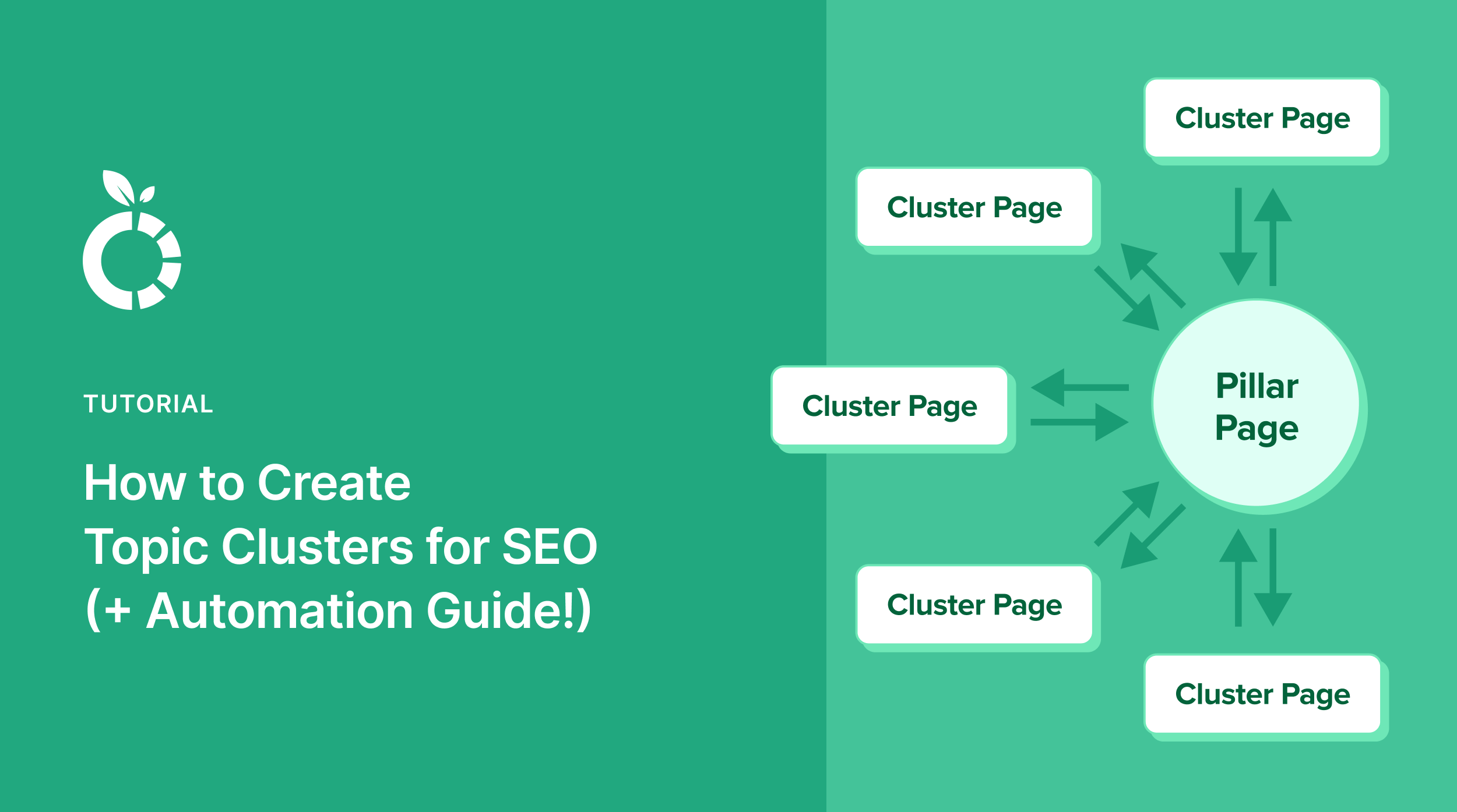
Think of topic clusters like a well-organized filing cabinet, where each file (or article) links to a central dossier (the pillar content). This structure helps search engines understand the depth and breadth of your coverage on a topic, making your site a trusted resource.
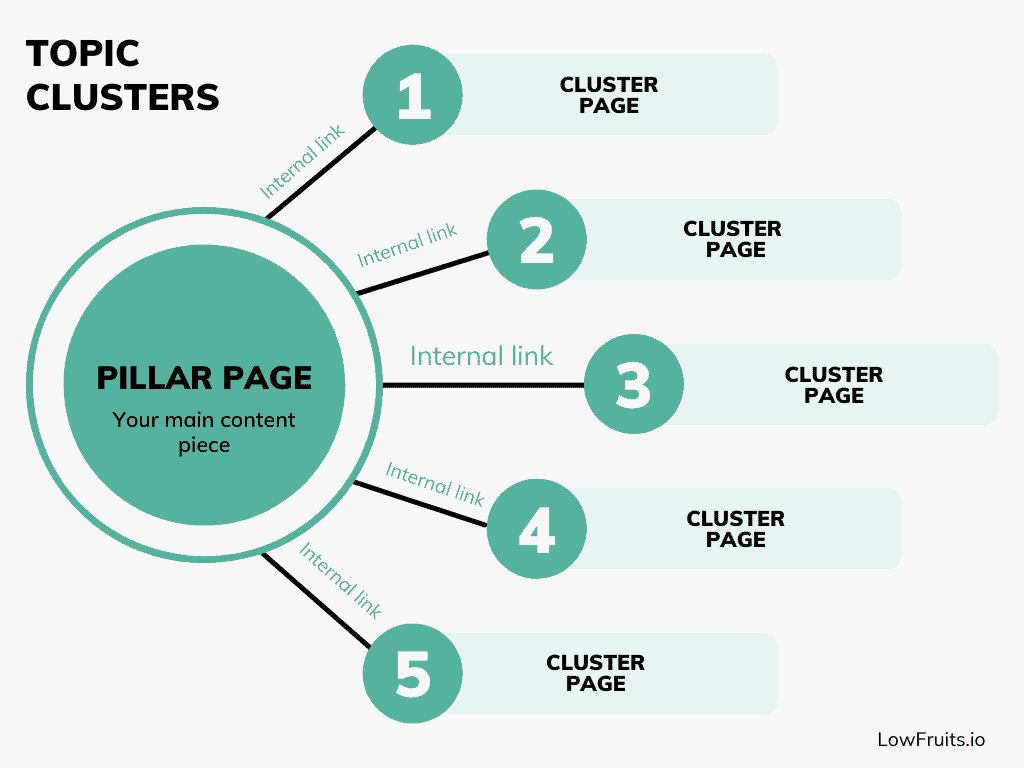
- Pillar Content: This is the heart of the cluster — a comprehensive, authoritative piece that covers a core topic in detail. It’s like the CEO of your content strategy, setting the direction for everything else.
- Cluster Content: These are supporting documents. Articles or blog posts that dive into specific aspects or subtopics related to your pillar content. They fill in the gaps and reinforce the central message.
- Internal Linking: The glue that holds your cluster together. Each piece of content within the topic cluster links back to the pillar page. Conversely, the pillar page links out to each cluster article, creating a web of interconnected authority.
Topic clusters represent a strategic shift from traditional keyword-focused SEO to a more holistic, topic-based approach to content creation.
Unlike the old-school method of targeting individual keywords with standalone articles, topic clusters create an interconnected network of content that covers an entire subject.
Benefits of Topic Clustering for SEO & Users
Here’s why topic clustering is a game-changer:
- Improved Rankability: By thoroughly covering a topic and linking related content, you enhance your site’s visibility. Search engines love this network of content because it signals thoroughness and expertise.
- Enhanced User Experience: Visitors embark on a seamless journey through your content, leading to longer stays and better engagement. Imagine lending a helping hand to someone lost in a sea of information — that’s what your clusters can do!
- Building Content Authority: Establish your site as the go-to resource in your niche. When users and search engines see the depth and connectivity of your content, they trust your authority on the subject.
Ultimately, topic clusters can improve your visibility in search engine results pages (SERPs) and increase organic traffic.
How to Create Topic Clusters Step-by-Step
Creating topic clusters requires a strategic approach, but it doesn’t have to be hard or complicated.
Here’s a step-by-step guide on how to create topic clusters that build your content authority:
1. Identify Your Core Topics (Pillar Content)
Think of choosing your pillar content topic like picking the main ingredient for a recipe. It needs to be something you know well and can build upon. Your pillar topic should be broad enough to create multiple related articles but specific enough to show you’re an expert.
Let’s say you run a pet supply store website. Instead of trying to cover “Pets” (too broad) or “Best Food for Three-Month-Old Golden Retrievers” (too narrow), you might choose “Dog Food Guide” as your pillar topic. This topic is perfect because:
- It’s something your customers constantly ask about.
- You can create lots of related articles.
- It’s directly connected to your products.
- It’s a topic that stays relevant over time.
From this main “Dog Food Guide” topic, you could branch out into many related articles that help pet owners make informed decisions about feeding their dogs.
Before you select your own pillar topic, ask yourself three simple questions:
- What do my customers frequently ask about?
- What topics do I know inside and out?
- What information would truly help my audience?
The best pillar topics are those that answer important questions your audience has while showcasing your expertise.
Keep it simple, focused, and relevant to your business goals.
2. Strategize Supporting Content (Articles)
Once you have your main topic, it’s time to plan the supporting articles that will form your cluster content.
Think of these articles as chapters in a book. Each one explores a specific aspect of your main topic in detail.
Continuing with our “Dog Food Guide” example, you’d want to create articles that answer specific questions pet owners have about dog food. Your cluster content might include articles like:
- How to Read Dog Food Labels
- Dry vs. Wet Dog Food: Which Is Better?
- Understanding Dog Food Allergies
- Puppy Feeding Guidelines
- Senior Dog Nutrition Needs
This list should get pretty long. The idea is to provide comprehensive topic coverage with various articles to build content authority.
To identify the right supporting topics for your cluster, try these simple approaches:
- Look at what people are searching for using Google’s suggested searches.
- Check the questions in Google’s “People Also Ask” section.
- Review your customer service emails and chat logs.
- Browse relevant social media discussions.
- Ask your sales team about common customer questions.
The key is to choose topics that naturally connect back to your pillar content. Each supporting article should be detailed enough to stand alone but work together with other pieces to create a comprehensive resource for your readers.
Pro tip: Create a simple spreadsheet to organize your topics. List your pillar content at the top, then add your supporting articles below. This helps you visualize how everything connects and ensures you’re not missing any important subjects.
Remember: Quality matters more than quantity. Start with 8-10 strong supporting articles that thoroughly answer your audience’s most pressing questions. You can always add more articles later as you identify new topics your readers want to learn about.
3. Create Content That Aligns With Search Intent
Writing great content isn’t just about what you write. It’s about understanding why people are searching for this information in the first place.
In SEO, we refer to this as “search intent.”
Each piece of content should match what your readers are trying to accomplish when they type their query into Google. In other words, it needs to align with search intent.
Going back to our “Dog Food Guide” example, let’s look at how different types of content align with different search intents:
- Informational Content (When readers want to learn): “How to Transition Your Dog to New Food” or Signs Your Dog Has Food Allergies”
- Commercial Content (When user want to research products): “Best Dog Food Brands for Large Breeds” or “Top-Rated Organic Dog Food Reviews”
- Transactional Content (When customers are ready to buy): “Where to Buy Prescription Dog Food” or “Dog Food Subscription Services”
To create content that truly helps your readers:
- Look at the current top-ranking pages for your topic.
- Notice the format they use (how-to guides, lists, step-by-step instructions).
- Identify what questions they answer (and what they miss).
- Create content that provides better, more complete information.
Remember: Your content should be thorough but not overwhelming. Use clear headings, short paragraphs, and simple language. This will improve readability, keep users on your website longer, and reduce bounce rates.
It’s also a good idea to include real examples and practical tips that readers can use right away.
Most importantly, always put yourself in your reader’s shoes. If someone is searching for information about dog food allergies, they probably have a concerned pet owner looking for clear, trustworthy advice. Make sure your content addresses their worries and provides actionable solutions.
4. Link Internally Across Your Topic Cluster
Internal linking is what transforms a collection of related articles into a proper topic cluster. Create a systematic approach to internal linking that strengthens the topical relationship between your content pieces.
Your pillar page should link to every piece of cluster content, using relevant anchor text that accurately describes the linked content. Conversely, each cluster article should link back to the pillar page at least once, preferably in a context that makes sense to the reader.
Here are some best practices for internal linking:
- Use descriptive anchor text. Instead of “click here,” use “understanding dog food labels.”
- Link where it makes sense. Place links within relevant context.
- Keep it natural. Don’t stuff paragraphs with links.
- Make sure links add value. Each link should help readers learn more about the topic they’re interested in.
The goal is to create meaningful pathways that build topical and content authority — not random connections.
5. Monitor SEO Performance & Refine Your Strategy
Implementing topic clusters isn’t a “set it and forget it” strategy. Regular monitoring and optimization are essential for long-term success. Here are the key things to monitor:
- Traffic and Rankings: How many people are visiting your pillar and cluster pages? What keywords is your site ranking for? Are you appearing in Google’s featured snippets?
- User Behavior: How long do people stay on your pages? Which articles are they reading next? Where are they leaving your site?
Rank tracker tools can help you keep a pulse on your organic performance without having to pull these metrics manually. Then, based on what you learn, you make adjustments to refine your content strategy.
And there you have it! You now know how to create topic clusters that strengthen your SEO and improve UX.
Now, I want to show you how to automate this process in minutes in LowFruits.
How to Automate Topic Clustering in LowFruits
If you understand the concept of SEO topic clusters, but don’t have time to manually create them yourself, no problem.
LowFruits does it automatically for you.
LowFruits is the best keyword research and SERP analysis tool for small business owners. It packs powerful, user-friendly SEO features into one budget-friendly platform. Some of the most popular tools include:
- Keyword Finder: Discover long-tail keywords with low competition in SERPs. These hidden ranking gems help you rank high — and fast.
- Domain Explorer: Explore our database of over 100K low-authority websites. Identify weak competitors in your niche that you can easily outrank.
- Keyword Extractor: Uncover competitors’ keywords, ranking positions, and content gaps to improve your own SEO strategy.
- Sitemap Extractor: Extract competitors’ sitemaps to reveal their content strategies and find keyword opportunities for your website.
- Rank Tracker: Track your most important keywords in Google and their position changes over time with easy visuals and reliable data.
In addition to these features, LowFruits has a Keyword Clustering Tool that puts your cluster creation on autopilot.
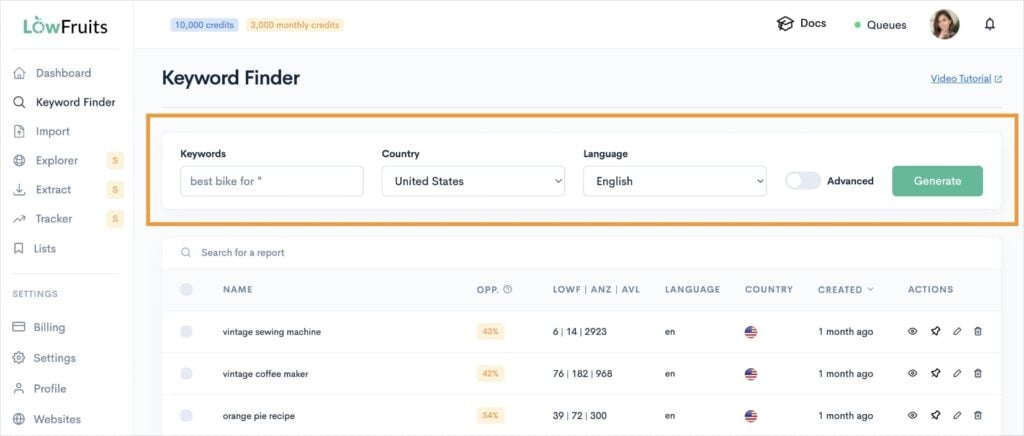
To get started, navigate to the Keyword Finder in the left menu. Then, enter a seed keyword, adjust the geographical settings, and click Generate.
LowFruits will ask you how you want to view your keywords. Typically, I select the second option because it analyzes all buyer-intent keywords automatically. (These keywords have high conversion rates.)
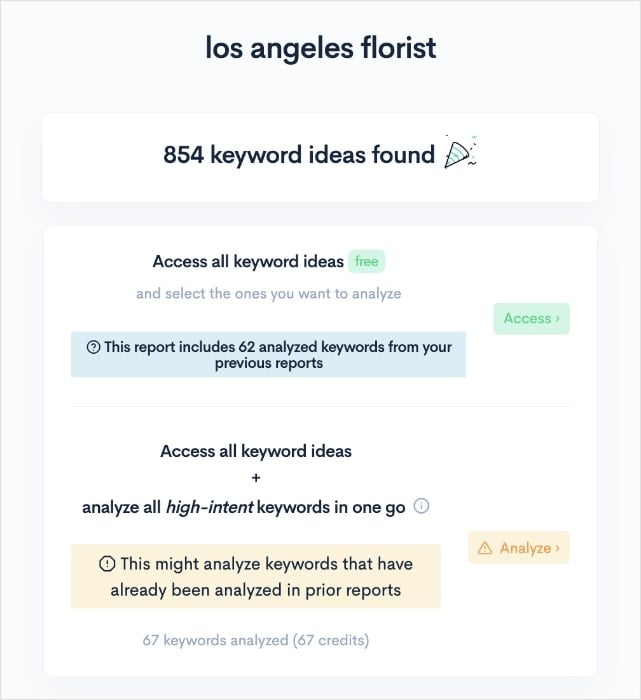
From here, you’ll get a report that looks like this:
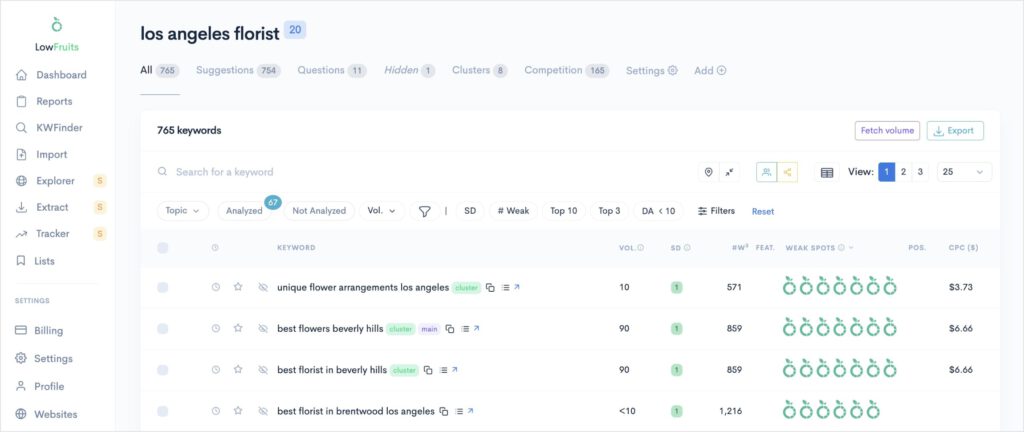
This whole process took about 30 seconds.
Now, let’s see how to get our topic clusters.
When you’re looking at a keyword report, click on the Clusters tab in the top menu.
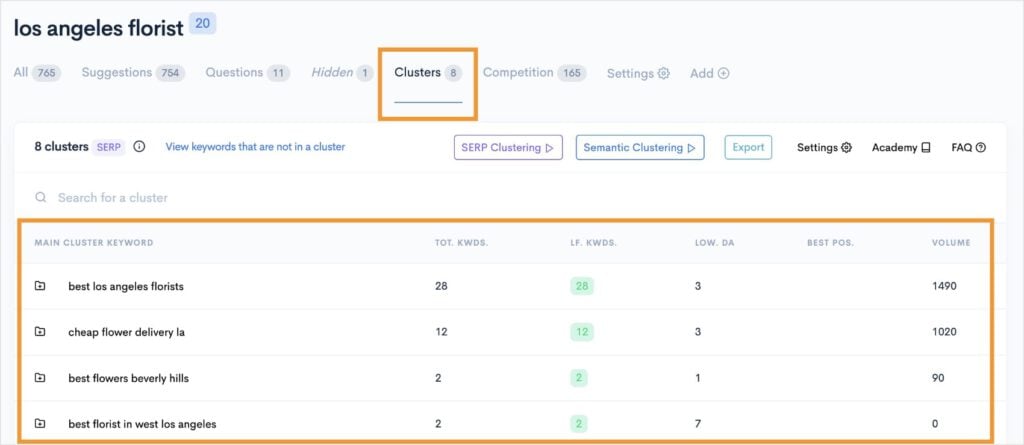
You’ll see that LowFruits has identified 8 clusters for our seed keyword “los angeles florist.”
By default, LowFruits groups together by search intent. This is called “SERP Clustering.” (See below for notes on the other type of keyword clustering you can do, too.)
LowFruits has two types of keyword clustering options:
- Semantic Clustering: Groups keywords based on their shared word structure.
- SERP Clustering: Groups similar keywords by search intent.
So, just by navigating to this tab, we’ve already discover 8 clusters. Each cluster is a potential content candidate.
Now, to see the individual keywords within the cluster, go ahead and click any of your keyword results. For our tutorial, I clicked on the first one, “best los angeles florists.”
And here are those results:
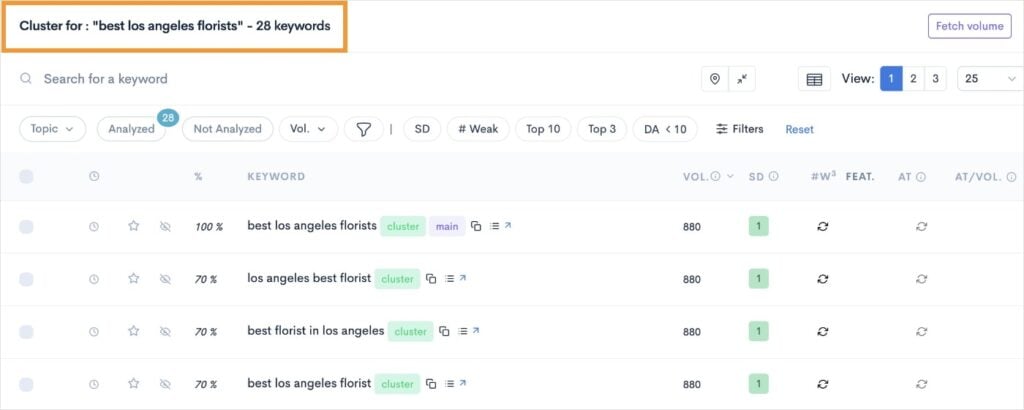
This view shows me all 28 keywords within our topic cluster. And I didn’t have to do anything manually to get them.
Ideally, I’d target these keywords on the same page to provide maximum visibility in search results and comprehensive topic coverage.
I’d also recommend looking at keyword metrics, like the SERP Difficulty Score (SD), which is the LowFruits equivalent of keyword difficulty.
Furthermore, you can sort the report by keyword search volume to help you prioritize which term should be your focus keyword.
And that’s it!
You’ve automated the topic cluster process. And it only took a few minutes.
As for next steps, you would repeat this process for each seed keyword you’re interested in, and make content according to the process described in Step 3 earlier.
Pretty simple, right?
I also want to mention that you can track your performance in LowFruits after building out your topic clusters.
Use the Rank Tracker to keep an eye on all your most important keywords.
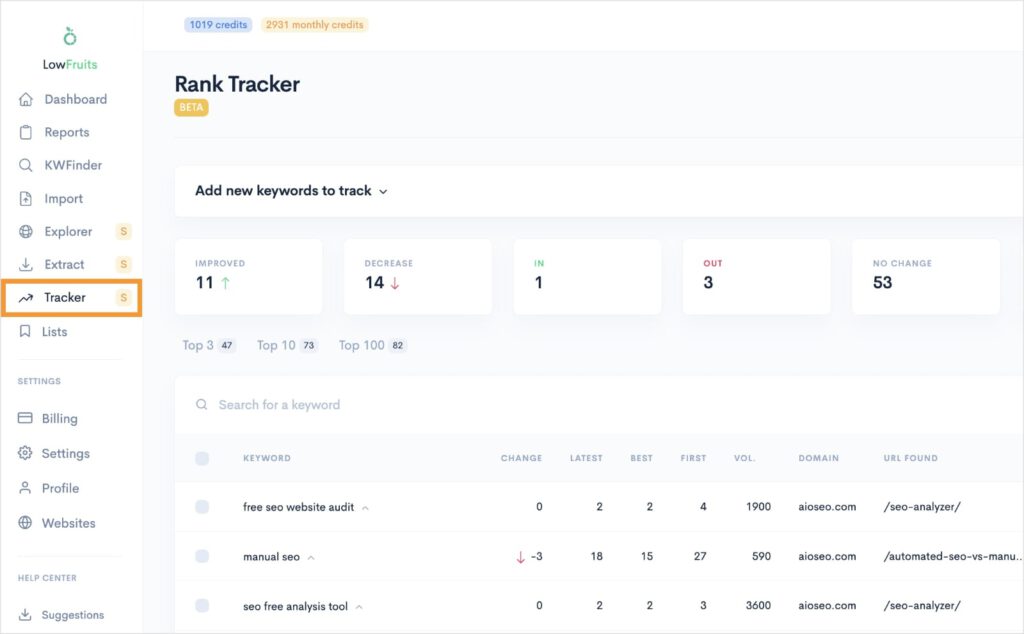
This is the best SEO tool for keyword ranking reports. It’s quick to set up, fetches your Google positions automatically, and presents data in a user-friendly dashboard.
Combined with your new topic cluster strategy, you’ll be miles ahead of the competition.
Topic Clustering FAQs
What are topic clusters?
Topic clusters are a method to organize a website’s content. They They consist of a main pillar page covering a broad topic, supported by detailed articles that explore various facets of that topic. You use internal links to connect these related articles to the pillar page. Topic clusters help search engines understand your site’s expertise and improves user navigation.
How to create topic clusters?
To create topic clusters, first choose a broad topic for your pillar page (like “Dog Food Guide”). Then identify 8-10 related subtopics for cluster content (like “Best Dog Food for Puppies” and “Organic Dog Foods Compared”). Create comprehensive content for your pillar page, develop detailed articles for each subtopic, and connect them through internal links. Ensure all content pieces naturally connect and provide value to readers.
Why are topic clusters important?
Topic clusters are important because they help users and search engines understand your expertise. They also allow for more fluid content discovery and help establish site authority. Furthermore, they prevent keyword cannibalization, where multiple pages compete for the same keywords.
How do SEO topic clusters establish content authority?
SEO topic clusters establish content authority by showing comprehensive knowledge through interconnected content. When you create in-depth articles covering multiple aspects of a topic and connect them through internal linking, search engines recognize your website as a reliable source in your niche.
Final Thoughts
Topic clusters aren’t just another SEO or keyword research trend. They’re a fundamental shift in how we organize and present content for both search engines and readers.
By structuring your content into well-planned clusters, you create a better experience for your audience while building niche authority for your domain.
Remember these key takeaways:
- Start with one strong pillar topic you know well.
- Create quality cluster content that genuinely helps your readers.
- Link your content thoughtfully and purposefully.
- Monitor performance and adjust as needed.
The best time to start building your topic clusters is now. Even if you start small with one pillar page and a few cluster articles, you’re laying the foundation for stronger SEO performance and better content organization.


