
Ever wonder how some websites consistently appear at the top of Google search results while others remain buried on page 5? The answer often lies in something that’s completely within your control: on-page SEO.
Don’t let the technical-sounding name intimidate you. On-page SEO isn’t hard once you understand the basic principles and best practices. It also doesn’t require any marketing spend, making it ideal for small businesses and DIY SEOs.
In this beginner’s guide, I’ll walk you through everything you need to know about on-page SEO. You’ll learn exactly what to do to help your content rank higher, attract more visitors, and ultimately, grow your business.
Let’s get started.
In This Article
- What Is On-Page SEO & Why Does It Matter?
- On-Page SEO vs. Off-Page SEO: What's the Difference?
- The Foundation: Your Focus Keyword
- Essential On-Page SEO Elements (The "Must-Haves")
- Beyond the Basics: Other Key On-Page Factors
- Putting It All Together: Your Easy On-Page SEO Checklist
- How LowFruits Helps With On-Page SEO
- What’s Next: Monitoring Your On-Page SEO Efforts
- Final Thoughts: On-Page SEO for Beginners
- On-Page SEO FAQs: Your Questions Answered
What Is On-Page SEO & Why Does It Matter?
On-page SEO refers to all the optimizations you make directly on your website to rank higher in search engine results pages (SERPs). Think of it as making sure your content is clear and easy to understand for your readers and search engines like Google.
But, why bother?
Because on-page SEO is fundamental to getting found online. When you optimize your pages, you’re helping search engines:
- Understand your content: What is your page about? Who is it for?
- Rank your content: If they understand it well and see it’s high quality, they’re more likely to show it to people searching for that topic.
- Drive more traffic: Higher rankings mean more visibility, which means more clicks to your site.
- Boost your business: More relevant visitors often lead to more sales, leads, or whatever your business goals are.
The best part?
On-page SEO is beginner-friendly and totally in your control. You don’t need to be a coding wizard or SEO expert to make a real difference.
On-Page SEO vs. Off-Page SEO: What’s the Difference?
When you hear people talk about SEO, you’ll often hear “on-page” and “off-page” mentioned.
They’re both crucial for ranking, but they refer to different types of activities:
- On-Page SEO: This is everything you do directly on your website to improve its search ranking. It’s what we’re focusing on in this on-page SEO guide, including things like your content, titles, images, and website structure. You have full control over these elements.
- Off-Page SEO: This refers to actions taken outside of your website to impact its rankings. The most common off-page activity is building high-quality backlinks (links from other reputable websites pointing to yours). Off-page SEO also includes things like social media signals, brand mentions, and local SEO citations. You have less direct control over these, as they often rely on others.
Think of it this way: On-page SEO is like making your house perfect inside (clean, organized, easy to navigate). Off-page SEO is like getting great reviews from your neighbors and having a well-respected address in town. Both are important for overall reputation!
Now, that you know the difference, let’s get back to on-page SEO.
The Foundation: Your Focus Keyword
Before you even start writing, the most crucial step in on-page SEO is choosing a main target keyword for each page. This is the primary phrase you want your page to rank for.
Think of it this way: if someone types a specific question or phrase into Google, what do you want your page to be the answer for? That’s your focus keyword.
Focus keywords go by many names. You may also see it referred to as primary keyword, SEO keyword, or keyword target.
How to Choose a Focus Keyword?
You want a keyword that’s relevant to your content, that (1) people actually search for (it has “search volume“) and (2) that isn’t too hard to rank for (“keyword difficulty“).
For on-page SEO for beginners, finding keywords with lower competition is key to seeing results faster. This is where tools like LowFruits can really help, as they specialize in finding these easy on-page SEO opportunities.
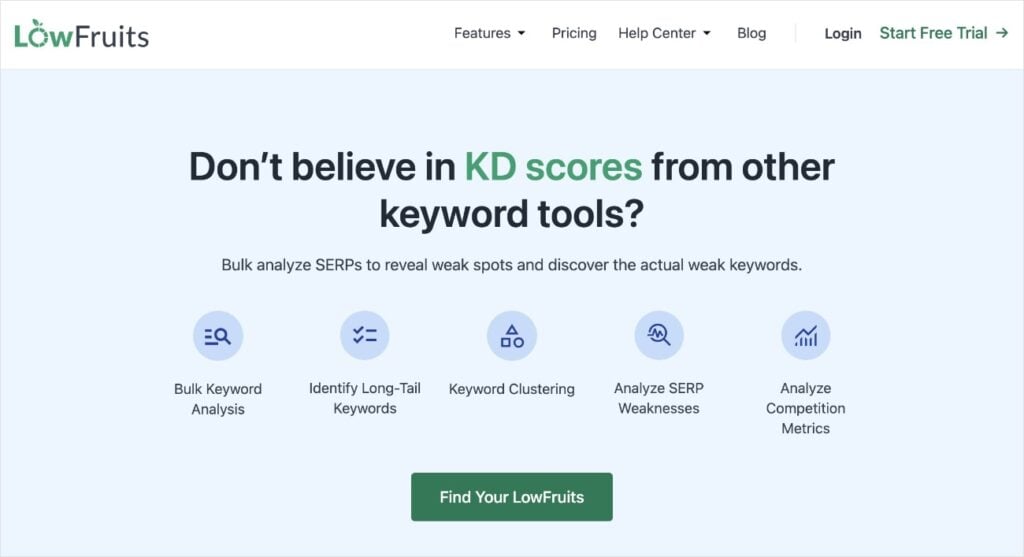
LowFruits is one of the best SEO keyword research tools for entrepreneurs and small business owners. It’s designed to help you uncover low-competition keywords that you can actually rank for.
When you’re viewing any of your keyword reports, just look for the following two metrics:
- SERP Difficulty Score (SD): This is the LowFruits metric for keywords difficulty. 1 is easy, 3 is hard.
- Weak Spots: These are low-authority domains ranking in the top 10 search results for that keyword.
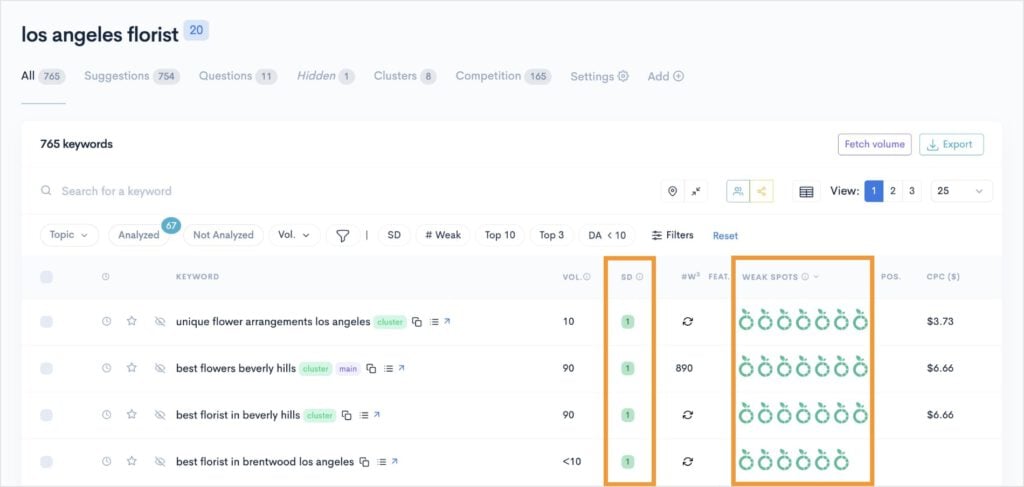
When you find a keyword with a low SD, multiple Weak Spots, and a decent search volume, congratulations — you have struck ranking gold.
These are the ideal keywords to target for easy on-page SEO wins, especially for new or small websites.
Essential On-Page SEO Elements (The “Must-Haves”)
Now, let’s dive into the practical steps. These are the core elements you should always optimize on your pages.
Title Tags
Your SEO title tag is the blue, clickable headline you see in Google search results. It’s one of the first things both users and search engines look at.
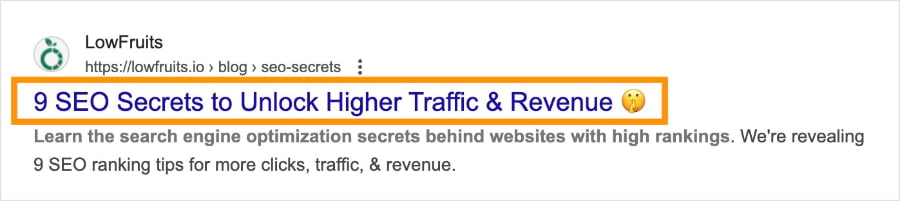
What it is: It’s an HTML tag (<title>Your Page Title</title>) that defines the title of a web page.
Why it’s important: It’s your first impression in search results. It tells users what your page is about and strongly signals the main topic to search engines.
Easy Tips:
- Include your primary keyword near the beginning of your title tag.
- Keep it concise, ideally under 60 characters, so it doesn’t get cut off in search results.
- Make it catchy and descriptive to increase your clickthrough rate (CTR).
Meta Descriptions
The meta description is the short paragraph that appears under your title tag in search results. It’s important to make it compelling while accurately summarizing what your page is about.
This approach ensures more clicks and decreased bounce rates.
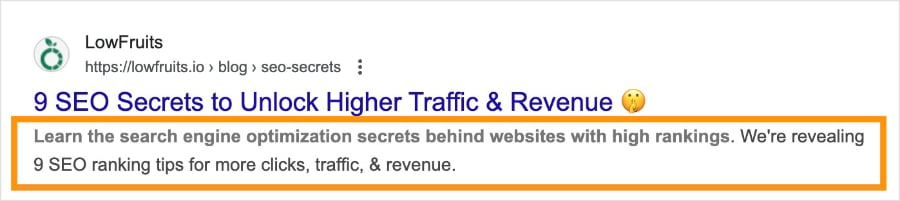
What it is: Another HTML tag (<meta name=”description” content=”Your page summary here.”>).
Why it’s important: While not a direct ranking factor, a compelling meta description encourages people to click on your link over others, which can indirectly help your rankings.
Easy Tips:
- Think of it as a mini-advertisement for your content.
- Include your primary keyword naturally.
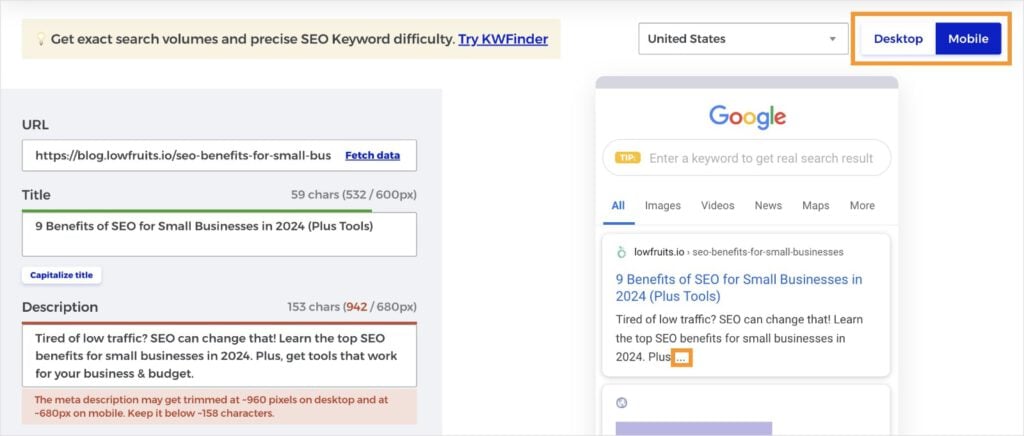
- Write a compelling, concise summary (under 160 characters) that makes users want to visit your page.
Pro Tip: Use a SERP preview tool to check your SEO title and meta description before publishing. These tools show you what your page listing will look like in search results and flag any length issues. Most will allow you to check both the desktop and mobile previews.
Header Tags (H1, H2, H3, etc.)
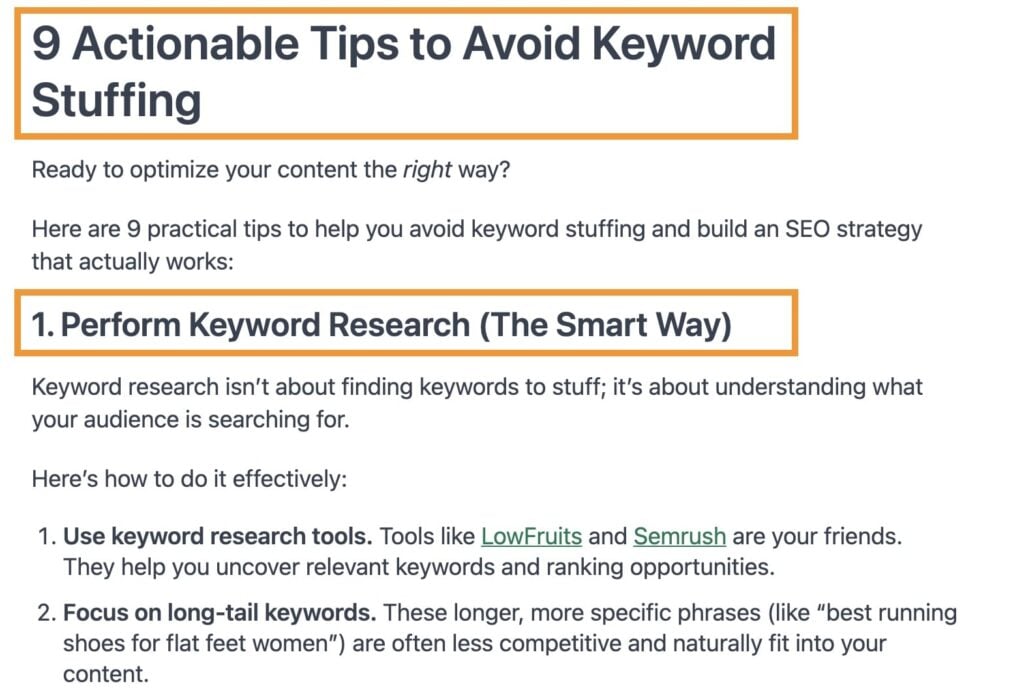
Header tags help structure your content, making it easier to read for humans and understand for search engines.
Here’s an example of what they look like on a blog post about keyword stuffing:
If you look at this alternative view, you can see how subheadings “nest” within each other and follow a logical structure (for example, H1 > H2 > H3).
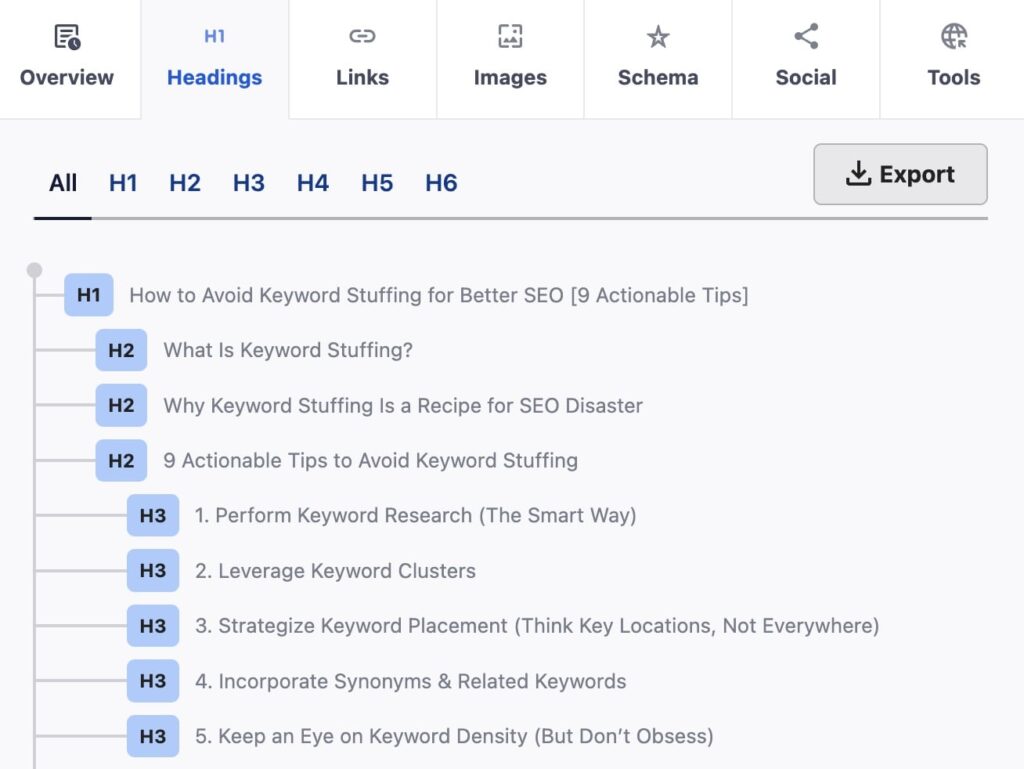
Note: The above screenshot was taken using the All in One SEO Analyzer by AIOSEO. This free Chrome Extension allows you to analyze competitors’ (or your own) website quickly.
What they are: HTML tags like <h1>, <h2>, <h3> that indicate headings and subheadings.
Why they’re important:
- For users: They break up long text, make content scannable, and improve readability.
- For search engines: They signal the hierarchy and importance of different sections, helping search engines grasp your content’s main points and subtopics.
Easy Tips:
- Use one <h1> tag per page for your main title. It should include your focus keyword.
- Use <h2> tags for major sections of your content.
- Include <h3> tags for subsections within your <h2> sections.
- Include variations of your main keyword and related terms in your H2 and H3 tags.
Content Quality & Keyword Usage
This is the most important element: the actual text on your page. Because on-page SEO optimizations aren’t going to make a difference if your content isn’t up to par.
Importance: High-quality, helpful, and comprehensive content is what users are looking for, and what Google wants to reward.
Natural Keyword Integration: Your primary keyword and related terms should appear naturally throughout your content. Don’t force them in or repeat them excessively (this is called “keyword stuffing” and it can hurt your rankings).
Easy Tips:
- Always write for your readers first, search engines second.
- Focus on providing real value, answering their questions, and being thorough.
- Once your content is written, then review it to ensure your keywords are included naturally and thoughtfully where they make sense.
- Use synonyms and related phrases to enrich your content and cover the topic broadly. This also helps you increase your content’s reach and visibility in search results.
Image Optimization
Images make your content more engaging, but they can also be an SEO asset if optimized correctly.
Importance: Optimized images improve page loading speed (a ranking factor), help with accessibility for visually impaired users, and can help you rank in Google Image Search.
Easy Tips:
- Use descriptive file names. Before uploading, name your image files clearly (e.g., sourdough-bread-recipe.jpg instead of IMG_12345.jpg).
- Optimize your image alt text. Provide a brief, descriptive explanation of the image for screen readers and search engines. Include your keyword if it’s relevant to the image. (e.g., alt=”Freshly baked sourdough bread loaf with a crispy crust”).
- Include image title tags. Image titles appear when users hover or click on an image. Keep it brief and accurate.
- Compress images. Use tools or plugins to reduce file size without losing quality. Smaller files load faster!
Let’s look at a quick example. Here’s a practice image:
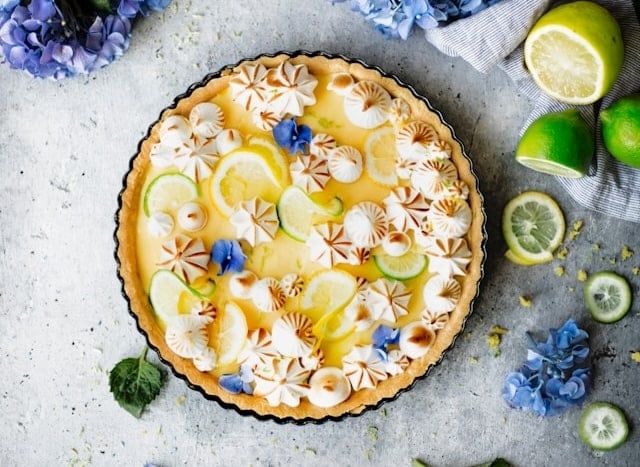
We’ll imagine I have a food blog and that I want to rank my recipe for the keyword “lemon lime meringue pie.”
Here are the image optimizations I would make for it:
- File name: lemon-lime-meringue-pie.jpg
- Alt text: A freshly cooked lemon lime meringue pie with edible flowers.
- Image title: Lemon Lime Meringue Pie
See? Image SEO is easy. It’s just about optimizing with intention.
Beyond the Basics: Other Key On-Page Factors
Once you have the essentials down, consider these additional elements for even better on-page SEO.
URL Structure
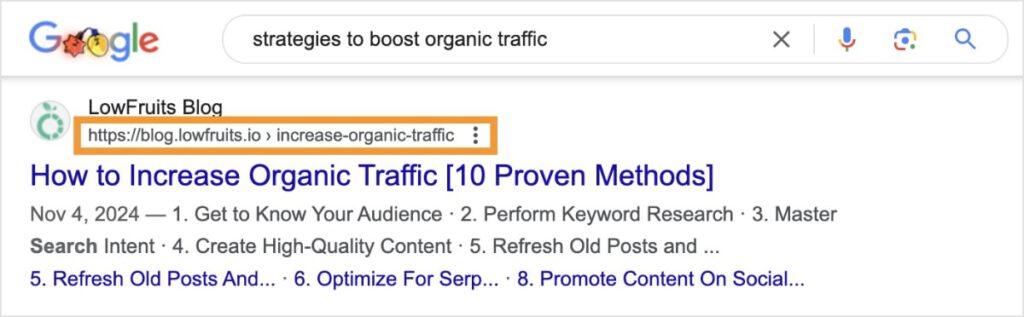
Your page’s URL (the web address) should be clean and descriptive.
Importance: Clear URLs are easier for users to understand and can give search engines a hint about your page’s topic. They can also help users who see your URL structure in SERPs.
Easy Tips:
- Keep your URLs short, descriptive, and include your focus keyword.
- Use hyphens to separate words instead of underscores.
- Avoid dates and numbers when possible.
Related Reading: The Perfect URL Structure for SEO
Internal Linking
Internal links are links from one page on your website to another page on the same website.
Importance: They help users navigate your site, distribute “link juice” (SEO value) throughout your content, and show search engines how your pages are related.
Easy Tips:
- When you mention a topic that you’ve covered in more detail on another page of your site, link to it!
- Use descriptive anchor text (the clickable words) that includes keywords relevant to the linked page (e.g., “learn more about keyword research” vs. “learn more here”).
External Linking
External links are links from your website to pages on other websites.
Importance: Linking to reputable, authoritative sources can show search engines that your content is well-researched and trustworthy.
Easy Tip: Don’t be afraid to link out to high-quality, relevant external sites where it adds value for your readers and supports your points.
Page Speed
How fast your page loads is a big deal for users and search engines.
Importance: Users get impatient with slow sites, and Google considers page speed a ranking factor.
Easy Tip: Beyond image optimization, consider using a reliable web host, and potentially looking into caching plugins if you use a CMS like WordPress (these are often easy to set up).
Mobile-Friendliness
According to SEO statistics, mobile traffic generates 60% of internet visits. That’s why it’s critical for your site to look good and be easy to use on mobile devices.
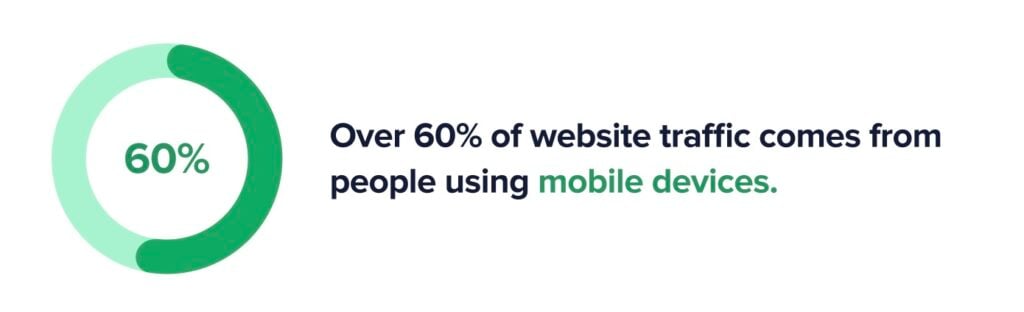
Importance: Google prioritizes mobile-friendly sites in its search results.
Easy Tip: Use a responsive website design. Most modern website themes and builders are responsive by default, meaning they automatically adjust to different screen sizes.
Putting It All Together: Your Easy On-Page SEO Checklist
To make your optimizations even more fluid, here’s a quick and easy on-page SEO workflow you can use for every new piece of content you create:
- Choose your focus keyword. Pick one main keyword for the page. Identify related keywords to enhance its reach, too.
- Write great content. Focus on providing valuable, in-depth, and well-written information for your audience.
- Optimize your SEO title tag. Include your primary keyword, make it catchy, keep it under 60 characters.
- Craft a compelling meta description. Summarize the page, include a keyword, and keep it, under 160 characters.
- Use logical header tags. One <h1> with your main keyword, then use <h2> and <h3> to structure your content, naturally integrating keyword variations and related terms.
- Optimize images. Use descriptive file names and alt text with keywords. Compress images for speed.
- Clean up URLs. Make them short, descriptive, and keyword-rich.
- Add internal links. Link to other relevant pages on your site using descriptive anchor text.
- Add external links. Link to authoritative external resources when helpful.
- Check page speed and mobile-friendliness: Ensure your page loads fast and looks good on all devices. (This is considered part of technical SEO, but good on-page SEO will only take you so far. Your site needs to work properly for search engines to want to rank you!)
How LowFruits Helps With On-Page SEO
While on-page SEO is about what you do on your page, LowFruits plays a crucial role in helping you find the right topics and keywords to optimize for.
LowFruits helps you identify those long-tail keywords — often called “low-hanging fruit” — that are perfect for beginners to target. Instead of fighting for super-competitive terms, you can find queries where you have a real chance to rank.
LowFruits also highlights Weak Spots in SERPs, showing you where low-authority sites are already ranking. This approach to SERP analysis tells you there’s an opportunity for your well-optimized content to take their spot. It also means you’re investing your on-page SEO efforts where they’ll have the biggest impact and give you the best chance to see quick results.
What’s Next: Monitoring Your On-Page SEO Efforts
You’ve put in the work. Now, you want to know if it’s paid off.
Good news: LowFruits makes that easy, too.
It has one of the best rank tracking tools available, and it’s built directly into the LowFruits platform.
You can track your most important keywords and get quick insights into position changes from a central dashboard.
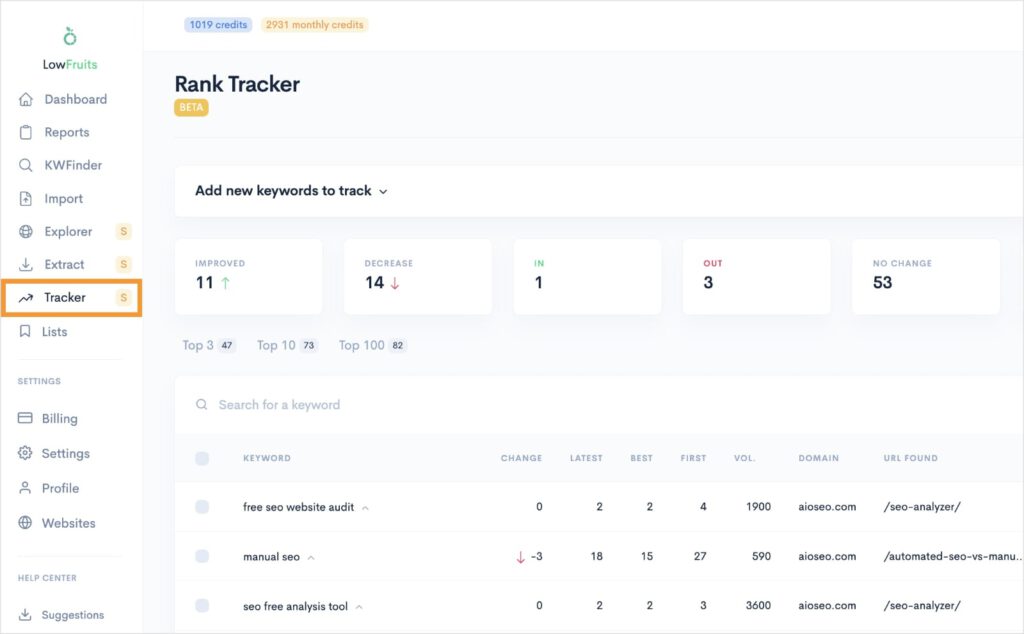
You can also expand any of your keywords to see their position changes over time. This is a great way to pinpoint if your on-page SEO efforts had the impact you wanted.
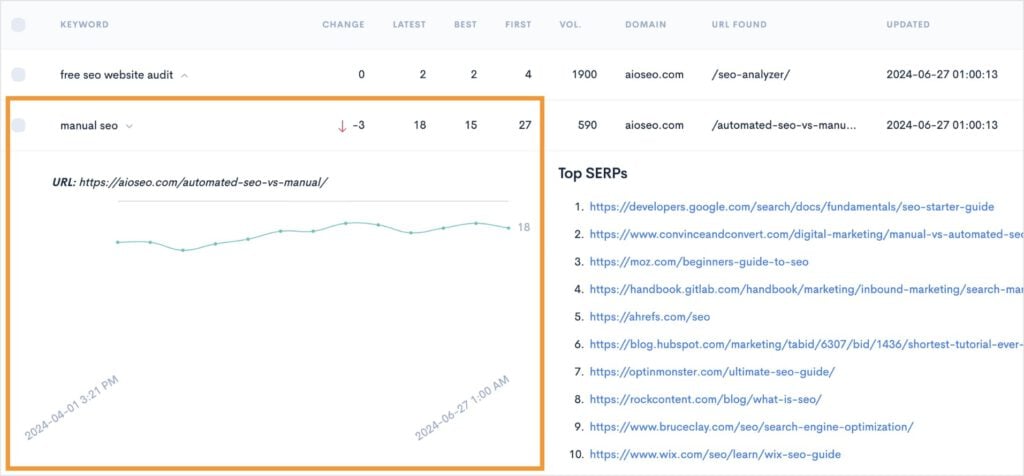
Overall, Rank Tracker makes it simple to monitor and ensure you hit your SEO goals without getting lost in data and complicated analytics.
Related reading:
Final Thoughts: On-Page SEO for Beginners
On-page SEO is a powerful and manageable way to improve your website’s visibility and support your business growth.
I hope this on-page SEO guide showed you how it doesn’t have to be complicated or hard. On-page SEO is accessible to everyone, you just have to know what to optimize.
It’s also important to remember that all optimizations should focus on putting your readers first.
Never sacrifice readability or a natural flow for search engines. They’re smart enough to understand search intent and determine if your content aligns with users’ needs.
Keep learning, keep optimizing, and watch as your content climbs search rankings.
On-Page SEO FAQs: Your Questions Answered
What is on-page SEO?
On-page SEO is the practice of optimizing your website to rank in search engine results pages (SERPs). It involves optimizing elements directly on your web pages, such as the content itself, title tags, meta descriptions, images, and more. The goal is to make your page more appealing and understandable for both search engines and the people searching, helping it rank higher.
Why is on-page SEO important for ranking?
On-page SEO is crucial because it helps search engines understand your content’s topic, relevance, and quality. When search engines understand your page easily, they’re more likely to show it to users looking for that specific information, leading to better visibility and traffic.
What are the most important on-page SEO elements?
Some of the most important on-page SEO elements include your H1, SEO title, meta description, and URL. Well-structured content is also important and can be achieved using optimized subheader tags (H2, H3, H4). High-quality content with natural keyword usage and optimized images are also fundamental.
How often should I do on-page SEO?
You should always perform on-page SEO when you create any new content or pages for your website. For existing pages, it’s a good practice to review and update them periodically, too. Or whenever you notice a drop in rankings or a change in the search landscape. This helps to keep them fresh and competitive.


