
Tired of watching your competitors dominate Google search results while your site struggles to get noticed? Don’t worry — it’s a common challenge that even the most experienced marketers face.
Here’s the thing, though: climbing search rankings doesn’t have to be complicated.
In fact, you can transform your SEO strategy in 7 simple steps using a technique called keyword gap analysis.
This process reveals exactly which keywords your competitors rank for that you do not. No more guessing what content to create — you’ll have a clear, data-driven plan to improve your rankings and outrank the competition.
In this guide, I’ll walk you through a complete keyword gap analysis using LowFruits.
By the end, you’ll know how to find easy ranking opportunities you might have missed, and start turning those keyword gaps into ranking wins.
In This Article
What Is a Keyword Gap Analysis?
A keyword gap analysis is exactly what it sounds like — finding the gaps between the keywords you rank for and the ones your competitors rank for. Think of it like a comparison shopping tool, but for keywords.
When you run a gap analysis, you’ll discover:
- Keywords your competitors rank for that you don’t
- Topics you might have overlooked
- New content opportunities in your market
- Areas where you could easily compete
For example, let’s say you run a coffee shop. Your competitor might be ranking for terms like “cold brew coffee delivery” or “best coffee beans for espresso” while your site doesn’t show up for these searches at all. These gaps represent opportunities for your business to create targeted content and attract more customers.
The best part? You don’t need to be an SEO expert to do this. With the right tool and process, anyone can identify these valuable keyword opportunities.
Why Is a Competitor Keyword Gap Analysis Important?
Let’s face it — creating content without knowing which keywords to target is like throwing darts in the dark. You might hit something valuable, but you’re mostly just guessing.
A keyword gap analysis takes the guesswork out of your content strategy.
Here’s why it matters:
Save Time and Resources
Instead of brainstorming topic ideas from scratch, you’ll find keywords that already work for your competitors. This means less time planning and more time creating content that drives organic traffic.
Find Easy Wins
You’ll discover keywords that are easier to rank for — the kind your competitors might have overlooked or aren’t targeting effectively. These are perfect opportunities for newer websites or businesses with limited resources.
Understand Your Market Better
By looking at what keywords your competitors rank for, you’ll get insights into:
- What your target audience is searching for
- Which topics are popular in your industry
- Where there might be gaps in the market
- What type of content performs well
Build a Smarter Content Strategy
With real data backing your decisions, you can create content that you know people are actually searching for. No more publishing posts and hoping for the best.
Keyword Gap Analysis Prep: What to Know Before You Start
Before diving into your analysis, you’ll need to understand a few keyword metrics. Don’t worry; they’re simple and easy to grasp.
Monthly Search Volume: This tells you how many times people search for a keyword each month. While bigger numbers might catch your eye, don’t ignore keywords with lower search volumes. These often have:
- Less competition
- More specific search intent
- Better conversion rates
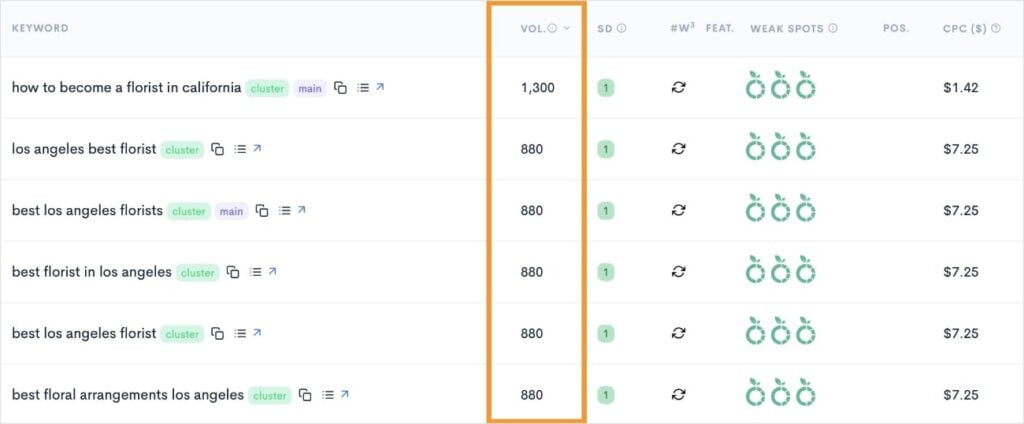
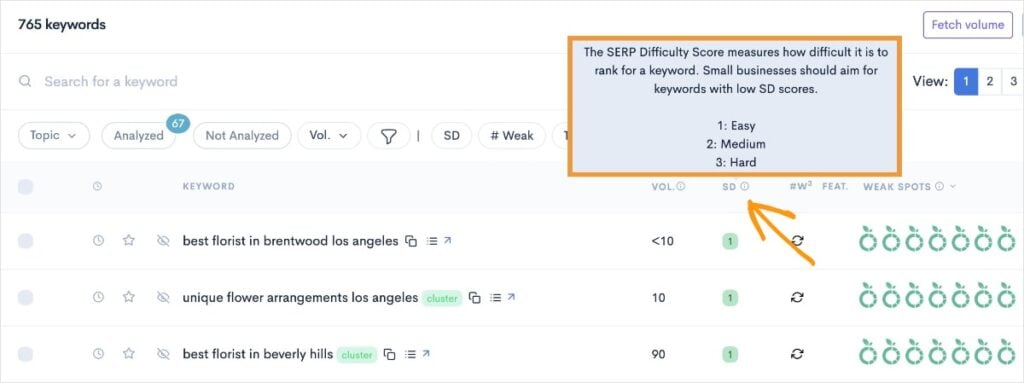
Keyword Difficulty: Think of this as a “competition score” from 0-100. The lower the number, the easier it might be to rank for that keyword.
- 0-30: Usually easier to rank for
- 30-60: Moderate difficulty
- 60+: Typically very competitive
Note: Some SEO tools use varying scales for keyword difficulty (KD). For example, at LowFruits, you’ll see KD represented as a SERP Difficulty Score (SD). The SD scale goes from 1 to 3, with 1 being the easiest to rank for.
Search Intent: This is about understanding why someone is searching for a term. For example:
- Are they ready to buy something? (“buy coffee maker online”)
- Looking for information? (“how to clean a coffee maker”)
- Trying to find a specific website? (“Starbucks near me”)
Matching your content to the right search intent is just as important as finding the right keywords.
Pro Tip: When you’re just starting out, focus on keywords with lower difficulty scores and clear search intent. These often provide the quickest SEO wins.
How to Do a Keyword Gap Analysis Step-by-Step
Ready to find new keyword opportunities? Follow the steps below to conduct a beginner-friendly keyword gap analysis:
1. Select a Keyword Research Tool
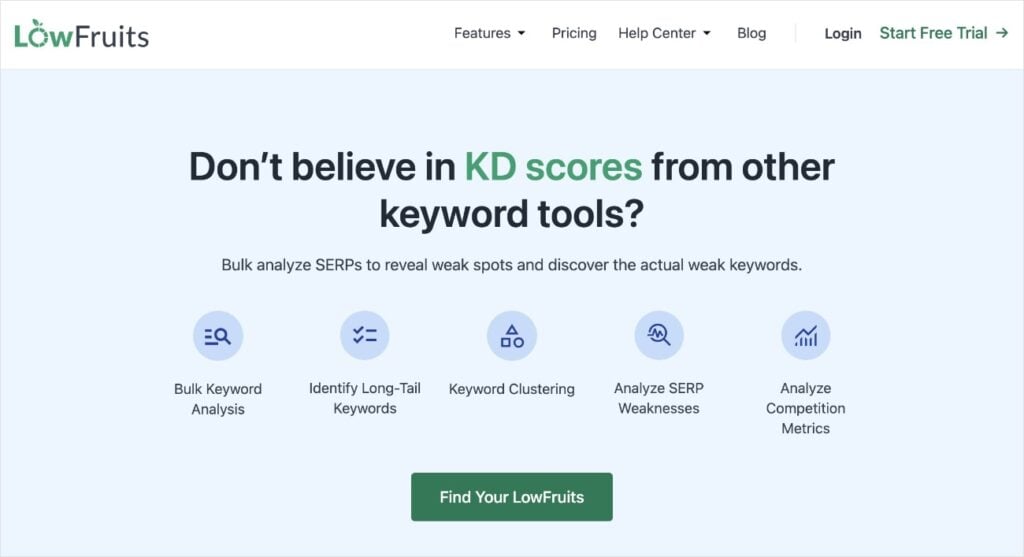
For this tutorial, we’ll use LowFruits — a tool specifically designed to uncover low-competition keywords. While there are plenty of keyword research tools out there (like Ahrefs, Semrush, and Moz), LowFruits is particularly helpful for smaller websites and businesses because it:
- Focuses on finding easier-to-rank-for keywords
- Helps identify “weak spots” in competitor content
- Shows keyword opportunities you can actually compete for
- Offers a more affordable price point for small businesses
- Has a simpler learning curve than enterprise-level tools
You might be wondering, “Do I really need a paid tool for this?”. While some free SEO tools exist, they often don’t provide the detailed competitor data needed for a proper keyword gap analysis.
My advice is to think of it as an investment. The right tool will save you countless hours of manual research and help you find opportunities you might otherwise miss.
LowFruits pricing start as low as $21/month. A subscription will give you full access to all the tools we discuss in this article.
2. Add Your Domain to LowFruits
Let’s start by adding your website to LowFruits. Here’s what to do:
- Log into your LowFruits account.
- Look for the Websites tab in the left navigation menu.
- Click on Add a Website and enter your domain name.
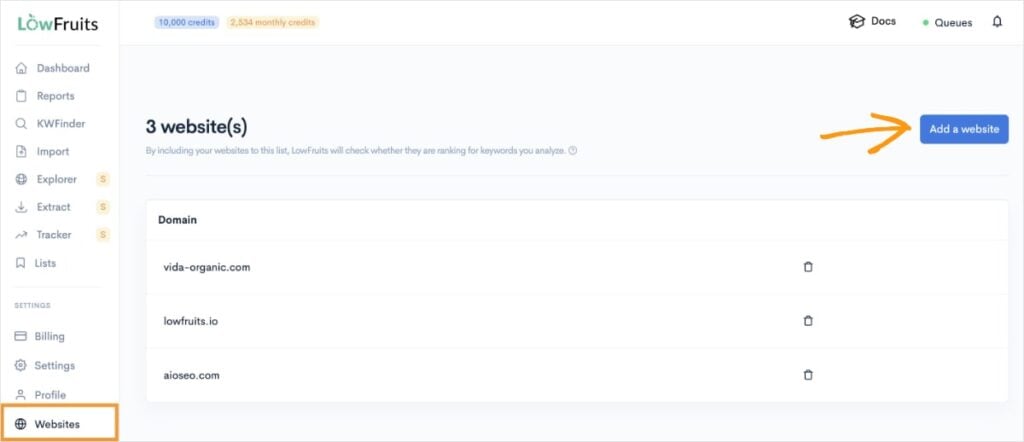
Once you’ve added your website to LowFruits, you’ll see it under Domain, like in the example above.
Notice how you can have more than website, which is helpful when you have multiple domains. You can add up to 20 websites at once.
This step might seem simple, but it’s crucial for your keyword gap analysis.
Why? Because LowFruits will use your domain as a baseline to:
- Show which keywords you currently rank for
- Compare your rankings against competitors
- Identify which competitor keywords you’re missing
- Display your current ranking position for any keywords you do rank for
When you later look at competitor keywords, LowFruits will automatically tell you if and where your site ranks for these terms. This saves you from manually checking each keyword and helps you quickly spot gaps in your content strategy.
In the screenshot below, we have a list of a few competitor keywords. The Position (Pos.) column tells us that our domain is ranking for these keywords and in what position.
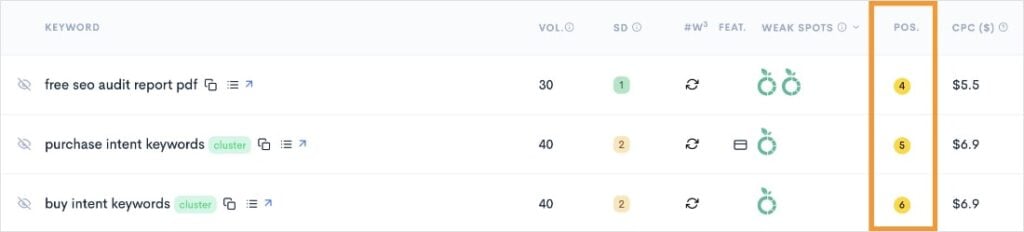
LowFruits Tip: Hover over the yellow icon with your position to see the exact URL on your website ranking for that keyword.
This is the basis for our keyword gap analysis, but let’s dive deeper into getting this data.
3. Extract Competitors’ Ranking Keywords
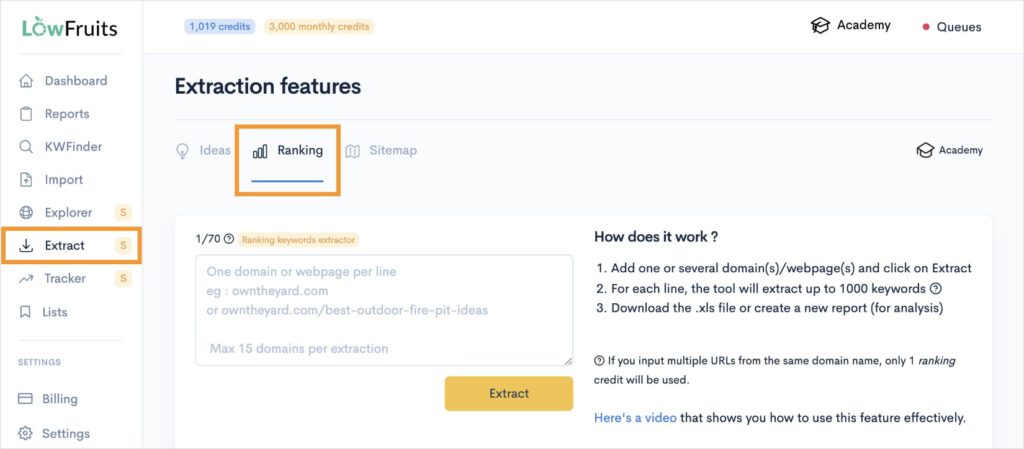
After adding your website to LowFruits, navigate to the Extract tool. Then, click the Ranking tab.
You’ll see a box where you can enter up to 15 competitor domains. (You only need 1 to run a report, though.) Once you’re happy with your list, click Extract.
Need help finding competitors? Visit this article on how to find competitors’ keywords. The first step details how to identify websites that complete for similar keywords as your domain.
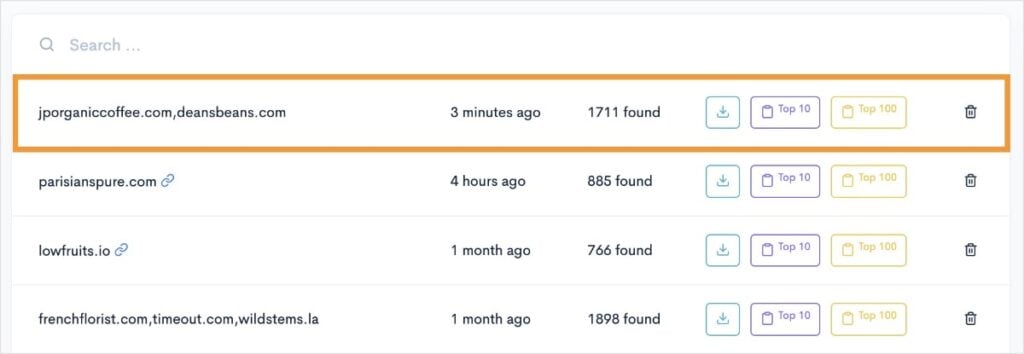
From here, scroll down, and you’ll see your most recent report on top.
Now, here’s where things really start to get interesting…
4. Create a New Report of Competitor Keywords
From here, we’re going to create a new report in LowFruits of our competitors’ keywords. This step is going to tell us exactly what keywords they’re ranking for (and if we are, too).
To do this, click the Top 10 button. This will extract competitors’ keywords ranking in the top 10 organic search results. (You can do top 100, too, but it will cost significantly more credits to analyze keywords.)
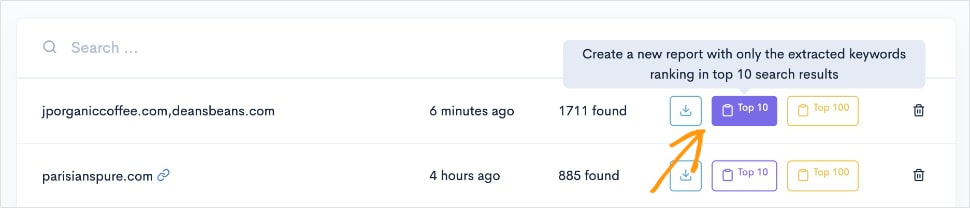
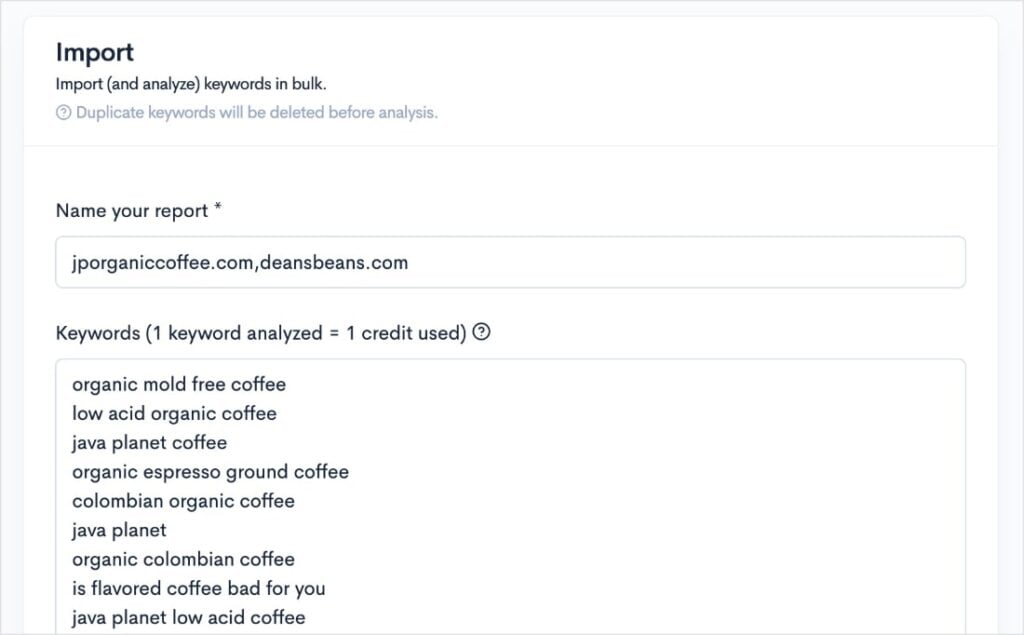
This action will take you to a new screen that has automatically populated your competitors’ top keywords. (This is the Import tool.)
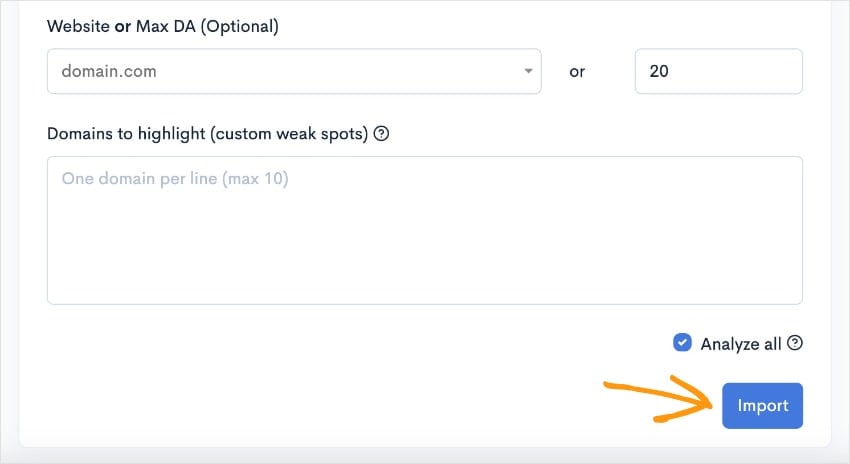
Scroll down until you reach the end of the page, and click Import.
(I like to keep the Analyze All option checked, but you can uncheck if you’re low on credits. Analyzing will pull metrics like keyword difficulty and Weak Spots, so you can see them in the report. You can pull these manually, though, if you leave it unchecked.)
You should now have a report that looks like this:
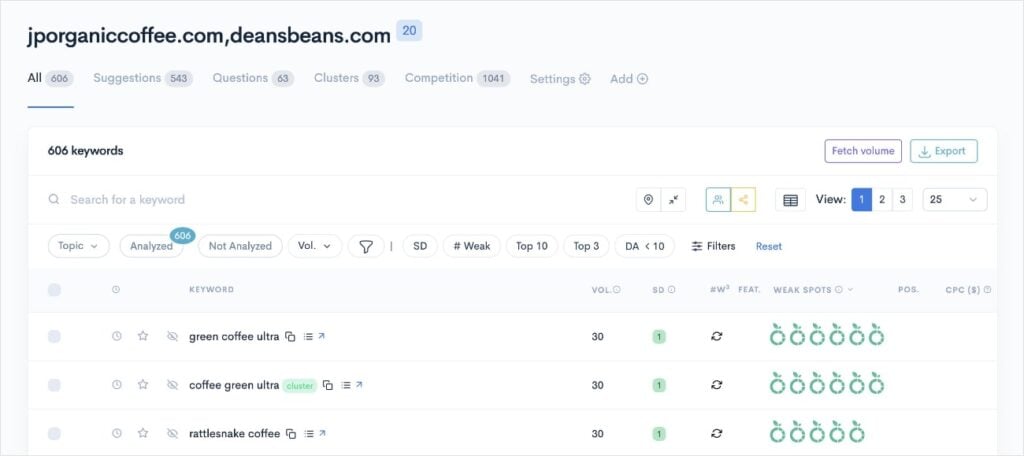
Note: If the right columns are empty, you likely left the Analyze all box unchecked. That’s okay. It just means you’ll need to manually select which keywords to extract this data for. You can do this by checking the box to the left of the keyword and clicking SERP Extract. (See image below.)
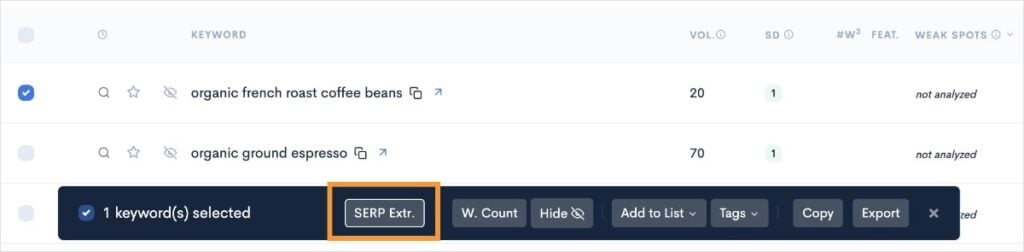
You now have a list of competitor keywords, but the question remains: Are you ranking for them, too?
Let’s find out.
Related reading:
5. Filter by Keywords Your Site Doesn’t Rank for
Now, we’re getting into the nitty-gritty of our competitor keyword gap analysis. It’s time to see which keywords your competitors rank for and you don’t.
When looking at your competitor keyword report, pay attention to the Position column we mentioned earlier. Is it empty? Well, sorry Charlie, but you don’t rank for that keyword.
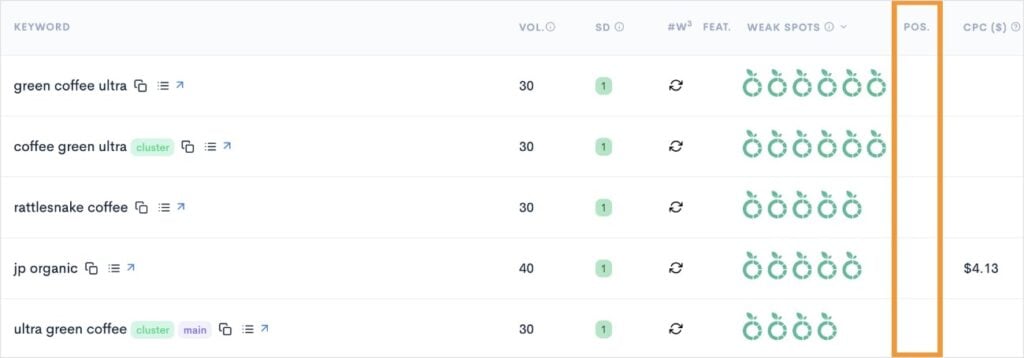
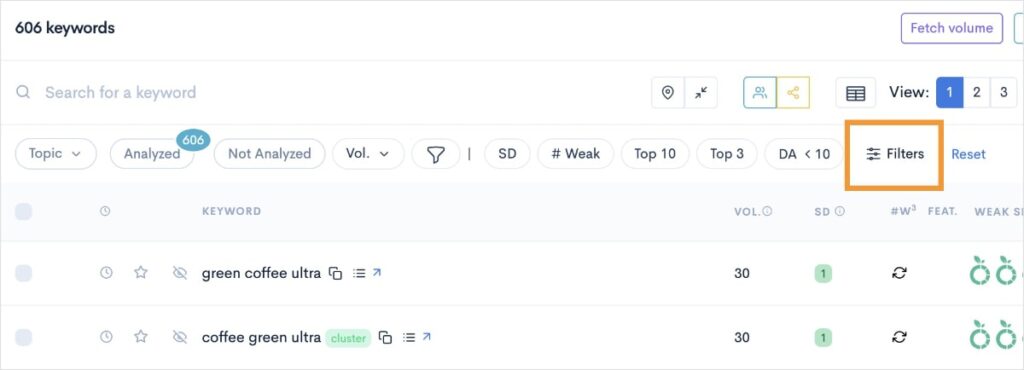
Now, in my report, I have 606 keywords. And I don’t necessarily want to scroll through every single one to see if my site ranks or not.
So, what you can do is use a filter.
Click on the Filters option at the top-right of your report.
Then, click on Your Website. You’ll notice a few options, but we’re going to toggle the Not in top 100 filter on, so we can see the keywords our competitors rank for, and we do not (aka, our keyword gap!).
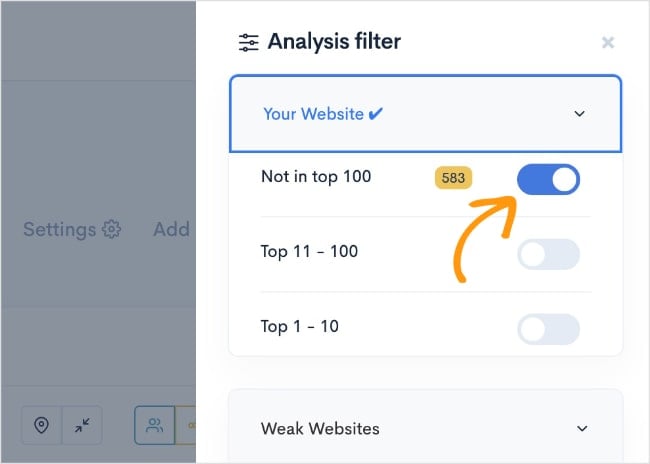
The number in the yellow box tells you how many keywords appear with those filter conditions.
So, in our example, my website isn’t ranking for 583 keywords of the original 606 competitor keywords found. Yikes.
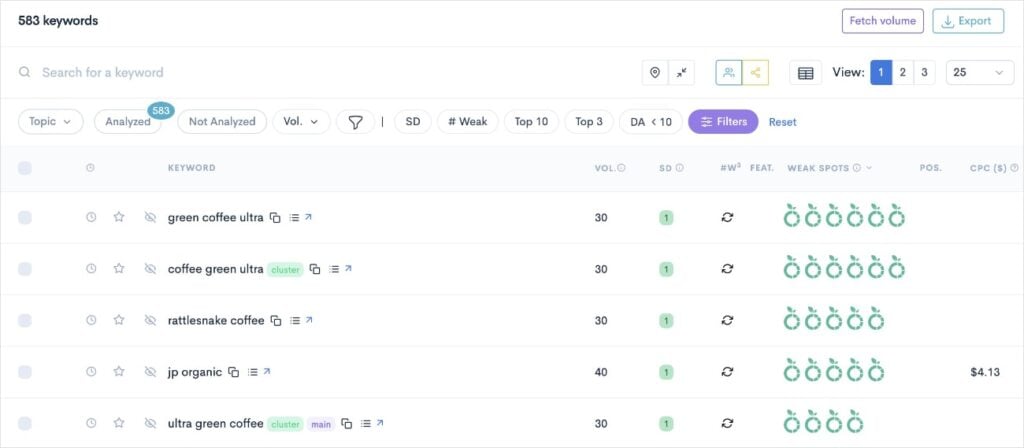
But here’s the silver lining:
Even though that sounds like a huge keyword gap (and it is), these are all opportunities for you to grow your online visibility.
That’s why you’re learning how to do a keyword gap analysis, after all! You’ve already shown the desire to rank for more keywords — and taken the first steps by looking for an article like the one you’re reading now.
Kudos to you. You’re already on your way to higher rankings.
So, now that we have our keyword gaps, let’s see if we really need to pay attention to all of them.
(Spoiler alert: you don’t.)
6. Refine Your Keyword List
At this stage, we want to trim down our list to keywords that we can actually rank for. This is where LowFruits really outshines other SEO tools. It makes finding low-competition keywords easy.
To do this, we’ll use the filtering system again.
First up, is keyword difficulty. (Which, if you remember, is SERP Difficulty Score (SD) in LowFruits.)
Click the SD filter
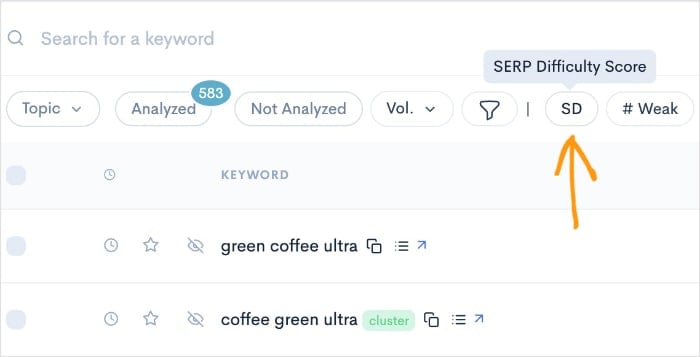
Then, set your max to 1. (If you have a decent domain authority (DA), you could set the max to 2. Just remember that these keywords will be more difficult to rank for.)
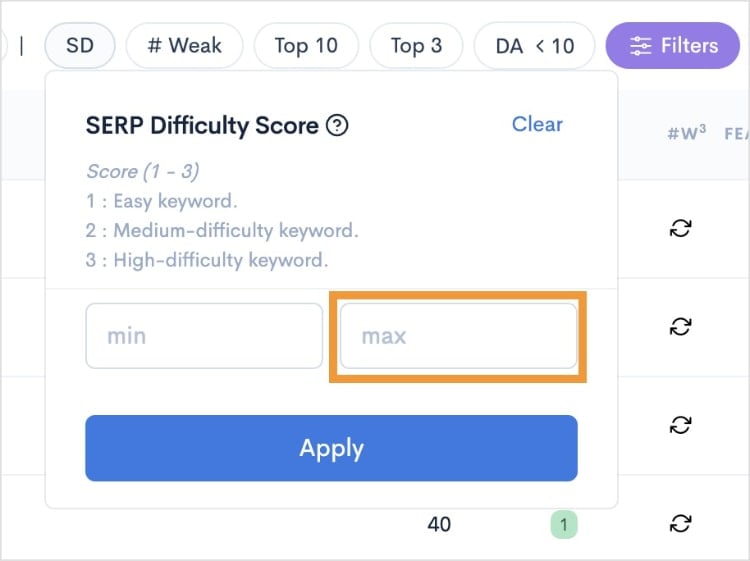
For our tutorial, I used 1. Once I clicked Apply, this reduced my list from 583 keywords to 178. That sounds more manageable!
But we’re not done quite yet.
I’d like to add one final filter that’s going to help us identify easy keywords that we can rank high for.
To do this, click on the # Weak filter at the top of the report.
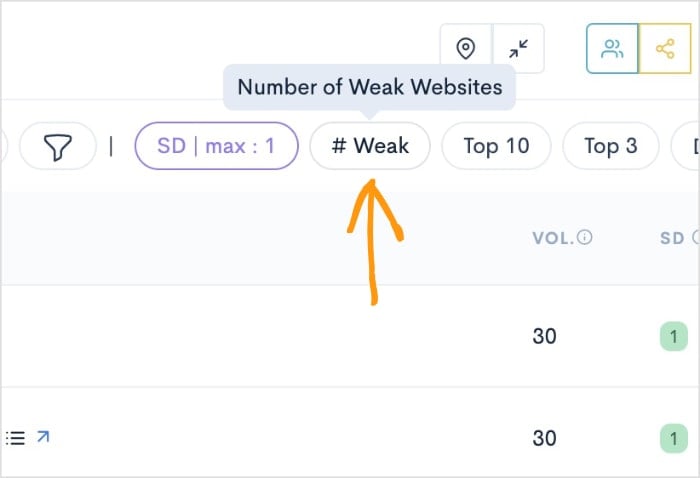
Then, set the min to 2. Click Apply.
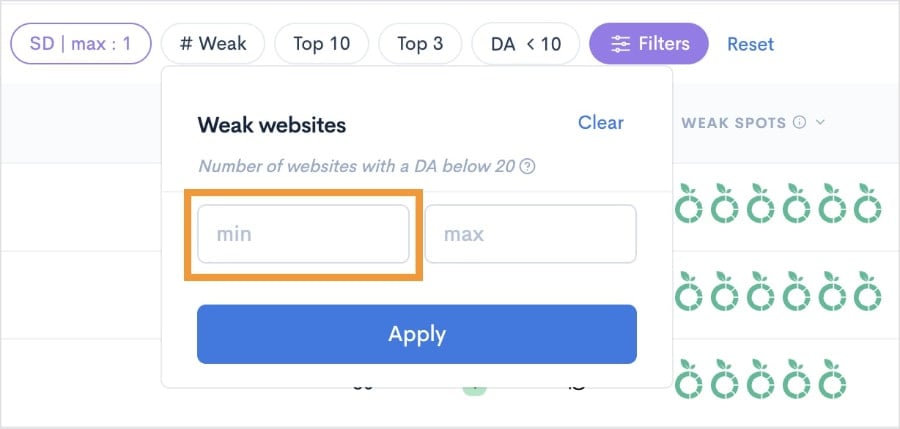
Now, our report has 165 keywords that have an SD score of 1 and multiple weak spots.
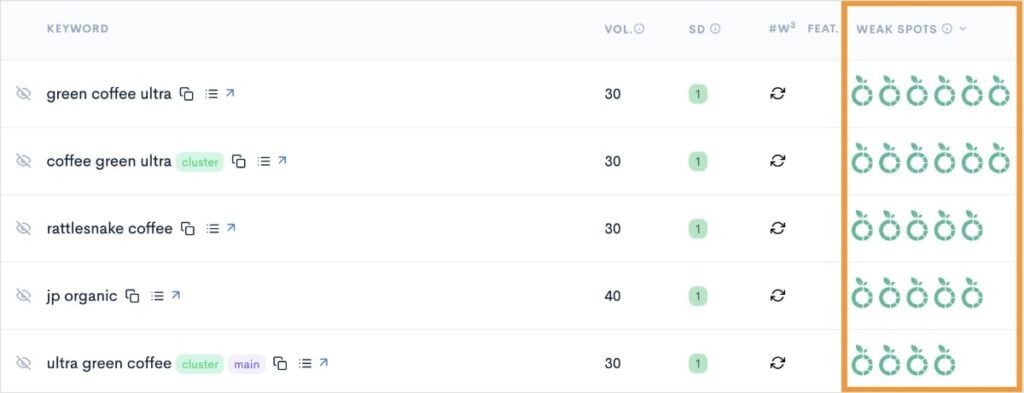
“But what are Weak Spots, anyway?”, you might be wondering.
Weak Spots are a LowFruits metric for weak websites. Each green icon represents a low-authority domain ranking in the top 10 search results.
These are competitors that are easy to beat — even as a new or small website.
Pro Tip: The more Weak Spots a keyword has, the better your chances of ranking high in search results. These are your “low-hanging fruit” keywords that can deliver quick wins for your website.
7. Analyze the Gaps
Now that you have your refined list of keywords, it’s time to look for patterns and opportunities. This is where you turn raw data into actionable insights.
Start by scanning your filtered list for common themes. You might notice:
- Questions your audience is asking
- Topics you haven’t covered yet
- Product features people search for
- Problems your customers need help solving
For example, if you run a coffee shop website, you might spot patterns like:
- Several keywords about coffee brewing methods
- Questions about coffee bean storage
- Searches for specific coffee drinks
- Terms related to coffee equipment care
To help you identify these themes and patterns, you can use the following tabs in LowFruits:
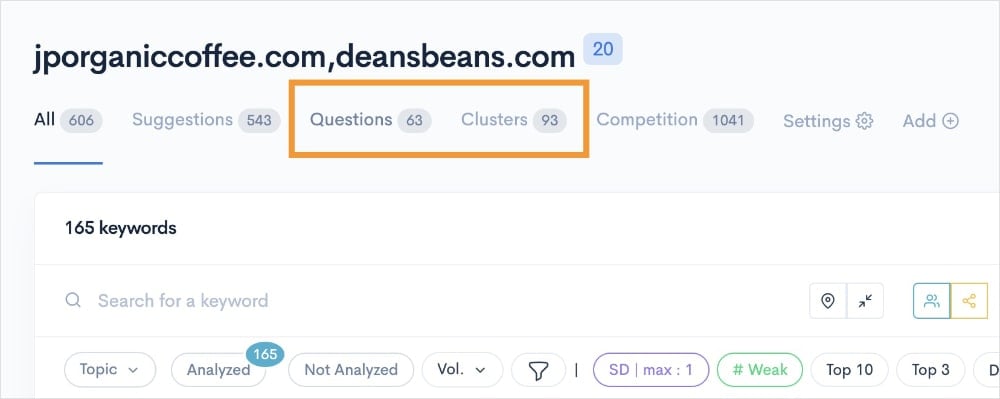
The Questions tab shows your competitors’ keywords that are in the form of a question. These make excellent FAQs in your content.
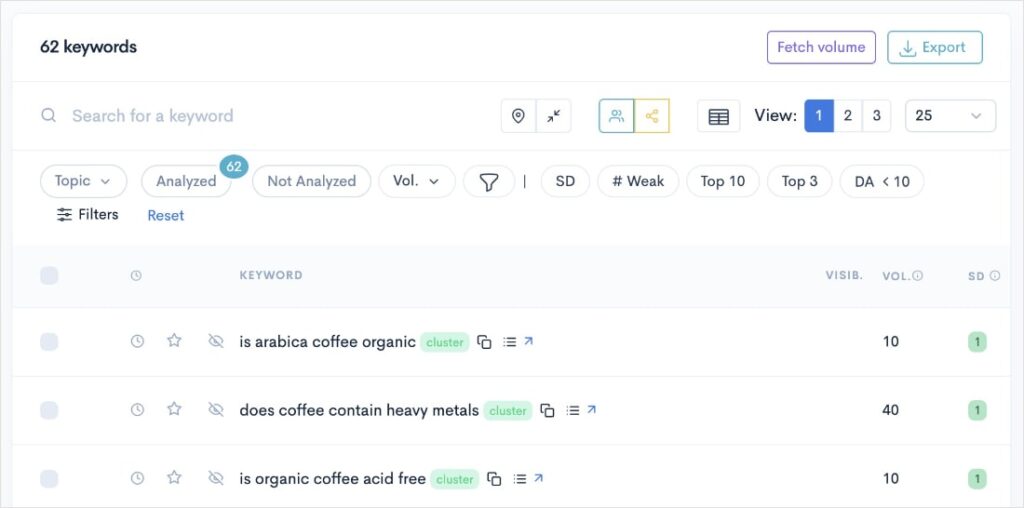
FAQs are one of the best ways to rank in Google’s People Also Ask box. This area of the SERP has high visibility and organic clickthrough rates.
The Clusters tab groups related keywords together, so you can easily identify themes. These are good for identifying gaps in your content strategy.
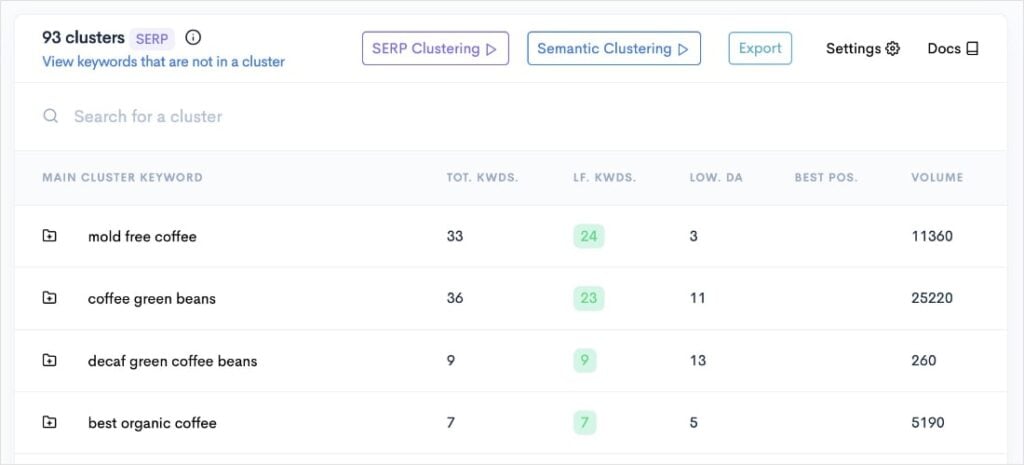
The goal here isn’t just to collect keywords — it’s to understand what your audience wants and where you can add value.
These tools can help you make the most out of your keyword gaps and inform your content strategy.
Next Steps: Content Creation
Now that you’ve identified your keyword opportunities, it’s time to turn them into content that ranks. Here’s a quick roadmap to get you started:
- Group similar keywords together to create comprehensive content. Instead of writing separate articles for related terms, combine them into one authoritative piece.
- Check the current top-ranking pages for each keyword. What are they doing well? More importantly, what are they missing that you could cover better?
- Prioritize keywords based on your findings. When deciding which keywords to tackle first, aim for:
- Low difficulty scores
- Multiple weak spots
- Clear search intent
- Relevance to your business goals
Remember, the goal is to create something more valuable than what’s currently ranking. Focus on quality over quantity, and make sure each piece directly addresses your audience’s needs.
Pro Tip: Start with 2-3 pieces of content targeting your most promising keywords. This focused approach helps you test what works before scaling up your content creation efforts.
Keyword Gap Analysis FAQs
What is a competitor keyword gap analysis?
A competitor keyword gap analysis is a process that helps you identify keywords your competitors rank for that your website does not. It’s a strategic way to find new content opportunities and understand where you can compete in search results.
What are the benefits of conducting a keyword gap analysis?
A keyword gap analysis helps you discover new ranking opportunities, save time on keyword research, and build a more effective content strategy. It shows you exactly where your content is missing compared to competitors, making your SEO efforts more targeted and data-driven.
What are the best keyword gap analysis tools?
The most effective keyword gap analysis tools include LowFruits, Ahrefs, and Semrush. LowFruits specializes in finding low-competition keywords, while tools like Ahrefs and Semrush offer broader SEO features. The best choice will depend on your budget and needs.
Final Thoughts
Keyword gap analysis doesn’t have to be complicated. With the right tools and a systematic approach, you can find valuable keywords your competitors are targeting and create a plan to compete for these rankings.
When you start, focus on keywords with low competition and multiple Weak Spots. These are easy ranking opportunities, ripe for the taking.
Ready to get started?
Sign up for LowFruits to begin performing your own keyword gap analysis today. Your next top-ranking pages could be just a few keywords away.
Related reading:


