
I know… the phrase “stealing competitors’ keywords” sounds a little aggressive. But trust me, it’s a completely ethical and essential SEO practice for getting your business found online.
When I talk about stealing keywords, I don’t mean copying and pasting their content. (That’s a black hat SEO tactic and big ethical no-no.)
No, I’m talking about performing a keyword gap analysis to spy on competitors’ keywords and “steal” these insights for my own content. It’s surprisingly simple and can make a serious difference for your SEO.
This guide will show you my 5-step process on how to steal competitors’ keywords. I’ll share exactly how I peek into their keyword and content strategies and use this information to outrank them in search results.
Plus, it’s super easy, meaning anyone can do it.
In This Article
Why You Should Spy Competitors’ Keywords & Steal Them for Your SEO
Back in my early days of SEO, I used to just guess at what my audience wanted. I’d create content, publish it to the digital abyss, and… nothing. No rankings. And not a single visitor in sight.
That’s until I learned the power of competitor keyword research.
Keyword research removes the guesswork from SEO. It tells you exactly what your audience is looking for and the words they’re using in search engines to find it.
Today, stealing competitors’ keywords is a core part of my content strategy. Because who better to get your keywords from than the websites already ranking for what you want? (And connecting with your customers.)
Here’s why I (and you should) do it:
Reason 1: Helps You Find Hidden Ranking Gems
The smart competitors in your niche will target long-tail keywords, not the flashy, high-volume ones that are impossible to rank for. These lower competition phrases are easier to rank for and have higher conversion rates. That’s because they represent a specific search intent.
By finding these keywords in your competitors’ strategies, you can leverage them in your own optimizations.
Reason 2: Gives You a Proven Content Roadmap
You don’t have to come up with every new content idea.
Your competitors have already done the difficult work of finding topics that resonate with your shared audience. By analyzing their top-performing content, you can identify a ready-made list of topics that are already proven to attract traffic.
This gives you a clear content roadmap and eliminates the risk of creating articles that no one is searching for. You can simply use their success as a starting point and then create a more valuable and helpful piece of content.
Reason 3: Exposes Weak Competitors in SERPs
Google’s goal is to provide the best possible answer to a user’s query. When a low-authority site ranks on the first page, it’s a signal that Google hasn’t yet found a truly great, authoritative piece of content for that keyword.
This is your cue to step in and create that definitive guide, satisfying both the user and the search engine, and earning you that top spot. You can easily outrank these weak competitors with a well-researched, comprehensive article.
Reason 4: Saves You a Ton of Time
Traditional keyword research can be tedious. It involves a lot of brainstorming, filtering, and manual SERP analysis.
By starting with a competitor’s domain, you get an instant, pre-vetted list of keywords that are already relevant to your niche and audience. This allows you to jump directly to the most critical steps of the process: analyzing opportunities and creating content.
In summary, you’re leveraging your competitors’ success to build your own content strategy in a fraction of the time.
My 5-Step Process to Steal Competitors’ Keywords
This is the exact strategy I use for my own websites and for clients. I’ll walk you through it from start to finish.
Step 1: I Identify My True Competitors
The first thing I do is figure out who I’m really competing against. I search for my main keywords and look at the first page of the search results. I’m looking for two types of competitors:
- Direct Competitors: These are other businesses or blogs in my niche that offer a similar product or service.
- Organic (Indirect) Competitors: These are sites ranking for my target keywords, but might not be in my industry. For example, a big-box store might rank for a product review keyword, but I know I can beat them with a more detailed, expert article.
I create a short list of 3-5 of these competitors to start my analysis.
Let’s run through a quick example. We’ll imagine I’m a florist in Los Angeles. I want to rank for the keyword “los angeles florist” so that’s what I searched in Google.
After sponsored posts and the Local Pack, these are the top organic search results:
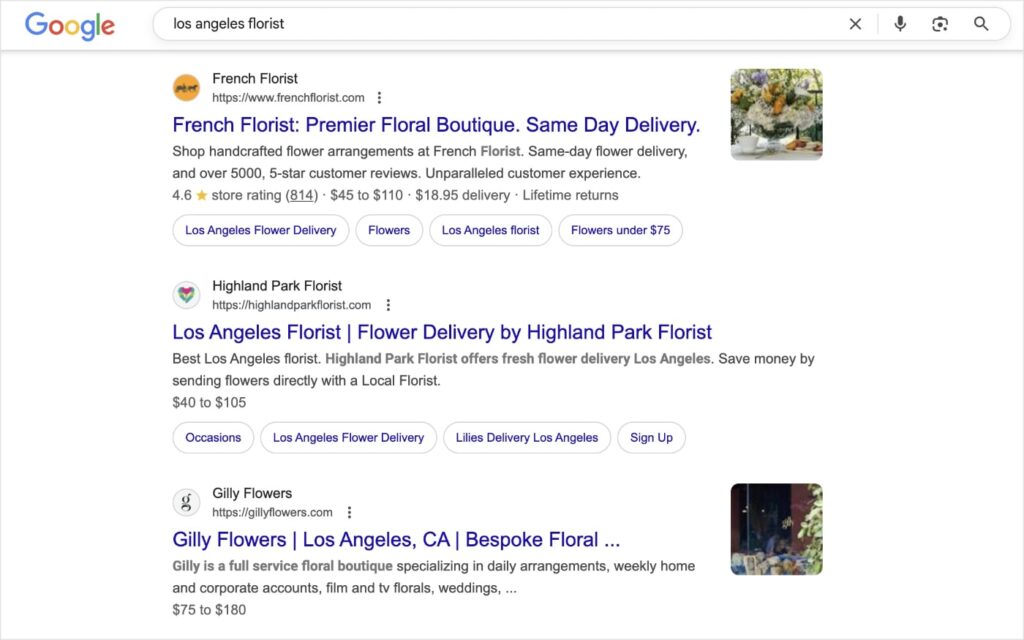
All these websites would be considered direct competitors. That’s because they’re each a florist in LA. We’re selling the same thing (flowers) to the same customers (people in LA).
If I continue scrolling down the first page, I run into our first organic (indirect) competitor:

This is an indirect competitor because it’s not actually another LA florist selling to local customers. Instead, it’s a lifestyle digital publication that simply has an article on the best florists in Los Angeles.
So, in “real life,” they’re not a risk to taking my physical customers. However, digitally, they’ve taken a keyword that I want to rank for.
This means they’re still a threat to my online visibility.
Step 2: Find the Keywords They Rank For
Once I have my list of competitors, I use a keyword research tool to do some digging.
For our tutorial, I’m going to use LowFruits.
LowFruits is the best long-tail keyword research tool for investigating your competitors. Its Extract tool is particularly useful for stealing your competitors’ keywords.
Here’s how it works:
First, you navigate to the Extract tool from the left menu. Then, select the Ranking tab at the top.
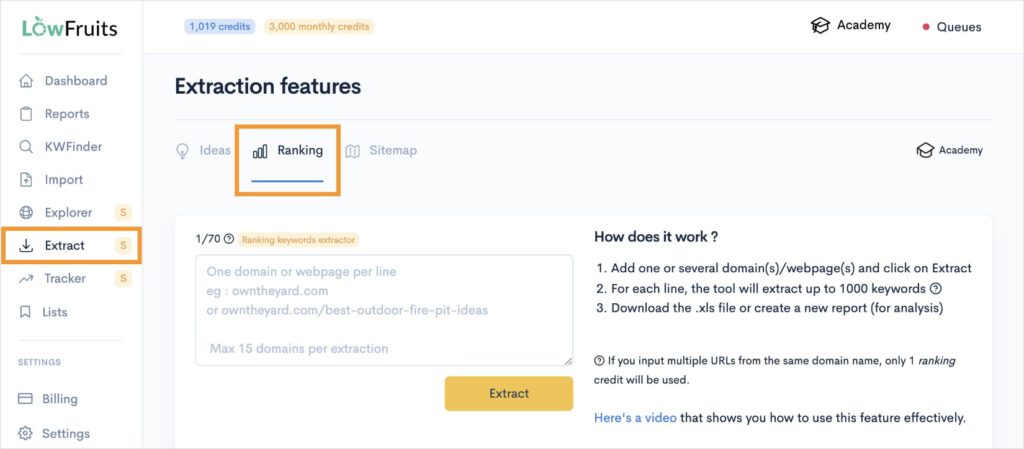
Pro Tip: Be sure to switch to the Ranking tab before entering your URLs! The default tab when you enter the Extract tool is Ideas. This report will give you competitor keyword ideas, but not necessarily the keywords they’re actually ranking for. You won’t get specific metrics, like impressions or position, either.
Once you’ve reached the above page, you’ll enter the URLs of the websites we found in step 1.
So, in my case, that would be:
- https://www.frenchflorist.com/
- https://highlandparkflorist.com/
- https://gillyflowers.com/
- https://www.modernluxury.com/best-flower-shops-los-angeles/
After you’ve entered all your URLs, click the Extract button.
LowFruits will generate a keyword report that you can find by scrolling down the page. Your most recent report will be on the top.
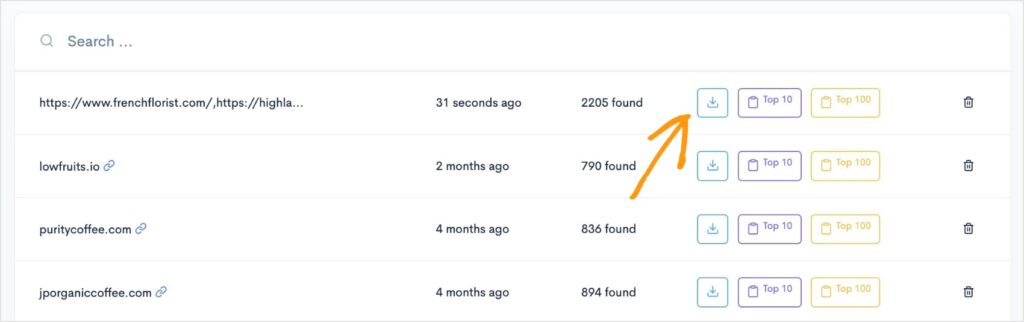
To view all your competitors’ ranking keywords, click the blue download button.
From here, open the downloaded .XLS report. Here’s what mine looks like:
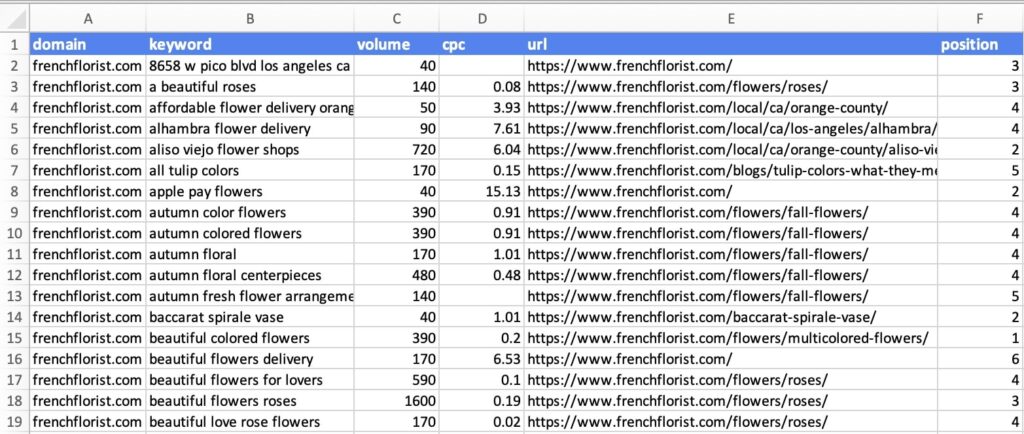
LowFruits organizes the report by domain, so you’ll notice that all these first results are for frenchflorist.com.
In addition to the keyword itself, it also gives you the following keyword metrics:
- Search volume
- Cost per click (CPC)
- Ranking URL
- Position
Congratulations. You just found your competitors’ keywords!
Time to move on to our next step.
Step 3: Analyze for “Weak Spots” & Easy Keywords
This is where the magic happens and where a tool like LowFruits becomes absolutely essential.
At this step, we’re going to curate our list to find the low-hanging fruit. These are easy keyword targets that give us the best chance of ranking high in SERPs.
To get started, we’re going to return to our competitor keyword report and click the Top 10 button.
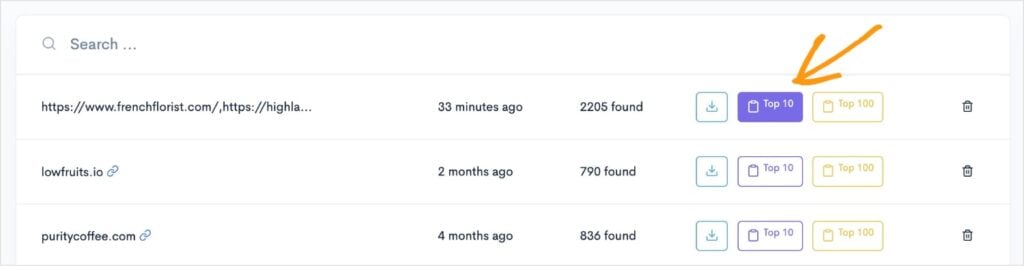
This will take us over to the Import tool in LowFruits. It will also prepopulate the data with your competitors’ ranking keywords.
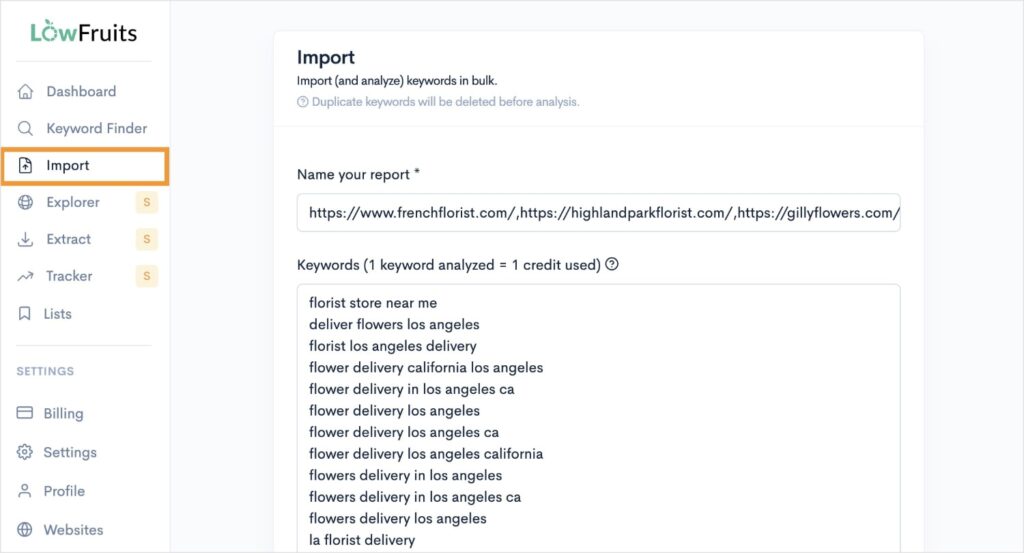
All you have to do is scroll down to the bottom of the list and click Import.
Note: The default setting is to “Analyze all” keywords. LowFruits uses a credit system for keyword analysis. 1 keyword analyzed = 1 credit. If your list is too long, or you’re low on credits, just remove some keywords from the above list or uncheck the “Analyze all” box. (You can manually select which ones to analyze afterward.)
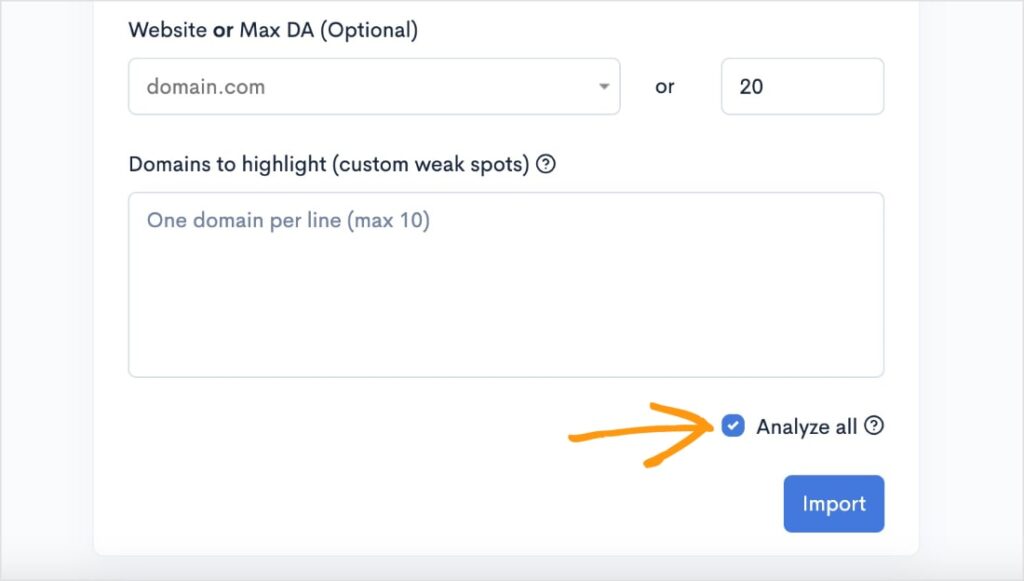
I have plenty of credits, so I went ahead and analyzed all when importing.
This is what my report looks like:
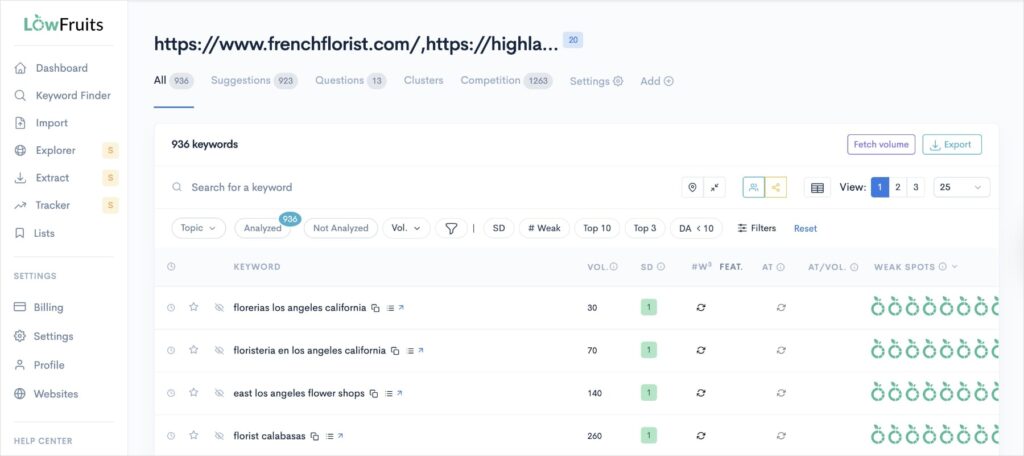
Reminder: if you unchecked the “Analyze all” box, the right columns will be empty. You’ll just need to select which keywords you want to analyze manually by clicking the box to the left of each keyword. Then, click the “Extract” button that will appear on the screen.
Okay, our competitor keywords are now officially in the KWFinder of LowFruits. This is the heart of keyword research, and where we’re going to find our easy keywords.
To do that, we’re going to pay attention to the following two columns:
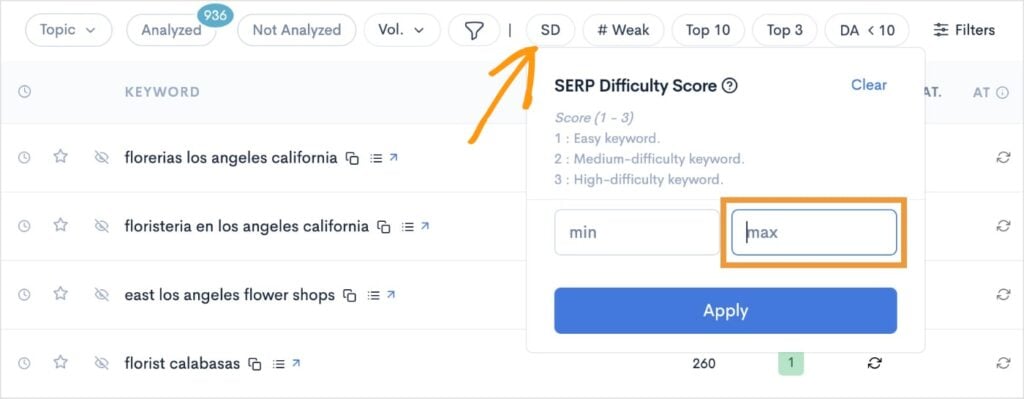
- SERP Difficulty Score (SD): This metric represents keyword difficulty. It’s on a scale of 1 to 3, with 1 being the easiest, and 3 the hardest.
- Weak Spots: Each icon represents a low-authority domain ranking in the top 10 search results. These are weak domains you can potentially outrank with high-quality content.
So, like any good research tool, let’s work with some filters.
First, we’ll set our SD filter to a maximum of 1. Click Apply.
Then, we’ll set the number of weak websites (# Weak) to a 2 minimum. Click Apply.
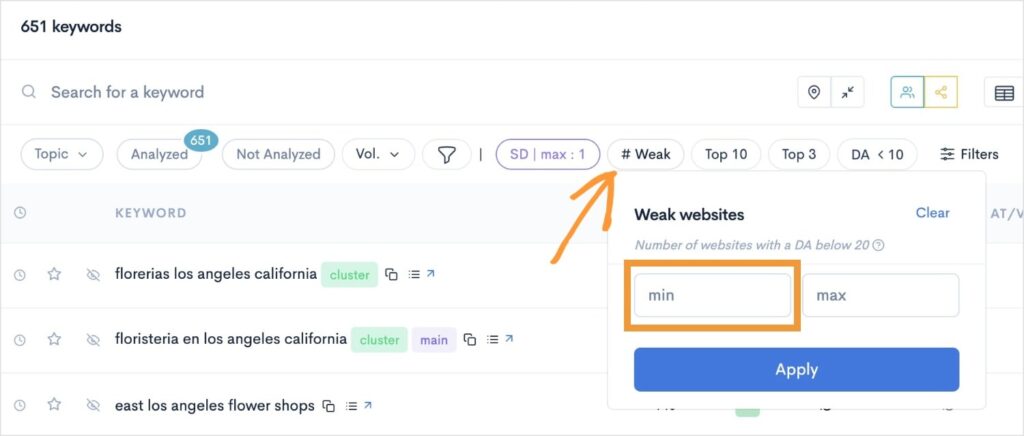
Now, when we look at our keyword report, we’ll only have easy keywords. (Keywords with a 1 SD score and multiple Weak Spots.)
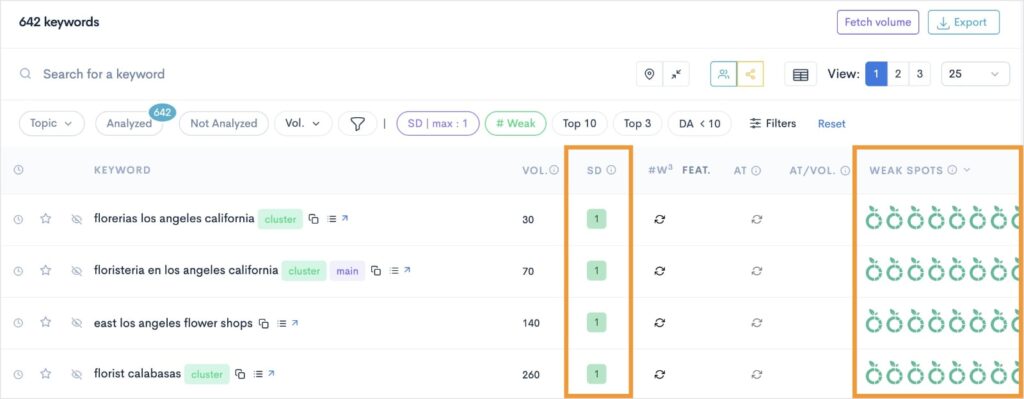
My final piece of advice is to sort by search volume. Just click the “Vol.” column, and LowFruits will sort your report in descending order. This puts your highest volume keywords at the top.
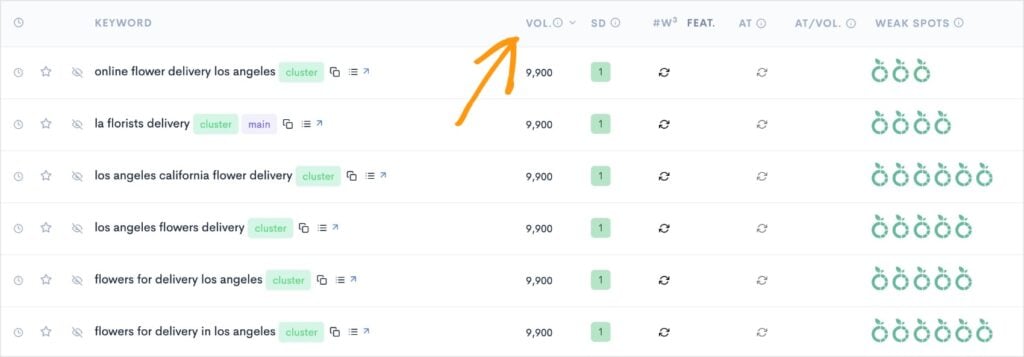
Boom! You’ve got high-volume, low-competition keywords prime to rank!
Step 4: Create Better Content
This is where I have to let you work a bit on your own. But don’t worry, I’ve still got some tips and tricks for you.
At this stage, you need to create content. But not just okay content. You need great content.
So, to do this, we’re gonna start by checking out the competition. (You know the expression “”keep your friends close and your enemies closer”? Yep, it applies to SEO, too.)
Perform a Google search for your focus keyword, and see what’s already ranking. Is it a blog post? In-depth tutorial? Product page? Video?
The content type can tell you a lot about what users and search engines want to see. (This is called search intent.)
If we return to our earlier narrative of me being an LA florist. I may want to write an article about the “different colors of tulips.” After performing a Google search, I can see that this keyword has informational intent, meaning users want to learn something.

Once you’ve performed your search, investigate the actual web pages ranking in the top positions. This means clicking through the SERPs to your competitors’ websites and exploring their content.
You need to understand how they’re addressing a topic, and, more importantly, how you can do it better.
While all of this can be done in Google, you can also do it directly in LowFruits.
Click on the “View the SERP” button next to the keyword you want to target (and rank for).
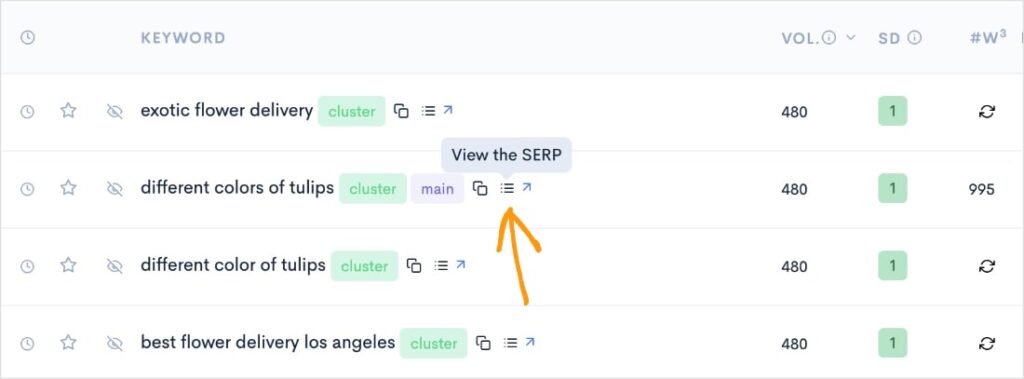
This action will open a pop-out window of the top 10 organic search results.
Here are the results from the same keyword I search in Google just a minute ago (“different colors of tulips”). If you compare the top 3 results to those in the earlier Google screenshot, you’ll see that they’re the same.
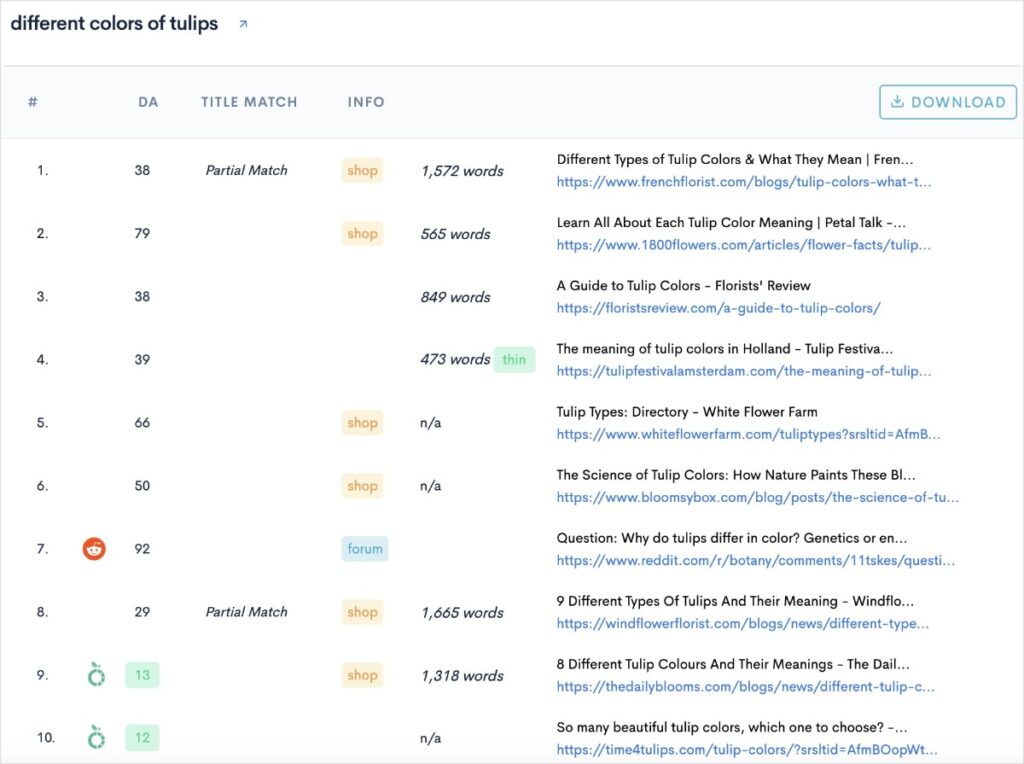
You can also click any of the URLs to go directly to the web page.
Now that you know what your competitors are doing in their content, here are some tips to make yours better:
- Answer the Searcher’s Intent: Figure out why someone is searching for this keyword and make sure your content fully addresses their needs.
- Improve Readability: Use short paragraphs, clear headings, bullet points, and images to make your content easy to skim and read.
- Add More Value: Include a unique perspective, a step-by-step process, or a helpful video that your competitors don’t have.
- Perfect Your On-Page SEO: On-page SEO refers to the practice of optimizing your web pages to rank in search results. A central component of it is strategic keyword optimizations. Put your keywords in all the right places (SEO titles, meta descriptions, heading tags, and more).
- Use Content Optimization Tools: Content optimization tools can help you incorporate your target keywords without overdoing it. (Don’t fall victim to keyword stuffing.)
Regarding this last point, I really like to use SEOBoost for content optimizations. It provides real-time feedback for your SEO and keyword optimizations.
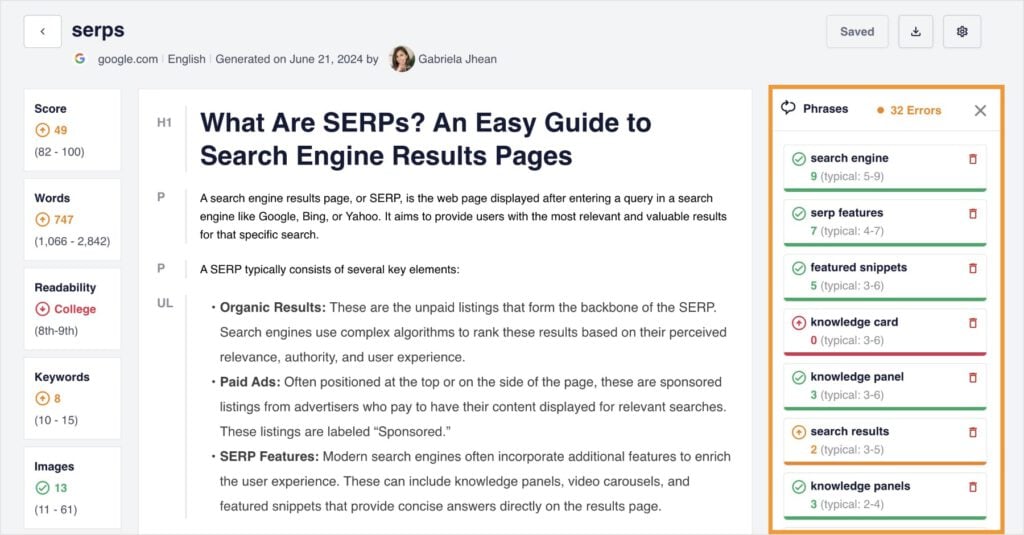
I’m particularly fond of the fact that it includes related keywords. This helps me catch additional phrases that can improve the visibility and reach of my content.
Do you have a WordPress website? WordPress users will be happy to know that SEOBoost integrates with All in One SEO (AIOSEO), the original WordPress SEO plugin. The AIOSEO Writing Assistant provides insights from SEOBoost directly in the editor.
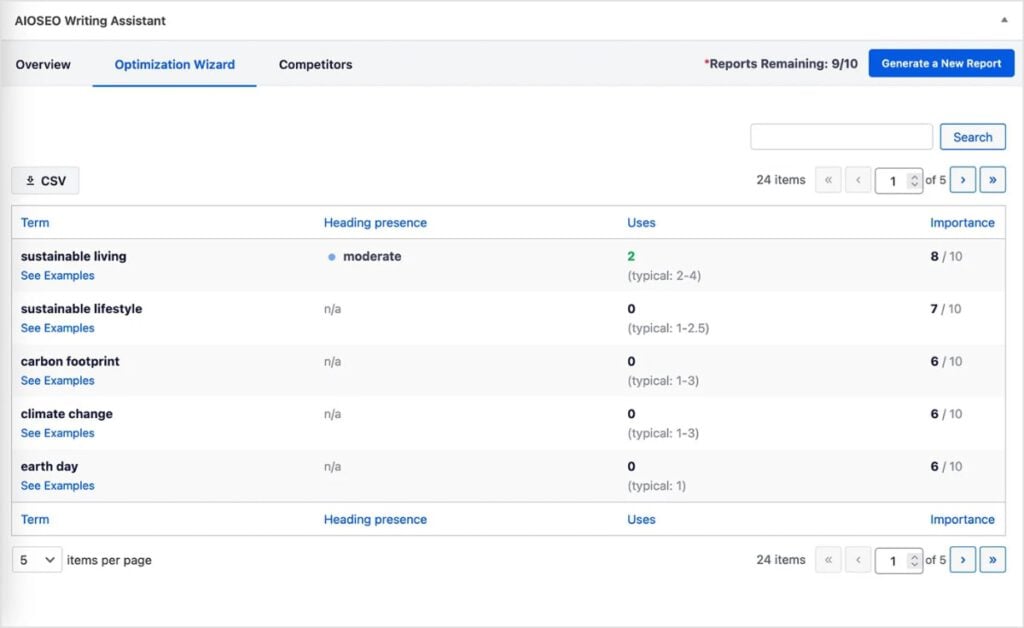
Step 5: Promote Content on Various Platforms
Once the content is live, your work isn’t quite done. But this part is pretty fun.
You tell all the world just how great your new content is and why they’ve got to read it.
After I publish a blog post at LowFruits, my next visit is to Facebook. I create a new post promoting the latest article and linking to our website.
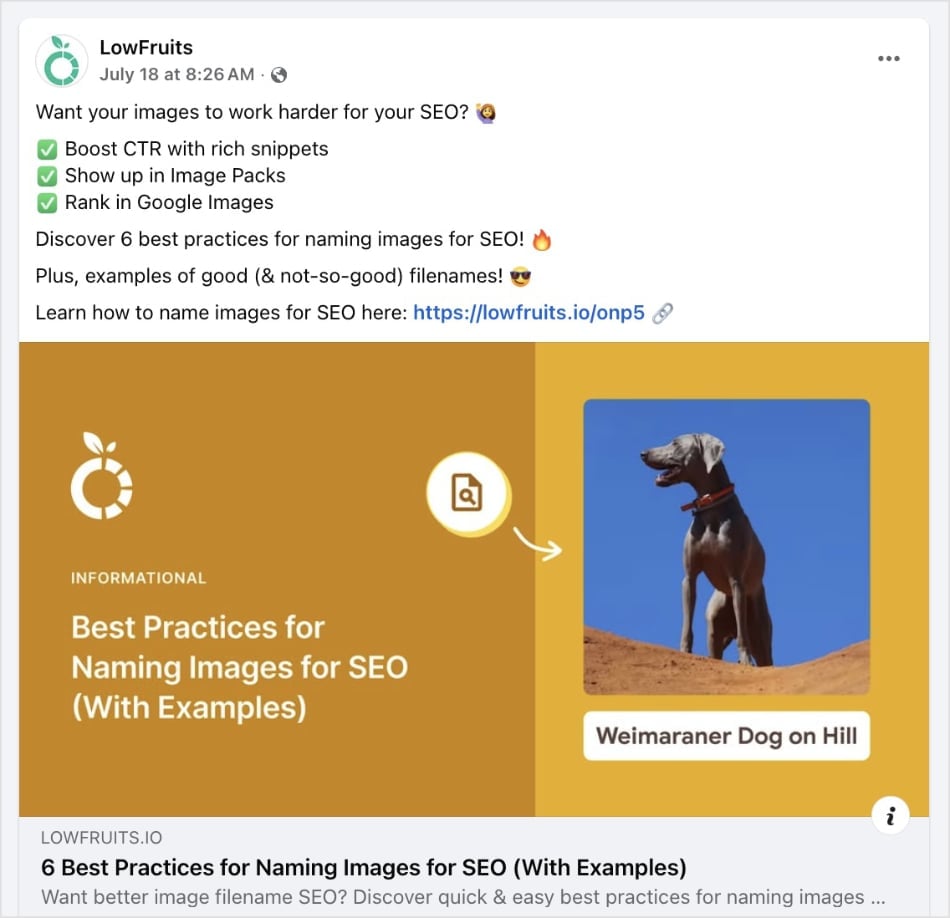
From there, I move over to X (formerly Twitter), and do the same thing.
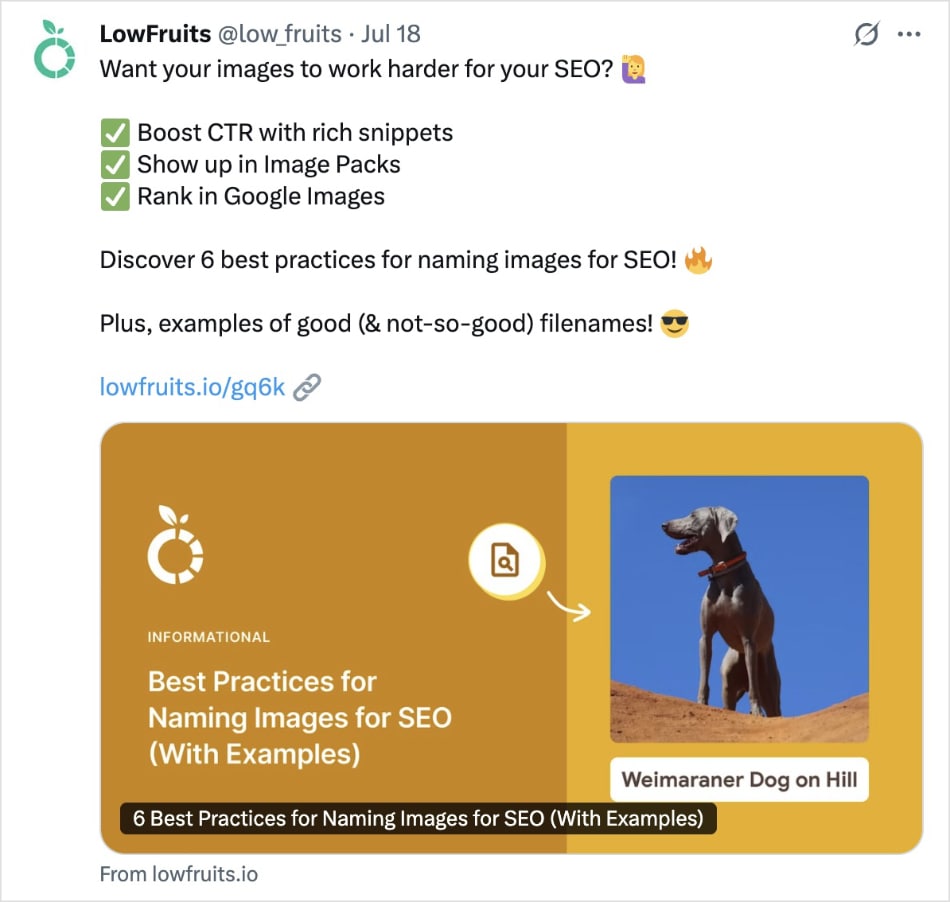
You don’t have to reinvent the wheel. I just use the same post for both (but when I’ve got more time, I tailor copy to each platform. Technically, this is considered an SEO best practice, so do as I say, not as I do!).
From here, you can move on to any other social media platforms you use. I also recommend promoting it to your subscribers via email.
Pro Tip: Another shout out for WordPress users. AIOSEO has a new AI Content Generator that can repurpose your blog post into social media copy — automatically.
And if it’s a really great piece of content, you can even do some outreach asking for backlinks. These are links back to your website from other, external domains.
Overall, the idea behind this step is to get as much exposure as possible for your content.
And there you have it!
My fool-proof, 5-step process for stealing your competitors’ keywords.
My Go-To Tools for Stealing Competitors’ Keywords
While this process can be done manually, I use a few tools to speed things up. I mentioned these in my 5-step process, but here’s a quick recap:
- Keyword Research Tool: This is essential for steps 1 and 2. It helps me find my organic competitors and get a full list of their keywords. While there are many options, I use LowFruits because it’s built to uncover low-competition keywords that are easy to rank for.
- SERP Analyzer: This is a crucial tool for step 3. It shows me the top-ranking results for any keyword and helps me spot valuable “weak spots” at a glance. LowFruits has a built-in SERP analysis feature that I use for this.
- Content Editor: For step 4, I use a content editor with an SEO checklist. This helps me ensure my content is well-structured, readable, and optimized for my target keyword before I hit publish. My favorites are All in One SEO for WordPress websites and SEOBoost for any other website.
Now That You Know How to Steal Your Competitors’ Keywords…
It’s time to put your knowledge into action.
“Stealing” keywords is all about working smarter, not harder. My 5-step process is a repeatable, profitable strategy for building your content based on what’s already working in your niche.
Identify your competitors, find their top keywords, look for easy-to-win opportunities (the low-hanging fruit), create better content, and then promote it.
It’s not rocket science, but it does take strategy.
Now, it’s your turn to start building your own content roadmap. Are you ready to find some low-hanging fruit and start outranking your competitors?
Sign up for LowFruits today to dominate your niche and grow your visibility online.
FAQs About Competitor Keyword Research
The term “stealing” is a metaphor for a competitor keyword analysis. It means you’re identifying your competitorss successful content and keyword strategy, and then creating a better piece of content to attract that same audience to your own website.
This article is a step-by-step guide on my process for finding and using competitor keywords to improve your own rankings. You can follow the 5-step process outlined below to get started:
- Promote your content online.
- Identify your “true” competitors.
- Find the keywords they rank for.
- Analyze the SERPs for “weak spots.”
- Create better content.
No. When done correctly—by researching your competitors and creating better, more helpful content—it is a standard, white hat SEO practice. Black hat SEO involves unethical tactics like keyword stuffing or using hidden text, which is not what this process is about. “Stealing” keywords is just performing a keyword gap analysis, which is a very standard SEO best practice.
A keyword gap analysis is the process of comparing your website’s keywords with a competitor’s to find keywords they rank for that you do not. It helps you find competitors’ keywords, identify content opportunities, fill in the gaps in your own strategy, and improve your overall SEO.
While many tools can do this, I personally recommend LowFruits for small business owners and beginners. It’s designed specifically to find low-competition keywords and “Weak Spots” that are easy to target and is perfect for building a content strategy from the ground up.


