
Are you ranking? This seemingly simple question isn’t always so easy to answer. For many, it’s often a guessing game or a time-consuming manual Google check.
In my early days of SEO, that’s exactly what I did, and I quickly learned that manually checking search engine results pages (SERPs) gets old FAST. It takes forever and you can only search for 1 keyword at a time—not ideal when you’re trying to get a big picture of your SEO.
Enter keyword position checkers.
A keyword rank checker tells you exactly where you’re ranking, turning guesswork into clear, actionable data.
In today’s article, I’ve got 10 of them for you. These are my tried-and-true favorites that get the job done without wasting your time.
In This Article
What Is a Keyword Position Checker? (And Why You Need One)
A keyword position checker monitors your website’s rankings for specific keywords in search engines like Google. You give it a list of keywords during the initial setup so it knows what keywords to look for. Then, it automatically reports your ranking position for these terms and phrases.
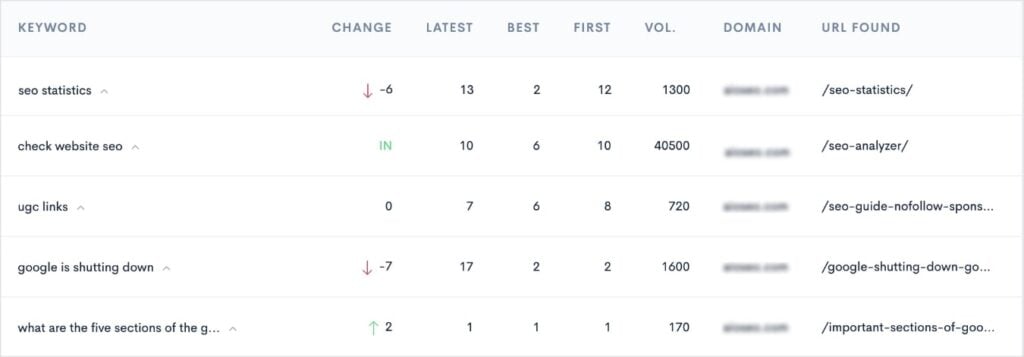
A good keyword rank checker will also record position changes over time, eliminating the need for tedious manual checks and old school spreadsheet reporting.
Here’s why keyword rank checkers are non-negotiable for anyone serious about their SEO:
- Measure SEO Performance: Your keyword rankings are a primary indicator of success. By tracking them, you can see if your optimization efforts are working and if your rank is improving or declining.
- Identify Ranking Fluctuations: A good keyword position checker will show you regular changes, helping you pinpoint exactly when a rank dropped or soared.
- Inform Content Strategy: By seeing which keywords are ranking well, you can make smarter decisions about your content. You can find “low-hanging fruit” keywords on the edge of the first page and focus on optimizing those posts.
- Spot SERP Feature Opportunities: Modern search results are full of features like “People Also Ask” boxes and featured snippets. Many keyword rank checkers will monitor these features, helping you identify new opportunities to capture them.
- Monitor Competitor Rankings: SEO isn’t just about you; it’s about your competition. Some tools allow you to track your competitors’ rankings for the same keywords to identify opportunities to outrank them.
The Criteria I Used When Selecting the Best Keyword Position Checkers
After 6+ years of using and testing dozens of SEO tools, I’ve developed a strict set of criteria for what makes a great keyword position checker. Here are the key factors I used to build this lineup:
- Accuracy and Freshness of Data: A tool is useless if its data is wrong. I prioritized platforms that provide reliable, objective, rankings, with frequent updates for both mobile and desktop searches.
- Actionable Features: I chose tools that do more than just show a number. I looked for features like historical position tracking, competitor insights, and the ability to get alerts for important ranking changes.
- Scalability: I work with clients who own businesses of all sizes. I need tools that can grow with their websites. My selections include options that are affordable for beginners but can also handle a growing number of keywords as a business expands.
- User Interface & Usability: I personally prefer a clean, intuitive dashboard. This list prioritizes tools that make complex data easy to understand, so you can spend less time learning the tool and more time improving your content.
- Budget-Friendly Options: I’m a firm believer that effective SEO shouldn’t have to break the bank. This list includes a range of tools, from powerful free options to premium suites, ensuring there’s a valuable choice no matter your budget.
Why You Should Trust This Lineup
There are a ton of software lineups out there, all claiming they have the best keyword rank checkers. (I saw and read them, too.)
So, what makes this one different?
This list isn’t just a summary of what’s popular. It’s a collection of tools I’ve personally used and vetted throughout my 6-year career in SEO. I’ve spent countless hours in these dashboards, and each tool on this list has helped me achieve real, measurable growth.
This is the exact lineup of tools I would recommend to a fellow SEO or business owner looking to stop guessing and start tracking their success. I’ve done the hard work of testing these tools so you can make a smart, informed choice from the start.
Top 10 Keyword Position Checkers for Monitoring SERPs
Without further ado, let’s get into the tools.
1. LowFruits
LowFruits is a long-tail keyword research tool that has a built-in rank tracker. The Rank Tracker feature is one of the easiest keyword position checkers I’ve come across, with a setup that takes under a minute.
First, you open the Rank Tracker from the platform’s main menu. Then, you paste in your keywords from your chosen platform or spreadsheet. Enter your website’s domain, then make any geographical or language setting changes you’d like to see.
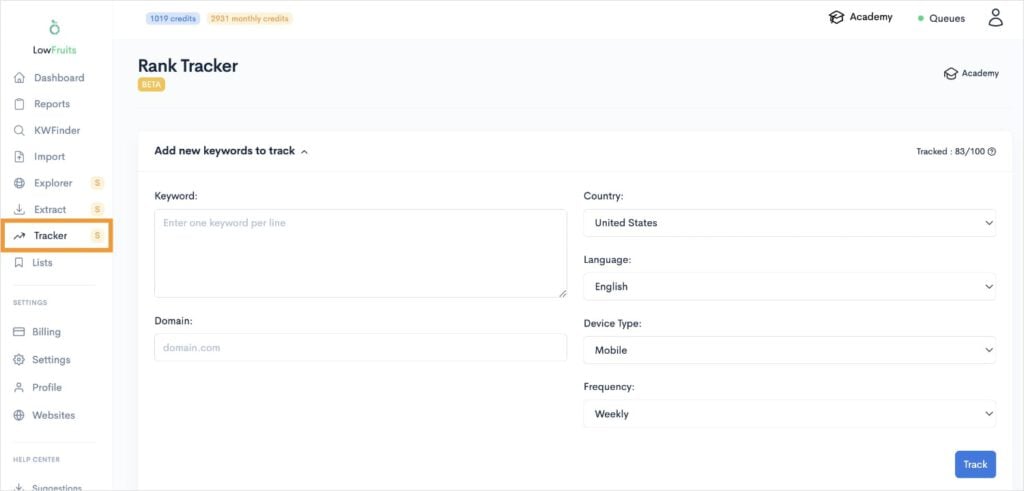
Finally, select your frequency (daily, weekly, monthly), which tells LowFruits how often you want it to fetch your keyword positions in Google. Once you’ve made your selection, click Track.
What I like about LowFruits’ keyword rank checker is that it gets its data straight from Google. I prefer tools that pull ranking positions straight from the source instead of using “proprietary algorithms” that so many SEO tools like to boast.
In fact, when it comes to checking your website’s Google rankings, simple is often the best.
Now, back to the Rank Tracker. Once it’s collected your keyword position data, you’ll get a dashboard that looks like this:
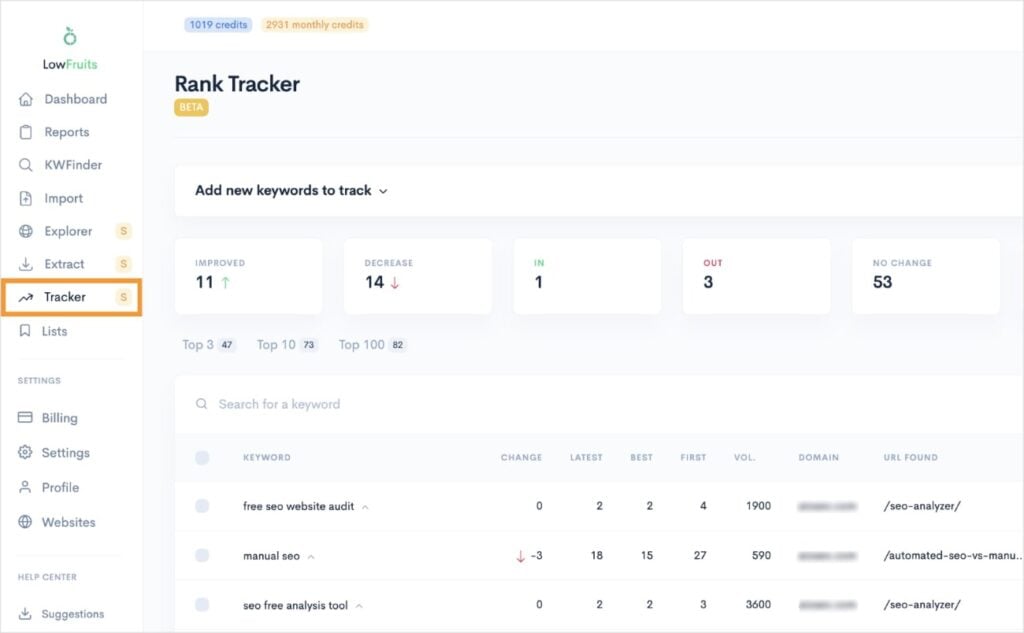
I appreciate how the top metrics give you a bird’s-eye view of your keyword position changes since the last fetch. You get the following keyword metrics:
- Improved: Keywords that are ranking higher than the last Google fetch.
- Decreased: Keywords that are ranking lower than the last Google fetch.
- In: New keywords you weren’t previously ranking for.
- Out: Keywords you’re no longer ranking for.
- No Change: Keywords with the same position as the last Google fetch.
This makes it super simple to see what ranking changes have occurred since the last check.
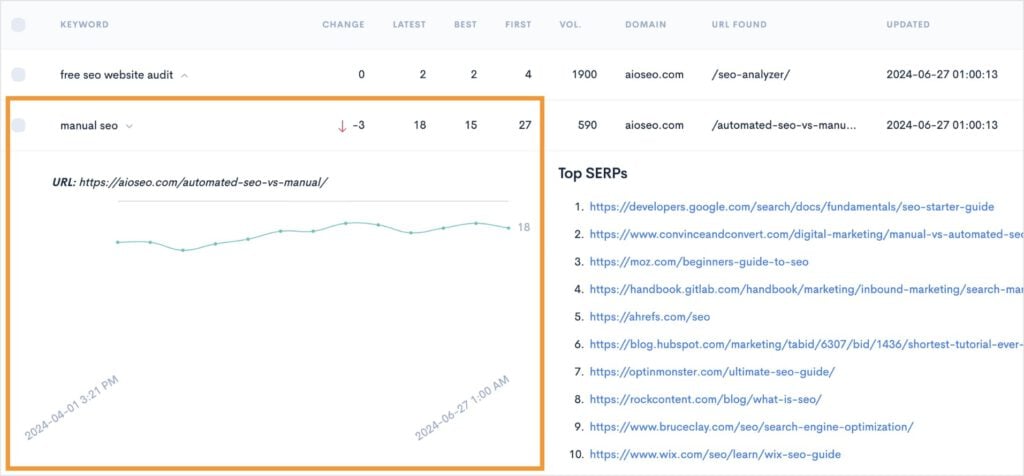
You can also view historical position data by opening any keyword. I like how this option also shows you the top 10 search results ranking in SERPs right now.
Key Features:
- Position Monitoring: The LowFruits Rank Tracker monitors your website’s position for a list of target keywords over time. You get to see daily, weekly, or monthly reports on where your content appears in search results.
- Historical Data: It generates a report with your tracked keywords and provides historical ranking data, allowing you to see how your positions change over time. You can correlate these shifts with your optimization efforts.
- Keyword Tracking Metrics: For each keyword, it shows key metrics like the latest position, position changes (up or down), best position achieved, and search volume.
- User-Friendly Interface: The dashboard is designed to be very intuitive, making it easy to set up and track your most important keywords without a learning curve.
Pricing: LowFruits starts at $21/month with 100 tracked keywords.
2. Google Search Console
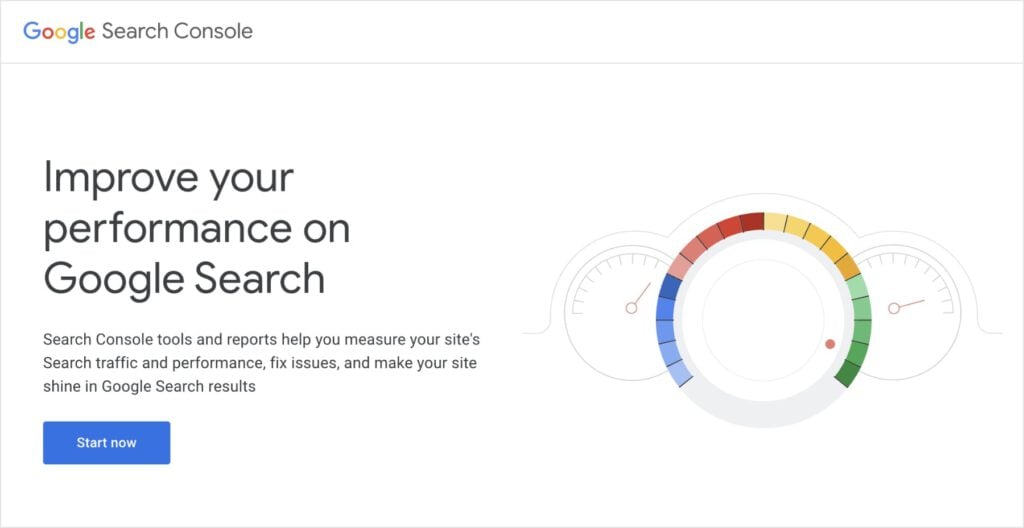
Google Search Console (GSC) is a free tool that helps you monitor and improve your site’s performance in Google Search. It’s the single most authoritative source for understanding how Google views your site. It also has a free keyword rank checker built into its performance reporting tools.
Why It’s Great
GSC is an essential, foundational tool for any website owner, whether you’re a beginner or an expert. The data comes directly from Google, making it the most reliable source for your site’s rankings and performance.
It shows you exactly what keywords you’re ranking for, which pages are getting the most impressions, and if there are any technical issues that are hurting your SEO.
And while it doesn’t have the bells and whistles of a paid tool, it’s the first place I look for any major SEO insights.
Key Features:
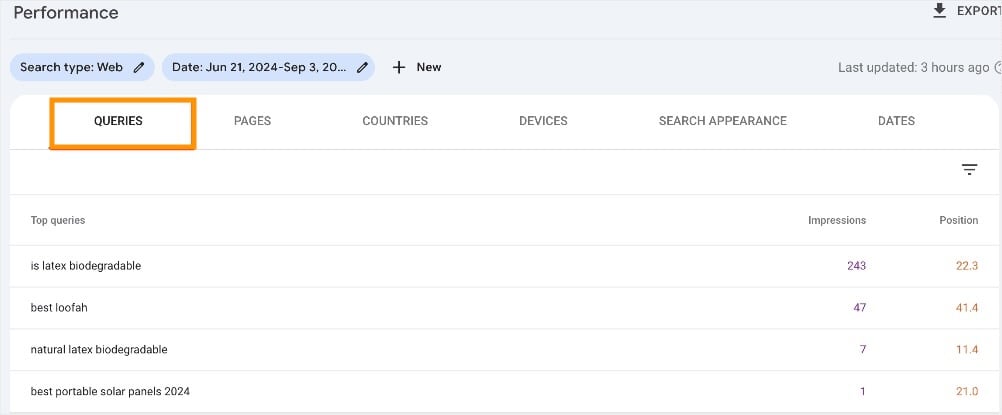
- Performance Report: This is your primary keyword rank checker within GSC. The Queries tab provides a 16-month history of your site’s performance, showing key metrics like total clicks, total impressions, and average position. You can see exactly which search queries are bringing traffic to your content.
- Indexing & Core Web Vitals: GSC helps you identify technical issues that prevent your pages from being indexed—a crucial step before they can even rank. It also reports on Core Web Vitals (site speed and stability), which are important Google ranking factors.
- Sitemaps: You can submit your site’s sitemap directly through GSC, which helps Google discover all your new and updated content, ensuring it’s eligible to be crawled and indexed faster.
- URL Inspection Tool: This feature allows you to see how Google views any specific page on your site, helping you troubleshoot indexing issues or request that a new page be crawled immediately.
Pricing: Free, high keyword tracking limits (1,000 or more).
3. MonsterInsights
With WordPress hosting 43.4% of the global content management system (CMS) market, it only felt right to include a WordPress plugin in our lineup.
MonsterInsights brings Google Analytics data straight into your WordPress dashboard. This allows users to make data-driven decisions without leaving their websites or getting lost in GA4 reports.
It also integrates with Search Console, so you can check keyword rankings right in WordPress.
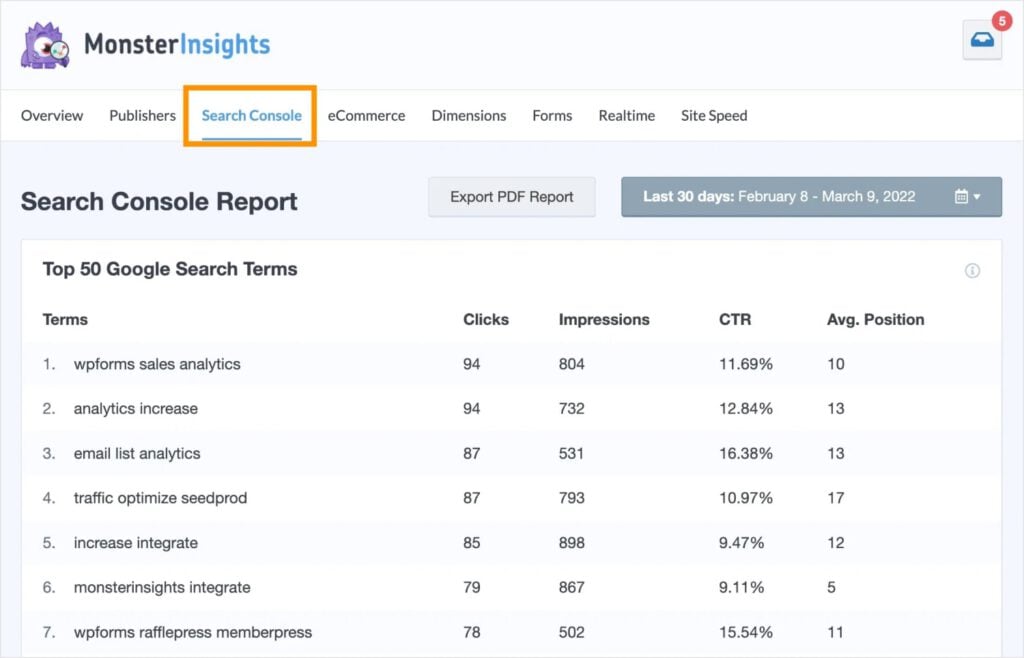
I actually prefer the layout of GSC data in MonsterInsights than Search Console. I find it a bit more user-friendly and clear to read. You can also export PDF reports to share with your team or stakeholders, making it a powerful reporting tool.
Why It’s Great
MonsterInsights is a strong solution for any WordPress user who wants to understand their SEO performance without being overwhelmed. It removes the learning curve of Google Analytics and GSC, giving you a simplified dashboard with the most important data points.
This is a huge time-saver that allows you to check your most important metrics in a single, familiar place, making it easy to monitor and refine your keyword strategy.
Key Features:
- Search Console Report: It integrates with GSC to show your top-performing keywords, their average position, clicks, and impressions right inside WordPress. This gives you a quick snapshot of your rankings without needing to navigate the GSC interface.
- User Behavior Tracking: The tool provides easy-to-understand reports on user behavior, such as time on page, bounce rate, and popular posts. This helps you understand how readers interact with your content.
- Affiliate Link Tracking: A powerful feature for affiliates and content creators, it automatically tracks clicks on your affiliate links so you can see which posts are driving the most revenue without any manual setup.
- Headline Analyzer: It includes a built-in headline analyzer that helps you write more compelling titles to improve your organic click-through rates (CTR) in search results.
Pricing: Starts at $99.60/year with 50 Google search terms tracked.
4. Semrush
I said I wasn’t only picking popular tools, but there’s a reason Semrush is on practically every SEO lineup out there. It really is one of the best tools for virtually every SEO and growth task.
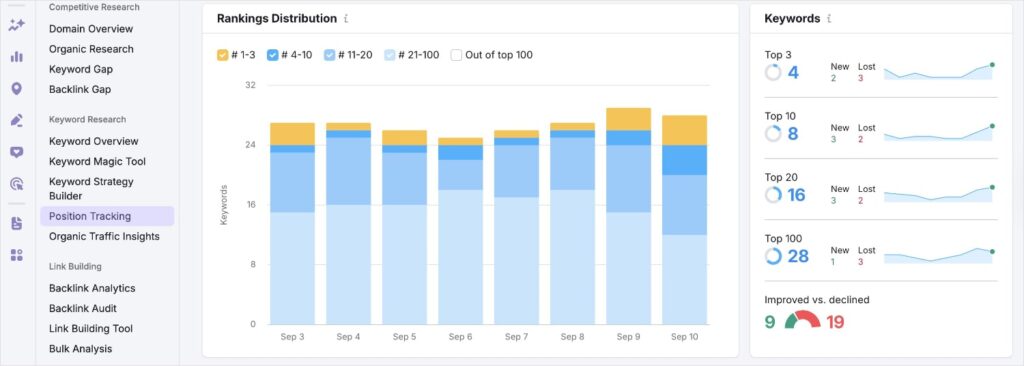
As a keyword position checker, Semrush gives you a lot of data. This can be slightly overwhelming for new users, but you can also just focus on certain parts to make it more beginner-friendly.
For example, the Rankings Distribution report shows how many keywords are ranking in various position group (e.g., 1-3, 4-10, 11-20). This type of data is helpful for knowing where your keywords land the most frequently in SERPs.
Why It’s Great
Semrush’s rank tracker is perfect for anyone who needs to:
- Track their own performance
- Gain a comprehensive view of their competitive landscape
Its ability to track and compare a large number of keywords across different locations and devices, combined with its detailed SERP feature monitoring, makes it a powerful tool for a truly data-driven SEO strategy.
It’s an ideal choice for businesses and agencies that need an all-in-one solution.
Key Features
- Position Tracking: Monitors a website’s daily rankings for a custom list of keywords. You can set your targeting to track any geographic location (down to the postal code level), device type (mobile or desktop), and search engine (Google, Bing, etc.).
- Competitor Discovery & Comparison: Semrush’s rank tracker excels at competitive analysis. It allows you to track up to 20 competitors for the same keywords, providing visibility and comparison metrics to see how you stack up against them.
- SERP Features Monitoring: It goes beyond simple rankings by tracking whether your content appears in different SERP features, such as featured snippets, Local Packs, and even AI Overviews.
- Custom Alerts: You can set up custom notifications to get alerted of significant ranking changes. This feature saves you from manually checking your dashboard and allows for immediate action on ranking drops or gains.
Pricing: Starts at $139.95/month with 500 tracked keywords.
Want to see Semrush and Lowfruits go head to head? Check out this comparison article explaining why LowFruits is the best Semrush alternative.
5. Ahrefs

Ahrefs is another widely recognized all-in-one SEO toolset. I like it for its backlink analysis features, but I’ve also come to appreciate the ease-of-use of its Rank Tracker.
I’m particularly fond of the fact that you can schedule reports to be sent straight to your inbox. This makes rank tracking a breeze and keeps me out of multiple tools and focused on client work.
Why It’s Great
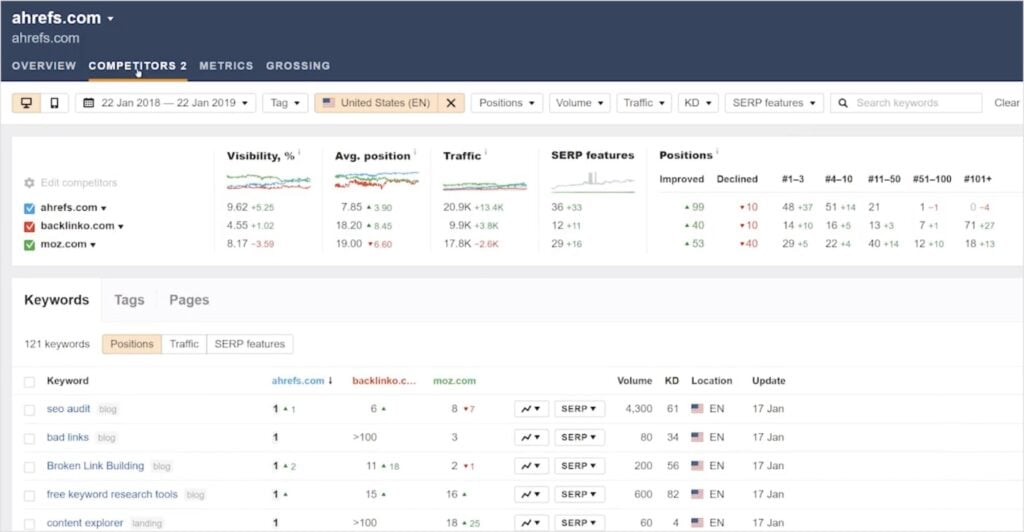
The Ahrefs Rank Tracker provides a clean dashboard for monitoring your keyword positions. You get detailed insights into your rankings and those of your competitors (shown below). The ability to track historical data for years is also a bonus when most tools limit you to a few months.
Key Features
- Rank Tracker: Tracks your ranking progress for up to 10,000 keywords over time. You get to see metrics like average position, traffic potential, and SERP feature visibility.
- Historical Data: Ahrefs saves your keyword ranking history as far back as your project. (For example, if you created a project in 2020, you could track back to then.) This historical data is invaluable for analyzing long-term trends.
- SERP Features Tracking: Ahrefs monitors which SERP features (e.g., featured snippets, top stories, video carousels) exist for your tracked keywords and how many of them your website owns.
- Competitor Monitoring: You can add up to 10 competitors to a project and track their rankings against yours for the same keywords. This helps you identify keyword gaps and understand how your competitors are performing.
Pricing: Starts at $129/month with 750 keywords.
To get the most out of Ahrefs’ competitor insights, learn how to perform a keyword gap analysis. This process will help you spot content opportunities and improve your keyword rankings.
6. SE Ranking
If you saw my lineup of the best rank tracker tools, you’ll notice that SE Ranking is on both lists.
SE Ranking is a well-rounded SEO platform that’s considerably cheaper than Semrush and Ahrefs. It’s about half the cost and comes with a lot of similar features, including a keyword position checker.
Why It’s Great
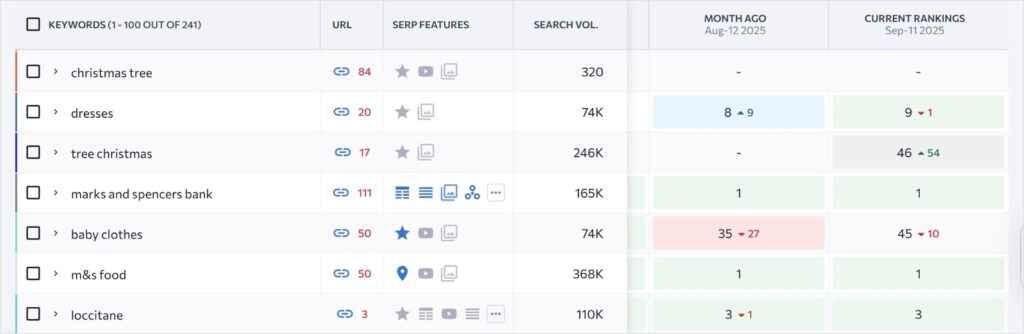
SE Ranking offers a premium-level experience at a more affordable price point, making it a favorite for small businesses and DIY SEOs. Its rank tracker is both accurate and robust, providing detailed daily updates and SERP feature monitoring.
The Share of Voice metric is particularly useful for understanding your overall market presence. It strikes a good balance between features and cost, making it a compelling choice for many website owners.
Pricing: Starts at $52/month with 500 keywords tracked daily.
Pro Tip: Not sure if you want to invest in SE Ranking quite yet? Go to this Position Tracking page, and you’ll get 5 free keyword tracks.
7. All in One SEO
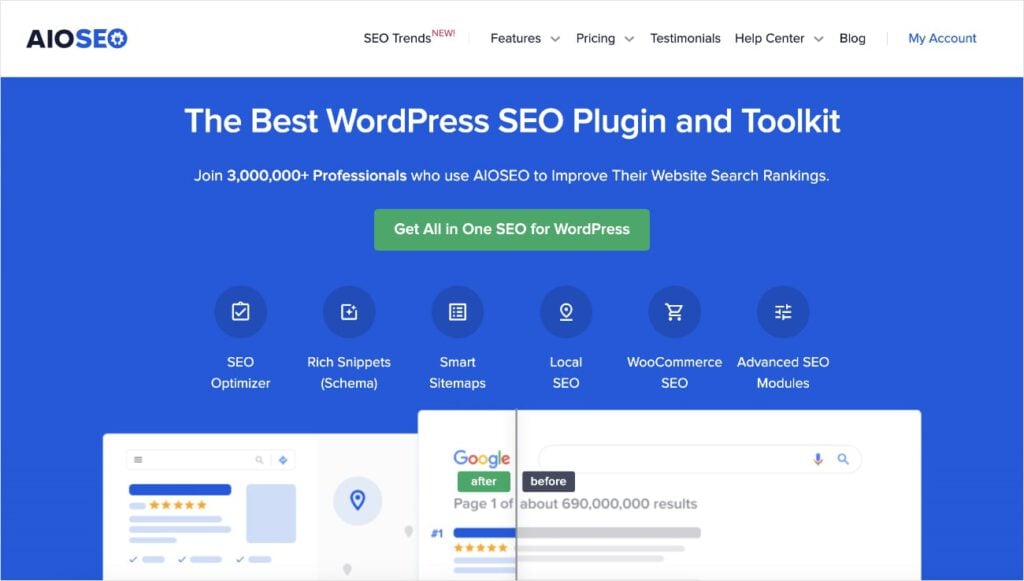
When I work with WordPress websites, All in One SEO (AIOSEO) is my go-to keyword position checker. It has a Search Statistics feature that connects with Google Search Console to bring keyword ranking data right into WordPress.
“Doesn’t MonsterInsights do this too?”, you might be thinking.
You’re right, it does, but AIOSEO is designed specifically for all things SEO. It helps with other tasks like optimizing your content for search engines, fixing broken links, and improving technical performance.
For these reasons, I wanted to include it in our lineup for those who want a more robust SEO tool outside of just rank tracking. (But if you want it just as a keyword position checker, it’s great for that too!)
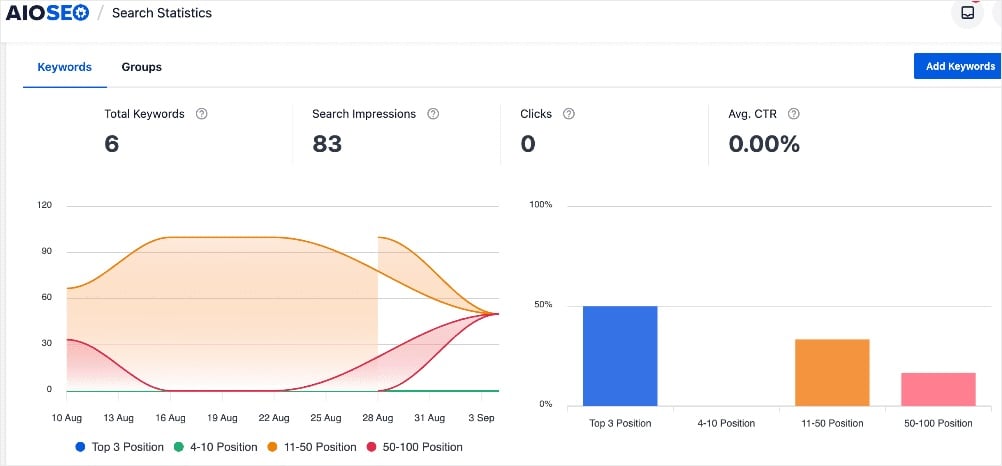
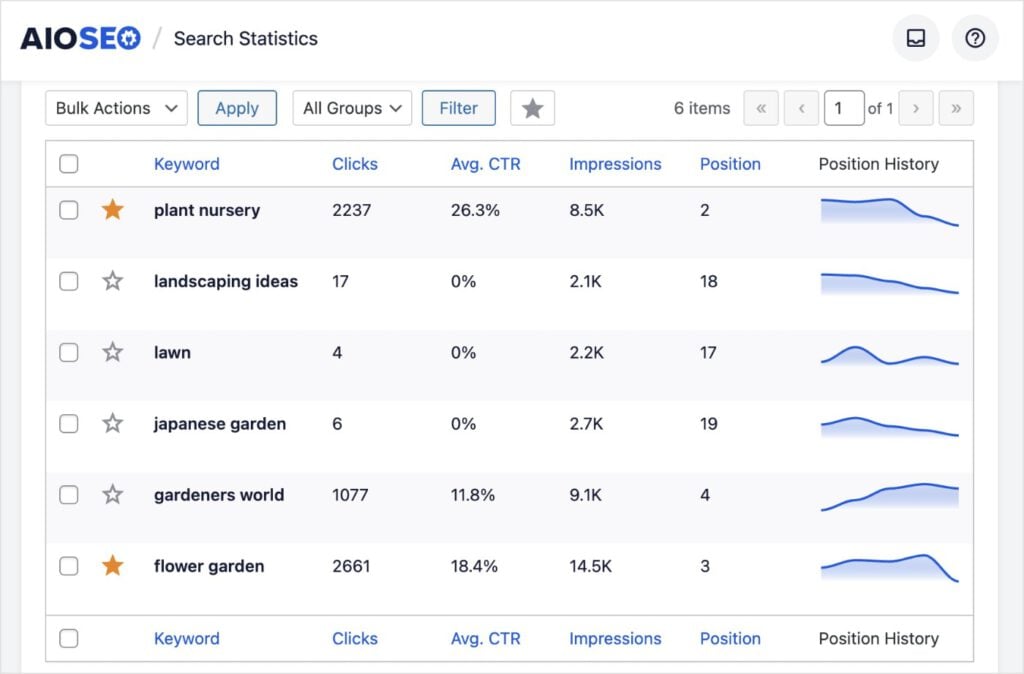
I like the visual dashboard, which makes it quick and easy to see how your tracked keywords are performing in Google. You can also explore other areas in the Keyword Rank Tracker that show more granular metrics, like clicks, average CTR, and more.
Why It’s Great
AIOSEO is perfect for WordPress users who want a simple, integrated solution for both optimizing content and tracking keywords. It’s strength lies in its ability to get GSC right into your WordPress dashboard and present in a way that’s easy to understand. This eliminates the need for switching between tools and helps beginners see if their optimization efforts are paying off.
Key Features
- Search Statistics: Integrates with Google Search Console to show you a simple dashboard of your top-performing keywords. It’s a great way to monitor your rankings without leaving WordPress.
- On-Page SEO Analysis: Provides real-time on-page SEO analysis for each post you write. This helps you ensure your content is optimized for your focus keywords before you publish, which is key for improving rankings.
- Keyword & Site-Wide Tracking: It allows you to track keyword performance not just for individual posts but also for your entire website. This gives you a holistic view of your SEO.
- Sitemap Generation & Schema Markup: AIOSEO automatically generates XML sitemaps to help search engines crawl your site. It also simplifies the process of adding schema markup, which can help your website earn rich snippets and improve visibility.
Pricing: AIOSEO plans start at $49.60/year.
8. SERPWatcher by Mangools
I’ve been a long-time fan of some of Mangools, but one of the more recent tools in my SEO arsenal is SERPWatcher. It’s straightforward, easy to interpret, and has a clean interface. It also comes at a really good price, which is why I often recommend it for small business owners who aren’t looking to spend a ton on rank tracking.
Why It’s Great
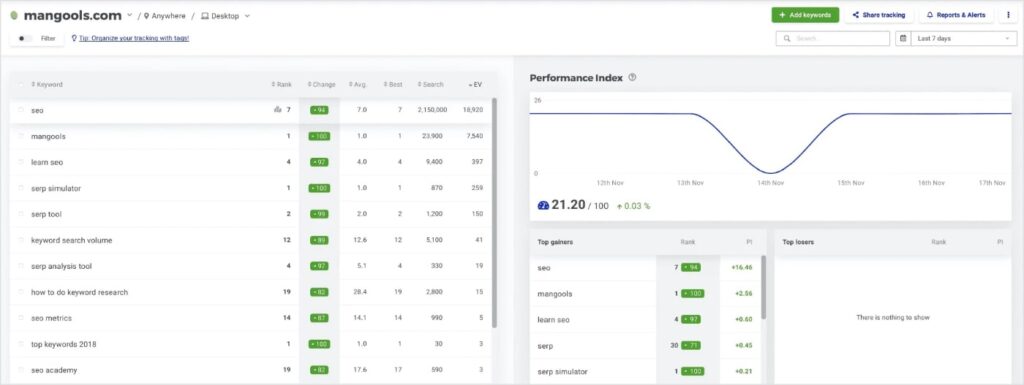
Mangools is a solid choice for small business owners who want a powerful and accurate rank tracker minus a harsh learning curve. It’s interface makes complex data easy to understand, and its pricing is highly competitive.
If you’re a visual learner like me, you’ll also appreciate the different charts and graphs that make data analysis more enjoyable.
Key Features
- SERPWatcher: This is the core rank tracking tool within the Mangools suite. It tracks your keyword positions with daily updates, allowing you to see your rankings and their changes over time.
- Performance Index: This metric calculates your website’s organic traffic potential based on your current keyword rankings and search volumes. It gives you a better idea of your overall visibility.
- Location & Device-Based Tracking: SERPWatcher allows you to track rankings in more than 65K locations. This is crucial for local SEO or for targeting specific markets.
- Visual Reports & Alerts: The tool provides interactive reports that you can share with clients or colleaues. You can also set up event-based alerts to get notified of any significant ranking changes, so you can take action quickly.
Pricing: SERPWatcher starts at $29/month with 50 keywords tracked daily.
9. AccuRanker
AccuRanker is a specialized keyword position checker and rank tracking platform. Unlike all-in-one suites, its sole focus is on providing accurate ranking data for your most important keywords.
Personally, I like specialized tools because even though they do less, they do their main function very well. And that’s the case with AccuRanker.
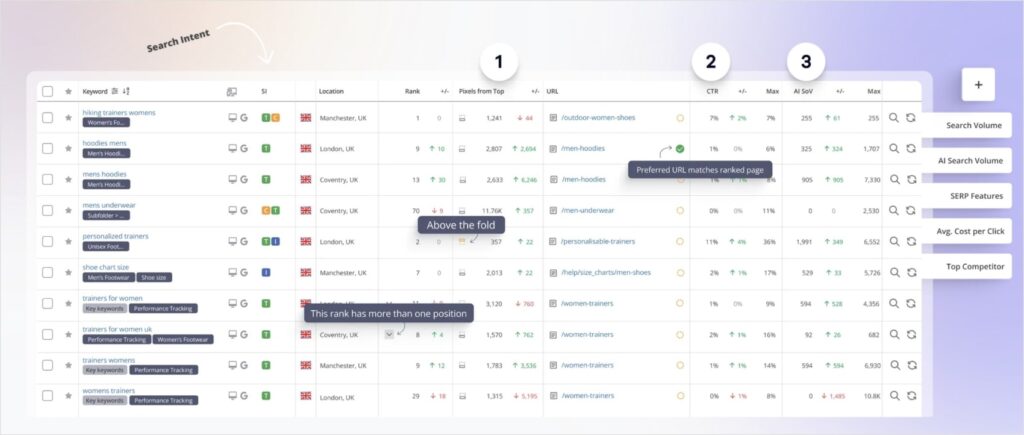
It’s really easy to get started. You just add your domain, enter your keywords, and the tool starts tracking. I’m including a screenshot from their website because I like how they showcase the different areas of the ranking report.
Why It’s Great
With AccuRanker, you get a no-fuss approach to rank tracking without the feature bloat of all-in-one-tools. This makes it one of the most beginner-friendly SEO keyword position checkers in our lineup.
I know how easy it is to bogged down and distracted by other features, but AccuRanker keeps you focused on your main goal: monitoring your rankings and improving your search performance.
Key Features
- Daily & On-Demand Updates: While it provides daily updates, you can also request on-demand ranking for your keywords. This is perfect for seeing the immediate impact of a new content publish or a recent optimization.
- Granular Local Tracking: AccuRanker allows for highly specific location-based tracking, down to the city and ZIP code level. This makes it an ideal tool for businesses that rely on local SEO.
- SERP Feature Monitoring: Tracks SERP features, helping you see where you rank in organic search and with what features.
- Competitor Insights: Its dashboard provides easy-to-read competitor data, allowing you to quickly compare your rankings, visibility, and market share against rivals.
Pricing: Starts at $116/month for 1,000 tracked keywords.
10. Moz Pro
Last but not least in our lineup of the best keyword rank checkers is Moz Pro. This platform has been around since the early 2000s, and it’s what I used back when I started my SEO journey.
Today, it’s become slightly overshadowed by Semrush and Ahrefs, but it still has qualities that keep loyal users coming back. One of these features I personally appreciate is the rank tracker. And while I don’t have an active subscription right now, I’d gladly go back to it if needed.
Why It’s Great
I’ve used Moz for its simplicity and clear presentation of data. It’s a great tool for those who want a comprehensive SEO suite without being overwhelmed.
Moz’s proprietary metrics like Domain Authority (DA) and Page Authority (PA) are widely recognized in the industry, making it a valuable platform for SEO benchmarking and understanding a site’s overall strength.
Its rank tracker is solid, providing consistent weekly updates and a great way to monitor long-term trends without getting lost in day-to-day fluctuations.
Key Features
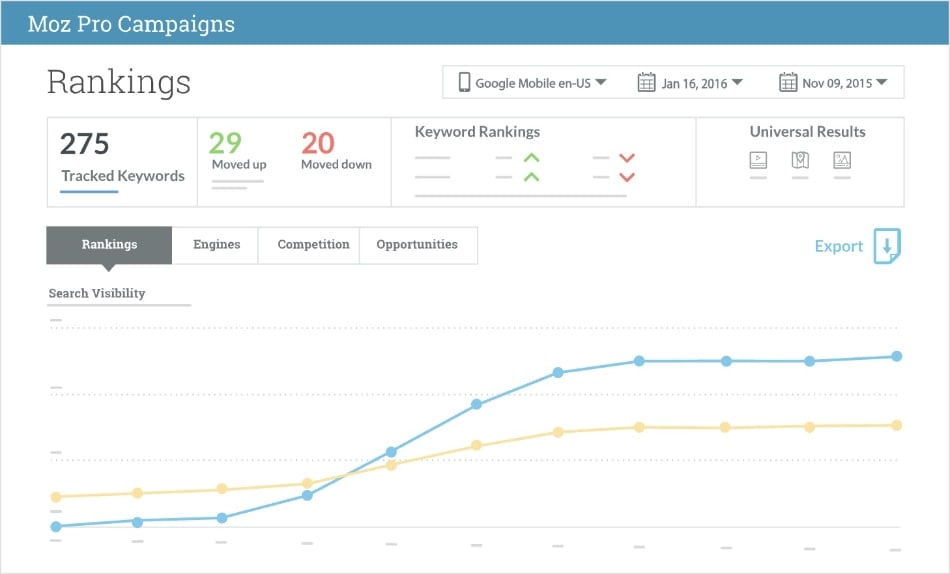
- Rankings Dashboard: Provides regular updates on your keyword rankings, showing your Search Visibility, overall keyword movement, and how many keywords are ranking in specific position ranges.
- Competitor Comparison: Tracks your keyword rankings against your competitors to see how your Search Visibility compares. This helps you identify who is gaining or losing ground in your niche.
- Local & National Tracking: Moz Pro allows you to track keyword rankings on both a local and national level, which is essential for modern SEO.
- Automated Reporting: Set up custom reports that can be automatically sent to clients or teammates on a weekly or monthly basis, saving you time on manual reporting.
Pricing: Starts at $49/month with 50 tracked keywords.
Choosing the Right Keyword Position Checker
With so many tools available, the final choice comes down to your specific needs, goals, and budget. To help you decide, I’ve broken down my recommendations into a few key categories.
Best for Beginners & Budget-Conscious Users
If you’re just starting out or working with a limited budget, these tools provide a strong foundation without a huge financial commitment.
- Google Search Console: This is your non-negotiable starting point. It’s free and gives you the most reliable data on what keywords you’re actually ranking for. Use it to understand your baseline performance before you invest in a paid tool.
- LowFruits: This is an excellent choice if your primary goal is to find easy-to-rank keywords and monitor their performance as you build your site’s authority. It’s affordable, effective, and automates the manual work of finding “Weak Spots.”
- Mangools (SERPWatcher): With its clean and simple interface, Mangools is perfect for beginners who want a dedicated rank tracker that is easy to understand. It provides daily updates and local tracking at a very reasonable price.
Best for Agencies & Enterprises
If you’re managing multiple clients, tracking thousands of keywords, or need a truly comprehensive solution, these platforms are built for scale and advanced analysis.
- Semrush: The best all-in-one platform for a complete SEO strategy. Its Position Tracking tool is powerful and highly granular, perfect for competitive analysis, monitoring a huge number of keywords, and tracking a wide range of SERP features.
- Ahrefs: Ahrefs is a powerhouse for competitive intelligence and backlink analysis. Its Rank Tracker is robust and accurate, and the ability to track extensive historical data makes it an ideal choice for serious long-term growth and in-depth reporting.
- AccuRanker: For those who need the fastest and most accurate ranking data, AccuRanker is the clear winner. Its sole focus on rank tracking, combined with daily and on-demand updates, makes it the go-to tool for agencies that demand precision and speed for client reporting.
Best for a Balance of Features & Price
These tools offer a strong mix of features typically found in more expensive suites, but at a more accessible price point.
- SE Ranking: This tool offers a fantastic balance of features and affordability. You get an accurate rank tracker with daily updates, extensive SERP feature monitoring, and a full suite of other SEO tools—all at a price that is hard to beat. It’s a well-rounded option that works for many different use cases.
- Moz Pro: Known for its user-friendly interface and industry-standard metrics like Domain Authority. Moz Pro is a great choice for those who need a comprehensive platform that’s easy to use and provides reliable data for long-term strategic planning.
Final Thoughts
A keyword position checker is a must-have for any website owner serious about their SEO. Relying on guesswork will only get you so far, and in today’s competitive landscape, every piece of data matters.
The right tool empowers you to:
- Make smarter, data-driven decisions
- Refine your SEO efforts and focus on what works
- Track and report on how your efforts are paying off
Don’t make the same mistake I did and continue tracking in spreadsheets. These keyword rank checkers will automate the tracking process for you, putting all the right data at your fingertips.
If you enjoyed this article, you may also be interested in learning how to automate keyword ranking reports and how to check your SEO rankings for free.
Keyword Rank Checker FAQs
How do I check my keyword position on Google?
You can manually check your keyword positions by performing a Google search in an incognito window. However, this method is time-consuming and unreliable due to search personalization. A faster alternative is to use a keyword rank checker. These tools provide objective, non-personalized data about your keyword ranking positions and how they change over time.
What’s the best keyword position checker?
The best keyword position checker depends on your specific needs and budget. For a beginner or a user on a budget, free tools like Google Search Console are essential. For a more balanced approach, tools like LowFruits and SE Ranking offer a great mix of features at an affordable price. For agencies and enterprises, platforms like Semrush and Ahrefs provide comprehensive, all-in-one solutions with advanced features.
Why should I use a keyword rank checker?
You should use a keyword rank checker to move beyond guesswork and make data-driven decisions about your SEO. The tools help you measure the effectiveness of your SEO efforts, monitor competitor rankings, and identify fluctuations in your positions. This data helps you refine your content strategy, spot opportunities, and grow your site traffic.


