
Do you spend too much time manually generating keyword ranking reports?
Or worse — painstakingly scrolling the SERPs to find your website’s rankings?
There’s a better way that puts your keyword tracking on autopilot. And it takes just a few minutes to set up.
In this guide, you’ll learn what keyword ranking reports are, why they matter, and how to automate them with LowFruits. I’ll also share some advanced tips for helping you get the most out of your reporting.
In This Article
An Overview of Keyword Ranking Reports
Keyword ranking reports provide a detailed snapshot of where your website appears in search results for specific queries. More often than not, these reports extracted data from Google. A well-structured SEO ranking report typically includes:
- Current keyword positions in search results
- Position changes over time
- Keyword search volume
- Ranking URL
Why Are Keyword Reports Important for SEO?
Keyword ranking reports are essential for SEO because they help you:
- Measure Visibility: See where your website stands for target keywords over time.
- Track Progress: Monitor improvements or declines in SERP (Search Engine Result Pages) positions.
- Identify Opportunities: Discover which keywords have growth potential or need further optimization.
Essentially, these reports provide the data you need to refine your SEO strategy and stay competitive.
Why Use LowFruits to Track Keyword Positions?
LowFruits stands out as one of the best rank tracker tools for small business owners and DIY SEOs.
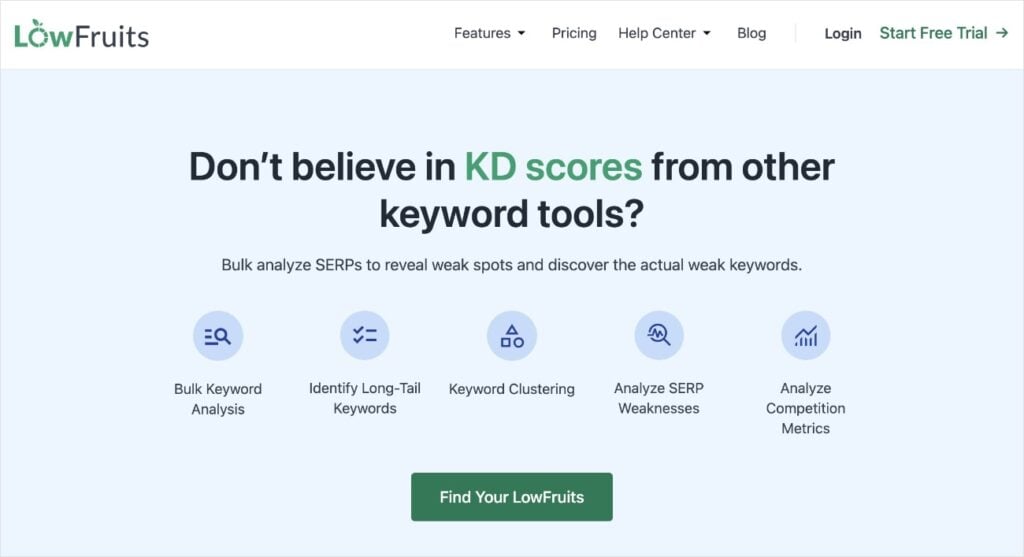
LowFruits offers a user-friendly platform designed to simplify keyword research, SERP analysis, and rank tracking. Here are a few compelling reasons why it’s the ideal tool for automating your SEO reports:
- User-Friendly Interface: The platform is designed with beginners in mind, making it easy to set up and track your most important keywords.
- Automation Capabilities: LowFruits automates the generation of SEO reports, saving you hours of manual work.
- Customization Options: Tailor your reports by adding specific keywords, adjusting fetch frequency, and setting custom filters.
- Cost-Effective: Compared to enterprise-level tools, LowFruits offers competitive pricing while maintaining professional-grade features.
Note: For our tutorial, we’ll be using the LowFruits Rank Tracker. This tool requires a LowFruits subscription, which starts at $21/month billed annually.
How to Automate Keyword Ranking Reports in 5 Steps
Let’s dive into the step-by-step process of setting up automated keyword ranking reports in LowFruits.
1. Create a LowFruits Account
Before you can start automating your keyword tracking, you’ll need to set up your LowFruits account:
Already have a LowFruits account? Skip to Step 2.
- Visit the LowFruits website and click on the “Login” button.
- Select “Create an Account.”
- Fill in your details and click “Register.”
- Choose your preferred plan. (Remember, to use Rank Tracker, you’ll need a subscription plan, not just Pay-As-You-Go credits.)
- Complete your profile with necessary information.
Now that you have LowFruits access, we’re going to explore the tool we’ll be using to track keywords.
2. Add Your Website to LowFruits
If you’re new to LowFruits, we’ll want to add your website to your account. This takes about 30 seconds.
Already have your site connected to LowFruits? Skip to Step 3.
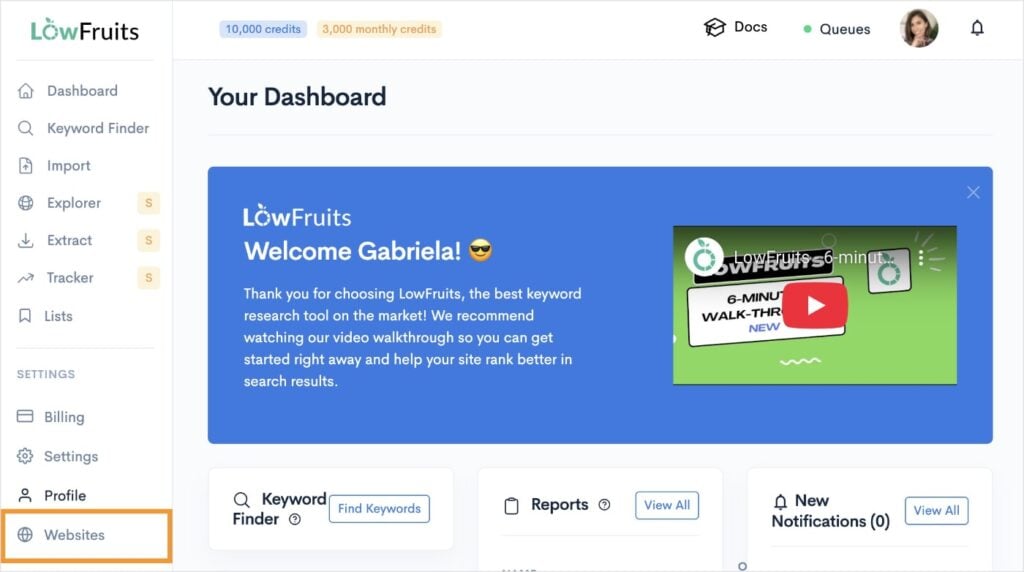
First, go to Websites under Settings.
Then, click the Add a website button. (You’ll notice I’m tracking 4 websites, but if it’s your first time, this area will be blank. You can also add multiple websites.)
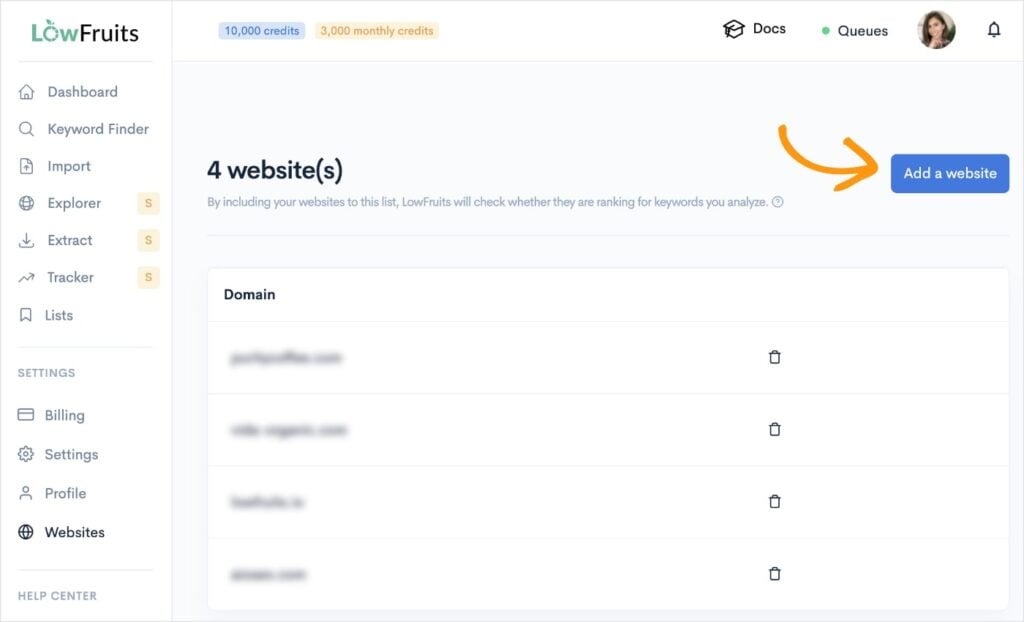
Now that you have your website added to your account, LowFruits will be able to tell you when and where you’re ranking in search engine results pages (SERPs).
We’re finished with our set-up. Now it’s time to get into the actual rank tracking.
3. Add Keywords to the Rank Tracker
From your LowFruits dashboard, navigate to the Rank Tracker. You’ll find this tool in the left menu.
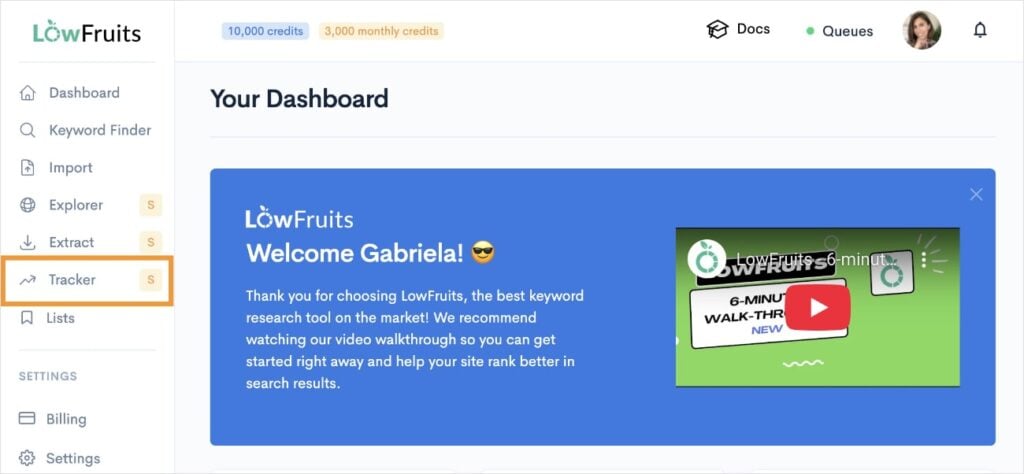
Then, add the keywords you want to track. (You can add up to 100 keywords.)
You can paste them from another SEO tool, document, or spreadsheet. You can also type them manually if you only want to track a few.
Not sure what keywords to track? Learn what keywords your site is ranking for. This is a good way to see what keywords you’re already ranking for and should be tracking.
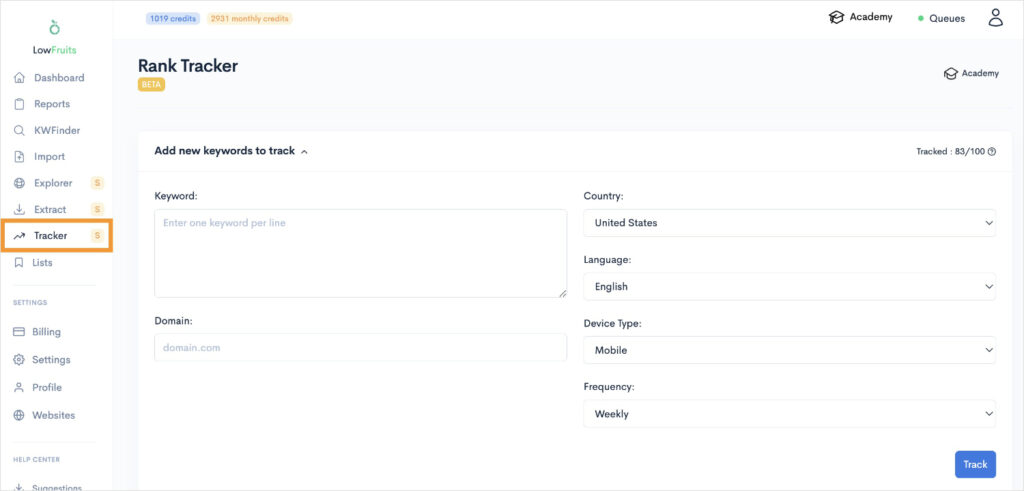
From here, you’re going to add your domain to its respective field. You’ll also make the following selections:
- Country
- Language
- Device Type
We’ll talk more about the last option (frequency) next.
4. Schedule Your Keyword Ranking Report
Your last customization option is the frequency of your report. This determines how often LowFruits will fetch your keyword rankings from Google.
You can select:
- Daily
- Weekly
- Monthly
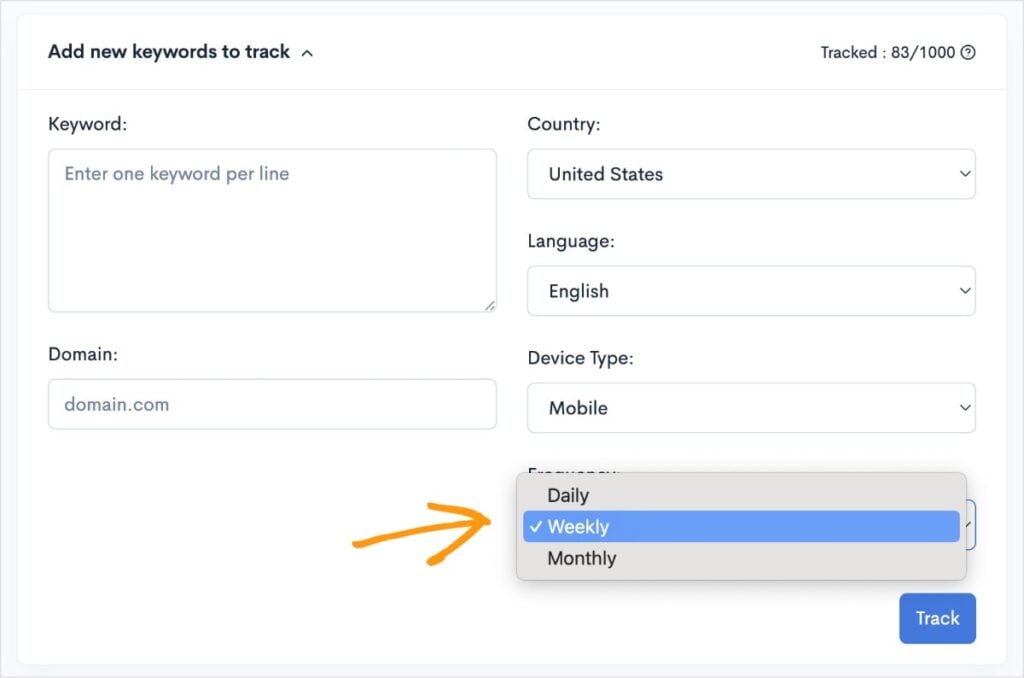
Personally, I use a weekly fetch frequency. Daily fluctuations are too sensitive, and monthly is a bit long. I find that weekly is a happy medium, giving me enough data to assess a keyword’s movement over time without getting too much (or too few) details.
Once you’ve made your selection, click Track.
5. Analyze Your SEO Keyword Ranking Report
Once LowFruits has fetched your keyword data, you’ll get a report that looks something like this:
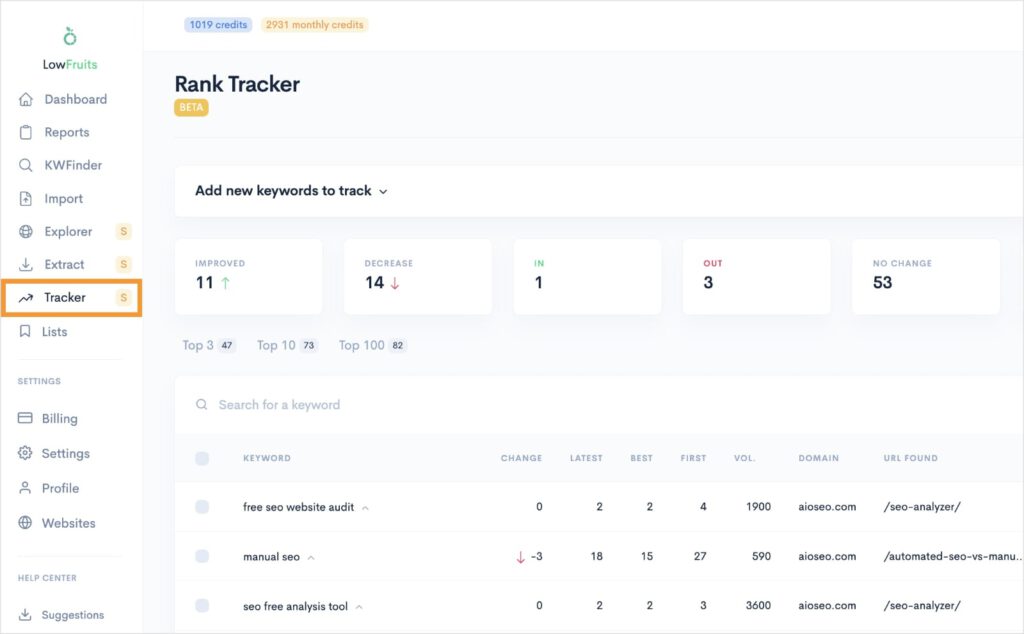
You’ll see a list of all your tracked keywords and the following metrics:
- Change in position
- Latest position
- Best position
- First position
- Search volume
- Ranking domain
- Ranking URL
I also like how you can change your view based on the position tracking. For example, you see that 11 keywords have improved since the last fetch. You can click this box to view only these keywords.
The same goes for decreased. In the above example, 14 keywords have fallen in positions since the last Google fetch. It’d be a good idea to look at these keywords and investigate why they’re declining in performance.
Having these insights at your fingertips allows you to track positive and negative changes in keyword rankings while refining your SEO strategy.
Finally, I want to mention that you can also expand any of the keywords to see their historical position data and the current top 10 ranking domains.
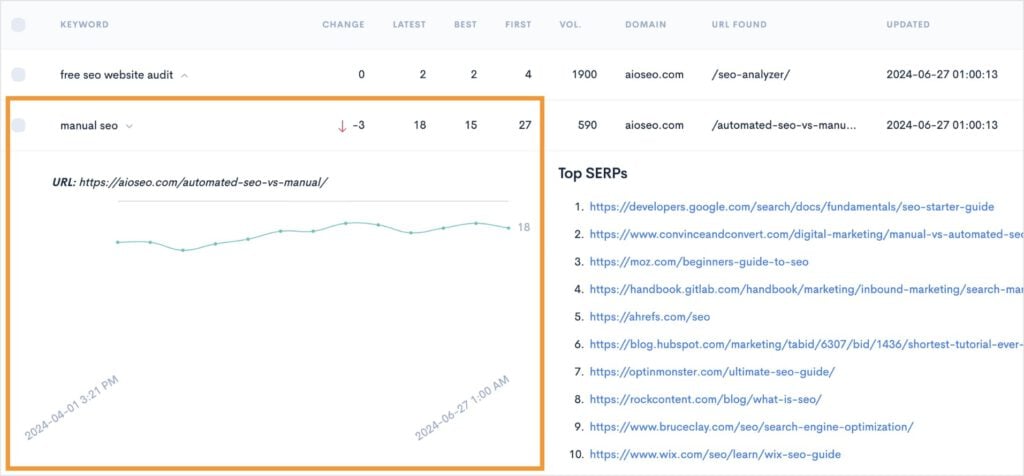
When analyzing keyword metrics, keep the following in mind:
- Look for patterns in ranking fluctuations.
- Identify keywords with significant movement.
- Compare performance against your SEO goals.
- Track the impact of your optimization efforts.
- Note any seasonal trends or market changes.
By analyzing your report regularly, you can make informed decisions that enhance your online visibility and drive sustained organic growth.
Advanced Tips & Reporting Best Practices
To take your reporting to the next level, consider these advanced strategies:
- Regular Keyword Audits: Revisit and update your keyword list periodically to remove outdated terms and incorporate emerging trends.
- Integration With Other Tools: Combine your LowFruits data with insights from Google Analytics or Google Search Console for a comprehensive view of your SEO performance.
- Mobile vs. Desktop Performance: Analyze how your content performs for both mobile and desktop users.
- Data Segmentation: Use the various views (increased, decreased, new, etc.) to identify trends in keyword performance.
These best practices will help you transform basic reporting into a strategic asset that drives continuous improvement.
FAQs About Keyword Ranking Reports
What is a keyword ranking report?
A keyword ranking report is a document or dashboard that shows where your website ranks for specific keywords. It offers insights into your SEO performance. This report helps you pinpoint strengths and weaknesses in your content strategy so you can better tailor your efforts.
Why is automation important?
Automation saves time, eliminates manual errors, and ensures that you have real-time data to make strategic decisions quickly. It also frees up resources so you can focus on higher-level strategy and creative initiatives.
How often should I check my keyword rankings?
While automated reports can be generated daily, weekly reports are typically sufficient for most websites. Major algorithm updates or significant content changes might warrant more frequent monitoring.
How many keywords can I track?
You can track up to 100 keywords in LowFruits Rank Tracker. Quality matters more than quantity — focus on keywords that drive valuable traffic and are relevant to your business.
What should I do if I notice ranking drops?
Investigate potential causes such as technical issues, content changes, or algorithm updates. Compare against competitors and review recent website modifications.
Final Thoughts
Automating your keyword ranking reports with LowFruits is a smart investment in your SEO strategy. It saves time, provides reliable data, and helps you make informed decisions about your optimization efforts.
Remember: the true value lies not just in collecting the data, but in how you analyze and act upon it.
Start small, focus on accuracy, and gradually expand your tracking as you become more comfortable with the system. Keep testing and refining your keyword report settings to ensure they align with your evolving SEO goals.
With consistent monitoring and strategic adjustments, you’ll be well-equipped to improve your visibility and achieve better rankings.


