
When it comes to mastering the art of SEO, choosing the right keyword research tool can make all the difference. And while platforms like Semrush have dominated the SEO landscape, many users find themselves overwhelmed by steep learning curves or the hefty price tag.
But what if I told you there’s a simpler way to uncover high-potential keywords without breaking the bank or getting lost in feature overload?
Enter LowFruits — the refreshingly straightforward Semrush alternative that’s changing how website owners do keyword research. In this post, we’ll explore why LowFruits is the best Semrush alternative, comparing features, user experience, and overall value.
In This Article
Why Keyword Research Is Vital for SEO Success
Before diving into specifics, let’s address the elephant in the room: why does keyword research matter so much?
In today’s digital landscape, understanding what your target audience is searching for isn’t just helpful — it’s essential. Effective keyword research helps you:
- Drive Organic Traffic: By identifying the terms your target audience is searching for, you can create content that meets their needs.
- Improve Conversion Rates: Tailored keywords attract users who are more likely to convert.
- Understand Market Trends: Stay ahead of the competition with insights into evolving search patterns.
At the same time, many digital marketers face challenges with overly complex keyword research tools.
Common Challenges
Have you ever found yourself:
- Spending hours navigating through complex SEO tool interfaces?
- Paying for features you never use?
- Getting overwhelmed by data that seems more confusing than helpful?
- Struggling to identify truly actionable keyword opportunities?
If you’re nodding along, you’re not alone. Many marketers and content creators find themselves trapped in this cycle, particularly with comprehensive platforms like Semrush that, while powerful, can be overkill for entrepreneurs and non-SEO professionals.
Introducing LowFruits: The Best Semrush Alternative
LowFruits is designed to help you find profitable, low-competition keywords quickly and efficiently. Unlike jack-of-all trades SEO platforms, like Semrush, LowFruits strips away the complexity to deliver what website owners need most: effective keyword research.
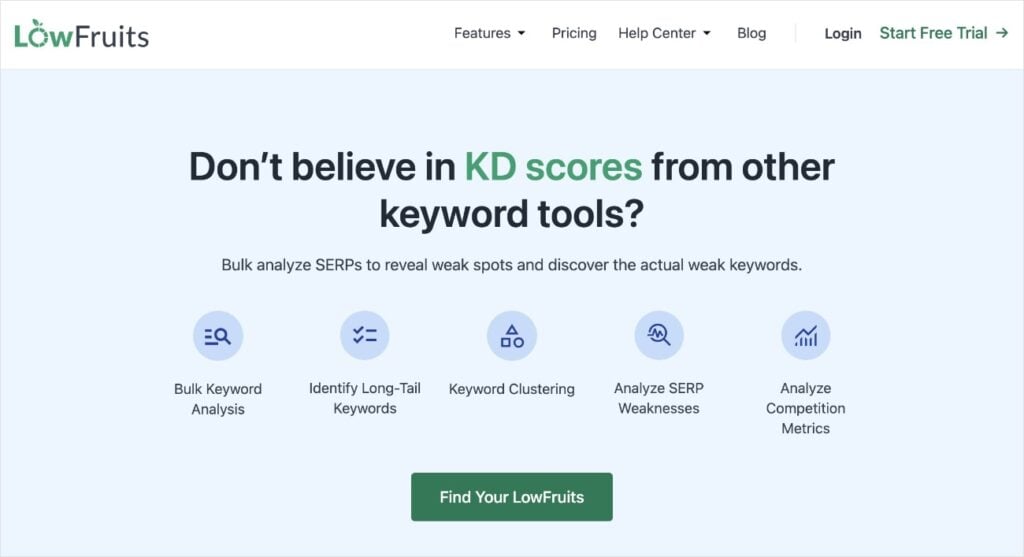
Here’s what sets LowFruits apart from Semrush:
- Simplicity: A clear interface that eliminates information overload.
- Cost-Effectiveness: A budget-friendly option that doesn’t skimp on quality.
- Accurate Data: Reliable keyword metrics that help you make informed decisions.
- Low-Competition Opportunities: Find keywords you can actually rank for.
Now, let’s see how the two tools stack up against each other.
LowFruits vs. Semrush: A Detailed Comparison
When choosing between LowFruits and Semrush, it’s crucial to understand how these tools differ in their approach to keyword research and overall functionality. Let’s break down the key aspects that matter most to users.
Objective
LowFruits
LowFruits takes a minimalist approach to keyword research. It’s hyper-targeted on helping users uncover low-competition, long-tail keywords. These are longer, more specific queries that have clear search intent and drive targeted traffic.
What’s great about this type of niche keyword research is that you focus your energy on keywords you can actually rank for. Ranking for these terms also brings higher conversion rates than more generic, short-tail keywords.
The emphasis is on quality over quantity, ensuring that each keyword you target has a genuine opportunity to convert. This is particularly beneficial for small businesses or those just starting out in SEO.
Semrush
Semrush, on the other hand, aims to provide a more comprehensive keyword research experience. This means you’re getting to get a lot of keywords, data, features, and more. This isn’t a bad thing.
In fact, I’ve been using Semrush for over 6 years, and it still remains one of my favorite SEO tools. With that said, I do not think it is the best SEO tool for beginners or small business owners.
Here’s why:
While the wealth of Semrush features and keyword data can be an advantage for digital markets and advanced SEOs, it often means the learning curve is steep for beginners. It’s packed with data, which can prove overwhelming when you’re just starting out. This can lead to analysis paralysis where you’ve got all the data, but don’t know what to do with it.
Or worse — not even know which keywords to go after, which is the whole point.
Let’s dive into this idea deeper, comparing the ease of use of LowFruits vs. Semrush.
Ease of Use
When it comes to ease of use, LowFruits and Semrush are quite different. I’ve noticed that it can be a game-changer in how quickly website owners get their accounts set up and start using each tool.
Let’s look at LowFruits first.
LowFruits
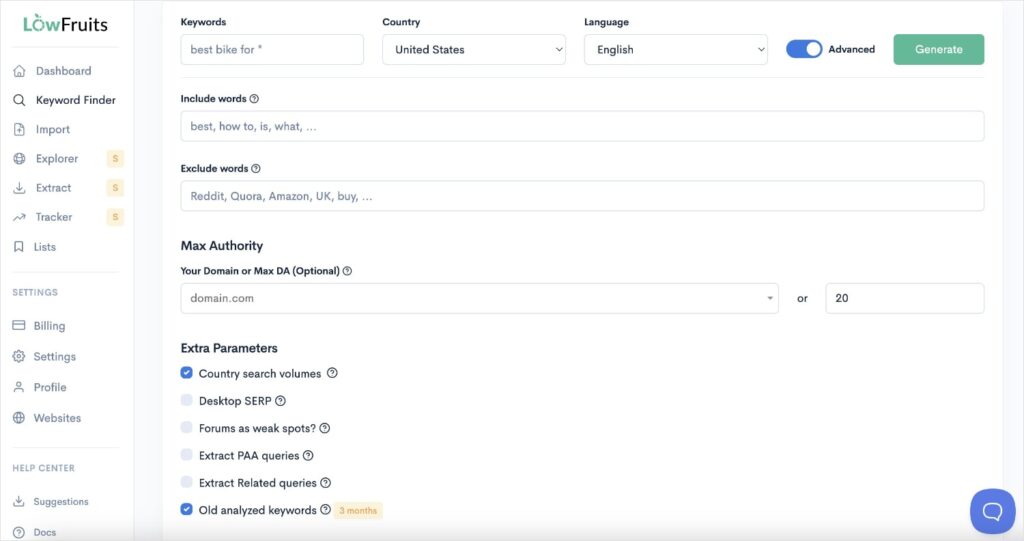
LowFruits is built with simplicity at its core. Because of this, you only have 1 place to go for keyword research on specific terms: the Keyword Finder.
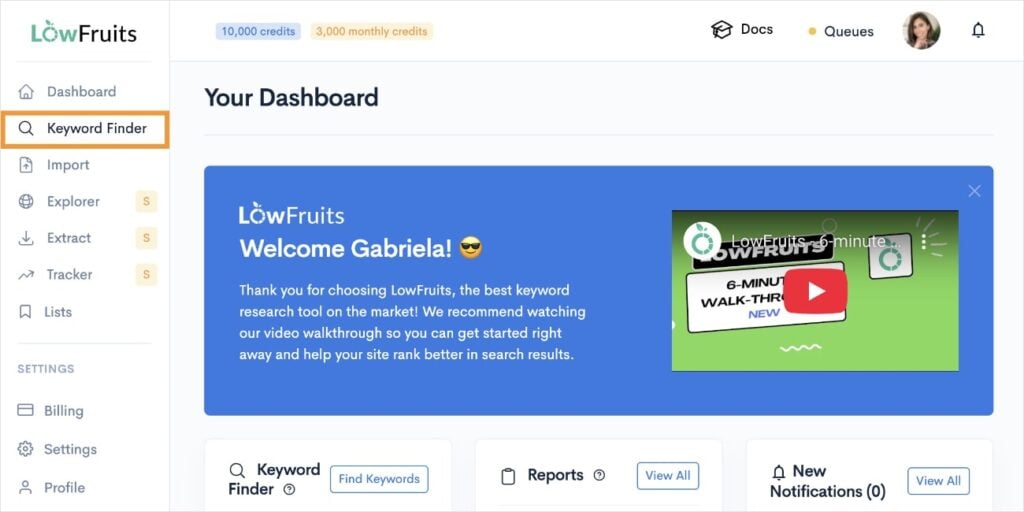
When you get here, you’ll notice that the interface is very straightforward. You’ll have a box to enter your keyword, a country dropdown menu, and language settings.
Pretty simple, right?
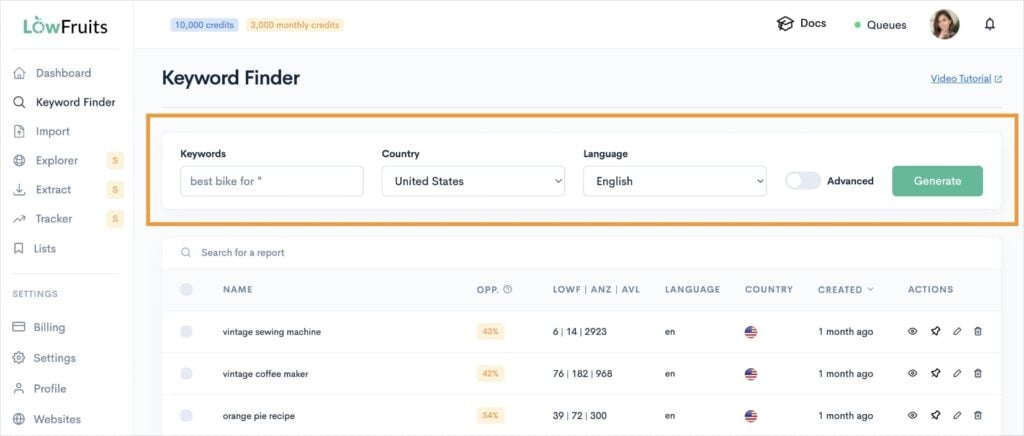
Tip: To access previous keyword searches, see your list of reports below the KWFinder search settings.
And if you want to go deeper, you’ll notice a toggle switch for Advanced settings. When you flip it on, you’ll get a list of various options that, again, are very easy to understand.
After entering a search, you’ll reach a new screen that asks how you want to access your keywords.
You can:
- Access all keyword ideas (and manually select which ones to analyze).
- Access all keyword ideas + analyze all high-intent keywords. (High-intent keywords show buying intent.)
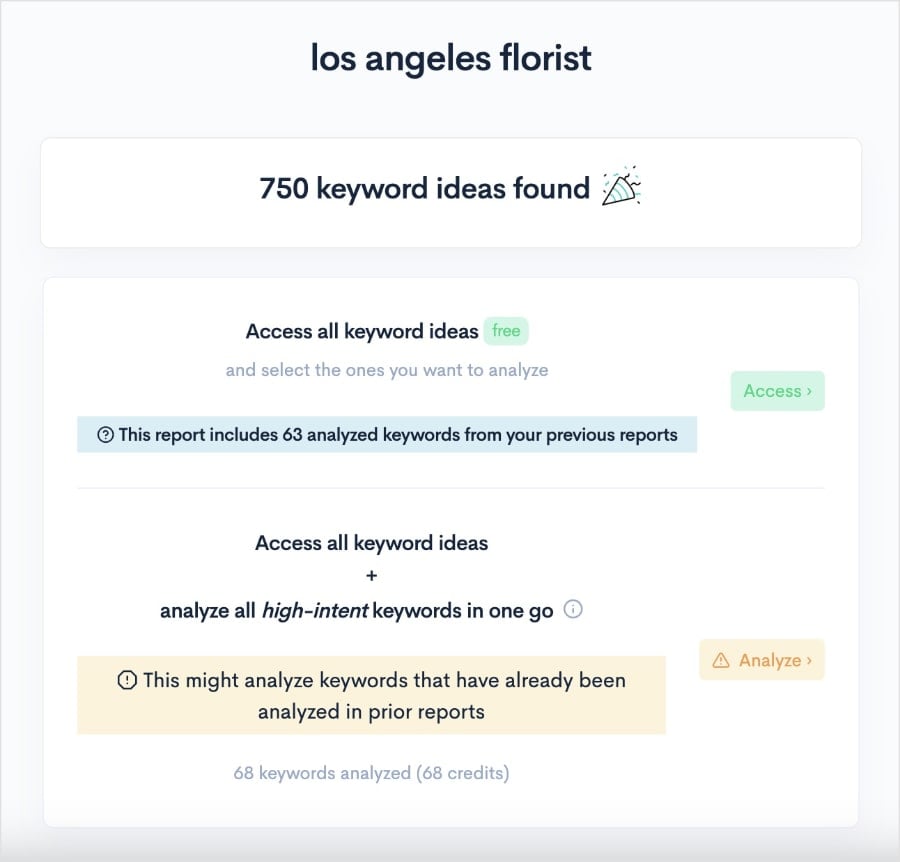
Personally, I like to go with the second option (analyze high-intent keywords) because it’s faster. Although, if you’re low on credits, it’s no problem to select the first option instead.
Once you have searched a keyword and analyzed the SERPs, you’ll get a report like this:
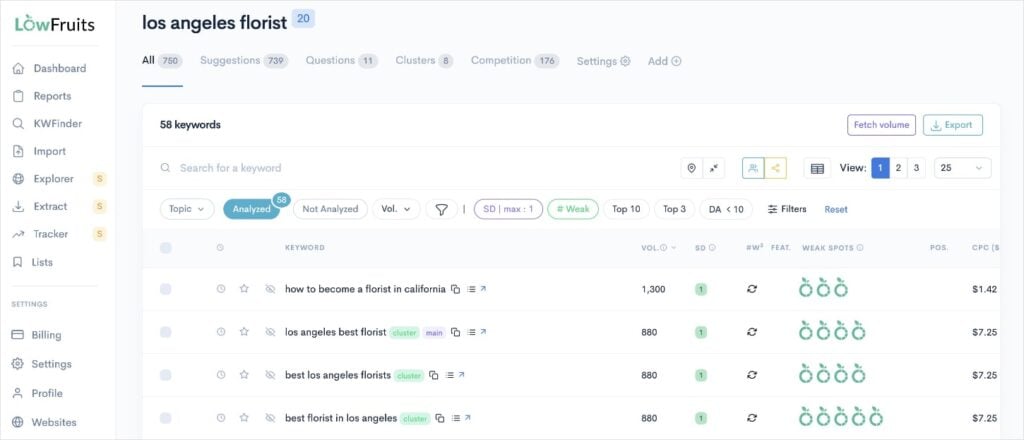
Congratulations, you’ve successfully performed keyword research in just a few steps!
Now, it’s time to figure out which keywords are worth targeting in your content.
This is super easy in LowFruits.
Pay special attention to the following two columns in the report:
- SERP Difficulty Score (SD): This metric represents the keyword difficulty. 1 is easy, 2 is medium, and 3 is hard.
- Weak Spots: Each icon represents a low-authority domain ranking in the top 10 search results. These are competitors that are easy to outrank.
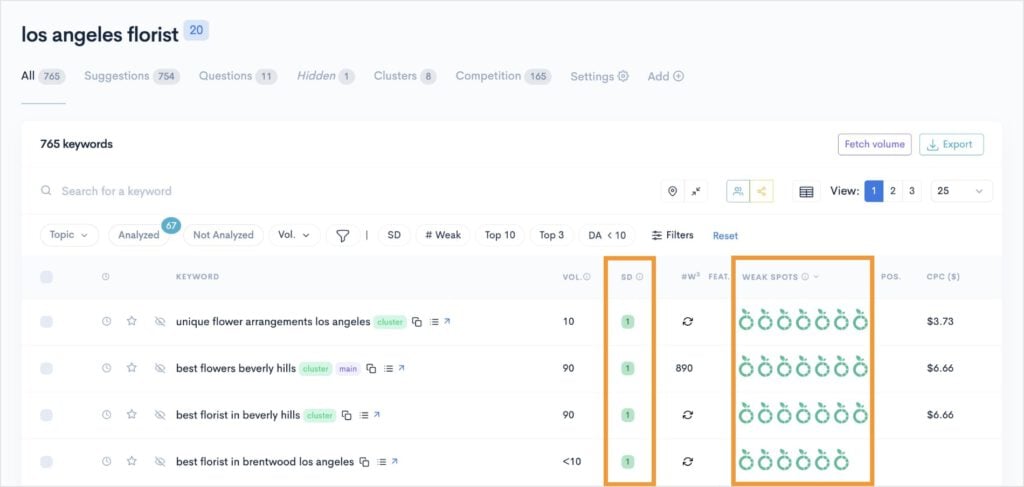
By focusing on low SD scores and multiple Weak Spots, you’ll be able to identify easy keywords for your website.
I recommend keeping an eye on the keyword search volume, too, so you know which terms to prioritize.
And that’s all there is to it!
As you can see, keyword research in LowFruits is simple and straightforward. There’s no unnecessary metrics or overwhelming steps to get to keywords that are attainable for your small business.
I want to also mention that you can also do competitor analysis in LowFruits using the Domain Explorer and Keyword Extractor tools.
To learn more, see: How to Find Competitors’ Keywords.
Related reading:
Semrush
When you get started in Semrush, you’ll notice that you have a few different options for keyword research.
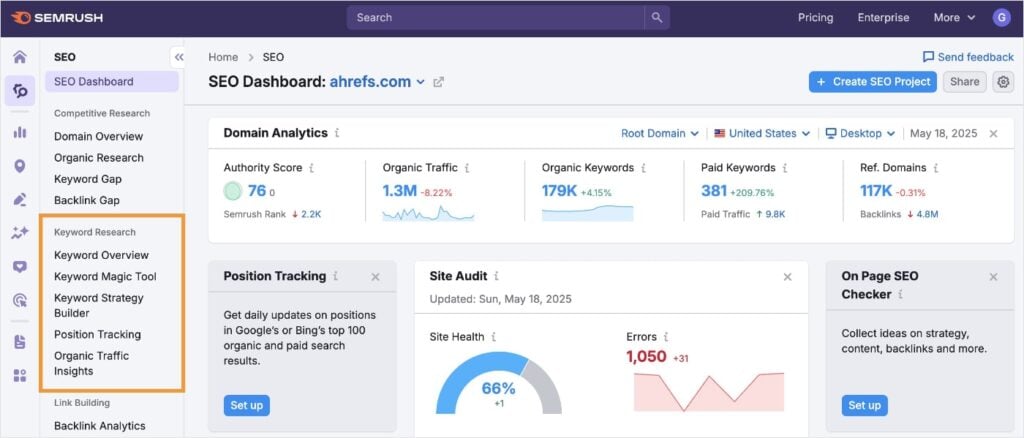
I’ll provide a quick overview of the first two tools since those are likely to be the ones you’d use most often.
First up, is Keyword Overview.
This one is pretty straightforward. You just enter any keywords (up to 100) you’re interested in.
From here, Semrush provides the metrics for each keyword. Easy? Definitely. Good for getting keywords you can rank for? Eh, not really.
Look at the report below. All my keywords have a keyword difficulty score (KD%) of 79 or higher. That’s extremely hard!
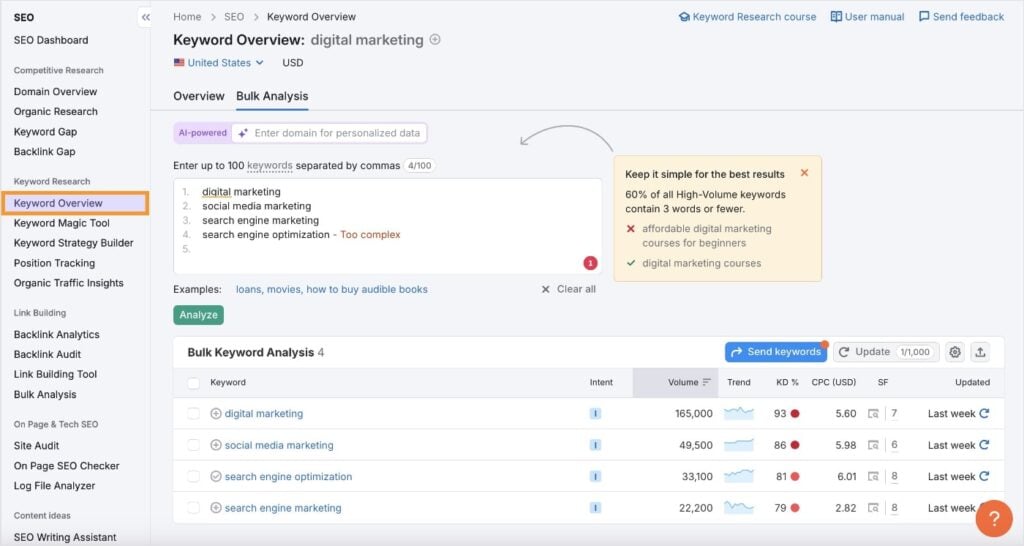
If I was writing for a new business in the digital marketing space, these would be super challenging to rank for. That’s why I don’t love Keyword Overview for finding easy keywords.
With that said, you can use the Keyword Magic Tool to dive deeper into a specific keyword and potentially find other, easier keywords.
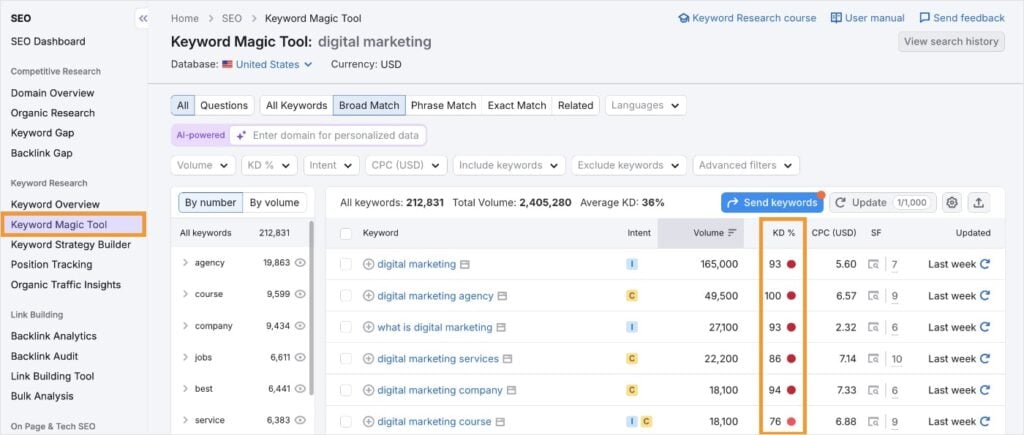
Unfortunately, in my case, I did not. All the keywords with high search volumes were difficult to rank for.
This is pretty normal for Semrush.
The good news is that you can use a filter to show only easy keywords. (FYI: you can do this in LowFruits, too.)
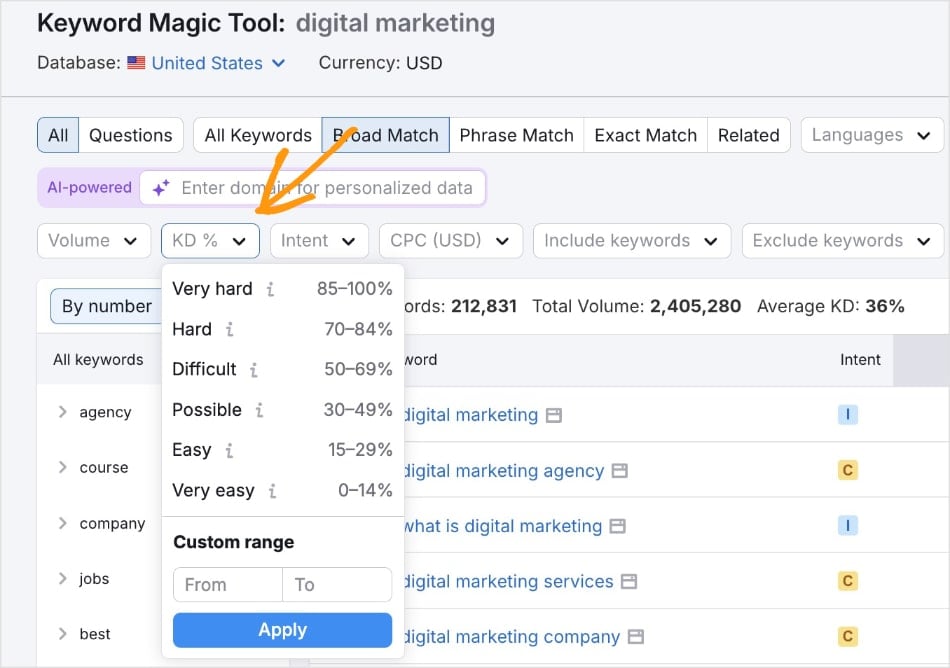
When I selected “Easy” keywords, I got the following list:
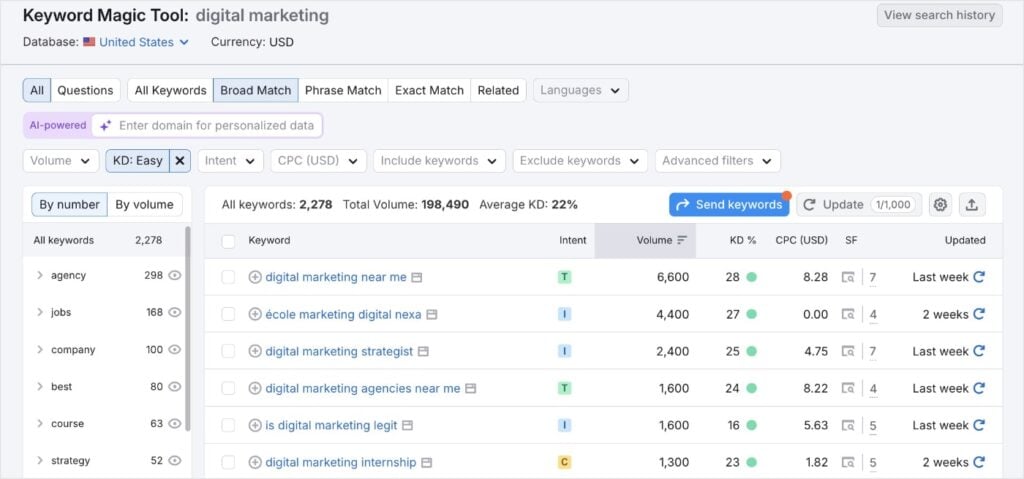
There are 2,278 results.
That’s a lot of keywords to go through, which is why I like how LowFruits curates high-intent keywords for you. This refines your list from the get-go, so you don’t have to spend a lot of time analyzing keywords that might not be relevant to your business or align with your SEO goals.
So, in summary, yes, Semrush has a decent ease of use, but we barely scraped the surface of its features. Even just by looking at the screenshots, you can probably tell there’s a lot more data to comb through.
This can be good, when you have the time or know what you’re doing, but might be unnecessary for your everyday user.
Comparison Recap
In terms of ease of use, LowFruits stands out with its clean, focused interface designed specifically for efficient keyword research. With one main tool — the Keyword Finder — it simplifies the process, allowing even beginners to quickly identify easy keywords without being bogged down by extraneous data.
In contrast, Semrush offers a broader, more complex suite of tools. While its Keyword Overview and Keyword Magic Tool provide extensive data, navigating through layers of metrics and endless keyword lists can be overwhelming, particularly for small business owners or those new to SEO.
Simply put, LowFruits curates high-intent keywords in a user-friendly way, whereas Semrush’s robust features might be more than what everyday users need.
Now, let’s see how LowFruits compares to Semrush when it comes to keyword data.
Keyword Data Accuracy
LowFruits
LowFruits extracts its keyword ideas from Google Autocomplete. This means that when you perform a search on LowFruits, you tap into what users are searching for right now.
Google Autocomplete reflects current trends and user behavior, ensuring that the keyword suggestions are timely and relevant.
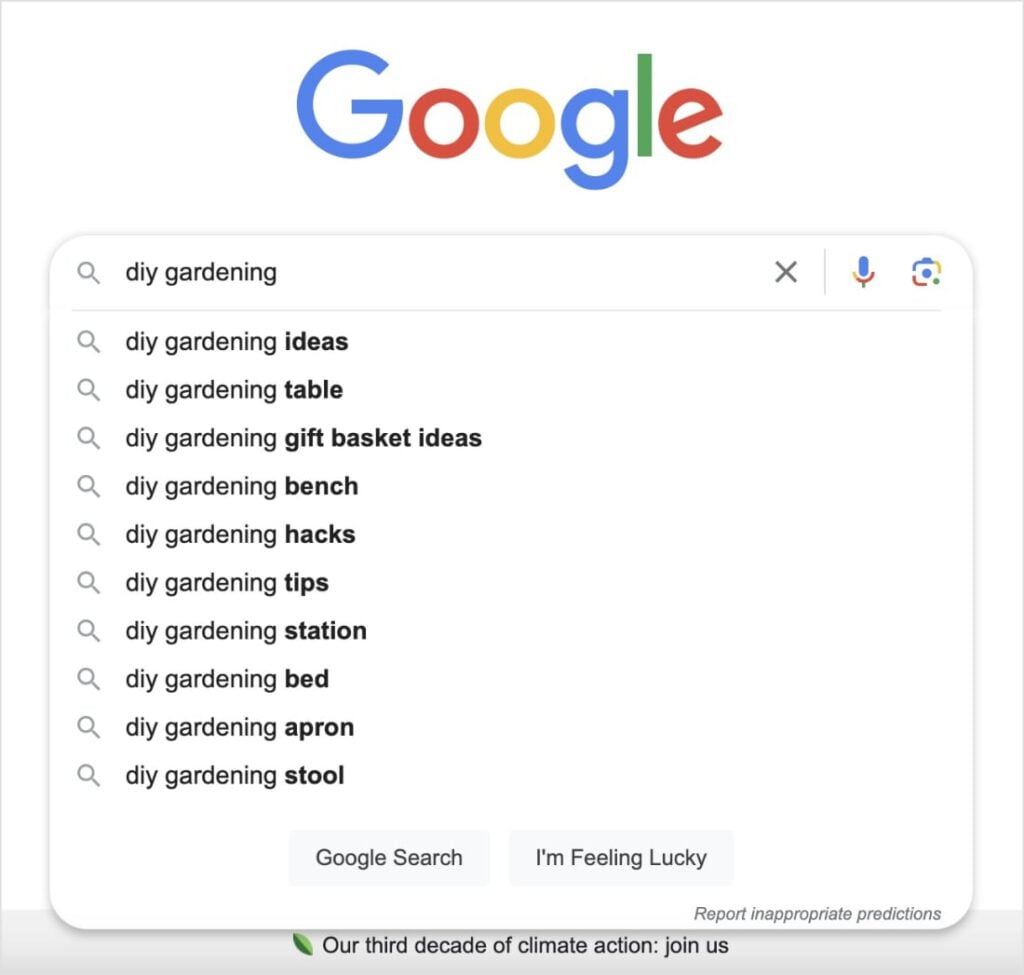
This direct link to Google’s own data makes LowFruits exceptionally accurate at finding long-tail keywords and measuring their potential.
It uses proprietary algorithms to calculate metrics, like SD scores and Weak Spots.
Semrush
Semrush claims to use millions of sources to collect its data, alongside its own “machine-learning algorithms” and databases.
While Semrush provides depth and detail, verifying if a keyword truly reflects today’s search behavior may require extra steps.
With LowFruits, you obtain clear, real-time insights directly from Google, removing unnecessary complexity and allowing you to focus on actionable metrics.
Regardless of which SEO tool you use, every platform has its own for collecting and presenting data.
In my opinion, both LowFruits and Semrush are reliable options for obtaining accurate keyword data. It just depends on the type of keyword data you want to see, i.e., long-tail vs. everything.
Pricing & Overall Value
LowFruits
LowFruits has two cost-effective pricing models. Each is designed to offer exactly what you need without charging for unnecessary extras.
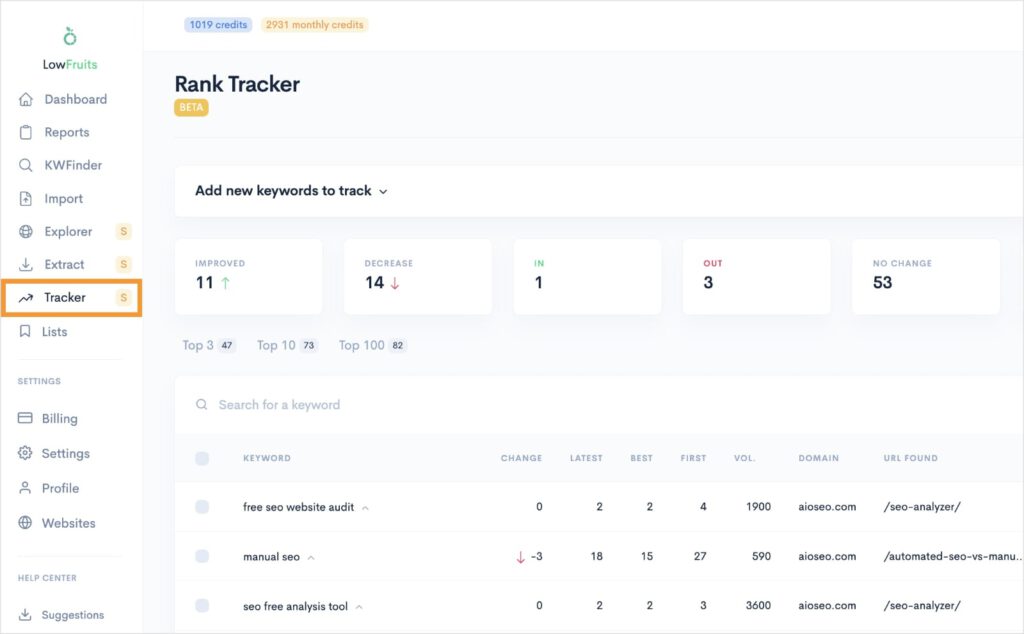
First, you have subscription plans. These plans unlock additional tools like Domain Explorer, Keyword Extractor, and Rank Tracker.
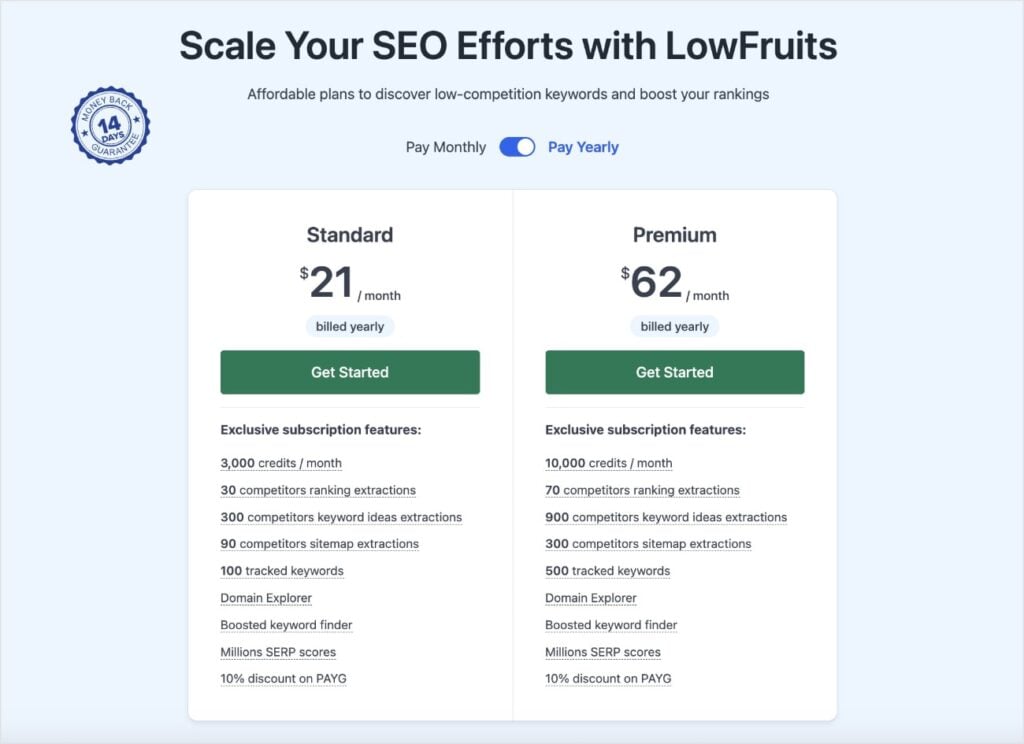
You can choose from a Standard plan that offers 3,000 credits per month or a Premium plan that offers 10,000 credits per month. (LowFruits uses a credit system to analyze keywords in SERPs and display keyword data.)
Each plan also offers varying amounts of competitor ranking and sitemap extractions.
I also want to point out that you can track up to 500 keywords in the Premium plan vs. 100 in the Standard plan.
If you’re running a new business, you’re probably fine with the Standard plan. However, as you grow, it’s a good idea to keep track of your most important keywords. You might benefit from a Premium plan to monitor them all.
Rank Tracker makes it easy to view your ranking keywords and their position changes over time.
The second pricing model LowFruits offers is the Pay-As-You-Go (PAYG) credit system.
As I mentioned above, LowFruits uses credits to extract keyword data. If you’re not planning on using the other tools (like Rank Tracker) or analyzing competitors, it’s a very inexpensive way to perform keyword research.
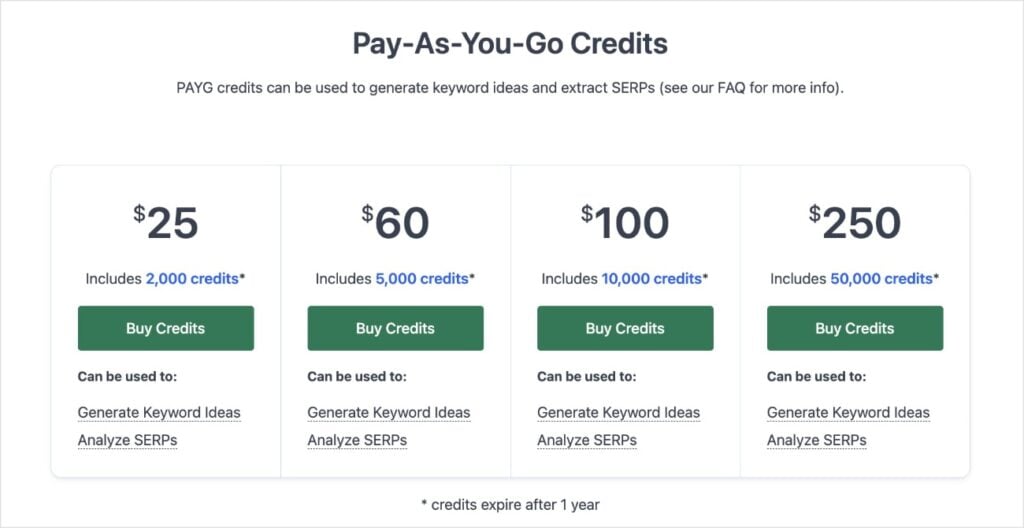
However, you get a boosted Keyword Finder when you have a subscription plan (i.e., more results).
Both options are budget-friendly and designed to accommodate small business owners’ marketing spend.
Semrush
Unlike LowFruits, Semrush only offers monthly (or annual) plans. There’s no credit system.
And here’s where most people get choked up: they start at $139.95 per month.
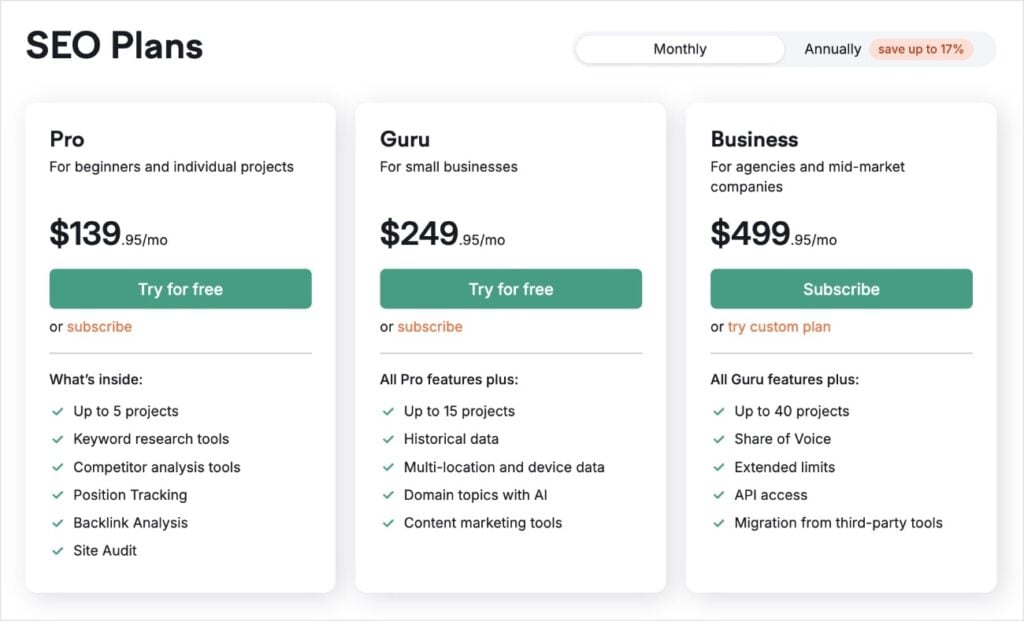
That’s more than 6 months of the LowFruits Standard plan — or 2 months of the LowFruits Premium plan.
It’s expensive. I get it.
Even when I was doing freelance SEO, it hurt to have to hand over $140 each month to get access. (Although, I used a lot of Semrush’s features, so it was worth it — for me.)
Here’s the thing though: most small business owners aren’t going to need all of Semrush’s capabilities.
And that’s okay! Don’t invest a lot of money in a tool that you can’t use to its full potential, especially at that price.
However, if you are going to use Semrush for all your SEO needs, then it’s definitely worth considering. There’s no doubt that Semrush is one of the best SEO tools out there.
After all, it didn’t get to the top for nothing! It has a ton of value and potential to improve your SEO strategy — when you know how to use it and have the budget for it.
Comparison Recap
LowFruits offers two budget-friendly pricing options that cater well to small businesses. You can choose from flexible subscription plans, which include credits for keyword analysis, Rank Tracker, and additional tools like Domain Explorer and Keyword Extractor. A Standard plan starts at $21/month billed annually.
Alternatively, its Pay-As-You-Go system lets you extract keyword data as needed without a full subscription. This focused approach ensures you pay only for what you really use.
In contrast, Semrush operates solely on a monthly or annual subscription basis, starting at $139.95 per month.
While its comprehensive suite is incredibly powerful for advanced SEO needs, the higher price point can be overkill for small businesses that don’t require every feature.
Use Cases: Who Benefits Most From LowFruits vs. Semrush
By now, you’ve probably got a solid grasp on who will benefit most from LowFruits and Semrush, but here’s a quick overview:
For LowFruits, the tool is perfectly suited for:
- Small business owners and startups looking for budget-friendly keyword research that delivers actionable insights.
- Beginners or digital marketers who prefer a straightforward, no-fuss interface focused on generating low-competition, long-tail keywords.
- Time-sensitive users who need to get quickly to the heart of opportunities without wading through an overload of metrics.
- Those who want a flexible pricing model, either through subscription tiers or a pay-as-you-go credit system, ensuring that every dollar spent directly supports their keyword research efforts.
In contrast, Semrush is ideal for:
- Advanced SEO professionals and digital marketing teams who require comprehensive features that extend far beyond basic keyword research.
- Users who need deep, historical data alongside broad competitive insights ranging from backlink analysis to content optimization.
- Enterprises with the budget to invest in a tool that provides endless data points and complex reports necessary for detailed, multi-layered SEO strategies.
- Professionals who have the time and expertise to navigate a robust interface.
Semrush vs. LowFruits FAQs: Your Questions Answered
What makes LowFruits the best alternative to Semrush?
LowFruits offers a simplified user experience, cost-effective pricing, and reliable keyword data that makes it easier to find profitable keywords without getting lost in a sea of unnecessary information. It’s ideal for small business owners, content creators, and beginner SEOs with limited budgets.
Can LowFruits handle advanced keyword research like Semrush?
Yes, while Semrush provides extensive data, LowFruits focuses on delivering precise and actionable insights, making it a great option for both basic and in-depth keyword research.
How do pricing and features compare between LowFruits and Semrush?
LowFruits offers competitive pricing and a streamlined set of features, ideal for users who prefer simplicity over a feature-heavy interface. For subscription plans, pricing starts at $21/month billed annually. Semrush, on the other hand, comes with a more complex set of tools that might be better suited for enterprises with highly specific SEO needs. Its plans start at $139.95/month.
Final Thoughts
While Semrush remains a powerful SEO platform, LowFruits is an excellent alternative for those wanting to focus on long-tail keyword research at a friendlier price point. It combines simplicity, accuracy, and user-friendliness to enhance your SEO strategy and help you focus on what matters most: finding keywords that drive real results.
Ready to simplify your keyword research process?
Take LowFruits for a test drive with 10 free credits and experience the difference yourself. No credit card required.


