
If you’re a small business owner or a DIY SEO, getting your website to rank higher often feels like an uphill battle. Your time is already stretched thin, and figuring out how to boost your rankings can feel like another daunting task on an endless to-do list.
This is where the right SaaS SEO tools become indispensable.
These tools simplify complex tasks, help you uncover hidden opportunities, and guide your SEO strategy. The goal? To get your website ranking higher and bringing in more customers.
In this article, I’ll share my top picks for the best SaaS SEO tools that I’ve used in my 6+ years as a digital marketer. You’ll walk away with the battle-tested strategies to leverage these tools and increase your organic traffic.
In This Article
- What Are SaaS SEO Tools?
- What I’ve Learned When Picking SaaS SEO Tools
- 10 Best SaaS SEO Tools to Outrank the Competition
- 1. LowFruits (Unearth Hidden Ranking Gems)
- 2. Google Search Console (Essential, Free)
- 3. Google Analytics (User Insights on Demand)
- 4. SEOBoost (Content Optimization Made Easy)
- 5. Semrush (Industry Standard All in One SEO Tool)
- 6. AnswerThePublic (Uncover User Questions)
- 7. UberSuggest (Affordable All-in-One for Beginners)
- 8. SE Ranking (Comprehensive Site Audit & Monitoring)
- 9. Screaming Frog (Technical SEO Powerhouse – Desktop)
- 10. All in One SEO (WordPress Users’ Best SEO Friend)
- How to Integrate These SaaS SEO Tools Into Your Workflow
- Common Pitfalls to Avoid (From Someone Who’s Made Mistakes)
- Final Thoughts
- FAQs About SaaS SEO Tools
What Are SaaS SEO Tools?
Let’s start with the basics.
SaaS stands for software as a service. Unlike traditional software you might install on your computer, SaaS tools live in the cloud. This means you access them online through your web browser, often on a subscription basis.
Now, let’s enter the world of search engine optimization.
SEO SaaS tools are designed to help you with various SEO tasks, from on-page optimizations to technical performance fixes. They provide data and features you need to:
- Understand how your website performs in Google.
- Identify keywords related to your business.
- Analyze competitors and their content strategies.
- Optimize your content to rank higher in SERPs.
The best part? They help you do all of this without needing to hire an SEO expert.
What I’ve Learned When Picking SaaS SEO Tools
Let me save you some time (and money) from falling for marketing hype. The best SaaS SEO tools don’t always get the most attention.
Here’s what I’ve discovered after trying more tools than I can count over the years:
Lesson 1: It Has to Be Easy
If a tool requires a week-long course or extensive SEO background, it’s probably not the best. My golden rule is that if I can’t jump and start getting results pretty quickly, it’s a pass. We deserve intuitive interfaces that let you focus on SEO, not on deciphering complicated software.
Lesson 2: Value for Money Is Non-Negotiable
Budgets are a reality, especially when you’re growing a small business. I always seek out tools that offer bang for your buck. That means looking for generous free tiers, robust free trials, or pricing plans that scale fairly with your needs. You shouldn’t have to break the bank just to get good SEO insights.
Lesson 3: Actionable Insights Beat Raw Data Every Time
Getting a mountain of data thrown at you can be more overwhelming than helpful. What you really need are tools that translate that data into clear, actionable steps. I’ve found the most valuable tools are the ones that tell you exactly what to do to improve your rankings, not just show you a bunch of numbers.
Lesson 4: Scalability Matters, Even When You’re Small
While you might be a one-person show right now, your business is growing! I always consider if a tool can grow with you. Can it handle more pages, more keywords, or more projects down the line without forcing you to switch platforms entirely? Planning for the future saves a lot of headaches.
Lesson 5: Sometimes, Niche is Nice
While all-in-one platforms are tempting, I’ve learned that sometimes a specialized tool that excels in one specific area is more effective. Whether it’s a deep-dive keyword research tool, a content optimizer, or a technical SEO crawler, don’t be afraid to mix and match if it means getting the best results for a particular task.
Pro Tip: Don’t get caught up in trying to use every single feature a tool offers. Focus on what solves your immediate problems and helps you make progress. Start small, master a few key functions, and then expand as you get more comfortable.
10 Best SaaS SEO Tools to Outrank the Competition
These are the tools I personally use and recommend. I chose a wide range of specialties, so you can find the best SEO SaaS tool for your specific needs, or create a well-rounded tool stack by combining them.
1. LowFruits (Unearth Hidden Ranking Gems)
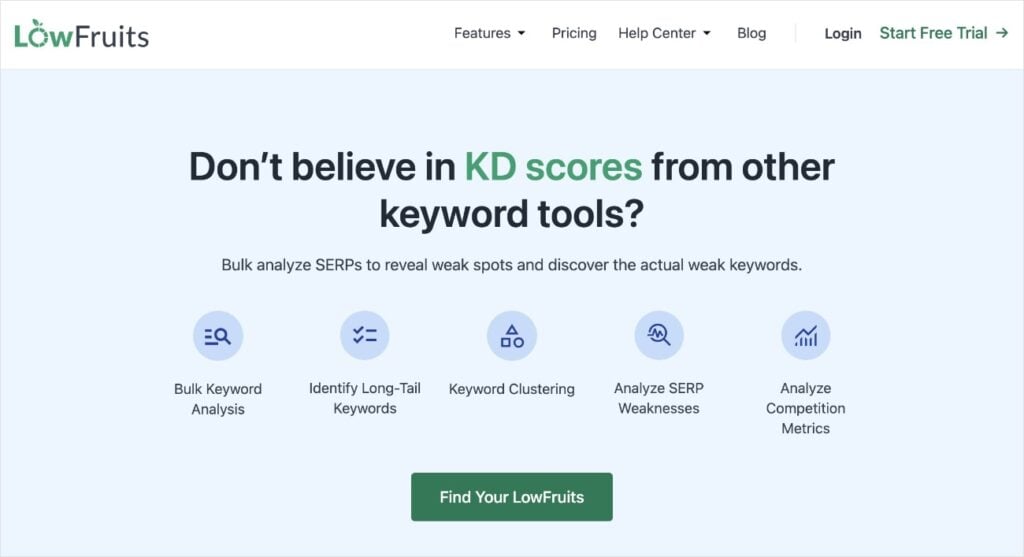
LowFruits is a keyword research tool designed to help you find low-competition keywords you can actually rank for. It’s built for those who want to punch above their weight in SERPs.
Why I Love It: This is where I spend a lot of my time. The biggest challenge for small businesses is competing with established giants. LowFruits cuts through the noise and shows you keywords that have weak competitors and high search volumes.
Here’s how it works:
First, you enter a seed keyword into the KWFinder.
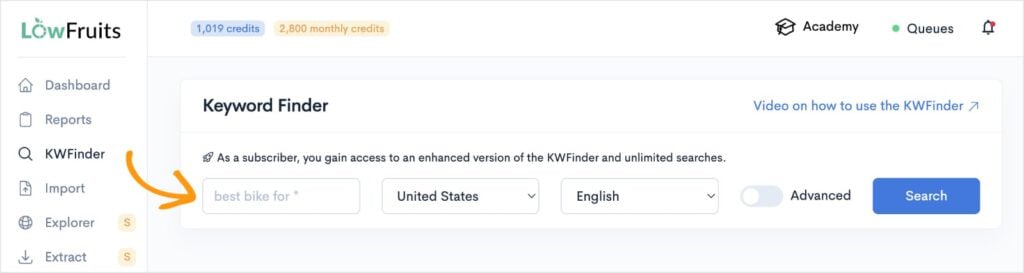
Once LowFruits has gathered data from Google’s Autocomplete feature, you’ll get a keyword report that looks like this:
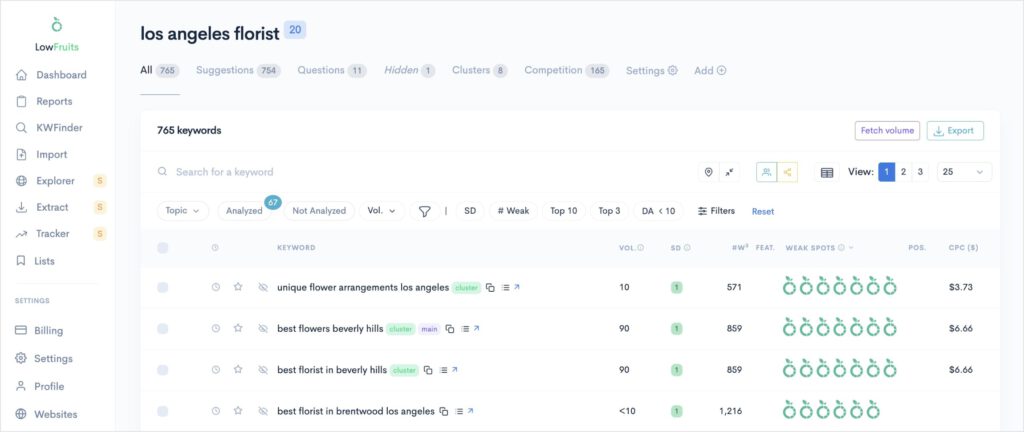
Note: If the right columns are empty, you’ll need to perform a SERP analysis. (Don’t worry, it’s easier than it sounds.) Just check the boxes to the left of the keywords you want to analyze and click “SERP Extract.” LowFruits will populate the columns with data.
Now, here’s what makes LowFruits different from other keyword research tools:
It has unique metrics that make spotting low-competition keywords easy and fast. Here are the two most important for uncovering these “low-hanging fruit”:
- SERP Difficulty Score (SD): This metric represents keyword difficulty. It’s on a scale of 1 to 3, with 1 being the easiest, and 3 being the hardest.
- Weak Spots: Each icon represents a low-authority domain ranking in the top 10 search results. You can outrank these competitors with high-quality content.
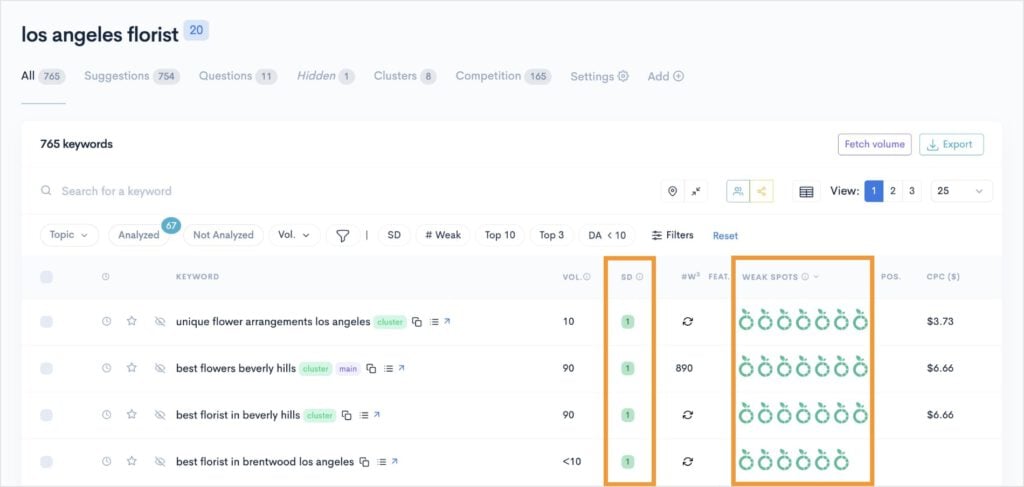
By paying attention to these particularly keyword metrics, you can find search queries that bring targeted traffic to your site — and give you a realistic chance of ranking.
LowFruits also has a Rank Tracker so you can monitor your keyword positions over time. This is a core component of effective keyword research and content optimization in SEO.
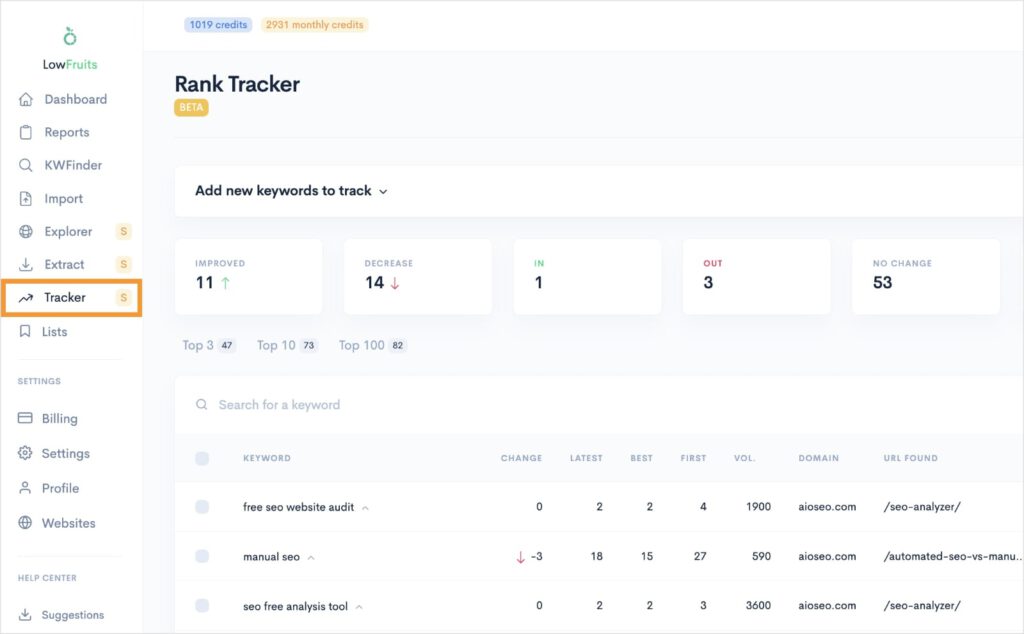
For these reasons, LowFruits has become an easy #1 for my favorite long-tail keyword research tools.
Key Features:
- Identifies “low-hanging fruit” keywords with weak competition
- Analyzes SERP features to show ranking opportunities
- Helps you find long-tail keywords that match user intent
- Tracks keyword positions in Google over time
Pricing: Starts at $21/month.
2. Google Search Console (Essential, Free)
Google Search Console (GSC) is a non-negotiable SEO SaaS tool. Whether you’re a website owner, agency, or marketer, GSC belongs in everyone’s site performance toolkit.
Search Console is a free web service by Google that helps you monitor your website’s performance in Google Search results. It’s like a direct line to Google, telling you exactly how they see your site.
Why I Love It: This is my must-have tool. Why? Because it tells you what keywords your website is ranking for, how many clicks you’re getting, and if Google is finding any issues with your site. It’s foundational.
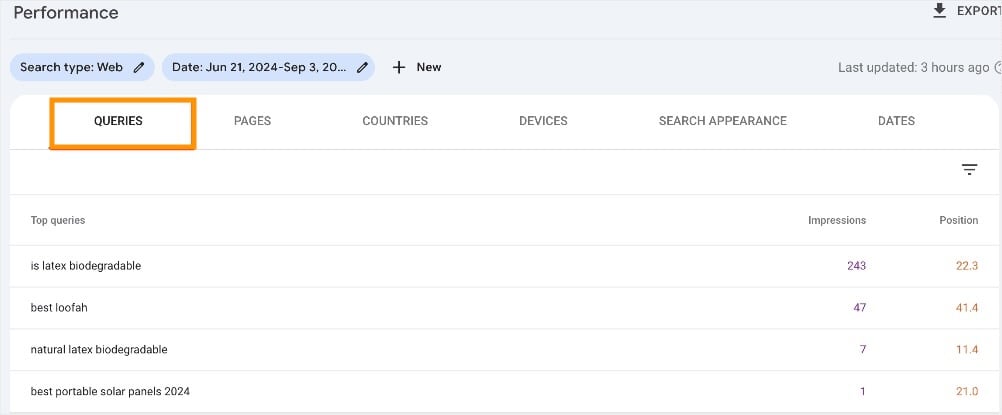
The Queries Performance Report is particularly helpful as it gives you keyword insights like impressions and ranking position.
Key Features:
- See which search queries bring users to your site
- Monitor your site’s indexing status and submit sitemaps
- Identify and fix crawling errors and mobile usability issues
- Get alerts about manual actions or security problems
Pricing: Free.
3. Google Analytics (User Insights on Demand)
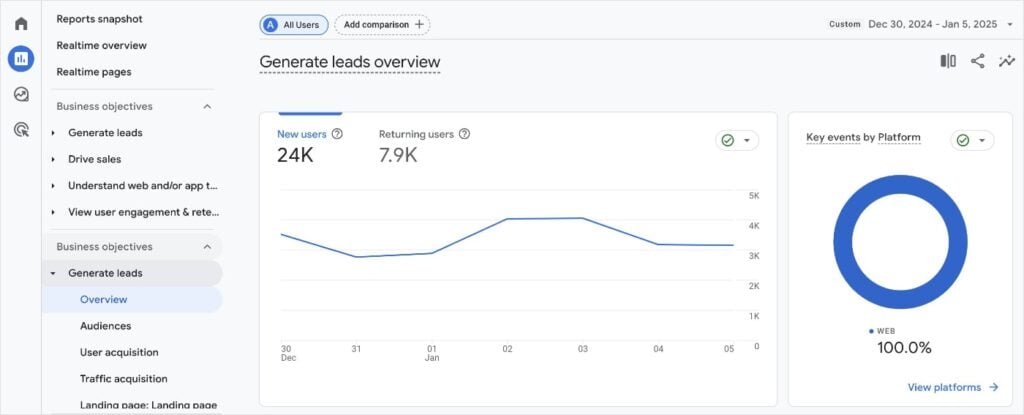
Google Analytics (GA) is another free tool from Google that tracks and reports website traffic. It gives you deep insights into who your visitors are, where they come from, and what they do on your site.
Why I Love It: While GSC tells you how people find you, GA tells you what they do after they arrive. Understanding user behavior is critical for improving your site and content, and GA provides that data for free. I use it to see which blog posts are actually holding people’s attention.
You can also investigate your lead generation efforts and see how they’re paying off. This is considered one of the top SEO benchmarks for small businesses to track.
Key Features:
- Track website traffic, user demographics, and engagement metrics (bounce rate, time on page)
- Monitor conversions (e.g., newsletter sign-ups, contact form submissions)
- Understand user flow through your website
Pricing: Free.
Pro Tip: Connect Google Analytics with Google Search Console. This integration allows you to see your search queries directly within GA, giving you a more complete picture of user behavior from search to conversion.
4. SEOBoost (Content Optimization Made Easy)
SEOBoost is a content optimization tool designed to help you write content that ranks. It analyzes top-ranking pages for your focus keyword and provides suggestions to improve your content’s relevance and depth.
Why I Love It: Writing content that Google loves can feel like a guessing game. SEOBoost takes the guesswork out of it by giving you real-time SEO feedback. This process helps you create content that covers all the essential topics that top-ranking pages include, without over-optimizing. It helps you write smarter.
I’m particularly fond of their Topic Reports. This is almost always my first stop when creating a fresh piece of content.
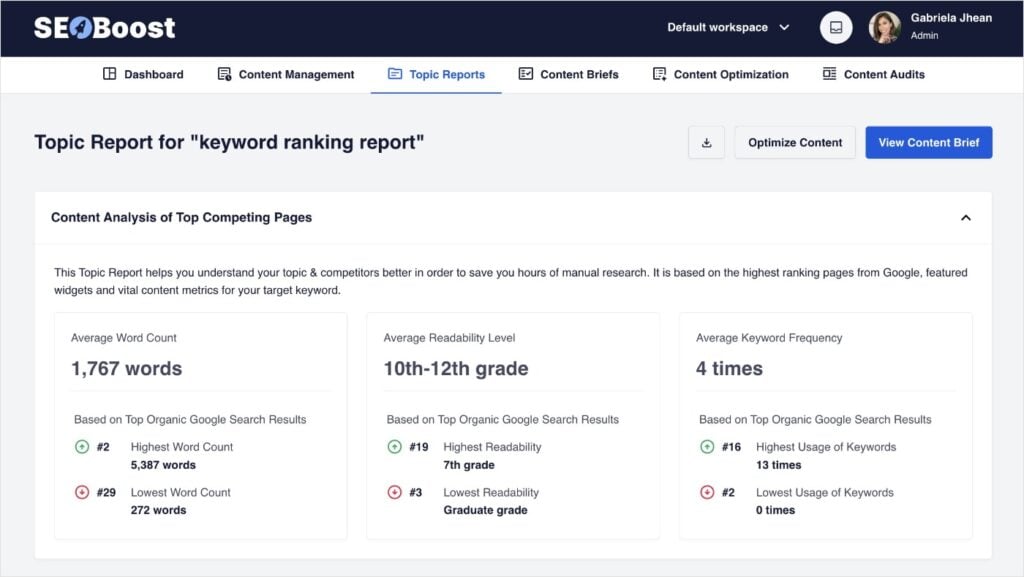
After entering your target keyword, SEOBoost provides you with an average word count, readability level, and keyword frequency of top-ranking domains.
This informs your own writing process, allowing you to compete with what’s already in SERPs.
Key Features:
- Analyzes competitor content for keyword usage and structure
- Provides suggestions for related keywords and topics to include
- Offers a content score to gauge optimization level
- Includes a content management system for easy planning
Pricing: Offers a 14-day free trial. Paid plans start at $22.50/month.
Pro Tip: Use SEOBoost before you start writing. Let it help you create a content brief that outlines all the important subtopics and questions related to your main keyword. This ensures your content is thorough and addresses search intent.
5. Semrush (Industry Standard All in One SEO Tool)
Semrush is a comprehensive digital marketing platform offering tools for SEO, content marketing, competitive research, PPC, and social media marketing. It’s a true powerhouse.
Why I Love It: While it might seem intimidating at first, Semrush is an industry leader for a reason. I’ve personally relied on Semrush for deep dives into competitor strategies and extensive keyword research. It’s the kind of tool that grows with you, offering advanced features as your SEO needs become more sophisticated.
One of my favorite features is its Keyword Gap tool. You can enter your website and up to 3 competitors to identify keywords that they’re ranking for but your website isn’t. (You can also see where you’re ranking and they’re not.)
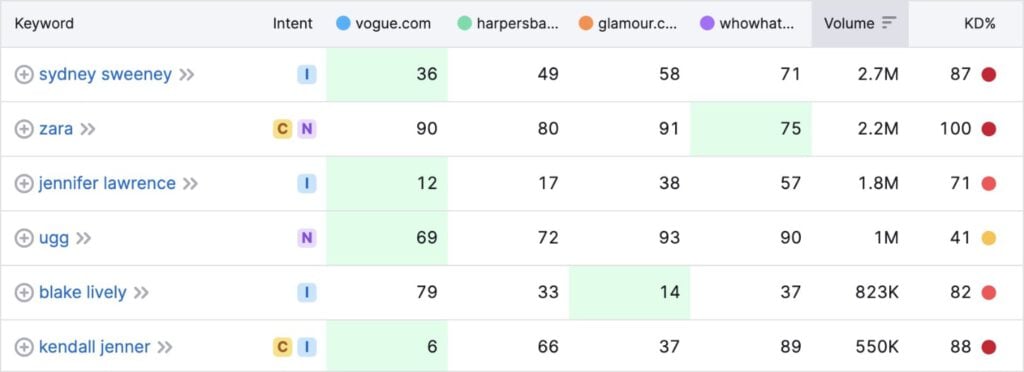
These insights inform your own content strategy, allowing you to identity missed opportunities.
I also want to give a shoutout to the Backlink Analytics tool. I use this for competitive research when I’m trying to understand a competitor’s backlink profile and identify potential backlinking opportunities.
Key Features:
- In-depth keyword research and gap analysis
- Comprehensive site audits to find and fix technical issues
- Competitor analysis (organic research, backlink analysis)
- Content marketing tools for topic research and content optimization
Pricing: Starts at $129.95/month.
6. AnswerThePublic (Uncover User Questions)
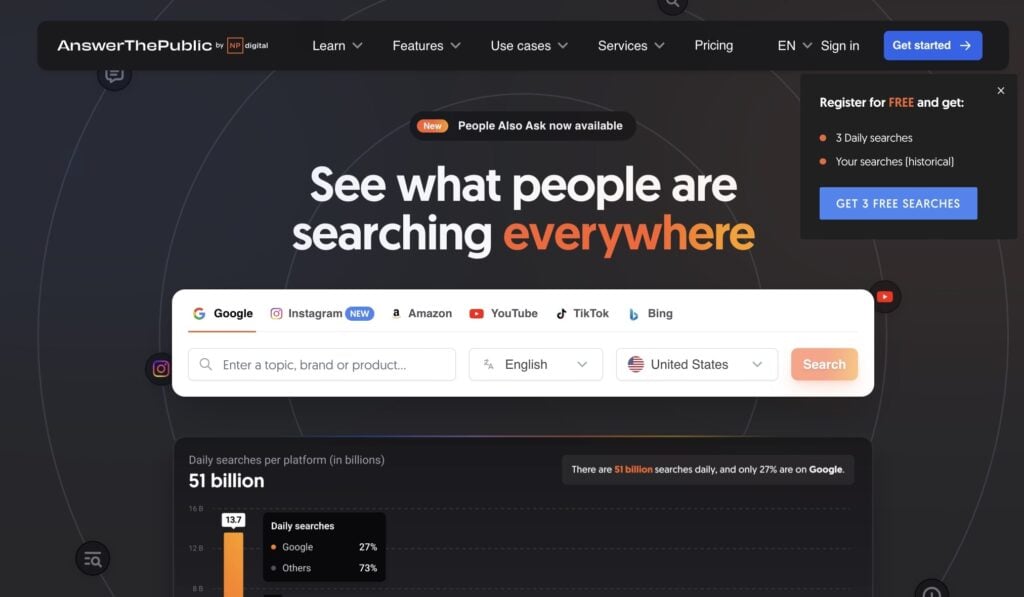
AnswerThePublic is a visual keyword research tool that leverages data from multiple search engines. You can tap into search queries from Google, Instagram, YouTube, TikTok, and Bing.
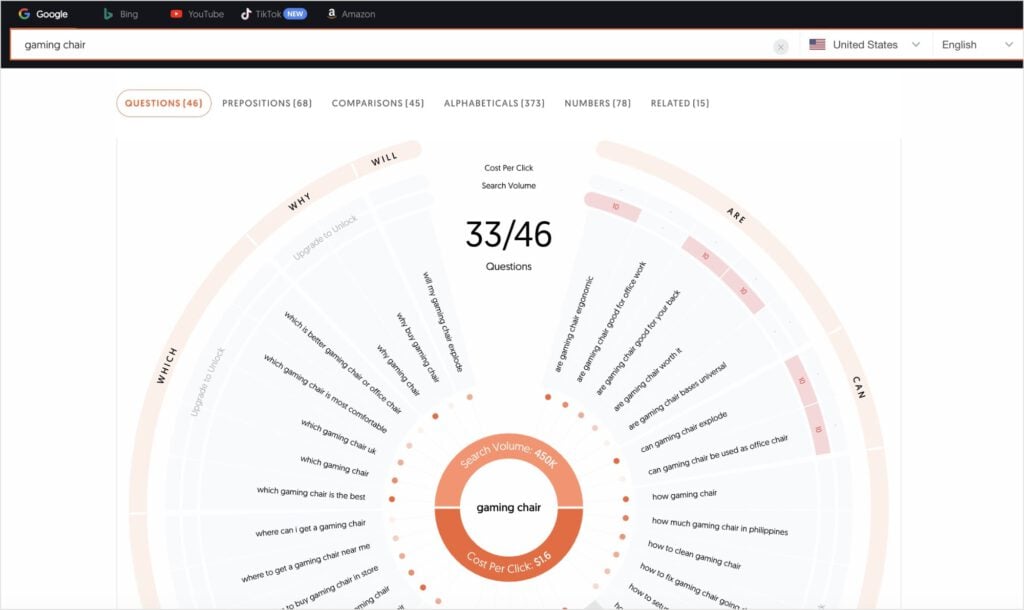
Why I Love It: This tool is a goldmine for content ideas, especially for “People Also Ask” boxes and AI Overviews. I use it to understand the exact questions my audience is asking, which helps me craft content that directly answers their needs. It’s like peering into the minds of your potential customers.
Key Features:
- Generates question-based keywords (Who, What, When, Where, Why, How)
- Visualizes search queries in an intuitive format
- Provides comparison queries (e.g., “tool A vs. tool B”)
Pricing: Get 3 free searches per day. Paid plans start at $11/month.
Pro Tip: Export the data from AnswerThePublic and use it to create dedicated FAQ sections in your blog posts. This directly targets “People Also Ask” results and can significantly boost your visibility in AI Overviews.
7. UberSuggest (Affordable All-in-One for Beginners)
Ubersuggest, by Neil Patel, is an all-in-one SEO tool that offers keyword research, content ideas, site audits, and competitor analysis. It’s known for being user-friendly and more budget-friendly than some of the larger suites.
Why I Love It: For those just starting out and needing a broad overview without breaking the bank, Ubersuggest is a solid choice. Its interface is very intuitive, making it easy to grasp basic SEO concepts and get quick insights.
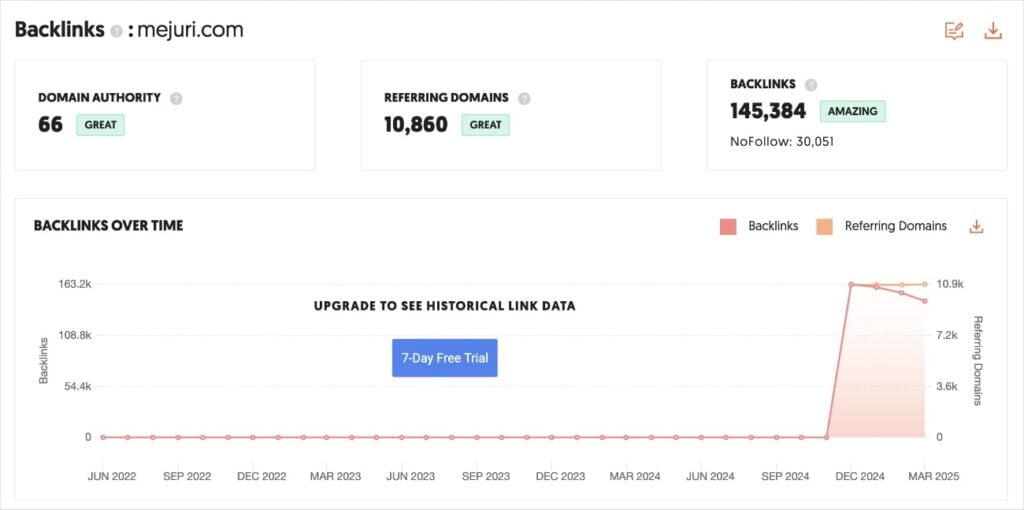
While I don’t have an UberSuggest anymore, I still like to recommend it for beginners. I particularly liked using the Backlink Checker for competitor analysis. The data is to the point, easy to read, and reliable.
Key Features:
- Keyword ideas and content suggestions
- Basic site audit to identify technical issues
- Competitor analysis for top pages and keywords
- Backlink data
Pricing: Free 7-day trial. Paid plans start at $29/month.
Pro Tip: Use Ubersuggest’s Content Ideas report. It can spark inspiration for blog posts that are already performing well for others, giving you a head start on topics that resonate with an audience.
8. SE Ranking (Comprehensive Site Audit & Monitoring)
SE Ranking is a versatile, cloud-based SEO platform that includes a robust site audit tool. It helps you identify technical SEO issues, monitor website health, and track your overall SEO performance, all from your browser.
Why I Love It: As a SaaS SEO tool, SE Ranking is a strong alternative for technical audits, especially if you prefer not to download desktop software. I appreciate how it combines a powerful crawler with clear, actionable reports, making complex technical issues understandable even for DIY SEOs.
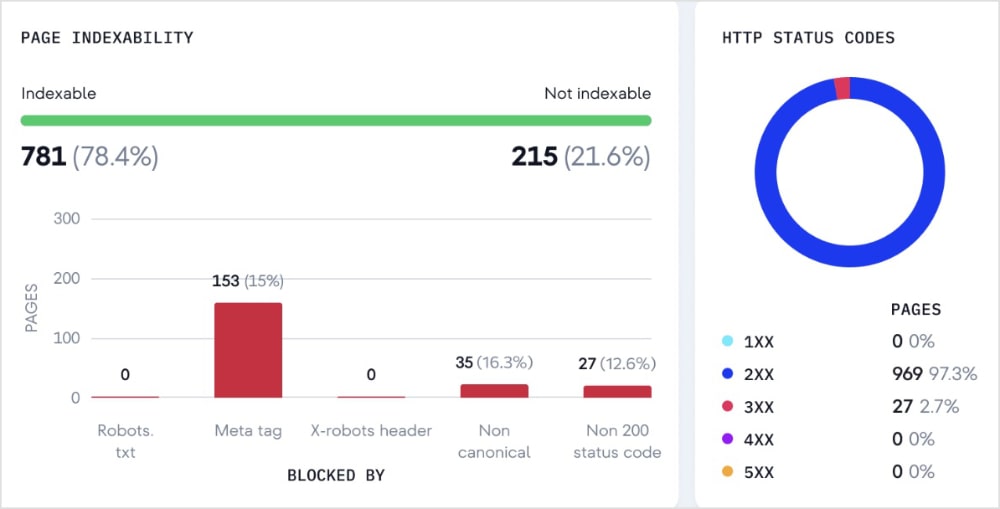
Overall, it’s a great all-in-one solution for keeping your site technically sound.
Key Features:
- Comprehensive website audit to detect technical issues (e.g., broken links, duplicate content, crawl errors)
- On-page SEO checker for individual pages
- Website health score and prioritized recommendations
- Competitor analysis and backlink monitoring
Pricing: Free 14-day trial. Paid plans start at $52/month.
9. Screaming Frog (Technical SEO Powerhouse – Desktop)
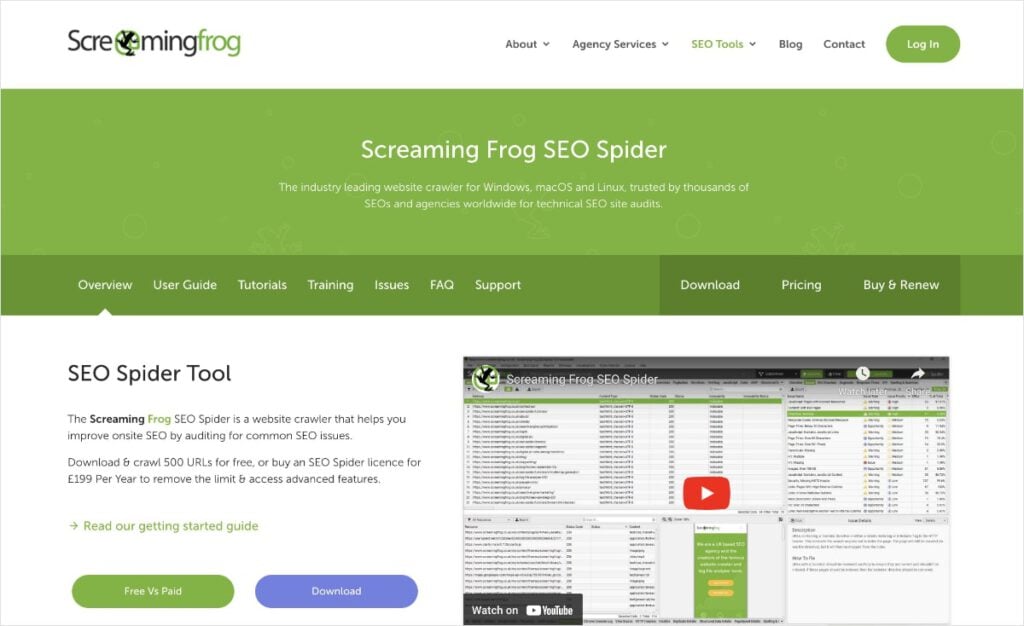
Okay, technically this next recommendation isn’t an SaaS tool, but I’m such an avid user that I wanted to include it on this list.
Screaming Frog SEO Spider is a desktop program that crawls websites, much like search engines do, to identify common SEO issues. While not a SaaS tool (you download it to your computer), it’s so easy to use and powerful that I still love it and recommend it for technical SEO audits.
Why I Love It: This tool might look a bit intimidating with its spreadsheet-like interface, but it’s incredibly powerful for technical SEO. I use the free version for myself and most clients. It crawls up to 500 URLs per domain, which is typically more than enough.
It flags issues that can silently hurt your rankings such as missing meta descriptions, duplicate content, and potentially incorrect canonical URLs.
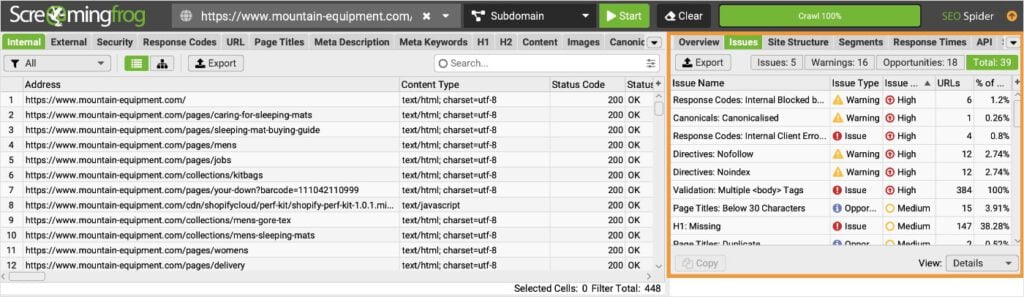
It’s like giving your website a full health check-up — for free and without coding or manual data scrapes.
Key Features:
- Finds broken links (404s) and redirects
- Identifies duplicate content, page titles, and meta descriptions
- Audits meta robots and directives
- Generates XML sitemaps
Pricing: Free version crawls up to 500 URLs per domain/crawl. Paid version offers unlimited crawling and costs $279/year.
10. All in One SEO (WordPress Users’ Best SEO Friend)
No SaaS SEO tool lineup would be complete without a WordPress plugin. After all, over 43% of all websites are hosted on it.
My favorite? All in One SEO.
All in One SEO (AIOSEO) is the original WordPress plugin for SEO. Today, it has over 3 million active users, and I’m one of them. I’ve been using it for over 2 years now, and I’ve got to say that I’ll never turn to another SEO plugin.
Why I Love It: AIOSEO does everything you need an SEO plugin to do. And it does it in a way that’s accessible for every SEO level. It simplifies complex tasks, allowing you to:
- Add schema markup.
- Automate internal linking.
- Create XML sitemaps.
- Perform SEO audits.
- Enhance author SEO (Google E-E-A-T).
- Monitor SEO revisions.
- Connect to Google Search Console.
- And more.
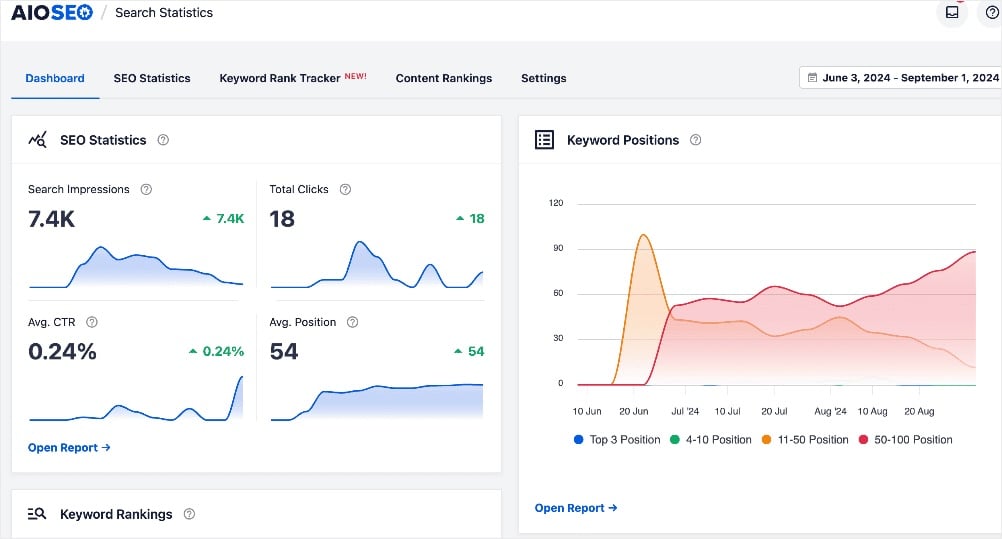
I really like the Search Statistics feature, which brings Google Search Console data directly into your WordPress dashboard. This keeps me from jumping between tools and tabs to get all my most important performance metrics.
Key Features:
- Easy setup wizard for basic SEO configuration
- Optimizes title tags and meta descriptions
- Generates XML sitemaps
- Includes schema markup generator for rich snippets
- Integrates with Google Search Console
Pricing: Free Lite version available. Paid plans start at $49.60/month.
Pro Tip: Utilize AIOSEO’s TruSEO Score and checklist when writing new content. It provides real-time feedback on your on-page SEO, guiding you to include keywords naturally, improve readability, and ensure your content is well-structured for search engines.
How to Integrate These SaaS SEO Tools Into Your Workflow
Now that you know about some of the best SaaS SEO tools, let’s talk about how to actually use them.
Think of your SEO tools like a small, dedicated team, each with a specific role to play. You don’t need to use them all at once, but understanding their combined power can streamline your efforts.
Here’s a simplified workflow I often recommend:
- Keyword Research (LowFruits First!): Start with LowFruits to find those low-competition, high-opportunity keywords. These are the topics where you have the best chance of ranking quickly.
- Content Creation & Optimization: Once you have your target keywords, use a tool like SEOBoost to guide your writing. Make sure your content is comprehensive, answers user questions (perhaps from AnswerThePublic), and is optimized for your chosen keywords. If you’re on WordPress, AIOSEO will be your go-to for on-page tweaks.
- Technical Health Check: Regularly run crawls with SE Ranking and Screaming Frog (for smaller sites, the free version is great!) and monitor Google Search Console. Fix any broken links, crawl errors, or indexing issues promptly.
- Monitoring & Tracking: Keep an eye on your progress with Google Analytics (for traffic and user behavior) and Google Search Console (for keyword rankings and impressions). Semrush can also provide more in-depth rank tracking and competitor insights as you grow.
Pro Tip: Don’t try to master every tool at once. Pick one or two to start, get comfortable with their core functions, and then gradually expand your toolkit as your needs evolve. Consistency in applying basic SEO principles with a few good tools is far more effective than sporadic use of many complex ones.
Common Pitfalls to Avoid (From Someone Who’s Made Mistakes)
As someone who’s seen countless small businesses navigate the SEO landscape, I’ve noticed a few common traps. My honest advice? Learn from these so you can avoid unnecessary frustration:
- Getting Overwhelmed: It’s easy to get lost in the sheer number of tools and data points. Remember, the goal is to drive results, not to become a tool expert. Focus on the actionable insights.
- Ignoring the Basics: Tools supplement, they don’t replace good SEO fundamentals. Things like quality content, a fast website, and a good user experience are paramount. No tool can fix a fundamentally poor website.
- Chasing Vanity Metrics: Don’t get fixated on metrics that don’t directly impact your business (e.g., obsessing over daily ranking fluctuations for a single keyword). Focus on what truly drives traffic, leads, and sales.
- Not Taking Action: The best tools in the world are useless if you don’t implement their recommendations. SEO is about consistent effort and iterative improvements.
SEO is a marathon, not a sprint. You won’t see overnight results, and that’s okay. Consistency in applying the right strategies and using your tools effectively beats intensity every single time.
Celebrate small wins, learn from setbacks, and keep moving forward.
Final Thoughts
Navigating the world of SEO can feel daunting, but with the right SaaS SEO tools in your corner, it becomes a much more manageable and even enjoyable journey.
I truly believe that by leveraging the power of these platforms, you can demystify SEO and drive real, measurable growth for your business.
Don’t let the competition scare you. Focus on finding your unique opportunities, creating valuable content, and optimizing your online presence.
With tools like LowFruits, Google Search Console, and the others we’ve discussed, you’re well-equipped to increase your organic traffic.
FAQs About SaaS SEO Tools
A SaaS (software as a service) SEO tool is a cloud-based application that helps users optimize their websites for search engines. These tools are accessed online (not installed on your computer) and provide features for keyword research, site auditing, content optimization, backlink analysis, and more.
A SaaS (software as a service) SEO tool is a cloud-based application that helps users optimize their websites for search engines. These tools are accessed online (not installed on your computer) and provide features for keyword research, site auditing, content optimization, backlink analysis, and more.
It depends on the tool and your goals. For technical audits (SE Ranking, GSC), a monthly or quarterly check is often sufficient unless you’ve made major site changes. For keyword research (LowFruits, Semrush) and content optimization (SEOBoost), you’ll use them more frequently as you plan and create new content. Monitoring tools (GSC, GA) should be checked regularly, perhaps weekly or bi-weekly, to track performance.
No tool can guarantee top rankings. SEO tools provide data, insights, and recommendations to help you make informed decisions and improve your chances of ranking. Your success still depends on the quality of your content, your overall SEO strategy, and the competitiveness of your niche.


