
I remember when my blog was a disorganized mess. Then, I found pillar content.
When I first started writing blogs, I was just publishing post after post. I was creating a ton of content, but my traffic was stuck, and I couldn’t figure out why.
I later learned that the problem wasn’t the quality of my articles, but the lack of organization. My site was like a library without a catalog, making it hard for visitors—and Google—to see my expertise on any single topic.
It was a frustrating experience, but it led me to discover one of the most powerful content strategies out there: pillar pages. By creating comprehensive guides on core topics and linking all my smaller posts to them, I finally started to see the traffic and authority I was looking for.
In this guide, I’ll share how I use this strategy to build authority and increase organic traffic. You’ll also learn the exact process I follow to create pillar pages that users and search engines love.
Let’s get started.
In This Article
What Is a Pillar Page?
A pillar page is a comprehensive, authoritative article that acts as the foundation for a specific topic on your website. Think of it as the main hub in a wheel, with all your related, more detailed blog posts (your cluster content) branching out like spokes.
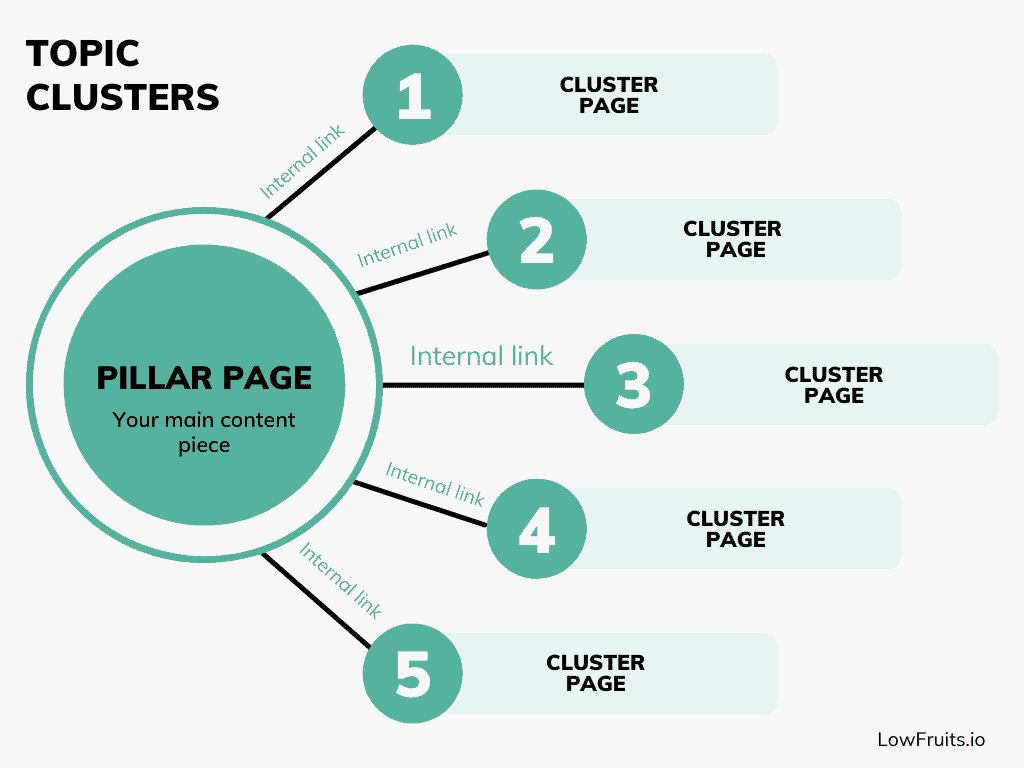
While a typical blog post might focus on a single, narrow question (“How long should a blog post be for SEO?”), a pillar page tackles the entire subject (“The Complete Guide to Content Marketing”). It gives readers a broad, useful overview while pointing them to supporting articles for deeper dives on subtopics.
A well-structured pillar page has several key attributes.
| Attribute | Description |
|---|---|
| Comprehensive Coverage | Covers every major aspect of its core topic in one place. |
| Answers User Questions | Answers the most common questions your target audience has. |
| Internal Linking Hub | Links out to related, in-depth articles for each subtopic (your cluster content). |
| Clear Navigation | Makes it easy for visitors and search engines to navigate your content. |
This structure demonstrates to search engines that you’re an expert on the subject and makes your site clear for both users and bots. As you build out more cluster content and link everything together, your pillar page becomes a magnet for organic traffic and authority in your niche.
Why Pillar Content Matters for SEO
In my experience, many sites struggle to rank not because their content is bad, but because it’s disorganized. When you publish dozens of standalone blog posts on similar topics, Google has a harder time understanding your expertise, and readers have a tougher time navigating your site.
Pillar content solves both problems. Here’s why they’re a game-changer:
- Improved Site Structure: Pillar pages group related content together in a clear, logical way, making it easy for visitors to find what they need. This “hub and spoke” approach also helps search engines crawl, understand, and trust your site.
- Stronger Internal Linking: Each cluster article links back to the pillar page, and the pillar links out to the clusters. These internal links pass authority across your site and help distribute ranking power where it matters most.
- Higher Keyword Rankings: Because pillar pages are comprehensive and naturally target a wider range of keywords, they’re more likely to rank for multiple search terms. They also attract backlinks, another key factor in Google’s algorithm.
- Enhanced User Experience: Visitors land on a pillar page, get their big questions answered, and are guided to more specific resources. This keeps them on your site longer and increases the chance they’ll trust you.
In short, pillar content organizes your expertise, builds authority, and makes it much easier for both Google and your audience to see the value you offer.
How to Choose the Right Topic for Your Pillar Page
Before you can build your pillar page, you need a topic. A great pillar topic is broad enough to be broken down into many smaller articles but specific enough to be valuable to your audience.
Here’s the process I follow to find the perfect topic:
1. Brainstorm Your Core Topics
Start by asking yourself: What are the fundamental topics my business is built on?
These are usually the main services or products you offer. You should also think about what problems you solve for your customers.
I like to jot down 3–5 broad themes that keep showing up in customer questions or support tickets.
Not sure where to start? I recommend looking through your existing blog categories or customer FAQs. These are goldmines for pillar opportunities.
2. Validate Your Topic With Research
Once you have a few ideas, you need to see if people are actually searching for them. This is where a good keyword research tool comes in handy.
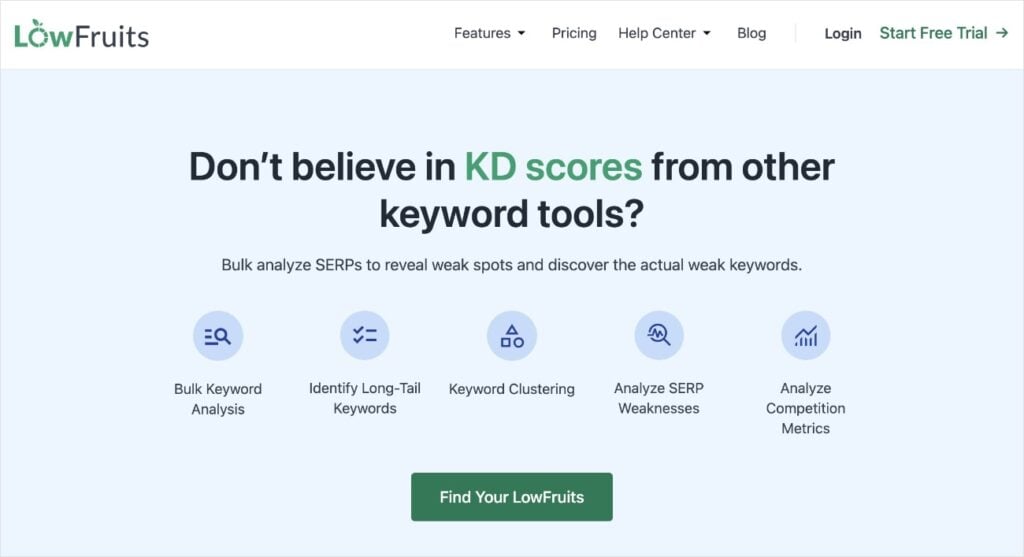
I often use tools like Ahrefs or Semrush for this. There are also excellent, more focused tools like LowFruits, which is great at finding low-competition keywords that are easier to rank for. If you’re on a budget, you can even use Google Keyword Planner for free.
Simply enter your broad topic idea into the tool. You’re looking for two things: a primary keyword with decent search volume and a large number of related, long-tail keywords. These long-tail keywords will become the ideas for your supporting “cluster” articles.
For instance, if your pillar is “email marketing,” you should see related searches for “how to build an email list,” “best email subject lines,” and “email automation tips.” If you find lots of these, you’ve found a great pillar topic.
Let’s run through an example. I’ll use LowFruits for this tutorial because it focuses on low-competition keywords. These keywords are easier to rank for, especially for new or small websites.
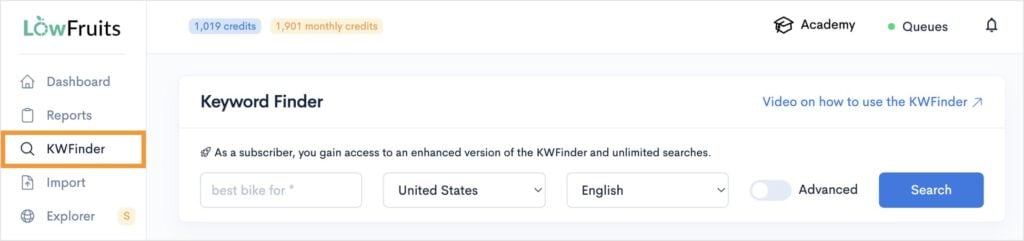
First, I put my seed keyword (pillar topic idea) into the KWFinder tool.
Once you’ve clicked Search, you’ll pick how you want to view your keywords. Personally, I typically pick the second option because it makes SERP analysis faster.

Now, we’ll look at which keywords to consider for pillar content. I pay attention to search volume, keyword difficulty, and the number of Weak Spots in the search results.
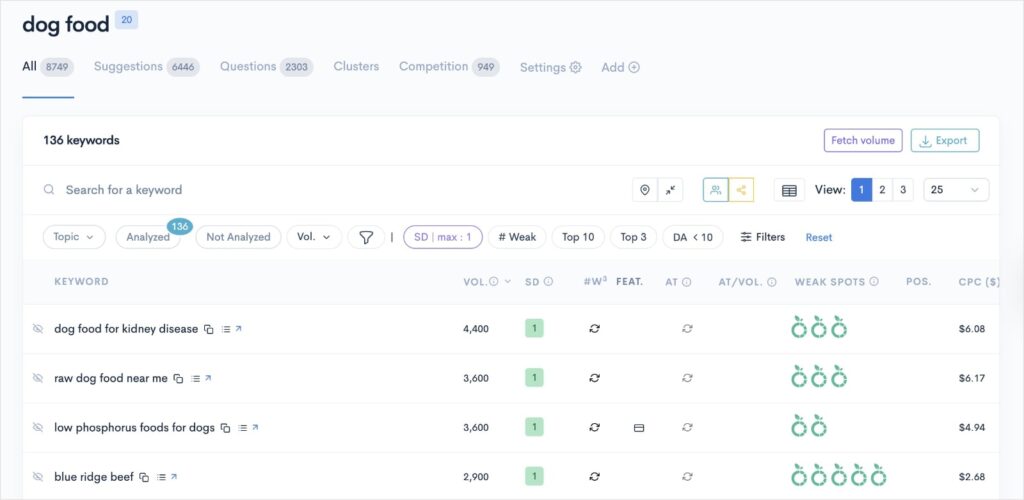
Once I find keywords with favorable metrics, I check what’s actually ranking in Google for that specific query. This takes us to the next step.
3. Analyze the Search Landscape
Now, I look at the top 10 search results to see what content types are popular and where I can provide more value.
This is easy to do in LowFruits because you just click View the SERP next to any keyword.

LowFruits will open a pop-out window that shows the top results ranking in Google right now.
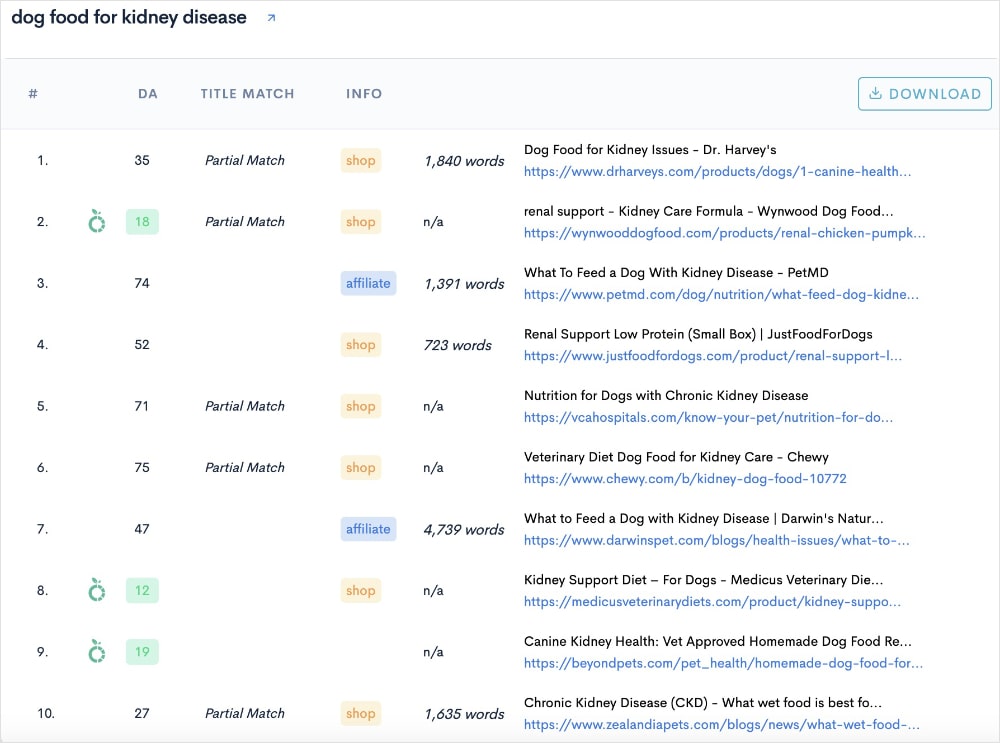
Just from glancing at the top results, we can see that product pages and blog posts are the most popular content types for this keyword.
I would open these results to do a bit more digging into the content itself. Are these long, authoritative guides? Or are they thin, outdated posts?
If I spot a gap, or something I can do better, then I know it’s a good contender for my pillar content.
Don’t have LowFruits? Sign up! Otherwise, you can also use Google to do a manual SERP analysis.
4. Check Topic Cluster Potential
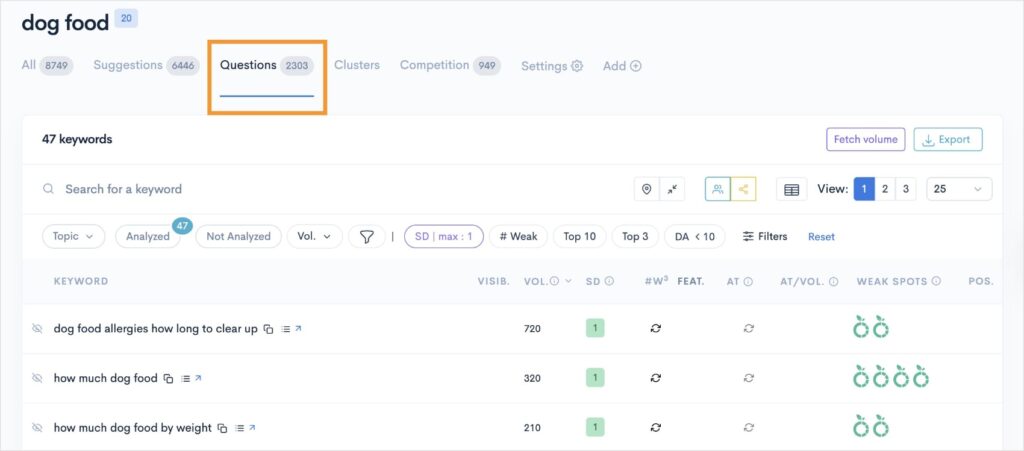
You shouldn’t stop at the main keyword. To check if there are other subtopics to support the main content pillar, I look at the Questions and Clusters tabs in LowFruits.
The Questions tab reveals valuable user insights into their thought process and what they need help with. These questions inform your pillar content strategy and help you better understand your audience.
The Cluster tab builds topic clusters for you automatically. These clusters make excellent subtopic pages for your main pillar content.
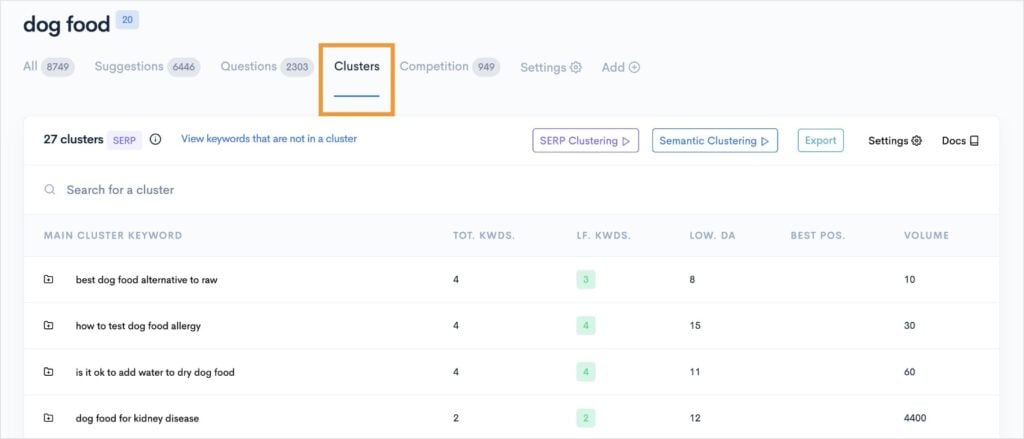
If I can confidently map out a dozen cluster ideas, I know I’ve picked a sustainable pillar topic.
Let’s look at an example:
- Pillar page: “The Only Dog Food Guide You’ll Ever Need”
- Cluster post: “Dry vs. Wet Dog Food: Which Is Best for Your Pup?”
- Cluster post: “New Pet Owner’s Guide to Puppy Dog Food”
- Cluster post: “How to Keep Dog Food Fresh After Opening”
- Cluster post: “Raw Dog Food Guide for Beginners”
See how each cluster post makes sense within the context of the main pillar topic? And how the pillar page could discuss and link to each subtopic? This is a good pillar topic.
5. Final Sanity Check: Is It Focused—But Not Too Narrow?
Before I dive into outlining, I double-check that the topic is not too broad (e.g., “content marketing”) and not too narrow. If my chosen topic is clear, useful, and supports a mini-ecosystem of cluster content, I know I’m on the right track.
How I Create a Pillar Page: Start to Finish
Once I’ve chosen and validated my topic, I shift into “builder” mode. Here’s the exact workflow I follow to create a pillar page that brings in traffic and positions my site as the go-to resource.
1. Outline My Structure Around User Intent
I always start with a detailed outline. I review all the related questions and subtopics people are searching for. This tells me exactly what my pillar page needs to answer.
- I map out broad sections based on these themes.
- Each subheading represents a real user question or intent, so no important angle gets missed.
- I check competitor pillar pages to see where I can be more thorough, more clear, or simply more actionable.
2. Write the Pillar Content (No Skimping)
Now, I roll up my sleeves and aim for writing a better piece of content than anything else out there.
- Answer every question: My goal is that a reader never needs to hit “Back” to Google. We want to keep bounce rates as low as possible.
- Break up big chunks: I use bullet points, graphics, and bolding so the content is easy to skim. This will improve your readability score and boost engagement.
- Add original insights: This is where I share first-hand tips, mini case studies, and anecdotes my readers won’t find on bigger, generic sites.
- Link to my best resources: I naturally reference my cluster articles, linking each one from the relevant section. (If I haven’t written them yet, I make a note so I can add the links later.)
3. Optimize for Search Engines
Next comes on-page SEO, which is the practice of optimizing web pages to rank in search engines. I sprinkle target keywords throughout the pillar page naturally, use variations in subheadings, and write a compelling title and meta description.
To help with this process, I like to use content optimization tools. One of my favorites is SEOBoost, which provides real-time feedback as you write. You can plug in your primary keyword and get suggestions for related keywords for greater visibility.
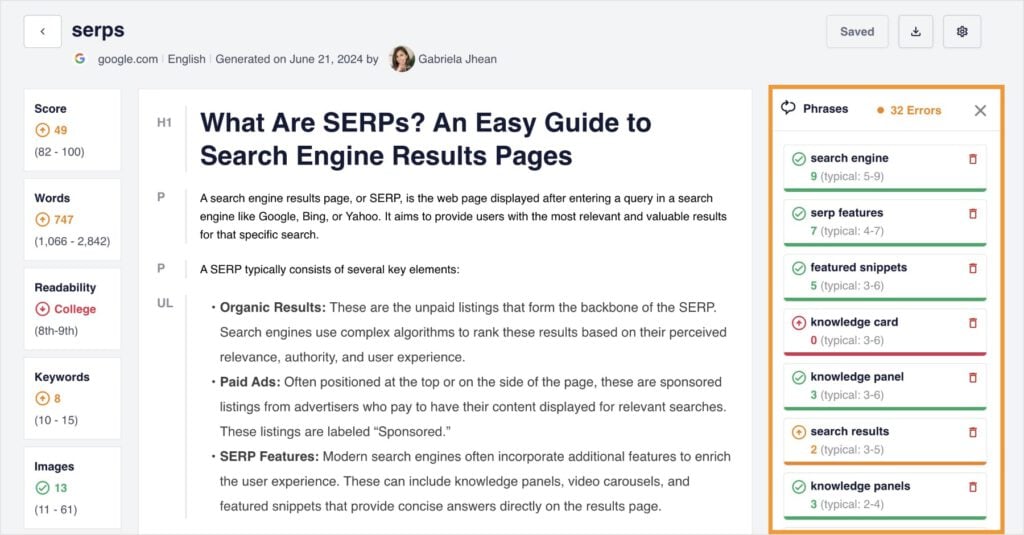
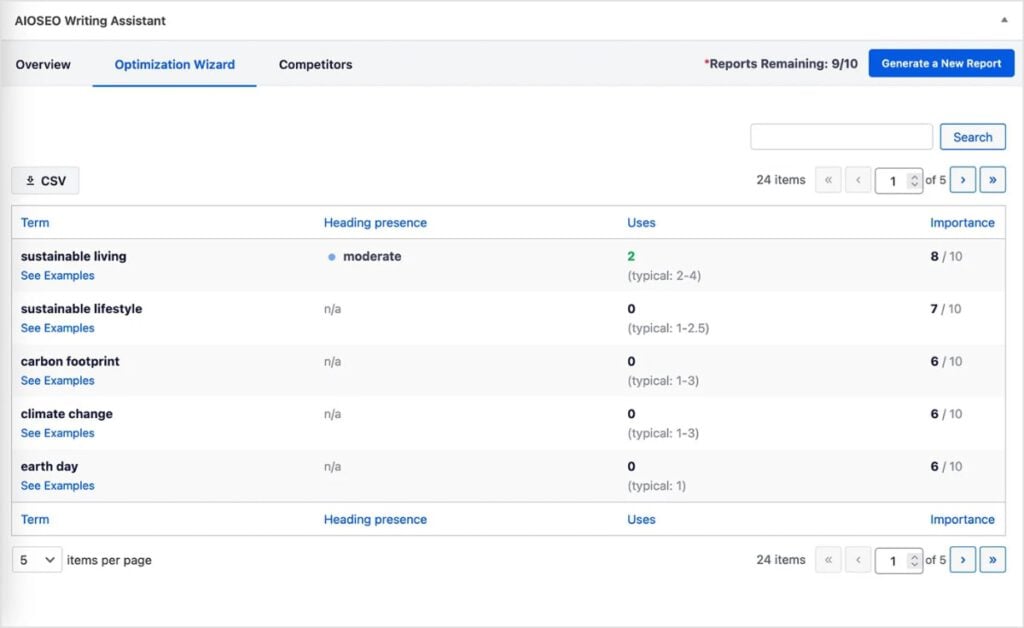
If you’re a WordPress user, SEOBoost also integrates with All in One SEO (AIOSEO), the most popular WordPress SEO plugin. Its AI Writing Assistant connects to your SEOBoost account to provide optimization feedback directly in the WordPress editor.
4. Add a Table of Contents for Easy Navigation
Pillar pages are long, so a table of contents at the beginning is essential for a good user experience. It allows readers to see an overview of your guide and jump directly to the section they’re most interested in.
Depending on the content management system (CMS) you use, there should be an option to add a table of contents automatically.
For example, if you use WordPress, AIOSEO has a “Table of Contents” block that automatically generates a list of links based on the headings in your article.
Regardless of which tool you use, just add your Table of Contents riht after the introduction. This will help users get to where they want to go quickly.
5. Add Internal Links to Your Content Hub
The last step is to add the internal links that connect your pillar page to your cluster articles. In the relevant section of your pillar page, simply highlight the text you want to use as your anchor text, and add the cluster post URL you want to link to.
Don’t forget to also go into each of your cluster articles and add a link back to your new pillar page. This completes the loop and signals the relationship between your articles to Google.
Real-Life Examples of Pillar Pages
If you learn best by example, here are a few high-quality pillar pages that cover a topic in its entirety:
- (HubSpot) The Ultimate Guide to SEO: Covers every major aspect of SEO, then links to dozens of cluster blog posts.
- (Backlinko) Link Building for SEO: The Definitive Guide: Single, in-depth pillar page organized by chapters.
- (AIOSEO) The Ultimate Guide to SEO for Bloggers: Organizes all facets of SEO into clear sections with relevant resources.
- (WPBeginner) How to Make a WordPress Site: Takes readers through every step of the WordPress site creation process, including what to do after.
- (OptinMonster) Google Analytics Reports Guide: Includes tons of screenshots and links to dozens of detailed supporting guides.
Notice how these pillar pages don’t just scratch the surface—they organize and connect a larger universe of advice and resources. This is what makes them good examples of pillar content.
Pitfalls to Avoid When Building Pillar Content
Here are a few common SEO mistakes small businesses make when writing pillar pages:
- Choosing topics that are too broad. “Digital marketing” is too big; “email marketing” is more focused.
- Publishing a pillar page with thin content. Aim for comprehensive content that answers every core question. (You can link to other pages to go deeper.)
- Forgetting internal links. Every cluster topic should link back to the pillar, and the pillar should link to each cluster. This is easy to overlook but super important for SEO.
- Neglecting updates. Pillar content needs refreshing as your industry or business evolves. Track your pillar pages’ performance to adjust as necessary.
Final Thoughts
Selecting content pillars and building effective pillar pages is a cornerstone of online success. Unfortunately, many people don’t take the time to learn to do it right.
And what’s crazy is that it’s actually super easy to do. You just have to be strategic in your research and plan your topics and cluster content. Then, link to and from your pillar pages to any related content.
The payout? More traffic, happier users, and a website that feels organized (to both people and Google). I promise it’s worth it.
Ready to get started? Fire up LowFruits, research those pillar keywords, and watch your organic presence grow.
Pillar Content FAQs
What are the benefits of pillar pages?
Pillar pages are essential for organizing your website and boosting your SEO. By acting as a central hub for your content, they make it easier for both users and search engines to find and understand your key topics. This improves your overall keyword rankings, keeps visitors on your site longer, and establishes your authority as an expert in your field.
What’s the difference between a pillar page and a landing page?
A pillar page is an in-depth, informational resource that covers a broad topic and links to related articles. A landing page is designed for one specific goal—like collecting leads or promoting a single offer. Pillar pages focus on education and SEO, while landing pages focus on conversions.
What’s the difference between a blog post and a pillar page?
A blog post usually covers a specific, narrow topic or answers a single question. A pillar page is a comprehensive guide to a broad subject, linking out to multiple related blog posts for deeper information. Pillar pages act as content hubs, whereas blog posts are individual resources.
How do I write a pillar page?
To write a pillar page, start by selecting a broad, high-value topic your audience cares about. Use keyword research tools like LowFruits to identify main themes and subtopics. Then, outline your page to cover every key section readers expect. From here, write in-depth content that answers common questions and links to detailed articles on related subtopics. Make sure your pillar page is easy to navigate with clear headings and a table of contents. You should also use internal links to connect all supporting content.
How do I create create pillar content?
To create a pillar page, start by choosing a broad topic relevant to your audience and business. Use keyword research tools like LowFruits to find what people search for. Then, outline all major subtopics related to your main content pillar. From here, you’ll write your pillar page and separate web pages on its subtopics. Finally, use internal links to connect all related content together.


