
Looking to grow your small business but overwhelmed by the endless parade of digital marketing tools?
As someone who’s tested too many marketing tools to count, I know how challenging it can be to find ones that actually deliver results. Not to mention, don’t break the bank or require a marketing degree to operate.
Here’s the good news: you don’t need dozens of expensive tools to market your business effectively.
This curated list focuses on 25 proven solutions that work specifically for small businesses in 2025. Each tool has been selected based on real-world results, ease of use, and value for money.
What makes this list different? I’ve personally tested each tool and focused on:
- Solutions that won’t break your budget
- Tools you can learn without extensive training
- Features that deliver actual business results
- Options that work well together
Whether you’re taking your first steps into digital marketing or looking to boost your existing strategy, you’ll discover practical tools that can help your small business grow.
Let’s get started.
In This Article
- Digital Marketing Strategies: Which One Is Right for Your Business?
- Digital Marketing Tools Compared (Quick Glance)
- Best Digital Marketing Tools for Small Businesses
- Best Digital Marketing Tools for SEO
- Best Social Media Marketing Tools
- Best Email Marketing Tools
- Best Content Marketing Tools
- Best Affiliate Marketing Tools
- Search Engine Marketing (SEM) Tools
- Final Thoughts
Digital Marketing Strategies: Which One Is Right for Your Business?
Before diving into specific tools, let’s quickly explore the various digital marketing channels. Understanding these strategies will help you choose the right tools for your business goals and budget.
Search Engine Optimization (SEO)
Want to show up when customers search for your products or services online?
That’s what SEO is all about. By optimizing your website for search engines like Google, you create a steady stream of potential customers finding you naturally.
While it takes time to build momentum, SEO is like having a digital storefront that attracts customers 24/7. Plus, it’s totally free.
Social Media Marketing (SMM)
Social media is where your customers hang out online. SMM puts your brand in the daily conversation on platforms like Instagram, Facebook, and LinkedIn.
This strategy focuses on more than just posting updates. It’s about building genuine connections, showcasing your brand’s personality, and turning happy customers into advocates for your business.
Email Marketing
Imagine having a direct line to your most interested customers.
That’s the power of email marketing.
By sending targeted messages to people who’ve shown interest in your business, you build lasting relationships that drive sales.
Unlike social media followers that platforms control, your email list is an asset you own — making it one of the most valuable marketing tools at your disposal.
Content Marketing
Ever heard the phrase “content is king”? There’s a reason for that.
Content marketing means creating helpful blog posts, videos, and guides that your target audience actually wants to read or watch. It’s like building a resource library that attracts potential customers, answers their questions, and establishes your expertise.
Content is the foundation for all your marketing efforts, so it’s important to make it count.
Affiliate Marketing
Imagine having an army of people promoting your business to their loyal followers.
That’s what affiliate marketing offers.
With affiliate marketing, partners earn commissions for sending you customers. It’s like getting a warm introduction to thousands of potential customers at once.
Search Engine Marketing (SEM)
Need visibility right now? Search engine marketing lets you skip the line and appear at the top of search results instantly through paid advertising.
While SEO builds long-term success, SEM is like turning on a tap of potential customers whenever you need them. It costs more than organic methods, but you get immediate results and complete control over your budget and targeting.
Digital Marketing Tools Compared (Quick Glance)
Want to compare the best digital marketing tools for small businesses at a glance?
This table organizes all our recommendations by digital marketing channel. To jump to a specific section, click on any tool name.
| Digital Marketing Channel | Tool | Main Feature | Best for | Price* | Free Version? |
| SEO | LowFruits | Low-competition keyword research | Finding easy-to-rank keywords | $21/mo | No |
| SEO | SEOBoost | Content optimization | Real-time SEO suggestions | $22.50/mo | No |
| SEO | Google Search Console | Organic search metrics | Direct Google insights | Free | Yes |
| SEO | Google Analytics | Website analytics | User behavior tracking | Free | Yes |
| SEO | Screaming Frog | Technical SEO audits | Site audits | Free & $149/yr | Yes (500 URLs) |
| SEO | Ahrefs | Competitor analysis | All-in-one SEO | $29/mo | No |
| SEO | AIOSEO | WordPress SEO | WordPress site optimization | $49.60/yr | Yes |
| Social media | Canva | Graphic design | Social media graphics | Free & $120/yr | Yes |
| Social media | Buffer | Post scheduling | Social media management | Free & $5/mo | Yes (3 channels) |
| Social media | ClickSocial | WordPress integration | WordPress content social sharing | $3.99/mo | Trial only |
| SendGrid | Email design | Beautiful newsletters | $19.95/mo | Yes | |
| Moosend | Automation | Budget-conscious email marketing | $7/mo | Trial only | |
| Omnisend | Email + SMS | Multi-channel marketing | $11.20/mo | Yes (limited) | |
| WP Mail SMTP | WordPress email delivery | Fixing WordPress email delivery issues | $49/yr | Yes | |
| Content | Google Trends | Topic research | Content ideation & spotting trends | Free | Yes |
| Content | ChatGPT | AI writing | Content ideation & writing drafts | Free & $20/mo | Yes |
| Content | Grammarly | Grammar checking | Error-free writing | Free & $6/mo | Yes |
| Content | Hemingway Editor | Readability | Clear, concise writing | Free & $8.33/mo | Yes |
| Content | AIOSEO AI Writing Assistant | SEO writing | WordPress content | $72.10/mo** | Limited |
| Affiliate | Tapfiliate | Affiliate management | Complete program management | $74/mo | Trial only |
| Affiliate | Carrd | Lead generation | One-page websites | Free & $19/yr | Yes |
| Affiliate | AffiliateWP | WordPress integration | All-in-one affiliate plugin | $149.60/yr | No |
| SEM | Google Ads | Search advertising (Google) | Immediate visibility | Pay-per-click | N/A |
| SEM | Microsoft Advertising | Alternative search networks (Bing, AOL) | Lower CPC rates | Pay-per-click | N/A |
| SEM | SpyFu | PPC competitor research | Paid ad strategy | $39/mo | No |
**The AIOSEO AI Writing Assistant requires a paid subscription to both AIOSEO and SEOBoost.
Best Digital Marketing Tools for Small Businesses
Let’s dive into the tools that can transform your small businesses’s digital marketing efforts.
Each recommendation has been carefully selected based on real-world performance, ease of use, and value for money.
Best Digital Marketing Tools for SEO
SEO remains one of the most cost-effective ways to drive qualified traffic to your website. These tools simplify common SEO tasks, help you optimize your content for users and search engines, and track your organic performance.
| Tool | Main Feature | Best For | Price | Free Version? |
| LowFruits | Low-competition keyword research | Finding easy-to-rank keywords | $21/mo | No |
| SEOBoost | Content optimization | Real-time SEO suggestions | $22.50/mo | No |
| Google Search Console | Organic search metrics | Direct Google insights | Free | Yes |
| Google Analytics | Website analytics | User behavior tracking | Free | Yes |
| Screaming Frog | Technical SEO audits | Site audits | Free & $149/yr | Yes (500 URLs) |
| Ahrefs | Competitor analysis | All-in-one SEO | $29/mo | No |
| AIOSEO | WordPress SEO | WordPress site optimization | $49.60/yr | Yes |
1. LowFruits (Keyword Research & Rank Tracking)
Ever feel like you’re fighting an impossible battle trying to rank for competitive keywords? It’s exhausting.
It’s also why I love LowFruits.
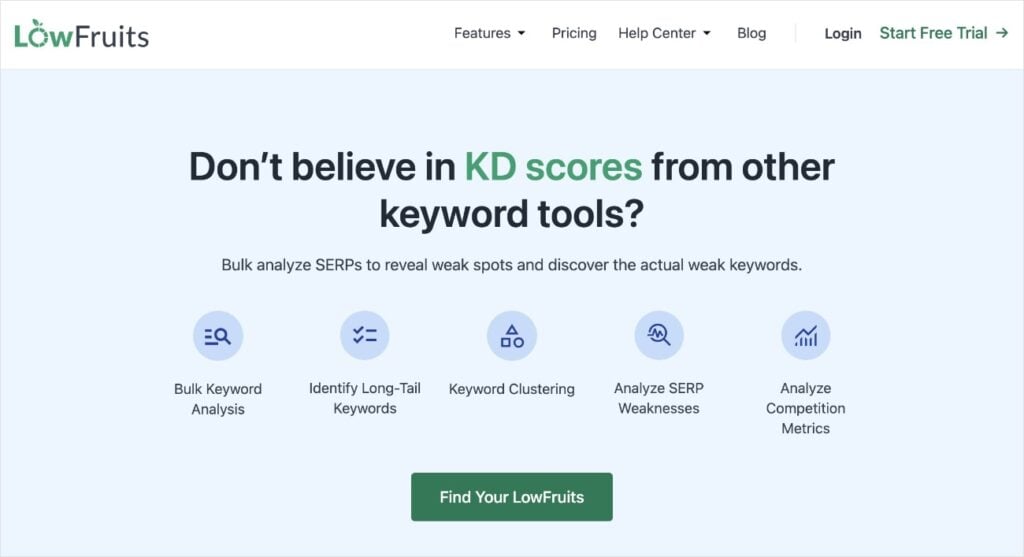
LowFruits helps you find low-competition keywords you can actually for. No more wasting time on keywords dominated by major brands with massive budgets.
What makes LowFruits different from other SEO keyword research tools is it focuses on finding “low-hanging fruit.”These are keywords with decent search volume and surprisingly low competition. It’s like having a metal detector for hidden ranking opportunities.
The KWFinder tool makes these terms and phrases easy to find in keyword reports. Just pay special attention to the following metrics:
- SERP Difficulty Score (SD): The LowFruits metric for keyword difficulty. It’s on a scale of 1 to 3, with 1 being the easiest to rank for.
- Weak Spots: These are low-authority domains ranking in the top 10 search results. These competitors are easy to outrank, even as a new or small website.
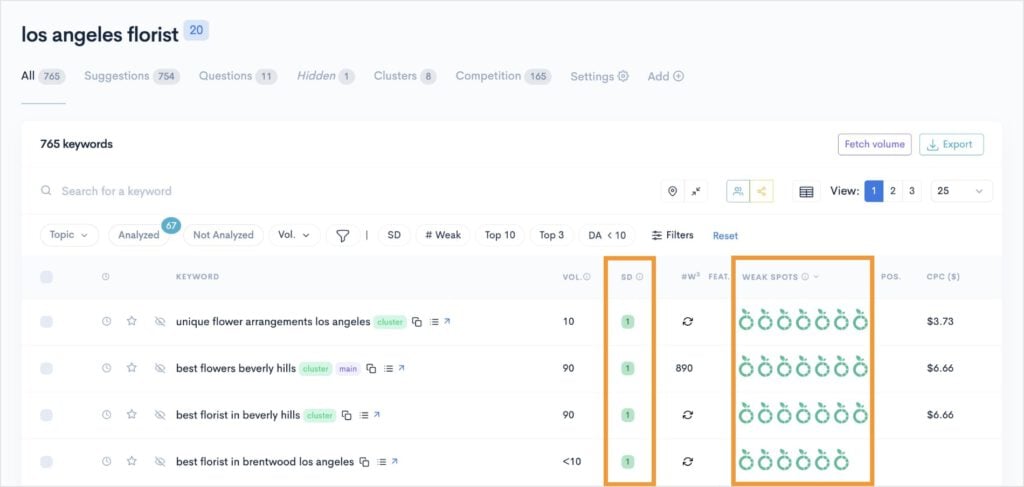
💡 Pro Tip: Look for keywords with an SD score of 1 and multiple Weak Spots. These are low-competition keywords you can target and win.
I also like how LowFruits has a built-in Rank Tracker. After all, if you’re doing keyword research and SEO, the whole point is to rank in search results.
This tool tells you exactly where you land in search engine results pages (SERPs).
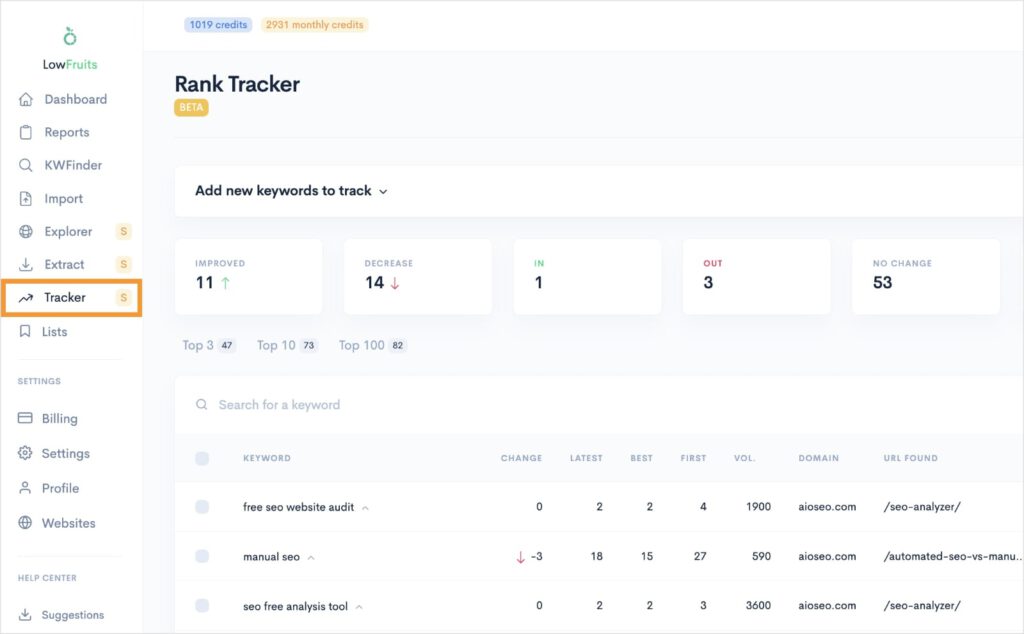
You’ll learn:
- What keywords your website ranks for
- The SERP position of each keyword
- Which URL is ranking for that keyword
You can also see how positions change over time.
Overall, it’s the best long-tail keyword research tool out there. And I’m not just saying that since this is the LowFruits blog. I’ve tried them all, and nothing comes close to the ease of use and the results you can get with LowFruits.
Pricing: A LowFruits subscription starts at $21/month.
The Bottom Line
If you’re tired of spinning your wheels with impossible-to-rank-for keywords, LowFruits is worth every penny. It’s become my go-to tool for finding realistic SEO opportunities for small businesses. The interface is straightforward, and you can start finding valuable keywords within minutes of signing up.
2. SEOBoost (Content Optimizations)
Here’s something most people don’t realize: Writing great content is only half the battle. If you’re not optimizing it properly, even the best content can get buried on page 10 of Google.
That’s where SEOBoost shines.
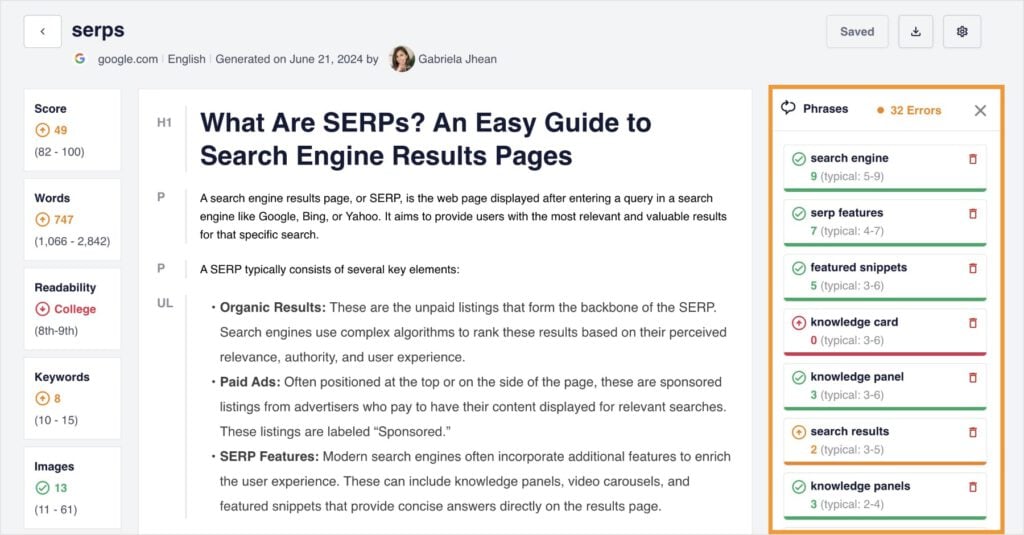
This AI-powered tool analyzes your content against top-ranking pages and shows you exactly what’s missing. It’s like having an SEO expert looking over your shoulder while you write. (But less annoying and minus the breath on your neck.)
What I love about SEOBoost is how it makes on-page SEO simple. Instead of overwhelming you with technical jargon, it gives you clear, actionable suggestions to improve your content’s ranking potential.
The Content Optimization tool provides real-time feedback regarding your on-page optimizations. It lets you know which related keywords to include and how often to use them.
Pricing: SEOBoost plans start at $22.50/month.
The Bottom Line
If you’re serious about getting your content to rank but don’t have time to become an SEO expert, SEOBoost is a no-brainer. It takes the guesswork out of optimization and gives you clear steps to improve your content’s search performance.
3. Google Search Console (Organic Search Performance)
Want to know a secret?
Some of the most powerful SEO insights come from Google itself — through Google Search Console (GSC). And I’m always surprised how many small businesses aren’t using this free tool.
Think of Google Search Console as your website’s report card from Google. It shows you how your site performs in search results, which keywords you’re ranking for, and even alerts you when something’s wrong with your site.
The best part? Unlike most SEO tools that estimate your search performance, this data comes straight from Google. It’s like getting the answers directly from the teacher.
My favorite feature: the Performance Dashboard.
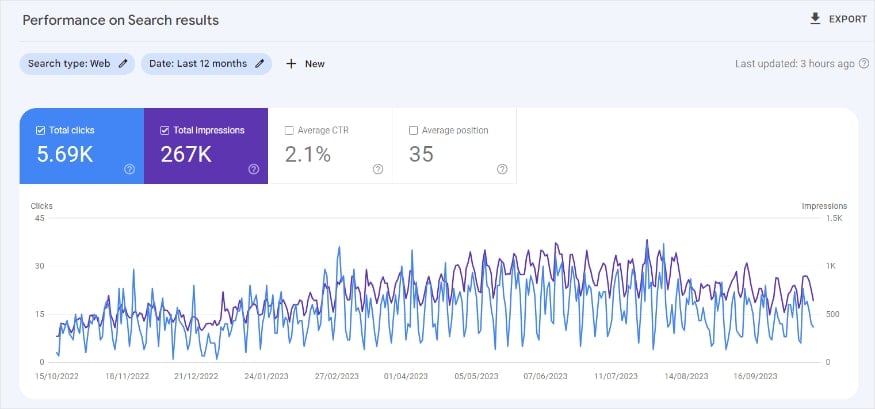
Performance reports are pure gold for small businesses. They show you:
- Which keywords are actually bringing visitors to your site
- How many people see your site in search results
- Which pages perform best (and worst)
- How your clickthrough rates (CTR) compare to others
Plus, you can track your progress over time and spot trends you’d miss otherwise.
Pricing: Free
The Bottom Line
If you’re doing any kind of SEO, Google Search Console is non-negotiable. It’s free, straight from Google, and gives you insights you simply can’t get anywhere else. Set it up today — your future self will thank you.
4. Google Analytics (Traffic Analytics & User Behavior)
Let me be straight with you: If you’re not tracking how people use your website, you’re flying blind. Google Analytics lifts the fog and shows you exactly what’s working — and what isn’t.
The latest version (GA4) might look intimidating at first, but once you know where to look, it’s like having x-ray vision into your website’s performance. You can see where visitors come from, what they do on your site, and most importantly, what makes them become customers.
While other analytics tools can cost hundreds per month, Google Analytics gives you enterprise-level insights completely free.
A good place to start is the Reports tool. You’ll get a snapshot view of your site’s users, average engagement time, and total revenue.
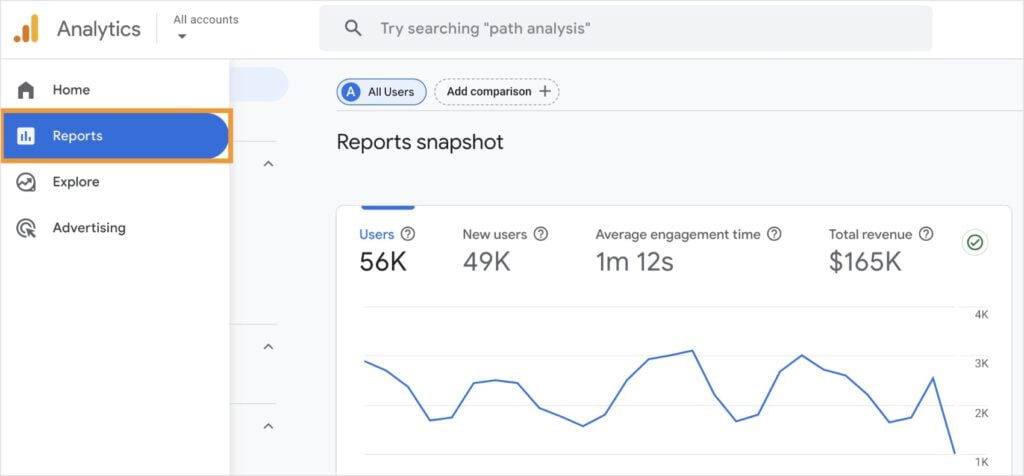
You can explore all GA4 has to offer by clicking into any additional reports. There are also tons of tutorials online, so you can easily figure out how to get the data you need.
Pricing: Free
The Bottom Line
Google Analytics is essential for any business serious about their website’s performance. Yes, there’s a learning curve, but even using just the basic reports will give you invaluable insights about your visitors. Start with the simple stuff, and you’ll be analyzing user behavior like a pro in no time.
5. Screaming Frog (Site Audits)
Technical SEO problems can tank your rankings without you even knowing. Broken links, missing meta descriptions, duplicate content — these silent killers hurt your site’s performance every day they go unfixed.
Screaming Frog is like running a full diagnostic scan on your website. This powerful crawler checks every nook and cranny of your site, finding technical issues that most tools miss. While the interface might look a bit technical, don’t let that scare you off. It’s actually very straightforward once you get started.
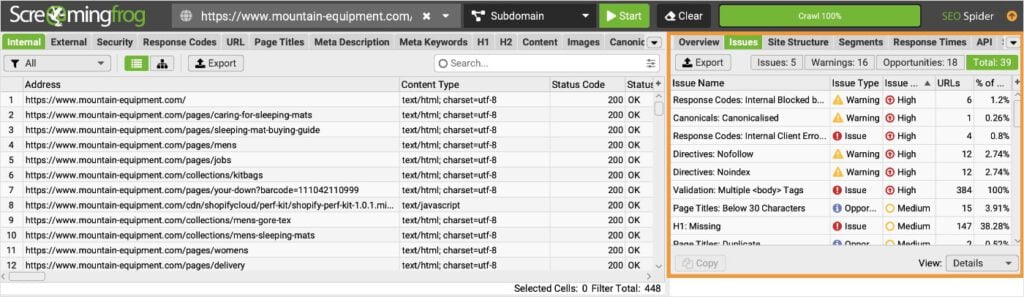
💡 Pro Tip: First time using Screaming Frog? Start by navigating to the Issues tab in the right menu. This will give you an overview of your site’s key technical issues and the level of their importance.
Pricing: The free version lets you scan up to 500 URLs, which is perfect for most small business websites.
Need more? The paid version handles unlimited URLs.
The Bottom Line
If technical SEO issues are holding back your rankings, Screaming Frog will find them. While it might look intimidating at first, it’s actually one of the most beginner-friendly tools for performing a site audit. The free version also crawls more than enough URLs for most small businesses.
6. Ahrefs (Comprehensive Platform)
Ahrefs is like the Swiss Army knife of SEO tools. It does pretty much everything, and it does it well.
Think of it as your complete SEO command center. Want to know what keywords your competitors rank for? Need to track your backlinks? Looking for content ideas that actually drive traffic? Ahrefs handles all of this and more from one platform.
I like the Keyword Overview tool, which gives you the most important keyword metrics in one user-friendly dashboard.
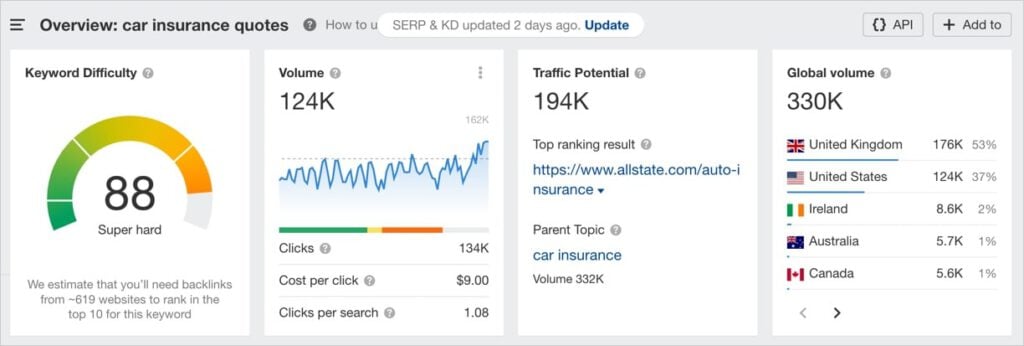
You’ll see:
- Keyword difficulty
- Keyword search volume
- Traffic potential
- Global search volume
A word for small business owners: Notice how the above screenshot shows a keyword with a keyword difficulty score of 88. That’s super hard. This is why I prefer LowFruits if you’re looking specifically for a keyword research tool. With that said, if you need a platform that does more, Ahrefs is a good option.
Pricing: Ahrefs has a relatively new Starter plan for $29/month. This is why I chose it over Semrush, which costs a whopping $139.95/month.
The Bottom Line
If you need more robust SEO capabilities, Ahrefs is the way to go. You can analyze competitors, get backlink data, perform site audits, and more. Their Starter plan is also very budget-friendly.
7. All in One SEO (WordPress SEO Plugin)
Ever wished someone would tell you what to do to optimize your WordPress site?
That’s exactly what All in One SEO does. While other SEO plugins overwhelm you with complicated settings, AIOSEO makes optimizing your WordPress site as easy as following a checklist.
What really sets it apart is how it guides you through SEO best practices while you’re creating content. The built-in optimization tools show you exactly what to improve — straight from the WordPress editor.
Here, you can see the Readability Checklist, plus its recommendation to use more transition words:
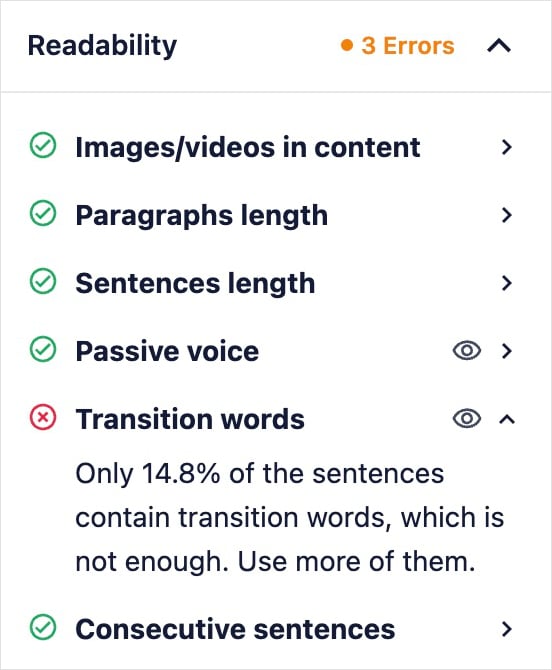
Readability measures how easily users can read and understand your content. It’s important for good engagement.
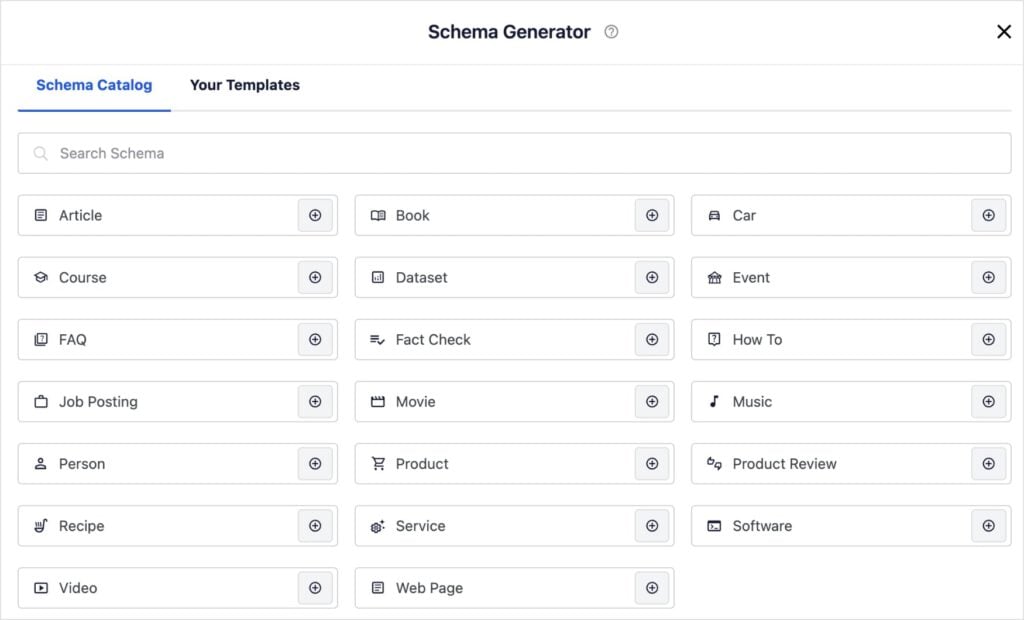
I also love that it has a Schema Generator because I know how much website owners shy away from implementing schema. It sounds hard. I get it! But AIOSEO makes it as easy as picking your desired schema type from a catalog.
Pricing: AIOSEO has a free Lite version, but its Basic plan is only $49.60/year, and unlocks more SEO features.
The Bottom Line
If you run a WordPress site and want to improve your SEO without getting lost in technical details, All in One SEO is your best friend. The free version is solid for basics, but the paid version’s advanced features are worth every penny for serious businesses.
Best Social Media Marketing Tools
Having the right social media tools can turn hours of manual work into minutes of automated magic. From creating eye-catching graphics to scheduling posts, these tools help you maintain a strong social presence without letting it consume your entire day.
| Tool | Main Feature | Best For | Price | Free Version? |
| Canva | Graphic design | Social media graphics | Free & $120/yr | Yes |
| Buffer | Post scheduling | Social media management | Free & $5/mo | Yes (3 channels) |
| ClickSocial | WordPress integration | WordPress content social sharing | $3.99/mo | Trial only |
8. Canva (Graphics)
Remember when creating professional-looking social media graphics meant hiring a designer or learning Photoshop?
Those days are over, thanks to Canva. This drag-and-drop design tool has transformed how small businesses approach visual content. Whether you need Instagram stories, Facebook posts, or Pinterest pins, Canva makes it ridiculously easy to create designs that look polished and on brand.
What makes Canva special is how it combines simplicity with flexibility. You start with templates but can customize everything to match your brand. It’s like gaining instant graphic design skills without years of training.
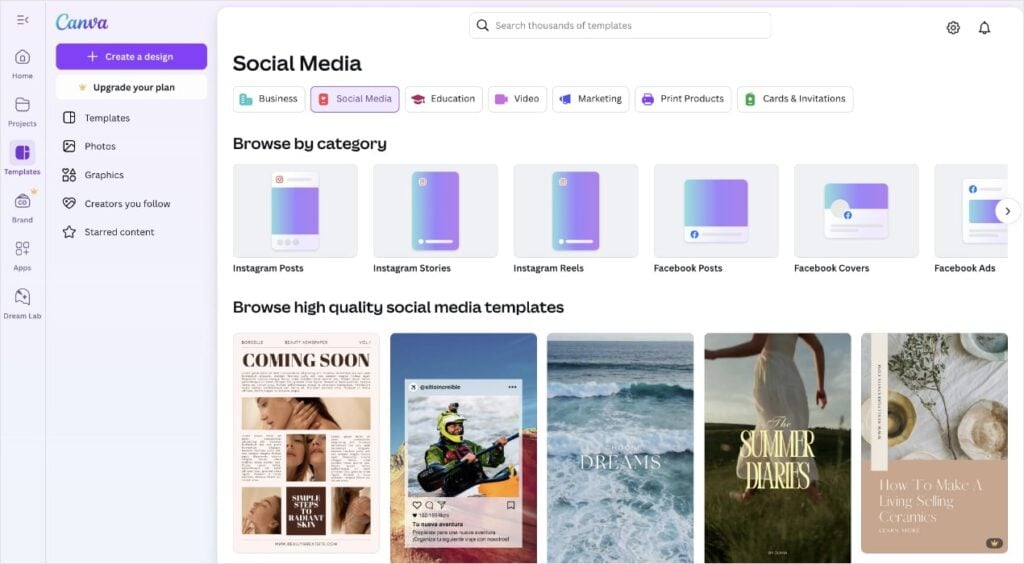
Fun fact: I use Canva to make social media graphics for my clients! And I do it on a free account.
Pricing: Most small business owners can do just fine with the free version. It has a ton of options and free templates. However, if you want access to more designs, you may consider upgrading to a Pro account, which costs $120/year.
The Bottom Line
Canva is the closest thing to design superpowers you can get without going to art school. The free version is surprisingly robust and intuitive. Pro features (like Background Remover and Brand Kit) are also interesting if you’re willing to pay the price.
9. Buffer (Social Media Management)
Ever wish you could plan out all your social posts for the month in one sitting?
That’s what Buffer lets you do.
Instead of logging in and out of different social platforms all day, Buffer helps you manage everything from one clean, intuitive dashboard. It’s like having a social media command center that anyone can operate.
What I love about Buffer is how it strips away unnecessary complexity. While other scheduling tools bombard you with confusing features, Buffer focuses on what matters: getting your content in front of your audience at the right time.

Pricing: Free plan allows you to connect up to 3 social channels and schedule 10 posts per channel. They also have Buffer plans that range from $5-10/month.
The Bottom Line
Buffer proves that powerful doesn’t have to mean complicated. Whether you’re managing one account or multiple platforms, it makes social media management effortless. Start with the free plan, and you’ll wonder how you ever managed without it.
10. ClickSocial (WordPress Social Scheduler)
You know that feeling when you’ve just published a great blog post, but then realize you still need to share it across all your social channels?
ClickSocial eliminates that last-minute scramble. This WordPress plugin turns social sharing into a seamless part of your publishing workflow. Just hit publish, and your content automatically gets shared exactly how you want it, where you want it.
There’s also a one-click scheduler for future shares.
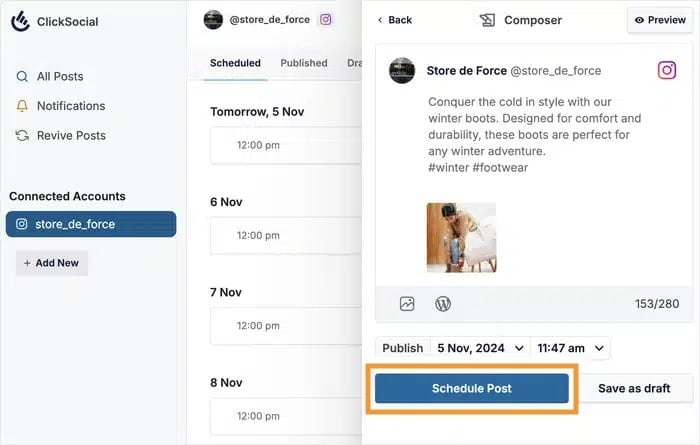
What makes ClickSocial different from other social tools is that it lives right inside WordPress. No more jumping between tools and social platforms.
Pricing: Free trial, Pro plan starts at $3.99/mo
The Bottom Line
If you regularly publish WordPress content and want to streamline social sharing, ClickSocial is a game-changer. While other tools make you jump between platforms, this keeps everything in one place. Perfect for busy content creators who want to focus on writing great content instead of managing social media.
Best Email Marketing Tools
Email marketing can deliver the highest return on investment (ROI). The right email marketing tools help build your list, create engaging campaigns, and turn subscribers into customers.
| Tool | Main Feature | Best For | Price | Free Version? |
| SendGrid | Email design | Beautiful newsletters | $19.95/mo | Yes |
| Moosend | Automation | Budget-conscious email marketing | $7/mo | Trial only |
| Omnisend | Email + SMS | Multi-channel marketing | $11.20/mo | Yes (limited) |
| WP Mail SMTP | WordPress email delivery | Fixing WordPress email delivery issues | $49/yr | Yes |
11. SendGrid (Full Email Service)
Looking for an email marketing tool that makes designing beautiful newsletters actually fun?
SendGrid’s modern drag-and-drop editor turns email creation into a breeze. Instead of wrestling with HTML or settling for basic templates, you can build professional-looking emails that look great on any device.
I like how the Design Library puts all these templates at your fingertips. Just pick your favorite, customize your content, and you’re ready to send. Uploading images is a piece of cake, too.

All designs are responsive, which means they look good on desktop, mobile, tablets — you name it.
Pricing: Free trial, paid plans start at $19.95/mo
The Bottom Line
If you want to create stunning emails without the usual tech headaches, SendGrid delivers. Email marketing solutions can also be quite expensive, but SendGrid’s pricing makes it more accessible to small businesses.
12. Moosend (Full Email Service)
Want to know what makes Moosend special?
It packs all the features you’d expect from premium email services — beautiful templates, automation workflows, detailed analytics — but at a fraction of the cost. While other platforms charge a fortune for advanced features, Moosend includes everything in one affordable package.
What I love about Moosend is how it makes sophisticated email marketing accessible to small businesses. The interface is clean and intuitive, with helpful tooltips guiding you through features like audience segmentation and automation building.
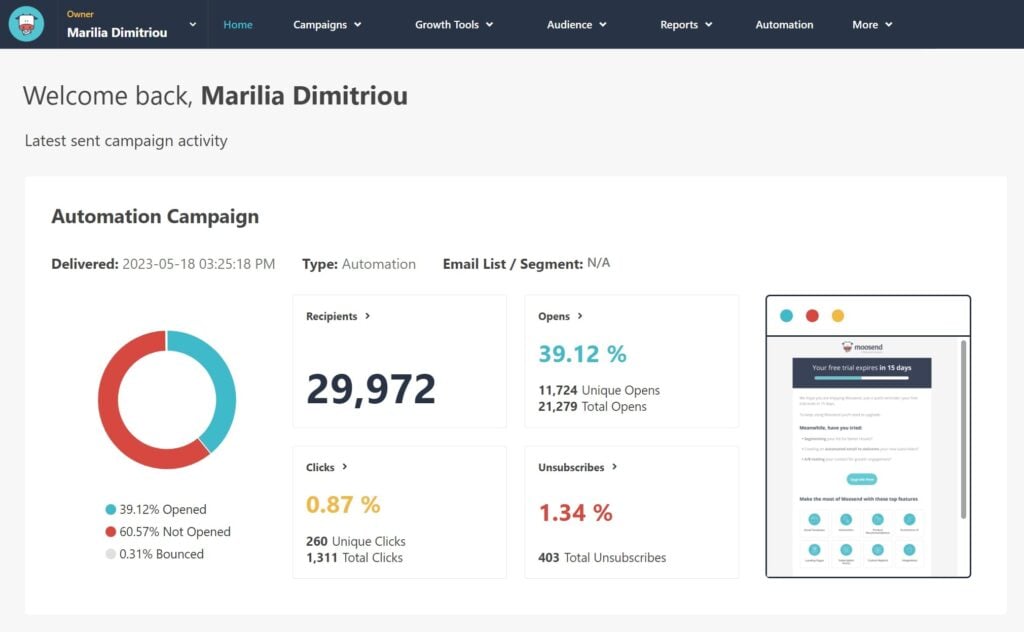
Creating automated email sequences can be complicated, but Moosend’s platform makes it simple:
- Choose from pre-built automation templates
- Customize triggers and conditions visually
- Set up welcome series, abandoned cart recovery, and more
- Track performance in real-time
It’s like having a marketing automation expert guide you through the process.
Pricing: Free 30-day trial, paid plans start at $7/mo
The Bottom Line
For small businesses wanting professional email marketing without the enterprise price tag, Moosend is a perfect fit. You get all the powerful features of expensive platforms with none of the complexity or cost.
13. Ominsend (Email & SMS)
Omnisend’s tagline makes me laugh because it says, “Email & SMS so good, it’s boring.” I love it because it’s true. When your marketing automation runs this smoothly, it becomes almost boring — in the best possible way.
While other platforms focus solely on email, Omnisend lets you create seamless campaigns across both email and SMS. It’s like having two powerful marketing channels working together in perfect harmony.
Start with an email, follow up with a text, and track the entire customer journey from a single dashboard. Perfect for ecommerce businesses who want to boost their conversion rates.
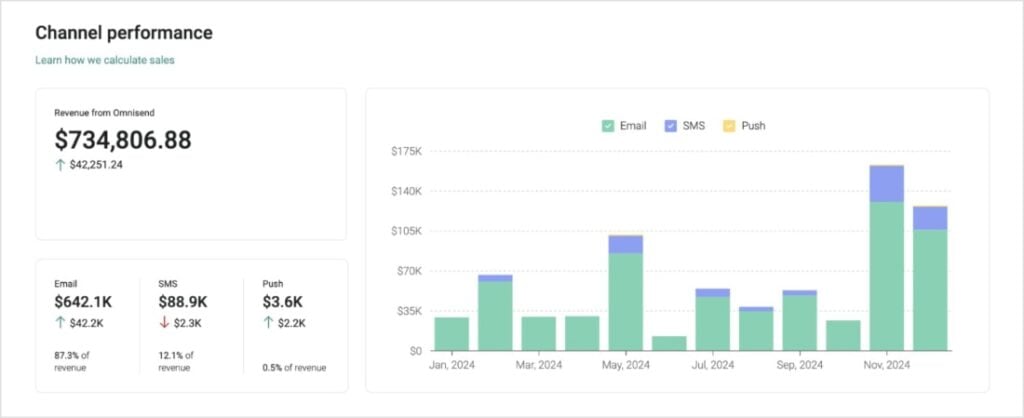
Pricing: Free plan for up to 250 contacts and 500 emails a month. Paid plans start at $11.20/mo.
The Bottom Line
If you want to connect with customers wherever they are, Omnisend makes it surprisingly simple. The combination of email and SMS, plus the smart automation features, helps you create campaigns that drive sales.
14. WP Mail SMTP (WordPress Email Plugin)
Ever wonder why your WordPress contact form submissions or password reset emails never seem to arrive?
It’s because WordPress doesn’t handle email delivery properly by default. WPMail SMTP fixes this common headache by connecting your site to reliable email providers like Gmail, Amazon, or Brevo (and many more).
This ensures your emails actually reach their destination — not the spam folder.
Not to mention, it offers one-click setup, which connects your WordPress site to your email account in mere seconds.
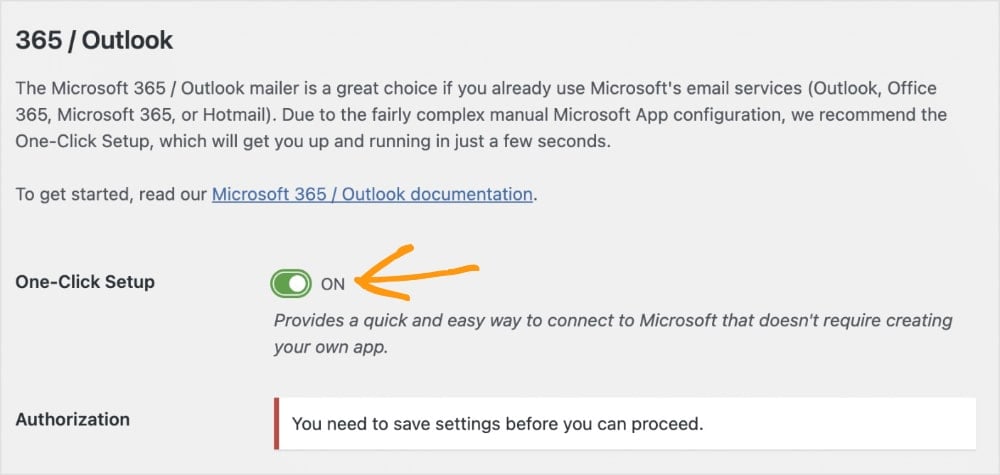
Note: One-click setup requires a Pro subscription.
Pricing: Pro plan starts at $49/yr
The Bottom Line
If you run a WordPress site, WPMail SMTP isn’t just another plugin — it’s essential infrastructure. The price is also super wallet-friendly for all the features you get.
Best Content Marketing Tools
Creating engaging content consistently is one of the biggest challenges for small businesses. These tools help streamline your content creation process — from finding trending topics to polishing your writing. Think of them as your personal content team, helping you produce better content in less time.
| Tool | Main Feature | Best For | Price | Free Version? |
| Google Trends | Topic research | Content ideation & spotting trends | Free | Yes |
| ChatGPT | AI writing | Content ideation & writing drafts | Free & $20/mo | Yes |
| Grammarly | Grammar checking | Error-free writing | Free & $6/mo | Yes |
| Hemingway Editor | Readability | Clear, concise writing | Free & $8.33/mo | Yes |
| AIOSEO AI Writing Assistant | SEO writing | WordPress content | Starts at $72.10/mo** | Limited |
15. Google Trends (Trending Topics)
Want to know what your audience is actually interested in right now?
Google Trends is like having a crystal ball for content ideas. While other tools show you historical data, Google Trends reveals what people are searching for in real-time. It’s the difference between following trends and getting ahead of them.
What makes Google Trends special is its ability to spot rising topics before they peak. You can see exactly when interest in a topic starts climbing, compare related terms, and even break down interest by region.
Plus, since it’s from Google, you know the data is reliable.

Pricing: Free
The Bottom Line
For content creators who want to stay relevant and timely, Google Trends is an essential tool in your arsenal. Plus, it’s completely free. Start exploring trends in your industry — you might be surprised what you discover.
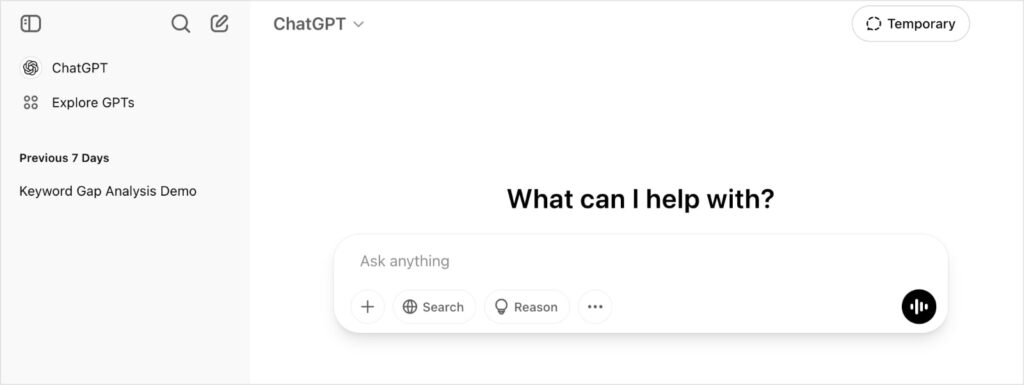
16. ChatGPT (AI-Powered Content Creation)
ChatGPT has completely transformed how we approach content creation. While it won’t replace human writers (and shouldn’t), it’s an incredibly powerful tool for brainstorming, outlining, and expanding your content ideas.
Think of it as a really smart writing partner that’s available 24/7.
What sets ChatGPT apart from other AI writers is its ability to understand context and maintain consistency throughout a conversation. You can brainstorm ideas, get different perspectives on a topic, or even have it explain complex concepts in simpler terms.
Ultimately, it’s about working smarter, not harder. And ChatGPT just does that.
Pricing: Free, paid plans start at $20/mo
The Bottom Line
ChatGPT isn’t magic, and you shouldn’t let it write everything for you. But as a tool for overcoming writer’s block, and generating fresh content drafts, it’s incredibly valuable. Just remember to fact-check and add your unique perspective to any AI-generated content.
17. Grammarly (Grammar Checker)
Bad grammar and typos can kill your credibility. Plus, they’re so easy to avoid.
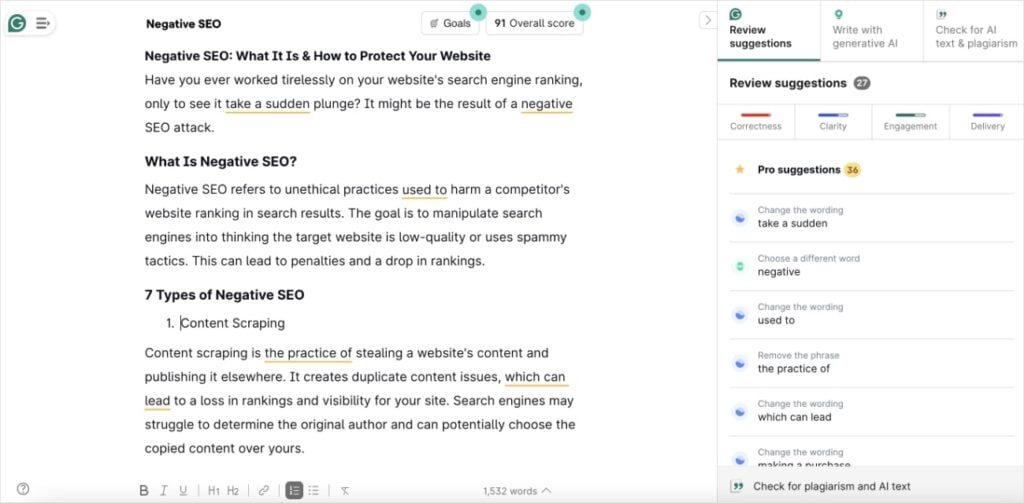
Grammarly acts as your personal editor, catching mistakes and suggesting improvements as you write. It also goes beyond basic spell-checking. It analyzes tone, clarity, and engagement level to help you communicate more effectively.
I’ve been writing professionally for over 6 years, and even I still like to run my content through it. (Just in case, you know?)
Pricing: The free version has very basic suggestions, like spelling and grammar. However, a Pro plan is only $6/mo per user and unlocks a lot more feedback. It’s a small cost that’s worth the investment.
The Bottom Line
For anyone creating content online, Grammarly is an essential safety net. The free version catches basic mistakes, but the Premium version’s advanced features help transform good writing into great writing. It’s an investment in your professional image that pays off with every piece of content you create.
18. Hemingway Editor (AI Writing Assistant)
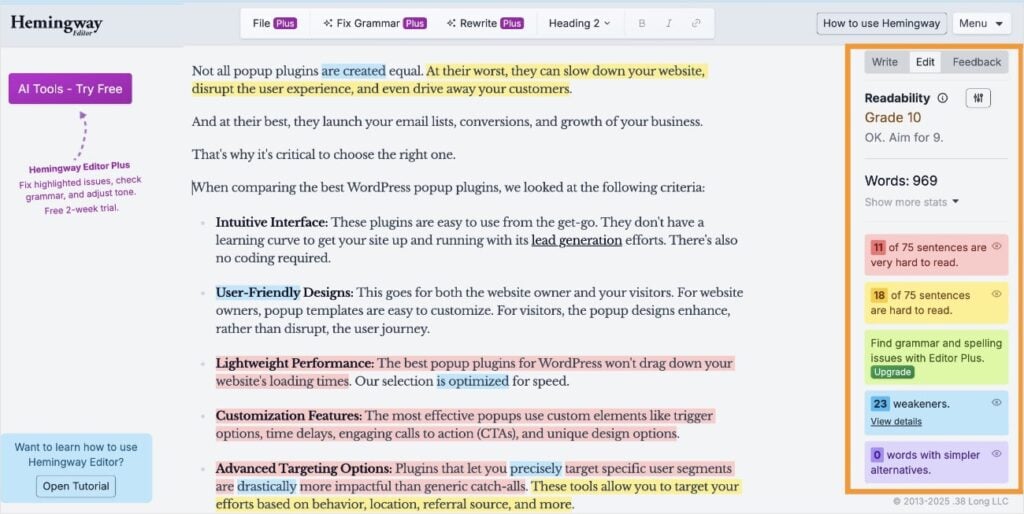
Long, complicated sentences put readers to sleep. Hemingway Editor makes sure your writing stays punchy and powerful. This simple but effective tool highlights complex sentences, passive voice, and hard-to-read phrases that might lose your audience.
What makes Hemingway Editor unique is its focus on readability. Unlike other editing tools that try to do everything, Hemingway has one mission: making your writing clearer and more engaging. It’s particularly valuable for business content, where every word needs to count.
Pricing: Free version should be sufficient for small business owners. However, they have paid plans that start at $8.33/mo to get even more features (like AI sentence rewrites and unlimited document reviews).
The Bottom Line
If you want your writing to pack more punch with fewer words, Hemingway Editor is your tool. The interface is refreshingly simple, and the feedback is instant. Perfect for turning flabby first drafts into lean, mean content that actually gets read.
19. AIOSEO (WordPress Writing Assistant)
Creating SEO-optimized content used to mean juggling multiple tools and browser tabs. AIOSEO’s AI Writing Assistant changes that by bringing smart content recommendations right into your WordPress editor.
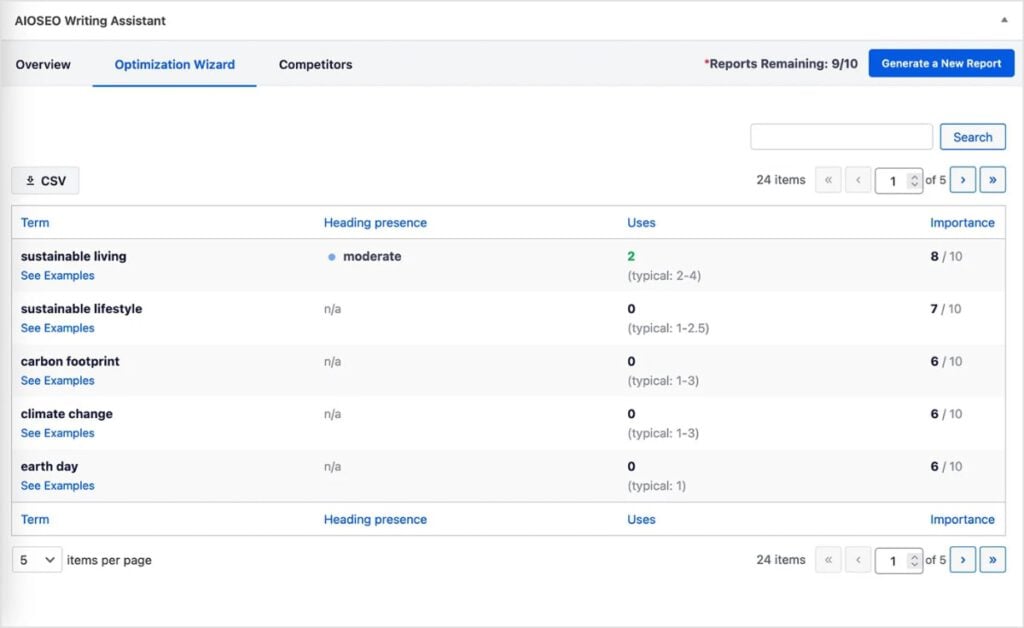
I’m a big fan of the Optimization Wizard because it gives you related keyword ideas directly in the post or page you’re working on. This is great for enhancing the visibility of your content and reaching a wider audience.
Pricing: While AIOSEO does have a free Lite version, you’ll need a paid subscription and SEOBoost account to use the AI Writing Assistant. In total, this starts at $72.10/mo.
The Bottom Line
AIOSEO’s AI Writing Assistant takes the guesswork out of creating SEO-friendly content. Whether you’re a seasoned writer or just starting out, it helps you craft content that’s designed to rank, without sacrificing readability — or your entire marketing budget.
Best Affiliate Marketing Tools
Affiliate marketing can be a powerful revenue stream for small businesses — when done right. These tools help you manage partnerships, track performance, and maximize your affiliate revenue without getting lost in spreadsheets or complicated networks.
| Tool | Main Feature | Best For | Price | Free Version? |
| Tapfiliate | Affiliate management | Complete program management | $74/mo | Trial only |
| Carrd | Lead generation | One-page websites | Free & $19/yr | Yes |
| AffiliateWP | WordPress integration | All-in-one affiliate plugin | $149.60/yr | No |
20. Tapfiliate (Affiliate Marketing Program)
Starting an affiliate program shouldn’t require a computer science degree. Tapfiliate makes it simple to recruit affiliates, track their performance, and automate commission payments — all from one clean dashboard.
It does a good job balancing powerful features with user-friendly design. I like how the Reporting section makes it particularly simple to understand how your affiliate program performs.
You can get a snapshot view of key metrics or go granular with more in-depth reporting on an individual’s affiliate performance and more.
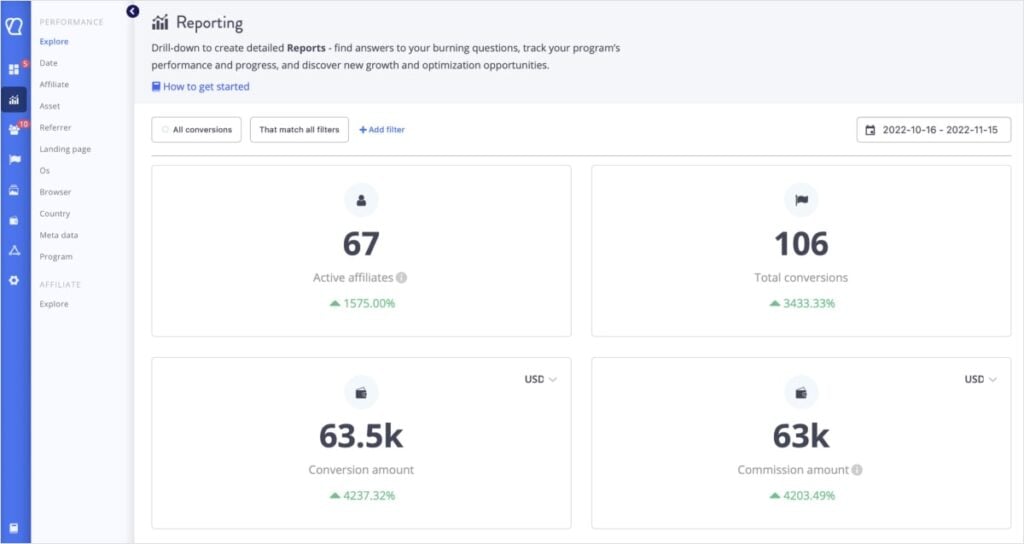
Tapfiliates integrates with popular e-commerce platforms and payment systems, so you can be up and running in hours, not weeks.
Pricing: Free 14-day trial, paid plans start at $74/mo
The Bottom Line
If you want to harness the power of affiliate marketing without the complexity, Tapfiliate is a great option. The platform makes it easy to start small and scale up as your program grows. Perfect for businesses ready to expand their reach through partner marketing.
21. Carrd (Site Builder & Lead Generation)
When it comes to generating leads online, simple is often best. Carrd specializes in beautiful one-page websites that turn visitors into leads. No complicated menus, no endless pages — just clean, focused design that guides visitors toward taking action.
As someone with zero web design background, I really appreciate how easy it is to use the the drag-and-drop editor. There are a ton of templates for you to choose from and you can customize every element on the page.
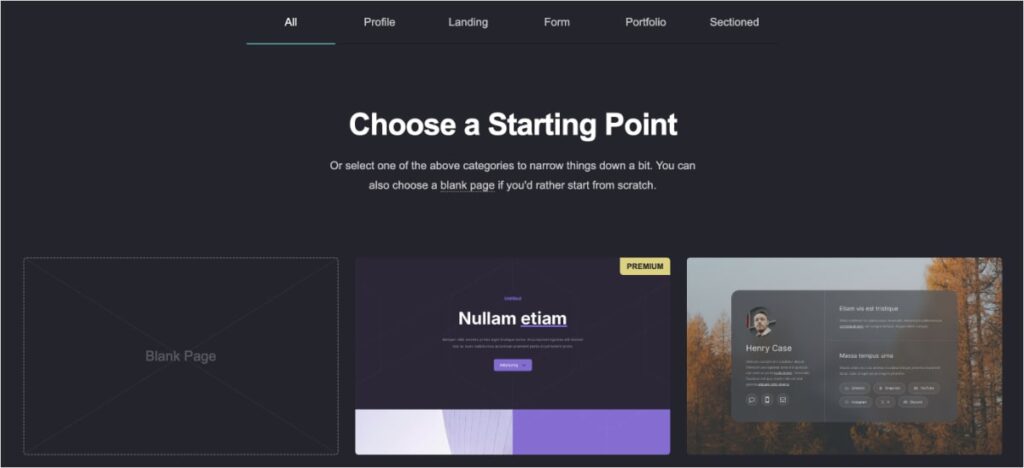
My favorite feature? Lead capture forms.
Carrd lets you add lead generation forms to your website in a matter of a few clicks. You can get customers’ email addresses, phone numbers, and more. It’s quick and effective.
Pricing: Free version allows you to build up to 3 sites per account. However, if you want to use the lead capture forms (among others), you’ll need to upgrade to a Pro account at $19/yr. Honestly, it’s a great price for creating a one-page site and capturing leads.
The Bottom Line
If you need a focused, distraction-free website that converts visitors into leads, Carrd is solid. The one-page design combined with lead capture tools makes it perfect for simple business websites.
22. AffiliateWP (WordPress Affiliate Management)
Managing a successful affiliate program shouldn’t require multiple plugins or complex external platforms. AffiliateWP brings professional affiliate management directly into your WordPress dashboard, making it easy to recruit partners and track performance.
You get literally everything you need in one solution:
- Customizable affiliate dashboards
- multi-tier commission structures
- Automated payouts
- And more
It also integrates seamlessly with your existing WordPress setup, playing nice with your favorite ecommerce plugins and payment systems.
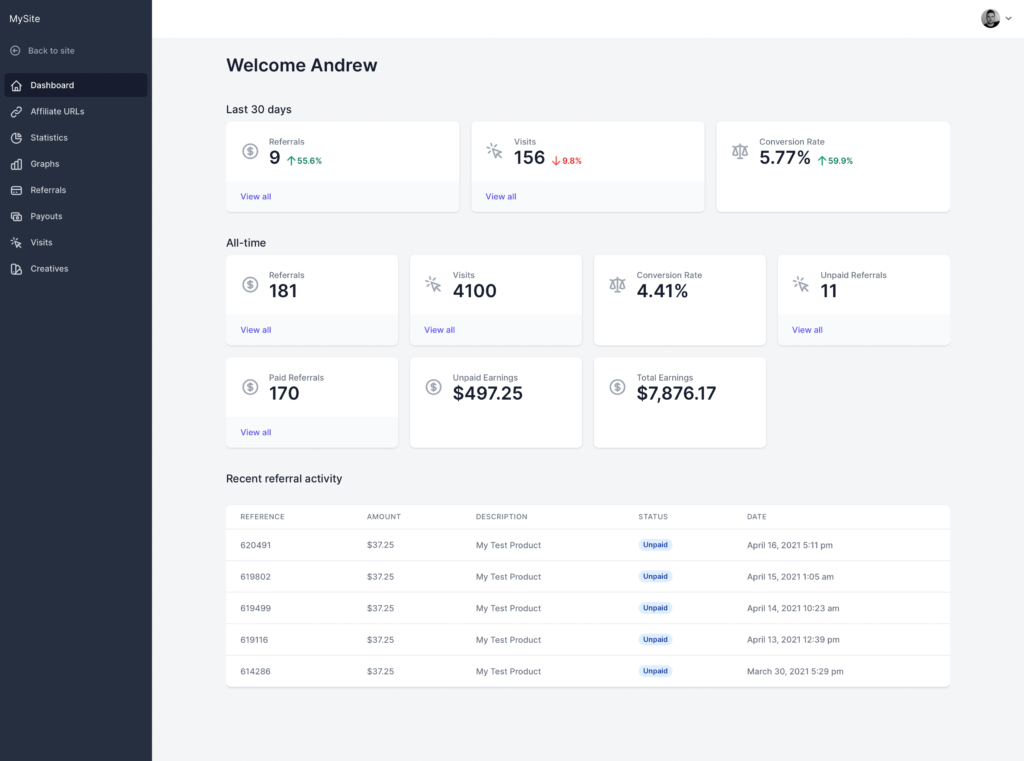
Personally, I like how affiliates get their own portals, too. This sets it apart from the competition and makes your program more professional and affiliate-friendly.
Pricing: $149.60/yr
The Bottom Line
If you’re serious about running an affiliate program on WordPress, AffiliateWP is the gold standard. While other solutions offer basic features, AffiliateWP gives you a complete affiliate marketing system that grows with your business.
Search Engine Marketing (SEM) Tools
Need to boost your online visibility fast? Paid search advertising can deliver instant traffic to your website—at a price. These tools help you manage your ad campaigns and spend so every advertising dollar works for your small business.
| Tool | Main Feature | Best For | Price | Free Version? |
| Google Ads | Search advertising | Immediate visibility | Pay-per-click | N/A |
| Microsoft Advertising | Alternative search networks (Bing, AOL) | Lower CPC rates | Pay-per-click | N/A |
| SpyFu | PPC competitor research | Paid ad strategy | $39/mo | No |
23. Google Ads (Google Search)
Want to appear in front of customers actively searching for your products or services? Google Ads lets you skip the long SEO waiting game and get quick visibility where it matters most. Your ads can appear at the top of Google’s search results the moment you launch your campaign.
What makes Google Ads powerful is its precision targeting. Unlike traditional advertising where you hope the right people see your message, Google Ads lets you show up exactly when potential customers are searching for what you offer.
Plus, you only pay when someone actually clicks on your ad.
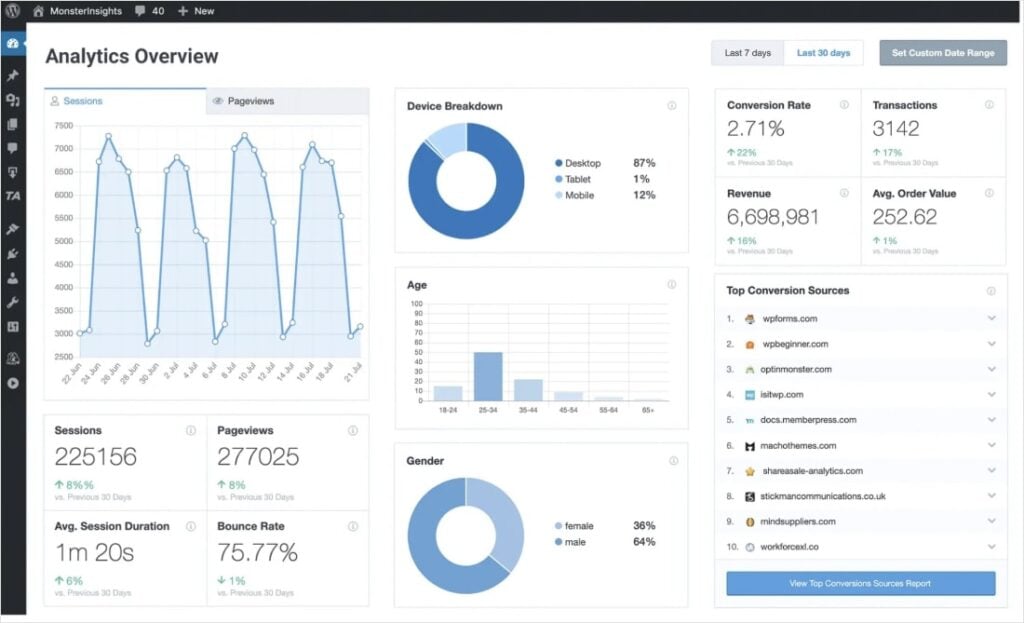
New to Google Ads? Check out this in-depth guide on how to use Google Ads.
Pricing: Cost-per-click (CPC) bidding system
The Bottom Line
For immediate search visibility and targeted traffic, Google Ads is essential. You get full control of your budget, but bidding can come with a slight learning curve. Start small, test what works, and scale up as you see results.
24. Microsoft Advertising (Bing, Yahoo, AOL)
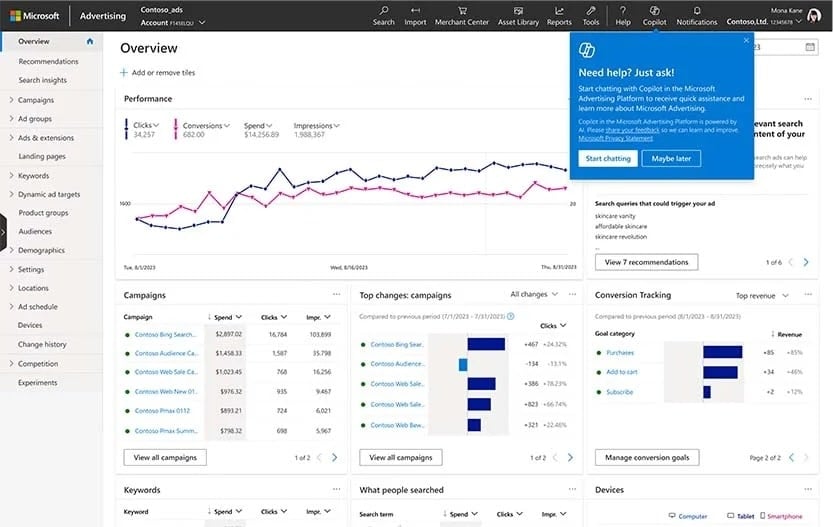
While everyone fights for attention on Google, Microsoft’s search network offers a valuable opportunity many businesses overlook. Through Microsoft Advertising, you can reach millions of users across Bing, Yahoo, AOL, and DuckDuckGo.
And often at a lower cost-per-click.
What’s great about Microsoft Ads is that you can connect with customers across multiple search engines from a single dashboard.
Pricing: Pay-per-click (PPC), but often lower rates than Google due to less competition
The Bottom Line
Microsoft Ads is a good option for those wanting to dip their toes into PPC marketing minus the Google CPC price tags. You can often get a lower CPC and access millions of additional customers.
25. SpyFu (PPC Competitor Research)
Wouldn’t it be great to see exactly which ads and keywords are working for your competitors?
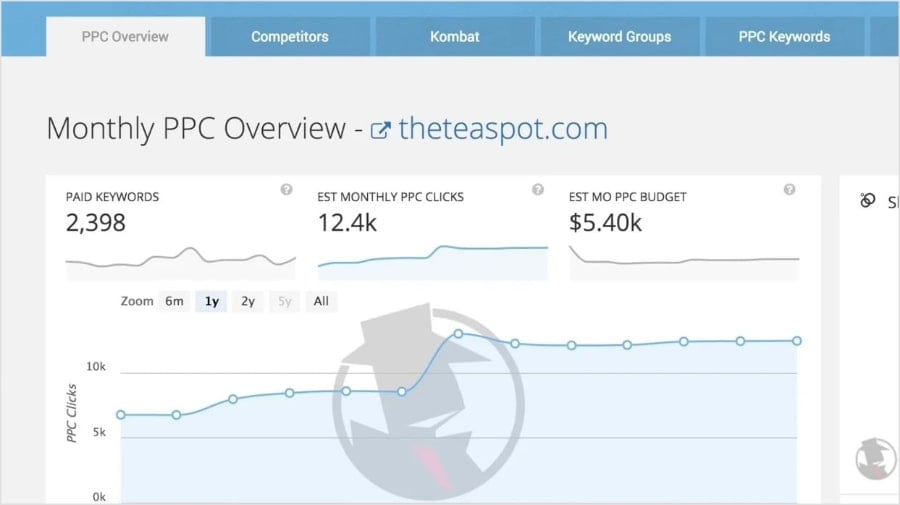
SpyFu lets you peek behind the curtain of your competitors’ search advertising strategies. You can see their most successful ads, track their budget changes, and discover their best-performing keywords.
Its historical data is particularly invaluable. Instead of guessing which strategies might work, you can see what’s been working in your market.
The tool reveals everything from ad copy variations to position changes and budget estimates, helping you make data-driven decisions about your own campaigns.
Pricing: Starts at $39/mo
The Bottom Line
SpyFu helps you skip the expensive trial-and-error phase of paid search advertising. By learning from your competitors’ successes (and failures), you can build more effective campaigns from day one.
Final Thoughts
Finding the right digital marketing tools for your small business doesn’t have to be overwhelming or expensive.
Start with the essential tools that align with your immediate goals — whether that’s improving your SEO, streamlining social media, or launching an email marketing campaign. As your business grows, you can gradually add more tools to your arsenal.
Remember: the best digital marketing tools for small businesses aren’t always the most expensive or feature-packed options.
They’re the ones that save you time, fit your budget, and help you connect with your target audience effectively.


