
Meta tags are the hidden heroes of SEO, working behind the scenes to help search engines understand your content — and improve your rankings.
Unfortunately, the mention of “SEO metadata” and “HTML meta” often makes website owners’ eyes glaze over. Or worse, makes you think SEO meta tags are too technical for you to tackle on your own.
The reality is, meta tags are actually pretty straightforward. And if you’re looking to boost your website’s visibility in search results, they’re 100% worth your attention.
In this guide, we’ll break down everything you need to know about SEO meta tags — no computer science degree required.
In This Article
What Are SEO Meta Tags?
Meta tags are snippets of code in your webpage’s HTML that tell search engines important information about your content. While visitors don’t see these tags when looking at your site, they’re crucial for how your pages appear in search results and how search engines interpret your content.
Here’s an example of what it looks like in the <head> section of a web page’s HTML:
<head>

<title>Your Page Title Goes Here | Brand Name</title>

<meta name="description" content="A compelling description of your page that will appear in search results and encourage people to click through to your website.">

<meta name="robots" content="index, follow">

<meta name="viewport" content="width=device-width, initial-scale=1.0">

</head>
If your web page is a book, think of meta tags as all the helpful bits that aren’t the actual story:
- The title on the cover (title tag)
- The back-cover description (meta description)
- Instructions for bookstores on where to shelf it (robots meta tag)
- Details about the book’s format (viewport meta tag)
All these elements work together to help search engines understand and properly display your content.
Why Are Meta Tags Important for SEO?
Let’s clear something up right away: meta tags aren’t some magical SEO hack that will instantly launch you to Google’s first page. But they are essential building blocks of good SEO.
And getting them wrong (or ignoring them completely) is like trying to run a race with your shoelaces tied together.
Here’s why SEO meta tags deserve your attention:
- They’re your search result first impression. Your meta title and description are often the first things potential visitors see in search results. Make that first impression count.
- They help Google understand your content. Think of meta tags as your direct line of communication with search engines. They clarify what your page is about and who should see it.
- They can boost click-through rates. Well-crafted meta tags can be the difference between someone scrolling past your result or clicking through to your site.
- They impact user experience. Proper meta tags ensure your site displays correctly across different devices and platforms — something both users and search engines care about.
Consider this: you wouldn’t send out a resume without a proper heading or summary, right? Meta tags work the same way. They’re your website’s resume to search engines and users, helping both understand what you have to offer.
4 Essential Meta Tags for SEO
Not all meta tags are created equal. While there are dozens of meta tags out there, only a handful really matter for SEO.
Let’s focus on the 4 that can make a real difference in your search performance:
- Title Tag
- Meta Description
- Robots Meta Tag
- Meta Viewport Tag
Think of them as your SEO toolkit’s greatest hits — the ones you’ll use most often and get the most value from.
Let’s break down each one in detail, starting with arguably the most important.
1. Title Tag
Your title tag is the headline that appears in search results and browser tabs. While technically not a “meta” tag, it’s the single most important piece of SEO real estate you have.
Here’s what it looks like in HTML:
<title>9 SEO Secrets to Unlock Higher Traffic & Revenue 🤫</title>And here’s how Google displays this data in search engine results pages (SERPs):
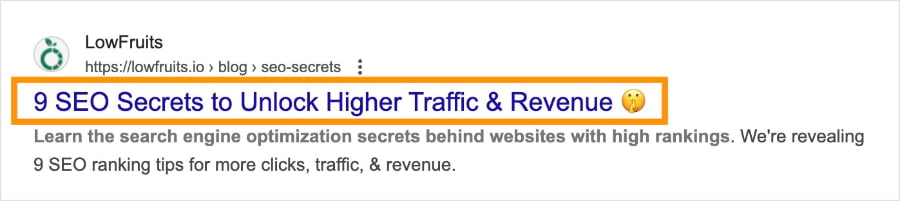
Title tags can also appear in browser tabs and bookmarks. As well as social media shares, unless otherwise specified.
Best Practices for Writing the Perfect Title Tag
- Keep it under 60 characters to avoid truncation in search results.
- Put your most important keyword near the beginning.
- Make it readable and compelling for humans.
- Create unique titles for every page.
- Use natural language — no keyword stuffing.
If branding is important to you, you can also include your brand name at the end of each title.
For a deeper dive into title tags, check out this article: How to Write SEO Titles That Get Clicks.
Did you know? Title tags go by many names in the SEO world. You may also see them referred to as “SEO titles,” page titles,” or “meta titles.”
Mistakes to Avoid
- Using the same title tag across multiple pages
- Exceeding the character limit
- Not including your focus keyword
- Stuffing keywords unnaturally
- Being too vague or generic
- Using all caps or excessive punctuation
Meta Title Examples
❌ Poor Example: Buy Products Online | Best Products | Cheap Products | Shop Now
✅ Good Example: Organic Cotton T-Shirts: Sustainable Comfort | EcoWear
2. Meta Description
Think of your meta description as your elevator pitch in the search results. You’ve got roughly 155–160 characters to convince someone your page is exactly what they’re looking for.
And while meta descriptions aren’t a direct ranking factor, a well-written once can drastically improve your CTR.
Here’s what a meta description looks like in HTML:
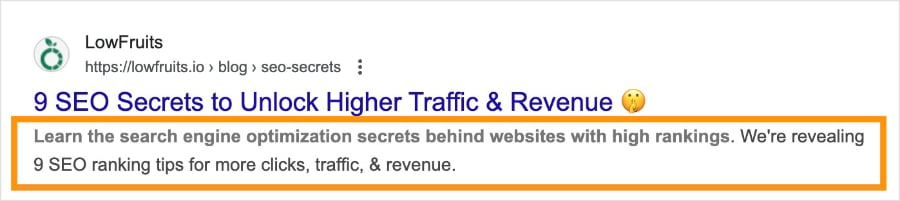
<meta name="description" content="Learn the search engine optimization secrets behind websites with high rankings. We're revealing 9 SEO ranking tips for more clicks, traffic, & revenue.">And here’s the meta description in SERPs:
Best Practices for Writing Meta Descriptions
- Keep it between 150–160 characters.
- Include your primary keyword naturally.
- Write compelling, action-oriented content.
- Be specific about what users will find on your page.
- Include a clear call-to-action (CTA).
- Match search intent (informational, commercial, etc.).
- Make each description unique.
To learn more, visit this article: How to Write Meta Descriptions.
Mistakes to Avoid
- Copying and pasting the same description across pages
- Writing vague or generic descriptions
- Promising something your page doesn’t deliver
- Focusing only on keywords, not on compelling content
- Ignoring character limits
Meta Description Examples
❌ Poor Example: We sell t-shirts. Best t-shirts online. Buy t-shirts here. Cheap t-shirts. Quality t-shirts. T-shirts for sale. Shop now for great deals on t-shirts.
✅ Good Example: Feel the difference with our buttery-soft organic cotton t-shirts. Ethically made, available in 12 colors. Free shipping over $50. Shop now at EcoWear.
3. Robots Meta Tag
Think of robots meta tags as traffic signals for search engines. They tell search engines whether they can index your page, follow your links, or show snippets of your content in search results.
While they’re more technical than our previous two meta tags, they’re not that intimidating once you understand the basics.
Here’s what robots meta tags look like:
<meta name="robots" content="index, follow">The most common commands are:
- index/noindex: Whether search engines should add this page to their index
- follow/nofollow: Whether search engines should crawl the links on this page
- noarchive: Prevents search engines from storing a cached copy of the page
- nosnippet: Prevents search engines from showing a description in search results
Best Practices for Robots Meta Tags
- Use index, follow as your default setting for internal links (most content management systems do this automatically).
- Only use noindex when you have a specific reason (like duplicate content or private pages).
- Be strategic with nofollow on links to pages you don’t want to endorse.
- Double-check your robots meta tags after major site updates.
Mistakes to Avoid
- Accidentally blocking important pages with noindex.
- Forgetting to remove noindex tags after development.
- Blocking CSS and JavaScript files that Google needs to understand your site.
- Using robots meta tags when robots.txt would be more appropriate.
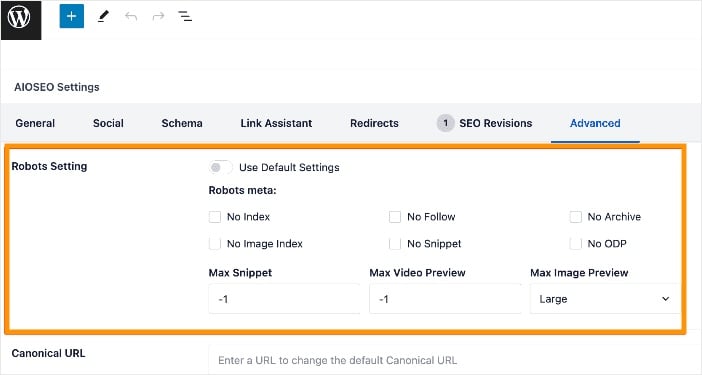
Note for WordPress users: If reading about robots meta tags is giving you heart palpitations, don’t fret. SEO plugins like All in One SEO streamline robots meta management. You can easily customize robots settings using check boxes instead of code.
4. Meta Viewport Tag
The viewport meta tag might not be directly related to SEO keywords or rankings, but in today’s mobile-first world, it’s crucial for how your site performs in search.
This tag tells browsers how to scale and size your page for different devices. It’s particularly important since Google predominantly uses mobile-first indexing.
Here’s what it looks like in HTML:
<meta name="viewport" content="width=device-width, initial-scale=1.0">This simple line of code helps ensure your site looks good and functions properly across all devices, from smartphones to tablets to desktop computers. Think of it as your website’s adaptive lens — helping it adjust to whatever screen it’s being viewed on.
What This Tag Actually Does:
- Sets the visible area of a web page to match the screen’s width
- Establishes the initial zoom level when the page loads
- Prevents mobile browsers from automatically zooming out to show the entire page
- Helps maintain your site’s responsive design features
Common Viewport Values:
<!-- Standard responsive design setup -->

<meta name="viewport" content="width=device-width, initial-scale=1.0">

<!-- Prevent users from zooming -->

<meta name="viewport" content="width=device-width, initial-scale=1.0, maximum-scale=1.0, user-scalable=no">

<!-- Allow users to zoom up to 3x -->

<meta name="viewport" content="width=device-width, initial-scale=1.0, maximum-scale=3.0">
Pro Tip: While you might see some sites using viewport tags that prevent zooming (user-scalable=no), this isn’t recommended for accessibility reasons. Some users need to zoom to read your content comfortably.
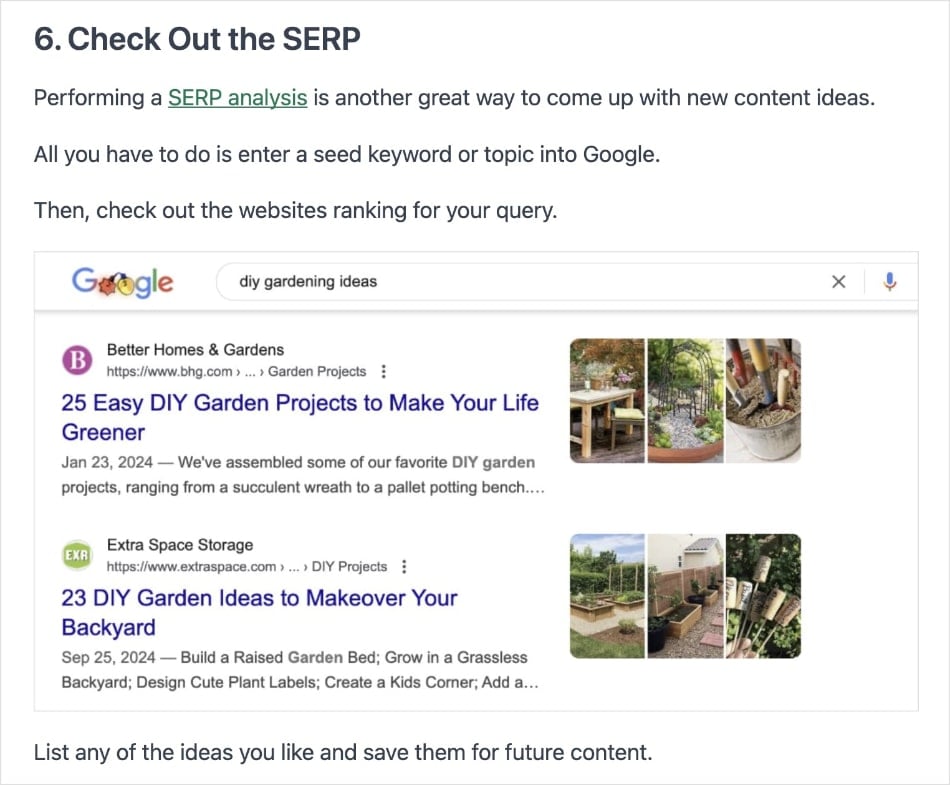
And here’s a viewport tag in action; here we have the desktop view of a blog post:
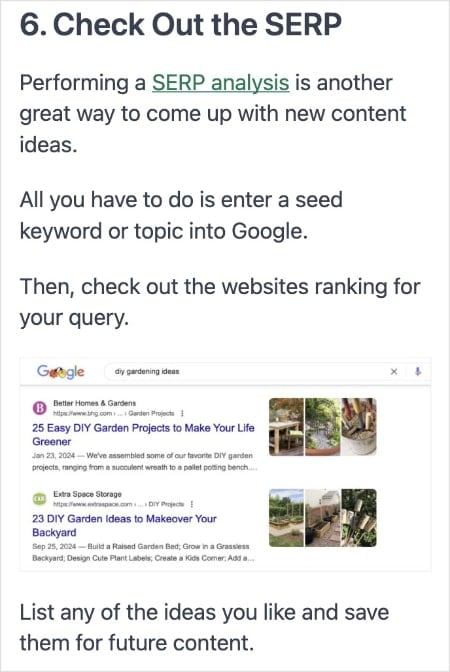
And here’s the same post resized for mobile devices:
Why Viewport Meta Tags Matter for SEO:
According to SEO statistics, 60% of website traffic comes from mobile devices. Here’s why viewport meta tags are essential for search engines and UX:
- Mobile-first indexing means Google primarily uses the mobile version of your site for ranking.
- Poor mobile experience can increase bounce rates and hurt your rankings.
- Page experience signals (including mobile usability) are ranking factors.
- Mobile-friendly pages are more likely to appear in mobile search results.
What About Meta Keywords?
Ah, meta keywords — the ghost of SEO past. If you’re wondering whether you should add the meta keywords tag to your site, here’s the short answer: no.
But there’s an interesting story here that’s worth understanding.
The Rise and Fall of Meta Keywords
Once upon a time (in the late 1990s), meta keywords were a big deal. Website owners could simply list their target keywords in this tag, and search engines would use this information to understand what the page was about. Sounds convenient, right?
Too convenient, as it turned out. Like many good things in SEO, this tag was abused to the point of becoming useless:
- Keyword stuffing became rampant.
- Competitors’ brand names were added to steal traffic.
- Irrelevant but popular terms were stuffed in to attract visitors.
- Some sites added hundreds of keywords per page.
Where We Are Today:
- Google has officially confirmed they don’t use the meta keywords tag.
- Bing might use it as a spam signal (yes, you read that right — using it could actually hurt you).
- Some smaller search engines might still look at it, but they’re not significant enough to matter.
Should You Use Meta Keywords in 2025?
Save yourself the time and skip the meta keywords tag entirely. Instead, focus your energy on:
- Writing compelling title tags
- Crafting engaging meta descriptions
- Creating high-quality content
- Using relevant heading tags (H1, H2, etc.)
- Implementing proper schema markup
Pro Tip: If you see the meta keywords tag in your site’s code, it’s usually harmless to leave it there. But if you’re launching a new site or updating an old one, there’s no reason to include it.
SEO Meta Tag FAQs: Your Questions Answered
What are HTML meta tags?
HTML meta tags are code snippets in your website’s <head> section. They provide information about your webpage to search engines and website visitors. While they’re not visible on the actual webpage, they play a crucial role in how your site appears in search results and how search engines understand your content.
Do meta tags help SEO?
Yes, meta tags help SEO when implemented correctly. While not all meta tags directly influence rankings, they play a vital role in how search engines understand your content. They also impact how users interact with your search results and website, which can lead to improved engagement — and more rankings.
Which meta tags are important for SEO?
In order of importance:
- Title tag
- Meta description
- Robots meta tag
- Viewport meta tag
- Open Graph meta tags (for social media)
Remember: Quality over quantity. It’s better to have a few well-optimized meta tags than dozens of poorly implemented ones.
What types of meta tags does Google support?
Google recognizes and processes various meta tags, such as: description, robots, googlebot, refresh, rating, viewport, charset, and notranslate. Google no longer supports meta keyword tags due to black hat SEO tactics and misuse.
Next Steps: Put Your SEO Metadata to Work
Understanding meta tags is one thing – implementing them effectively is another.
Start with one important page on your website. Write a compelling title tag that includes your primary keyword, then craft a meta description that acts as a mini-advertisement for that page.
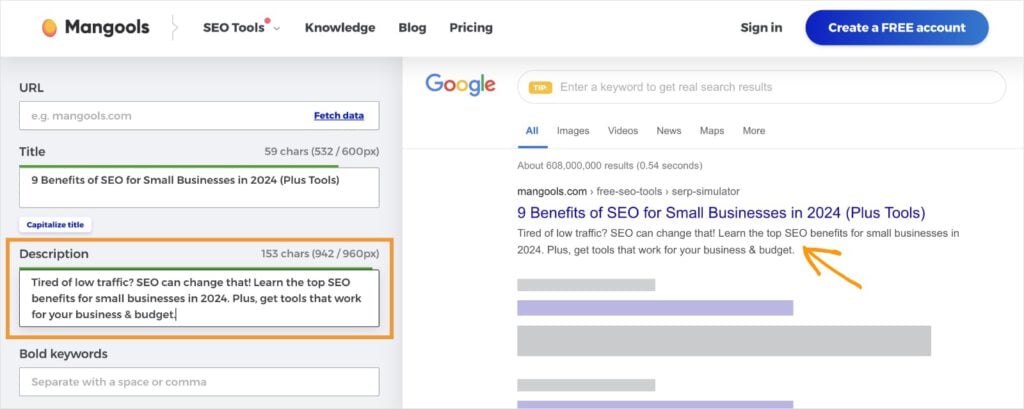
Once you have your copy, test how it looks using a SERP preview tool. This will show you how your metadata translate to search results. (I like to use the Mangools SERP Simulator, but any snippet tool will do.)
Pro Tip: Finding the right keywords for your meta tags can be challenging. Tools like LowFruits can help you identify low-competition keywords that are actually worth targeting. This makes it easier to create meta tags that have a real chance of ranking well in search results.
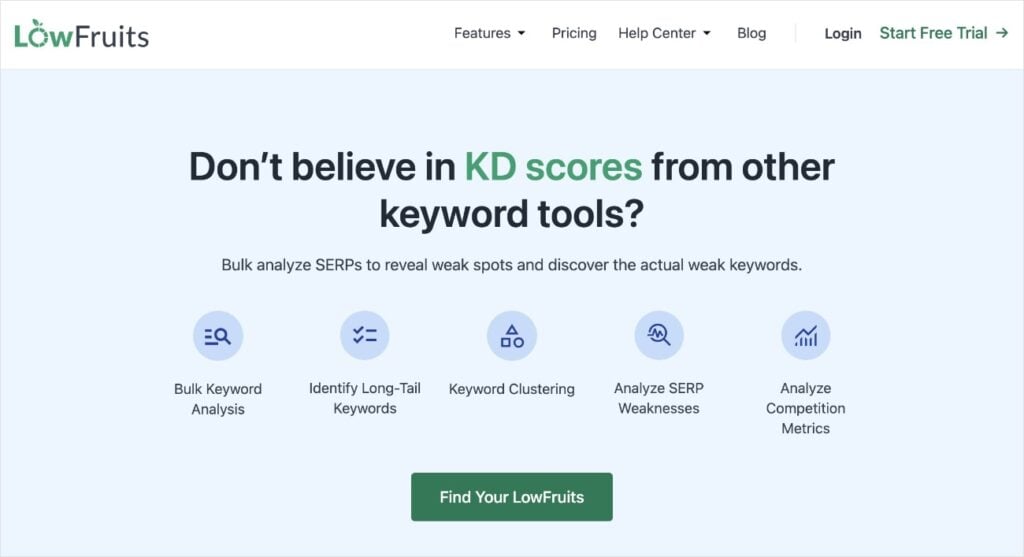
LowFruits is the best SEO keyword research tool for small business owners.
When you perform keyword research in the KWFinder, you’ll get a report that makes spotting easy keywords fast and simple. I recommend paying attention to the following two metrics:
- SERP Difficulty Score (SD): The LowFruits metric for keyword difficulty. 1 is easy, 2 is moderate, and 3 is hard.
- Weak Spots: These are low-authority domains ranking in the top 10 search results. Each icon represents a competitor that is easy to outrank.
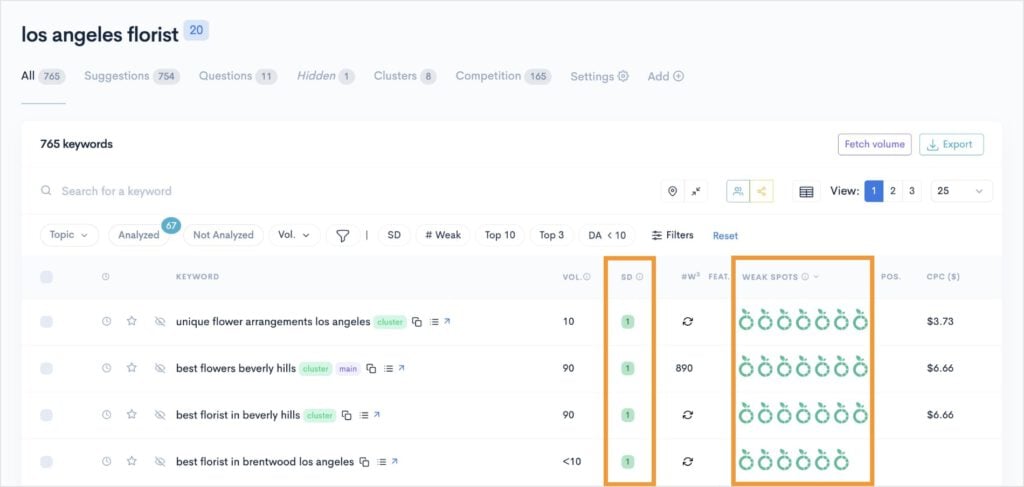
When you look at these metrics, keep an eye out for keywords with an SD score of 1 and multiple Weak Spots. These are prime ranking opportunities, and you don’t need a super high authority to get them!
As for prioritizing which ones to tackle in your metadata and SEO efforts first, I suggest sorting by keyword search volume. Start with the highest volume keywords first (that also have a low SD and weak competitors.)
And there you have it!
You’re ready to make your meta tag optimizations and take on the SERPs.
Final Thoughts
SEO meta tags might seem like a small piece of the puzzle, but they can have a significant impact on how your site performs in search results. They’re often the first impression users have of your website, and they help search engines understand your content.
And while they’re not a magic solution for ranking #1 on Google, they’re a fundamental element of SEO that’s completely within your control.
The key is to keep it simple: focus on writing clear, compelling meta tags that accurately describe your content and encourage clicks. It’s as easy as that!


